Windows Media Player 12 PROBLEMS

TheLionOfAzza

New member
Local time
11:48 PM
Messages
12
Why won't Windows Media Player 12 open to full screen by default?

Is there any way (perferably without the use of third party software) to force windows media player to 1.) open maximized, regardless of whether I open up ANY mp3 file or movie file?

THAT'S ALL I WANT from Windows Media Player. I don't know WHY this is impossible to do. In Vista it was SIMPLE (scary thought I know). All I had to do was maximize the Player window ONCE and when I exited out of it, the system/OS REMEMBERED that it was in maximized mode and regardless of what song I choose it opened up Windows Media Player in Maximized mode.

Please note that I'm NOT talking about Full Screen. I want it MAXIMIZED. I'm SICK AND TIRED of that stupid small box opening up whenever I want to listen to music.

I'm gonna state my problem again just to be CLEAR....

Windows Media Player 12 in Windows 7 DOES NOT remember the window state of the "now playing" view. As a result, even if you maximize the window, close it, and later open some video OR music file from Windows Explorer, the WMP window is NEVER maximized. Instead it keeps insisting on opening a small little box that I cannot see or enjoy my music on. So I'm FORCED to keep pressing the maximize button in the top right of the window EVERY SINGLE TIME. And it's annoying. I don't want to have to use iTunes to listen to my music collection.


I don't understand why this issue is not fixed. I like my Media Player window to always start maximized, and judging by people's response to WMP12, I'm not the only one.
 

My Computer

OS
Windows 7 Ultimate
Try this:

1. Go to start and type in Windows Media Player in the search bar.
2. Now right- click on the Windows Media player icon and select properties.
3. Now change the option to “Run to maximized” and click OK.

Now whenever you open Media player, it will run in maximized mode.


It's a PITA yes - but another way to fullscreen it would be to double left-click the open window.
 

My Computer

Computer type
PC/Desktop
Computer Manufacturer/Model Number
Systems by SmartEyeball
OS
8 Pro x64
CPU
i7 3770K 4.6GHz
Motherboard
ASUS P8Z77 WS
Memory
16GB G.Skill Trident X 2666mhz
Graphics Card(s)
x2 EVGA 780 Ti Superclocked SLI
Sound Card
SB X-FI Surround 5.1 PRO USB / ATH-AD900 Headphones
Monitor(s) Displays
x3 Dell U2410 / 58" Samsung
Screen Resolution
5760*1200/ 1920*1200
Hard Drives
2x Intel 520 240GB (RAID 0) * 2x WD Caviar Blacks 2TB (RAID 0) * 2TB WD Caviar Black * Sony Optirac DVD
PSU
Silverstone Strider Evolution 1200W
Case
Thermaltake Level 10 GT Snow Edition
Cooling
Noctua NH-D14
Keyboard
Topre Realforce // Ducky Shine MX Black // Filco Ninja TKL
Mouse
Thermaltake Theron (Highly Recommended) + Razer Imperator
Antivirus
MSE
Browser
IE, FF, WaterFox
Other Info
GT Extreme V2 Sim Racing Cockpit + 40" LCD and K/B Mouse stand ▼
Fanatec CSR Elite Wheel + Clubsport V1 Pedals + CSR shifter/7G-H ▼Saitek X52 Pro ▼ TrackIR 5 Pro
Buttkicker v2 Seat Rumbler with Dedicated 5.1 and Sub Woofer attached to frame ▼
=
Bloody Big Grin
Welcome to sevenforums! Smarteyeball is right! That is the best way to make sure it opens in full screen mode.

The reason why microsoft made it so that the windows media player runs by default, not in full screen mode, is that the aspect ratio of the video file is not changed. (This is probably not what happens when your videos always run in tiny squares. Read below for an explanation).

There is a bug, and it appears when some third party codecs are installed, or if sometimes playing H.264 video and you maximized it too early, or something, that windows media player might make the video always in a small two by two box that doesn't even maintain the aspect ratio. In that case, you would also have to do what smarteyeball (love that name!) said.
 

My Computer

Computer Manufacturer/Model Number
Dell Studio XPS 8000
OS
Windows 7 Home Premium
I've TRIED THAT. That's what it's currently set to. And yet it doesn't work....

I double click on an mp3 file and it still opens up in that small window...
 

My Computer

OS
Windows 7 Ultimate
=.= that is an mp3 file, why would you need it to run in full screen mode, or full window mode?
 

My Computer

Computer Manufacturer/Model Number
Dell Studio XPS 8000
OS
Windows 7 Home Premium
Because I WANT to...And I don't want to have a small screen for view the album art of whatever visual art that I've selected to play in the background.

Do you have a solution or not? Is this just some screw up on Microsoft's part. Because I cannot find anything to fix this.

I've reinstalled Windows 7 3 times and I'm not going to do it again because it's clearly not something wrong with the installation.

Again can ANYONE out there help me. I just want it to open up like IE opens up when I click on a saved webpage or I click on a link.

NOT Full Screen. Just MAXIMIXED.
 

My Computer

OS
Windows 7 Ultimate
Why won't Windows Media Player 12 open to full screen by default?

Is there any way (perferably without the use of third party software) to force windows media player to 1.) open maximized, regardless of whether I open up ANY mp3 file or movie file?

THAT'S ALL I WANT from Windows Media Player. I don't know WHY this is impossible to do. In Vista it was SIMPLE (scary thought I know). All I had to do was maximize the Player window ONCE and when I exited out of it, the system/OS REMEMBERED that it was in maximized mode and regardless of what song I choose it opened up Windows Media Player in Maximized mode.

Please note that I'm NOT talking about Full Screen. I want it MAXIMIZED. I'm SICK AND TIRED of that stupid small box opening up whenever I want to listen to music.

I'm gonna state my problem again just to be CLEAR....

Windows Media Player 12 in Windows 7 DOES NOT remember the window state of the "now playing" view. As a result, even if you maximize the window, close it, and later open some video OR music file from Windows Explorer, the WMP window is NEVER maximized. Instead it keeps insisting on opening a small little box that I cannot see or enjoy my music on. So I'm FORCED to keep pressing the maximize button in the top right of the window EVERY SINGLE TIME. And it's annoying. I don't want to have to use iTunes to listen to my music collection.


I don't understand why this issue is not fixed. I like my Media Player window to always start maximized, and judging by people's response to WMP12, I'm not the only one.
 

My Computer

OS
Windows 7 Ultimate
try this:
[FONT=Verdana, Arial, Helvetica]WMP 12 doesn't seem to remember the maximized state. However, it does
remember the actual (non-maximized) window size, so you could resize the
window to make it cover the whole desktop.

This can be done quickly by minimizing all windows except WMP,
right-clicking an empty space in the task bar, and selecting Show
windows side by side.
-------------------
If you open Windows Media Player (without opening a file) and switch to the Now Playing view, hold the ctrl button while resizing the window. Then exit and open a file.

Windows Media Player 12 maximize fix (Windows 7)

cheers

[/FONT]
 

My Computer

Computer Manufacturer/Model Number
Micro-Star International/MS-7529
OS
Windows 7 Ultimate x32
CPU
DualCore Intel Pentium E2200, 2218 MHz (11 x 202)
Motherboard
MSI G31M3 V2 (MS-7529) (2 PCI, 1 PCI-E x16,2 DDR2 DIMM)
Memory
2 GB DDR2-800 DDR2 SDRAM
Graphics Card(s)
nVIDIA GeForce 9500GT 1GB
Sound Card
Realtek ALC888/1200 @ Intel 82801GB ICH7
Monitor(s) Displays
Samsung SyncMaster 2253BW (Digital) 22'' LCD
Screen Resolution
1680x1050
Hard Drives
SAMSUNG HD322IJ ATA Device (298 GB , IDE)
try this:
[FONT=Verdana, Arial, Helvetica]WMP 12 doesn't seem to remember the maximized state. However, it does
remember the actual (non-maximized) window size, so you could resize the
window to make it cover the whole desktop.

This can be done quickly by minimizing all windows except WMP,
right-clicking an empty space in the task bar, and selecting Show
windows side by side.
-------------------
If you open Windows Media Player (without opening a file) and switch to the Now Playing view, hold the ctrl button while resizing the window. Then exit and open a file.

Windows Media Player 12 maximize fix (Windows 7)

cheers

[/FONT]

Thank You for at least replying with a constructive helpful post. I will try that asap.
 

My Computer

OS
Windows 7 Ultimate
Hi Everyone,

Sorry for adding to a post thats from over a year ago, but i am having the same frustrating problem as "TheLionOfAzza" who started this post.

None of the above solutions work for me, everytime i double click on a movie file, WMP opens with the small annoying box, instead of full screen mode.

Can anyone suggest a new fix or workaround please?

Thanks,

Steve
 

My Computer

OS
Windows 7 Enterprise x64
This software is the best freeware that I've tried for placing and sizing windows:
WinSize2 moves and resizes windows

Size and place the window, then press the hotkey while Winsize2 is running. Every time the window opens, it will be positioned and sized how you set it. But it only does it on open. That's to allow you move change the window size and position manually without it interfering.

It's simple. Have it start with Windows and leave it running in the tray.
As soon as a window that's in the list opens, it's sized and moved.
 

My Computer

Computer Manufacturer/Model Number
HP Media Center
OS
Windows 7 32 bit
CPU
AMD 5200+ dual core
Memory
2 GB
Graphics Card(s)
NVidia GeForce 6150SE 128 MB
Monitor(s) Displays
CRT
Screen Resolution
1280x1024
Hard Drives
500 GB Sata internal :

SIIG USB 3.0 docking stations w/WD Caviar Black 6 Gb/s drives
Keyboard
PS/2
Mouse
PS/2 Wheel Mouse
Other Info
SIIG USB 3.0 PCIexpress card.
Hi,

Thanks for your reply, i was hoping to do this without the use of additional software, it's such a simple task that i'm sure it can be done within WMP or via some sort of command.
 

My Computer

OS
Windows 7 Enterprise x64
My approach would be to use the 3rd party software until you figure it out. It's a simple matter to turn auto start option off when no longer needed.
 

My Computer

Computer Manufacturer/Model Number
HP Media Center
OS
Windows 7 32 bit
CPU
AMD 5200+ dual core
Memory
2 GB
Graphics Card(s)
NVidia GeForce 6150SE 128 MB
Monitor(s) Displays
CRT
Screen Resolution
1280x1024
Hard Drives
500 GB Sata internal :

SIIG USB 3.0 docking stations w/WD Caviar Black 6 Gb/s drives
Keyboard
PS/2
Mouse
PS/2 Wheel Mouse
Other Info
SIIG USB 3.0 PCIexpress card.
i dont seem to be experiencing your issue of wmp opening maximised. i maximise the wmp and i close it then re-open it and it is maximised. no problem there, and i havent adjusted any settings or used third party apps to achieve this result.
 

My Computer

Computer Manufacturer/Model Number
Hewlett packard/p6512uk
OS
Microsoft Windows 7 Home Premium 64-bit 7600
CPU
IIx4 amd athelon 635 processor
Motherboard
FOXCONN 2AA9
Memory
2x2gb
Graphics Card(s)
ati radeon HD 5450
Sound Card
(1) Realtek High Definition Audio (2) AMD High Definition
Monitor(s) Displays
samsung lcd tv 32"
Screen Resolution
1360x 768
Hard Drives
(1) WDC WD10 01FAES-60Z2A0 SATA Disk Device (2) Maxtor OneTouch USB Device (3) ST310003 33AS USB Device (4) WD My Book 1111 USB Device
PSU
?
Cooling
air!
Keyboard
wireless hp
Mouse
wireless Hp,optical
Internet Speed
1.10mb/s
Antivirus
MSE
Browser
Firefox
You don't need any addition software, all you have to do is right clock anywhere in the "Now Playing" window and in the context menu that pops up go to "Video" and remove the check beside "Fir Player to Video".

Now when you open a vid it won't resize now playing automatically:D
 

My Computer

OS
win 7 64
non of the above work good enough for me.

resizing the window does work to some extent, but if i try to close WMP afterwards i accidentally close some other program in the back because the X button isn't all the way in the top right corner.

i dont want to use 3rd party programs since they require even more effort to maximixe the window.

i wonder why microsoft hasn't looked into this bug yet really strange.
 

My Computer

OS
Windows 7 Ultimate x64
CPU
core i7 920
Motherboard
asus p6t
Memory
corsair xms3 6gb
Graphics Card(s)
asus engts250
Sound Card
-
Monitor(s) Displays
samsung syncmaster 2220vm
Hard Drives
2x western digital caviar black 1tb
3x seagate barracuda 1tb
PSU
corsair hx1000w
Case
antec 900
Cooling
asus silent square
made a mistake...duplication of an above post sorry
 
Last edited:

My Computer

Computer Manufacturer/Model Number
HP ENVY 15
OS
Windows 7 Home Premium service pack 1 64 bit
CPU
i5 Intel Core M540 2,53 ghz
Memory
4gb
Graphics Card(s)
ATI mobility radeon hd 5830
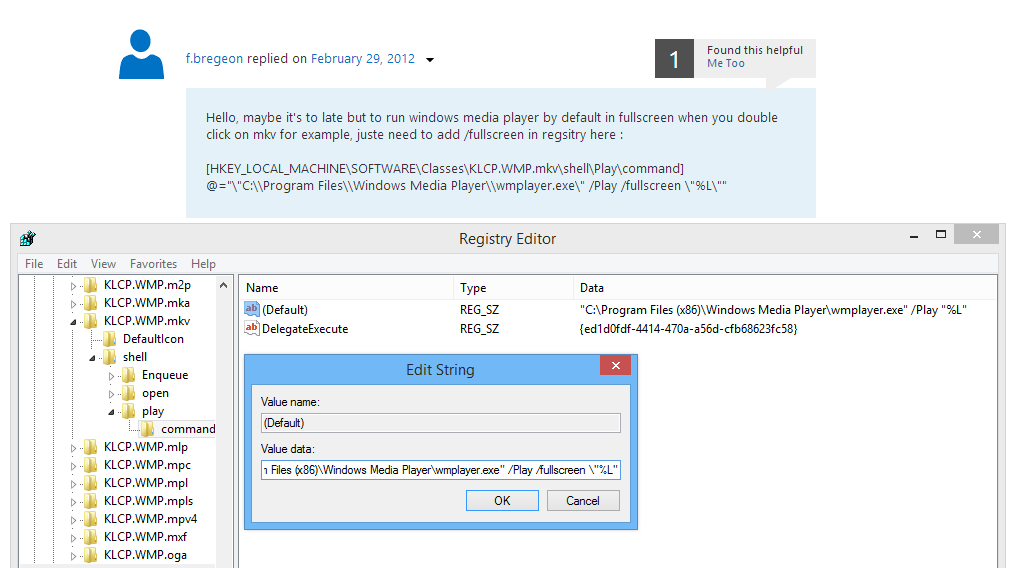
Try this for the file type that you need mp4, mkv, avi...
not sure the Backslash: \ after fullscreen is needed
cWFOCfp.png
 

My Computer

Computer type
Laptop
Computer Manufacturer/Model Number
Lenovo U330
OS
Windows 8.1 Professional x64
CPU
Core 2 Duo 2GHz
Memory
6GB
Back
Top