Windows Media Player skips songs...

Diablosblizz

New member
Member
Local time
9:29 PM
Messages
33
It's a bizzare issue, and I have no clue what the hell is going on. Basically, I start a song and WMP jumps through my whole entire library in mere seconds. I don't know what's causing this. I'm assuming it's one of my drivers. Can anybody help?

Thanks!
 

My Computer My Computer

OS
Windows 7 Ultimate
CPU
AMD Phenom II X6 1055T 2.8GHz
Memory
4x G.SKILL Sniper 4GB DDR3 (PC3 12800)
Graphics Card(s)
XFX Radeon HD 6950 1GB DDR3
Monitor(s) Displays
Main Display: LG Flatron W2343T 23" | Secondary Display: 19"
Screen Resolution
Main: 1920x1080 | Secondary: 1360 x 768
Hard Drives
Main:
Corsair 50GB SSD
Western Digital Blue Drive 500GB 7200rpm

Server:
4TB worth of drives (no special branding)
Case
Antec 600
Cooling
Cooler Master V6GT
Keyboard
Razer Lycosta
Mouse
Logitech MX Revolution
Usually when this happens, it is because the songs are no longer in their original location. Did you move your songs to a new folder, or have them on a second drive?
 

My Computer My Computer

Computer type
Laptop
Computer Manufacturer/Model Number
Toshiba P775-S7100
OS
Windows 7 Professional SP1 64-bit
CPU
Intel Core i5-2450M @2.5 GHz
Memory
6 GB DDR3 1333MHz
Graphics Card(s)
Intel HD 3000
Monitor(s) Displays
Built-in 17.3" LED; 22" Insignia NS-L22Q-10A
Screen Resolution
1600x900; 1360x768
Hard Drives
750 GB Hitachi
1TB Seagate FreeAgent External
Internet Speed
Verizon DSL Speed(Down/Up): 3360 Kbps / 800 Kbps
Antivirus
MSE and MBAM Pro
Browser
IE10
Probably moved or broken Links

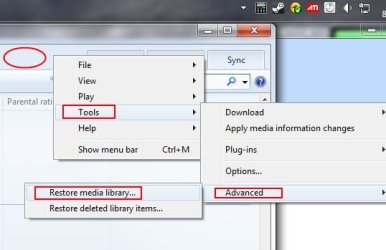
Have you tried Restoring the WMP Library?

Right Click anywhere to the left of the Play Tab And Choose:

Tools/Advanced/Restore Media Library

Close WMP, Open it again and let it rebuild the library.
 

Attachments

  • Untitled.jpg
    Untitled.jpg
    22.8 KB · Views: 19

My Computer My Computer

Computer Manufacturer/Model Number
Custom (Self Build)
OS
Windows 7 Home Premium 64bit
CPU
Intel Core i7 2700k
Motherboard
eVGA P67 SLI
Memory
8GB Mushkin Redline Ridgebacks @1866
Graphics Card(s)
EVGA GTX570 SC
Sound Card
XiFi Titanium HD
Monitor(s) Displays
LG W2453V
Screen Resolution
1920x1080
Hard Drives
Intel 320 80GB -- Intel X25-V 40GB --WD Black 1TB x2 -- WD Blue 640GB
PSU
Seasonic x750
Case
Corsair 600T SE White
Cooling
eVGA Superclocked CPU Cooler
Keyboard
Saitek Cyborg
Antivirus
Kaspersky
Browser
IE
Other Info
LG BD/DVD
I don't think that it can't find the media, and if that's the case then I need to buy a new hard drive. It only happens sometimes, for example it's not happening right now. It plays the beginning of the song, and then moves to another song and goes through them. I can go back to that file.

I'll check Event Viewer for I/O errors.
 

My Computer My Computer

OS
Windows 7 Ultimate
CPU
AMD Phenom II X6 1055T 2.8GHz
Memory
4x G.SKILL Sniper 4GB DDR3 (PC3 12800)
Graphics Card(s)
XFX Radeon HD 6950 1GB DDR3
Monitor(s) Displays
Main Display: LG Flatron W2343T 23" | Secondary Display: 19"
Screen Resolution
Main: 1920x1080 | Secondary: 1360 x 768
Hard Drives
Main:
Corsair 50GB SSD
Western Digital Blue Drive 500GB 7200rpm

Server:
4TB worth of drives (no special branding)
Case
Antec 600
Cooling
Cooler Master V6GT
Keyboard
Razer Lycosta
Mouse
Logitech MX Revolution
Oh. That sounds troubling to me, as the only time that has happened to me was when a lot of songs were damaged because of bad sectors on a failing hard drive.

I recommend using HD Tune Pro to scan for bad sectors. There is a free version, but the Pro trial is much better and the 30 days you have to activate will be enough for testing the hard drive.
 

My Computer My Computer

Computer type
Laptop
Computer Manufacturer/Model Number
Toshiba P775-S7100
OS
Windows 7 Professional SP1 64-bit
CPU
Intel Core i5-2450M @2.5 GHz
Memory
6 GB DDR3 1333MHz
Graphics Card(s)
Intel HD 3000
Monitor(s) Displays
Built-in 17.3" LED; 22" Insignia NS-L22Q-10A
Screen Resolution
1600x900; 1360x768
Hard Drives
750 GB Hitachi
1TB Seagate FreeAgent External
Internet Speed
Verizon DSL Speed(Down/Up): 3360 Kbps / 800 Kbps
Antivirus
MSE and MBAM Pro
Browser
IE10
I did an error scan with HD Tune pro and everything came up as ok.
 

My Computer My Computer

OS
Windows 7 Ultimate
CPU
AMD Phenom II X6 1055T 2.8GHz
Memory
4x G.SKILL Sniper 4GB DDR3 (PC3 12800)
Graphics Card(s)
XFX Radeon HD 6950 1GB DDR3
Monitor(s) Displays
Main Display: LG Flatron W2343T 23" | Secondary Display: 19"
Screen Resolution
Main: 1920x1080 | Secondary: 1360 x 768
Hard Drives
Main:
Corsair 50GB SSD
Western Digital Blue Drive 500GB 7200rpm

Server:
4TB worth of drives (no special branding)
Case
Antec 600
Cooling
Cooler Master V6GT
Keyboard
Razer Lycosta
Mouse
Logitech MX Revolution
Any other ideas? The issue has come back.
 

My Computer My Computer

OS
Windows 7 Ultimate
CPU
AMD Phenom II X6 1055T 2.8GHz
Memory
4x G.SKILL Sniper 4GB DDR3 (PC3 12800)
Graphics Card(s)
XFX Radeon HD 6950 1GB DDR3
Monitor(s) Displays
Main Display: LG Flatron W2343T 23" | Secondary Display: 19"
Screen Resolution
Main: 1920x1080 | Secondary: 1360 x 768
Hard Drives
Main:
Corsair 50GB SSD
Western Digital Blue Drive 500GB 7200rpm

Server:
4TB worth of drives (no special branding)
Case
Antec 600
Cooling
Cooler Master V6GT
Keyboard
Razer Lycosta
Mouse
Logitech MX Revolution
just curious, What version of Windows are you running?
Specs say build 7077?


Any yellow exclamation points showing up in the Device Manager?
 

My Computer My Computer

Computer Manufacturer/Model Number
Custom (Self Build)
OS
Windows 7 Home Premium 64bit
CPU
Intel Core i7 2700k
Motherboard
eVGA P67 SLI
Memory
8GB Mushkin Redline Ridgebacks @1866
Graphics Card(s)
EVGA GTX570 SC
Sound Card
XiFi Titanium HD
Monitor(s) Displays
LG W2453V
Screen Resolution
1920x1080
Hard Drives
Intel 320 80GB -- Intel X25-V 40GB --WD Black 1TB x2 -- WD Blue 640GB
PSU
Seasonic x750
Case
Corsair 600T SE White
Cooling
eVGA Superclocked CPU Cooler
Keyboard
Saitek Cyborg
Antivirus
Kaspersky
Browser
IE
Other Info
LG BD/DVD
7600, specs are outdated. Only yellow exclamation mark is "Universal Serial Bus (USB) Controller." Here are comp specs:

AMD Phenom II X6 1055T 2.8GHz
G.SKILL 8GB DDR3 1333MHz
Music is on a 80GB hard drive.

I just realized something. As I was typing this I looked up and realized that my keyboard was simulating that the "backspace" key was being pressed. Now, I'm not able to use the backspace key. I've had this happen to me in the past, except with "U" and "Y" keys. The keyboard is fairly new, and I just recently installed the drivers as I figured that was what was causing the WMP error. However, the keyboard drivers are running in 32bit instead of 64bit (although the download said it was 32/64bit compatiable. I am also not able to press the "s" key, and am having to use the on-screen keyboard.
 

My Computer My Computer

OS
Windows 7 Ultimate
CPU
AMD Phenom II X6 1055T 2.8GHz
Memory
4x G.SKILL Sniper 4GB DDR3 (PC3 12800)
Graphics Card(s)
XFX Radeon HD 6950 1GB DDR3
Monitor(s) Displays
Main Display: LG Flatron W2343T 23" | Secondary Display: 19"
Screen Resolution
Main: 1920x1080 | Secondary: 1360 x 768
Hard Drives
Main:
Corsair 50GB SSD
Western Digital Blue Drive 500GB 7200rpm

Server:
4TB worth of drives (no special branding)
Case
Antec 600
Cooling
Cooler Master V6GT
Keyboard
Razer Lycosta
Mouse
Logitech MX Revolution
You have a 32-bit driver installed on Win 7 x64? That could cause all kinds of problem, including several of the ones you are experiencing (not sure how it would cause Media Player to malfunction). Some installers, once extracted, have separate installers for 32-bit and 64-bit. Try to install the 64-bit version.
 

My Computer My Computer

Computer type
Laptop
Computer Manufacturer/Model Number
Toshiba P775-S7100
OS
Windows 7 Professional SP1 64-bit
CPU
Intel Core i5-2450M @2.5 GHz
Memory
6 GB DDR3 1333MHz
Graphics Card(s)
Intel HD 3000
Monitor(s) Displays
Built-in 17.3" LED; 22" Insignia NS-L22Q-10A
Screen Resolution
1600x900; 1360x768
Hard Drives
750 GB Hitachi
1TB Seagate FreeAgent External
Internet Speed
Verizon DSL Speed(Down/Up): 3360 Kbps / 800 Kbps
Antivirus
MSE and MBAM Pro
Browser
IE10
When installing the drivers it gives me no option to choose from 64bit or 32bit, it just installs. The keyboard is a Lycosa.. Google is not helping me at all.
 

My Computer My Computer

OS
Windows 7 Ultimate
CPU
AMD Phenom II X6 1055T 2.8GHz
Memory
4x G.SKILL Sniper 4GB DDR3 (PC3 12800)
Graphics Card(s)
XFX Radeon HD 6950 1GB DDR3
Monitor(s) Displays
Main Display: LG Flatron W2343T 23" | Secondary Display: 19"
Screen Resolution
Main: 1920x1080 | Secondary: 1360 x 768
Hard Drives
Main:
Corsair 50GB SSD
Western Digital Blue Drive 500GB 7200rpm

Server:
4TB worth of drives (no special branding)
Case
Antec 600
Cooling
Cooler Master V6GT
Keyboard
Razer Lycosta
Mouse
Logitech MX Revolution
The installer should extract files to a folder in C:. Look there for the separate installers.

Honestly, I am tired, and am about to go to bed. School just started again for me and I have a class really early on Tuesdays and Thursdays. If you need more help, I will do what I can tomorrow afternoon.
 

My Computer My Computer

Computer type
Laptop
Computer Manufacturer/Model Number
Toshiba P775-S7100
OS
Windows 7 Professional SP1 64-bit
CPU
Intel Core i5-2450M @2.5 GHz
Memory
6 GB DDR3 1333MHz
Graphics Card(s)
Intel HD 3000
Monitor(s) Displays
Built-in 17.3" LED; 22" Insignia NS-L22Q-10A
Screen Resolution
1600x900; 1360x768
Hard Drives
750 GB Hitachi
1TB Seagate FreeAgent External
Internet Speed
Verizon DSL Speed(Down/Up): 3360 Kbps / 800 Kbps
Antivirus
MSE and MBAM Pro
Browser
IE10
Without system specs its hard to help.

But you need to install your chipset/missing drivers.

You can get from the PC manufacturers Website. (Windows 7 x64 version)

Or, if self-build the Motherboards official Site.
 

My Computer My Computer

Computer Manufacturer/Model Number
Custom (Self Build)
OS
Windows 7 Home Premium 64bit
CPU
Intel Core i7 2700k
Motherboard
eVGA P67 SLI
Memory
8GB Mushkin Redline Ridgebacks @1866
Graphics Card(s)
EVGA GTX570 SC
Sound Card
XiFi Titanium HD
Monitor(s) Displays
LG W2453V
Screen Resolution
1920x1080
Hard Drives
Intel 320 80GB -- Intel X25-V 40GB --WD Black 1TB x2 -- WD Blue 640GB
PSU
Seasonic x750
Case
Corsair 600T SE White
Cooling
eVGA Superclocked CPU Cooler
Keyboard
Saitek Cyborg
Antivirus
Kaspersky
Browser
IE
Other Info
LG BD/DVD
The installer goes right to program files. I will try to install chipset drivers.
 

My Computer My Computer

OS
Windows 7 Ultimate
CPU
AMD Phenom II X6 1055T 2.8GHz
Memory
4x G.SKILL Sniper 4GB DDR3 (PC3 12800)
Graphics Card(s)
XFX Radeon HD 6950 1GB DDR3
Monitor(s) Displays
Main Display: LG Flatron W2343T 23" | Secondary Display: 19"
Screen Resolution
Main: 1920x1080 | Secondary: 1360 x 768
Hard Drives
Main:
Corsair 50GB SSD
Western Digital Blue Drive 500GB 7200rpm

Server:
4TB worth of drives (no special branding)
Case
Antec 600
Cooling
Cooler Master V6GT
Keyboard
Razer Lycosta
Mouse
Logitech MX Revolution
Installed chipset drivers and the entry is gone from the list. However that didn't fix the problem. For now, I've moved them to a different USB port. Let's see how it goes.
 

My Computer My Computer

OS
Windows 7 Ultimate
CPU
AMD Phenom II X6 1055T 2.8GHz
Memory
4x G.SKILL Sniper 4GB DDR3 (PC3 12800)
Graphics Card(s)
XFX Radeon HD 6950 1GB DDR3
Monitor(s) Displays
Main Display: LG Flatron W2343T 23" | Secondary Display: 19"
Screen Resolution
Main: 1920x1080 | Secondary: 1360 x 768
Hard Drives
Main:
Corsair 50GB SSD
Western Digital Blue Drive 500GB 7200rpm

Server:
4TB worth of drives (no special branding)
Case
Antec 600
Cooling
Cooler Master V6GT
Keyboard
Razer Lycosta
Mouse
Logitech MX Revolution
Back
Top