windows media player trouble

zebdog

New member
Member
Local time
10:52 PM
Messages
61
when using windows media player to watch a movie there are red dots in lines vertically down my screen
when i watch using vlc player the picture is perfect.
can anyone help me fix this
 
Last edited:

My Computer

Computer Manufacturer/Model Number
pc specialist
OS
windows 7 64 bit home premium
CPU
amd phenom 2 x4 945
Motherboard
asus m4n78
Memory
4gb
Graphics Card(s)
1gb ati radeon hd 5750
Sound Card
onboard 6 channel (5.1) high def
Monitor(s) Displays
lcd tv dgm ltv3289wh
Hard Drives
1tb serial ata
Keyboard
logitech navigator
Mouse
kingston trackball
Internet Speed
6.7mb
What type of media file are you trying to play with Windows Media Player?
 

My Computer

Computer type
Laptop
Computer Manufacturer/Model Number
Toshiba, Satellite L750/0T1
OS
Windows 7 64-bit SP1 (VM)
CPU
Intel(R) Core(TM) i7-2670QM CPU @ 2.20GHz (8 CPUs), ~2.2GHz
Motherboard
Intel Corp, PSK2YA-0T102S, Sandy Bridge - 09
Memory
4 GB (Expandable to 8 GB)
Graphics Card(s)
NVIDIA GeForce GT 525M
Sound Card
Conexant SmartAudio HD & NVIDIA High Definition Audio
Monitor(s) Displays
2 (Mobile PC Display, Dell E2009W)
Screen Resolution
1366 x 768 & 1680 x 1050
Hard Drives
TOSHIBA MK7575GSX - 698GB (Main Hard Drive)
WD Elements - 1TB (External Hard Drive)
Keyboard
Standard PS/2 Keyboard & Dell SK-8165
Mouse
Synaptics PS/2 Port TouchPad, Logitech Wireless Mouse M185
Internet Speed
Download: 49 Mb/s, Upload: 2 Mb/s 'via Ethernet' (OOKLA)
Antivirus
AVG AntiVirus Free Edition (Outside VM)
Browser
Internet Explorer, Google Chrome
Other Info
Main OS:Windows 10 64-bit
when using windows media player to watch a movie there are red dots in lines vertically down my screen
when i watch using vlc player the picture is perfect.
can anyone help me fix this

what format or file extension are you throwing at wmp?
 

My Computer

Computer type
Laptop
Computer Manufacturer/Model Number
Acer 5733Z
OS
Windows 7 Professional 32bit
CPU
P6200 @ 2.13GHz
Memory
2043 MB
Graphics Card(s)
Intel HD graphics
Hard Drives
C: Total - 49899 MB; D: Total - 149999; E: Total - 149999 MB; F: Total - 123107 MB;
Antivirus
Microsoft Security Essentials, ESET NOD 32
Browser
Mozilla
tried avi files and video from my camcorder even the video sample that comes with windows.
 

My Computer

Computer Manufacturer/Model Number
pc specialist
OS
windows 7 64 bit home premium
CPU
amd phenom 2 x4 945
Motherboard
asus m4n78
Memory
4gb
Graphics Card(s)
1gb ati radeon hd 5750
Sound Card
onboard 6 channel (5.1) high def
Monitor(s) Displays
lcd tv dgm ltv3289wh
Hard Drives
1tb serial ata
Keyboard
logitech navigator
Mouse
kingston trackball
Internet Speed
6.7mb
Try reinstalling windows media player. May be it can work.
 

My Computer

Computer type
PC/Desktop
Computer Manufacturer/Model Number
Unknown
OS
Windows 7 Ultimate 64 bit
CPU
Intel Pentium(R) Dual Core 2.60GHz each
Motherboard
DG41RQ G41 Chipset
Memory
4 GB
Graphics Card(s)
NVIDIA GeForce GT 610 2GB Zotac Synergy Edition
Screen Resolution
1920x1080
Hard Drives
1 TB Seagate Hard Drive
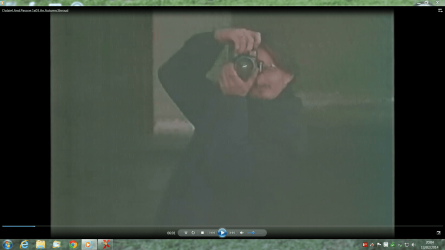
i have already tried that have taken screenshot you can see the dots.
i have tried 4 different media players and i dont have a problem with any of them.
 

Attachments

  • lines.png
    lines.png
    464.7 KB · Views: 20

My Computer

Computer Manufacturer/Model Number
pc specialist
OS
windows 7 64 bit home premium
CPU
amd phenom 2 x4 945
Motherboard
asus m4n78
Memory
4gb
Graphics Card(s)
1gb ati radeon hd 5750
Sound Card
onboard 6 channel (5.1) high def
Monitor(s) Displays
lcd tv dgm ltv3289wh
Hard Drives
1tb serial ata
Keyboard
logitech navigator
Mouse
kingston trackball
Internet Speed
6.7mb
Would you be able to post one screen shot with VLC playing a video perfectly and WMP with those red dots you mentioned earlier?

Also I'm not quite sure what is wrong with the picture above? Is it to do with those tiny dots that are vertically pointing down the screen?

I myself prefer to use VLC for playing all of my video files, but if you still want to fix WMP you could try this:


  1. If you have a codec pack installed, uninstall it. Restart your computer then reinstall it again.
  2. If you don't have a codec pack installed, you can download one from:
Windows 7 Codecs Pack for Windows Media Player WMP12 and Media Center

Note: Codecs are special instructions that help WMP play video files that you wouldn't be able to play normally. This might help you play some avi videos and some of your camcorder videos.
 

My Computer

Computer type
Laptop
Computer Manufacturer/Model Number
Toshiba, Satellite L750/0T1
OS
Windows 7 64-bit SP1 (VM)
CPU
Intel(R) Core(TM) i7-2670QM CPU @ 2.20GHz (8 CPUs), ~2.2GHz
Motherboard
Intel Corp, PSK2YA-0T102S, Sandy Bridge - 09
Memory
4 GB (Expandable to 8 GB)
Graphics Card(s)
NVIDIA GeForce GT 525M
Sound Card
Conexant SmartAudio HD & NVIDIA High Definition Audio
Monitor(s) Displays
2 (Mobile PC Display, Dell E2009W)
Screen Resolution
1366 x 768 & 1680 x 1050
Hard Drives
TOSHIBA MK7575GSX - 698GB (Main Hard Drive)
WD Elements - 1TB (External Hard Drive)
Keyboard
Standard PS/2 Keyboard & Dell SK-8165
Mouse
Synaptics PS/2 Port TouchPad, Logitech Wireless Mouse M185
Internet Speed
Download: 49 Mb/s, Upload: 2 Mb/s 'via Ethernet' (OOKLA)
Antivirus
AVG AntiVirus Free Edition (Outside VM)
Browser
Internet Explorer, Google Chrome
Other Info
Main OS:Windows 10 64-bit
yes its those dots they are white or red depending on the background
 

My Computer

Computer Manufacturer/Model Number
pc specialist
OS
windows 7 64 bit home premium
CPU
amd phenom 2 x4 945
Motherboard
asus m4n78
Memory
4gb
Graphics Card(s)
1gb ati radeon hd 5750
Sound Card
onboard 6 channel (5.1) high def
Monitor(s) Displays
lcd tv dgm ltv3289wh
Hard Drives
1tb serial ata
Keyboard
logitech navigator
Mouse
kingston trackball
Internet Speed
6.7mb
Okay, I'm not really sure what could be causing you to have lines/dots on your video playback in WMP.

I do have some other suggestions you could try that might help you :).


  1. Update your graphics card driver to the latest version.
  2. Make sure Direct X is installed and working properly.
  3. Try disabling the aero effect (try the Windows 7 basic theme).
  4. Try watching a video at a lower screen resolution.


Any one else got any ideas? :geek:
 

My Computer

Computer type
Laptop
Computer Manufacturer/Model Number
Toshiba, Satellite L750/0T1
OS
Windows 7 64-bit SP1 (VM)
CPU
Intel(R) Core(TM) i7-2670QM CPU @ 2.20GHz (8 CPUs), ~2.2GHz
Motherboard
Intel Corp, PSK2YA-0T102S, Sandy Bridge - 09
Memory
4 GB (Expandable to 8 GB)
Graphics Card(s)
NVIDIA GeForce GT 525M
Sound Card
Conexant SmartAudio HD & NVIDIA High Definition Audio
Monitor(s) Displays
2 (Mobile PC Display, Dell E2009W)
Screen Resolution
1366 x 768 & 1680 x 1050
Hard Drives
TOSHIBA MK7575GSX - 698GB (Main Hard Drive)
WD Elements - 1TB (External Hard Drive)
Keyboard
Standard PS/2 Keyboard & Dell SK-8165
Mouse
Synaptics PS/2 Port TouchPad, Logitech Wireless Mouse M185
Internet Speed
Download: 49 Mb/s, Upload: 2 Mb/s 'via Ethernet' (OOKLA)
Antivirus
AVG AntiVirus Free Edition (Outside VM)
Browser
Internet Explorer, Google Chrome
Other Info
Main OS:Windows 10 64-bit
tried all that still have problem
 

My Computer

Computer Manufacturer/Model Number
pc specialist
OS
windows 7 64 bit home premium
CPU
amd phenom 2 x4 945
Motherboard
asus m4n78
Memory
4gb
Graphics Card(s)
1gb ati radeon hd 5750
Sound Card
onboard 6 channel (5.1) high def
Monitor(s) Displays
lcd tv dgm ltv3289wh
Hard Drives
1tb serial ata
Keyboard
logitech navigator
Mouse
kingston trackball
Internet Speed
6.7mb
tried a dvd using two different dvd players on pc and then tried a dvd player connected to monitor which is a 40 inch tv and only had problem when viewing using windows media player.i would have tried to contact windows technical service but am not going to pay £65.00 to do so.
 

My Computer

Computer Manufacturer/Model Number
pc specialist
OS
windows 7 64 bit home premium
CPU
amd phenom 2 x4 945
Motherboard
asus m4n78
Memory
4gb
Graphics Card(s)
1gb ati radeon hd 5750
Sound Card
onboard 6 channel (5.1) high def
Monitor(s) Displays
lcd tv dgm ltv3289wh
Hard Drives
1tb serial ata
Keyboard
logitech navigator
Mouse
kingston trackball
Internet Speed
6.7mb
I agree, you shouldn't have to pay that much to get a problem like this fixed.

I don't really have any more ideas sorry :(.

When did you first start noticing that these red/white dots started appearing in WMP?
Can you remember any important tasks that your computer processed before the problem?
(e.g. a important Windows Update, updated your video card driver)

Basically anything that might have been updated that could have caused the problem.
If there was any important updates, try a system restore to the date before the problem occurred.
 

My Computer

Computer type
Laptop
Computer Manufacturer/Model Number
Toshiba, Satellite L750/0T1
OS
Windows 7 64-bit SP1 (VM)
CPU
Intel(R) Core(TM) i7-2670QM CPU @ 2.20GHz (8 CPUs), ~2.2GHz
Motherboard
Intel Corp, PSK2YA-0T102S, Sandy Bridge - 09
Memory
4 GB (Expandable to 8 GB)
Graphics Card(s)
NVIDIA GeForce GT 525M
Sound Card
Conexant SmartAudio HD & NVIDIA High Definition Audio
Monitor(s) Displays
2 (Mobile PC Display, Dell E2009W)
Screen Resolution
1366 x 768 & 1680 x 1050
Hard Drives
TOSHIBA MK7575GSX - 698GB (Main Hard Drive)
WD Elements - 1TB (External Hard Drive)
Keyboard
Standard PS/2 Keyboard & Dell SK-8165
Mouse
Synaptics PS/2 Port TouchPad, Logitech Wireless Mouse M185
Internet Speed
Download: 49 Mb/s, Upload: 2 Mb/s 'via Ethernet' (OOKLA)
Antivirus
AVG AntiVirus Free Edition (Outside VM)
Browser
Internet Explorer, Google Chrome
Other Info
Main OS:Windows 10 64-bit

My Computer

Computer type
Laptop
Computer Manufacturer/Model Number
Employer provided Dell Latitude
OS
W7 Pro SP1 64bit
CPU
i7
Memory
8GB
Graphics Card(s)
Intel HD Graphics
Hard Drives
crappy SSD
Antivirus
Employer mandated Symantec Endpoint Protection
Browser
Pale Moon 64bit, IE11 64bit & Chrome 64bit
tried with and without codec packs on for windows media player and k-lite pack still problem.
i have now reinstalled windows from disc and updated with sp1 and still get problem.
 

My Computer

Computer Manufacturer/Model Number
pc specialist
OS
windows 7 64 bit home premium
CPU
amd phenom 2 x4 945
Motherboard
asus m4n78
Memory
4gb
Graphics Card(s)
1gb ati radeon hd 5750
Sound Card
onboard 6 channel (5.1) high def
Monitor(s) Displays
lcd tv dgm ltv3289wh
Hard Drives
1tb serial ata
Keyboard
logitech navigator
Mouse
kingston trackball
Internet Speed
6.7mb
I have asked others to join this thread.
 

My Computer

Computer type
Laptop
Computer Manufacturer/Model Number
Employer provided Dell Latitude
OS
W7 Pro SP1 64bit
CPU
i7
Memory
8GB
Graphics Card(s)
Intel HD Graphics
Hard Drives
crappy SSD
Antivirus
Employer mandated Symantec Endpoint Protection
Browser
Pale Moon 64bit, IE11 64bit & Chrome 64bit
Here are a couple of ways you can try to control those artifacts.

If you have Windows Aero enabled, disable it by using one of the basic themes. Test WMP.

If they are still there leave the Aero setting disabled then go into your VLC controls and change the video output mode of VLC from its present setting to Windows GDI video output. Test WMP.

If you prefer to run Aero, you can then try re-enabling Aero then test WMP. If the artifacts still remain change the VLC setting to DirectX, DirectX3D or even OpenGL. Worst case, try the XP settings in the Quote below.

Ignore the fact that this Quote mentions XP, Vista, and that you are not having problems with your VLC player, there is something going on between your graphics card, the players, and DirectX:
Why does VLC only give black, white or garbled (or other visual errors) video output?

Usually the problem lies in display adapter drivers. If you are too scared to update your display adapter drivers, you can change VLC settings to make video work. If you are using Windows XP or older the easiest fix is usually to disable Accelerated video output/Overlay video output which can be found first opening Tools -> Preferences and then choosing Video. After you have unticked the Accelerated video output, press Save to save VLC settings and restart VLC after that to make sure changes are enabled. Image about Overlay video output setting

If disabling Overlay video output doesn't help, then the next step is to change video output module. Open Tools -> Preferences (set Show Settings to All) and then choosing Video -> Output module. There are multiple output modules you can use. For Windows XP and younger you can try DirectX 3D, DirectX, OpenGL and Windows GDI video output modules.

With Windows Vista DirectX and Windows GDI output modules will disable Aero so if you want to use Aero, please use DirectX 3D (should be default). Remember to press Save to save VLC settings and restart VLC after that to make sure changes are enabled. Image about video output modules setting

Source: https://wiki.videolan.org/VSG:Video:VisualErrors/
If none of this helps you will need to look into updating your Display adapter drivers. ATI Radeon HD 5750 Graphics

You will also need to check if your OS is fully updated including The latest version of DirectX

I suspect there is something going on with your graphics card and DirectX.
 

My Computer

Computer type
PC/Desktop
Computer Manufacturer/Model Number
Gateway DX4831-01e (Mid-Tower Desktop)
OS
Originally Win 7 Hm Prem x64 Ver 6.1.7600 Build 7601-SP1 | Upgraded to Windows 10 December 14, 2019
CPU
Intel i3 530 2.93GHz, 2933MHz 2 Cores 4 Logical Processors
Motherboard
Gateway H57M01 133 megahertz
Memory
6GB of 1,333MHz DDR3 SDRAM
Graphics Card(s)
32MB Intel Graphics Media Accelerator HD IGChip
Sound Card
Realtek High Definition Audio
Monitor(s) Displays
Gateway HX2000 20inch TFT active matrix TN
Screen Resolution
1600 x 900 x 59 hertz
Hard Drives
WDC WD10EADS-00M2B0 [HDD] (1000.20 GB) -- drive 0,
HL-DT-ST DVDRAM GH41N [CD-ROM dr]
Four card readers, and Four USB 2.0
PSU
300watts.
Case
Mid-Tower Desktop
Cooling
Stock from Gateway
Keyboard
Natural Ergonomic Keyboard 4000, see Other Info
Mouse
Orig. Gateway wore out now using Insignia USB wired optical
Internet Speed
Vz FIOS 10ms png 57.64Mbps down 65.53Mbps up Speedtest.org
Antivirus
Zamana Anti-logger with Anti-malware, MSE, Windows Firewall,
Browser
IE11.0.9600.19399-Upd ver11.0.135, Firefox 68.0.1 x64
Other Info
System Specs by Belarc.

BIOS: American Megatrends Inc. P01-A0 11/17/2009

Replaced the MS 'Natural' Standard PS/2 Enhanced 101-102 Keyboard with a new Natural Ergonomic Keyboard 4000 on August 1st 2014.

Canon Pixma MG3222 Printer.

Updated to IE11 on 12102015 | Fios Quantum Router g1100

Additional AV: SpywareBlaster, manual Mbam, SAS
Last edited:

My Computer

Computer type
PC/Desktop
Computer Manufacturer/Model Number
Custom assembled by me :}
OS
Win-7-Pro64bit 7-H-Prem-64bit
CPU
i7-5930K 2nd i9-9940x both water blocked VRM's too
Motherboard
ASUS SABERTOOTH X99 2nd ASUS x299 Apex
Memory
Trident-z 3200C14 2nd Trident-z 3600C16
Graphics Card(s)
EVGA 1080ti ftw3 2nd Titan Xp both water blocked
Sound Card
Built-in Realtek
Monitor(s) Displays
1-AOC G2460PG 24"G-Sync 144Hz/ 2nd 1-ASUS VG248QE 24" 144Hz
Screen Resolution
1920 x 1080 144Hz
Hard Drives
2-Samsung M.2 Evo & Evo Plus
2-Samsung 850 EVO 500GB SSD's/ 3-2.5 W.D. Black 1tb-&3-1tb/3-3.5 WD Black 1tb hdd's
PSU
EVGA SuperNOVA 1000-P2 2nd 1200-P2
Case
2-Corsair Obsidian Series 450D Black ATX Mid Tower
Cooling
Custom water loops
Keyboard
Logitech G710+/ 2nd Logitech G910
Mouse
2-RedDragon M901 Perdition 16400 dpi Gaming mouse = wired
Internet Speed
Comcast Ping 19ms 89.31mbps download speed 6.12mbps upload
Antivirus
Malwarebytes Pro/ Superantispyware Pro
Browser
FireFox & Pale moon
Other Info
2nd ASUS X299 Apex/Intel i9-9940x with Custom water loop/7H-Prem-x64/Corsair 450D case/Ram Trident-z 3600C16 4x8gb / Samsung970Evo plus 500gb SSD/Dual ssd EZ swap evo/PSU EVGA SuperNova 1200w-P2 80+Platinum/GPU Titan Xp /8-ML-140 on push-pull on 2-280GTX rads

My Computer

Computer type
PC/Desktop
Computer Manufacturer/Model Number
Own build (new) Desk1 / Asus ROG Win 7 / Desk2 1st build
OS
Desk1 7 Home Prem / Desk2 10 Pro / Main lap Asus ROG 10 Pro 2 laptop Toshiba 7 Pro Asus P2520 7 & 10
CPU
Desk1 i5 3750K / Laptop i7 GTX 860M / Desk2 i5 2500
Motherboard
Desk1 Asus P877-V / Desk2 Gigabyte H67 UD3H / Laptop ?
Memory
Desk1 8GB (1866) / Desk2 16GB (1333) / Laptop 8Gb DDR3
Graphics Card(s)
Desk 1& 2NVidia GTX 650 & Laptops on board Intel
Sound Card
Desk 1 & 2 -XONAR DG Realtek High Def audio Laptop
Monitor(s) Displays
Desk 1 Benq HD 2450 / Desk2 Philips 24" / Laptop 17.5"
Screen Resolution
1920x1080 D1 & D2 & Laptop 1
Hard Drives
Desk1 Samsung 120GB 830 SSD
Asus ROG 256GB 850 Pro SSD
Desk2 Samsung 840 256 SSD
Toshiba 120GB EVO
PSU
Desk 1 Corsair HX 1050/ Laptop ? / Desk 2 Corsair HX 650
Case
Desk 1 Cooler HAF XM ? Toshiba laptop / Desk2 Coolermaster
Cooling
Fans on all Desk1 -2 Desk2 - all Coolermasters 5 Laptop ?
Keyboard
Desk 1 MS Sidewinder X6 Desk 2 MS Sidewinder X 4
Mouse
Desk 1&2 - Gigabyte MS 900 gamer - laptop - Logitec wireless
Internet Speed
ADSL2+
Other Info
One other Desktop (tester) and spare Toshba laptop both with SSD's
Running Kaspersky 2016 ISS on all machines config'd identically
Logitec audio stereo systems on each machine (x3)
Canon MG5250MFC
Router/modem TP-Link running WPA2SK
Try uninstalling VLC player, all codec packs and test WMP. Many codecs can cause more problems so I use VLC to play media WMP can't. (I saw no problem with the video shot.)

If you still have the issue after a full clean install I would suspect your graphics driver (as suggested by Anak) or a failing GPU. VLC seems to have the ability to give more acceptable playback them WMP.
 

My Computer

Computer type
PC/Desktop
Computer Manufacturer/Model Number
Home Built Desktop By DataTech
OS
Windows 7 Ultimate X64 SP1
CPU
Intel i5-2550K, Differing ~4.4-4.8GHz No built in GPU
Motherboard
ASUS P8Z68-V PRO/GEN3
Memory
16GB G.Skill Sniper 1866MHz @ 2133MHz 2x8GB
Graphics Card(s)
ASUS GTX650TIB-DC2OC-2GD5, (650TI Boost)
Sound Card
Onboard Realtek 5-1
Monitor(s) Displays
Samsung P2570HD
Screen Resolution
1920x1080
Hard Drives
Samsung 840 Pro 256GB SSD for OS, 500GB Seagate Constellation (Enterprise drive) for Data
PSU
Corsair HX650W
Case
Inwin Dragon Rider
Cooling
Hyper 212 EVO w/two Noctua fans, push-pull, @1300 RPM
Keyboard
E-Z Eyes, bright yellow keys with large characters
Mouse
steelseries SENSEI Laser Pro Gaming
Internet Speed
48-51Mbs Mbs down, 11 Mbs up Xfinity Cable
Antivirus
Norton Internet Security 2013
Browser
IE 10, Opera, Pale Moon if needed
Other Info
4 case fans, LG BluRay-RE, ASUS DVD-RW, Mr. Fusion power supply, 1.21 gigawatts.
Try uninstalling VLC player, all codec packs and test WMP. Many codecs can cause more problems so I use VLC to play media WMP can't. (I saw no problem with the video shot.)

If you still have the issue after a full clean install I would suspect your graphics driver (as suggested by Anak) or a failing GPU. VLC seems to have the ability to give more acceptable playback them WMP.
Britton, that is a good suggestion if they've been re-installed, to remove all third-party codecs to force the use of the ones native to WMP and VLC. I went with the premiss that zebdog had not added any since his/her re-install of the operating system (OS).

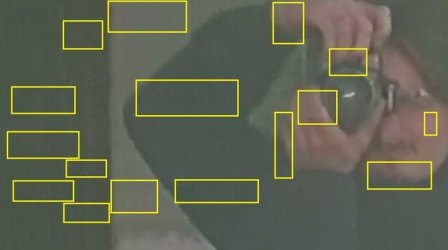
They are difficult to pick out with the dark background - it took me a while - but there are problems with the video shot, I highlighted some here:

wmp art.JPG

The darker areas show series of vertical 4 white dots/hashes and the lighter areas series of vertical and horizontal red dots/hashes, they are all through the shot and I only highlighted the most obvious.

I believe if the resolution was improved they would stand out better.
 

My Computer

Computer type
PC/Desktop
Computer Manufacturer/Model Number
Gateway DX4831-01e (Mid-Tower Desktop)
OS
Originally Win 7 Hm Prem x64 Ver 6.1.7600 Build 7601-SP1 | Upgraded to Windows 10 December 14, 2019
CPU
Intel i3 530 2.93GHz, 2933MHz 2 Cores 4 Logical Processors
Motherboard
Gateway H57M01 133 megahertz
Memory
6GB of 1,333MHz DDR3 SDRAM
Graphics Card(s)
32MB Intel Graphics Media Accelerator HD IGChip
Sound Card
Realtek High Definition Audio
Monitor(s) Displays
Gateway HX2000 20inch TFT active matrix TN
Screen Resolution
1600 x 900 x 59 hertz
Hard Drives
WDC WD10EADS-00M2B0 [HDD] (1000.20 GB) -- drive 0,
HL-DT-ST DVDRAM GH41N [CD-ROM dr]
Four card readers, and Four USB 2.0
PSU
300watts.
Case
Mid-Tower Desktop
Cooling
Stock from Gateway
Keyboard
Natural Ergonomic Keyboard 4000, see Other Info
Mouse
Orig. Gateway wore out now using Insignia USB wired optical
Internet Speed
Vz FIOS 10ms png 57.64Mbps down 65.53Mbps up Speedtest.org
Antivirus
Zamana Anti-logger with Anti-malware, MSE, Windows Firewall,
Browser
IE11.0.9600.19399-Upd ver11.0.135, Firefox 68.0.1 x64
Other Info
System Specs by Belarc.

BIOS: American Megatrends Inc. P01-A0 11/17/2009

Replaced the MS 'Natural' Standard PS/2 Enhanced 101-102 Keyboard with a new Natural Ergonomic Keyboard 4000 on August 1st 2014.

Canon Pixma MG3222 Printer.

Updated to IE11 on 12102015 | Fios Quantum Router g1100

Additional AV: SpywareBlaster, manual Mbam, SAS
Back
Top