
Windows Media Player Will Not Find Album Info

Sniggler

New member
Local time
3:18 PM
Messages
38
I am running Win7 with Windows Media Player 12. No problems until today... all of a sudden, WMP cannot find album info.

When it looks for album info, it just grinds around and around. Sometimes, it stops and says it cannot log onto the fai metadata website.

Does this have to do with the demise of Windows 7 or is there something else going on?

Thanks!
 

My Computer My Computer

At a glance

Windows 7 64 Bit
Computer type
PC/Desktop
Computer Manufacturer/Model Number
Dell
OS
Windows 7 64 Bit
Hi there,

Same same here..."This page can not be displayed". it worked few days ago.
 

My Computer My Computer

At a glance

Windows 7 Professional SP1 - x64 [Non-UEFI Boot]Ivy Bridge Core i5 3570K (Delidded)G.Skill "Ares" DDR3 PC3-12800 - 1600MHz (16Gb)Asus Dual-RX480-O4G
Computer type
PC/Desktop
Computer Manufacturer/Model Number
Custom Build
OS
Windows 7 Professional SP1 - x64 [Non-UEFI Boot]
CPU
Ivy Bridge Core i5 3570K (Delidded)
Motherboard
Asus P8Z77-V LE PLUS
Memory
G.Skill "Ares" DDR3 PC3-12800 - 1600MHz (16Gb)
Graphics Card(s)
Asus Dual-RX480-O4G
Sound Card
Creative Sound Blaster Z w/5.1 sound system
Monitor(s) Displays
Asus IPS 23"
Screen Resolution
16/9
Hard Drives
Internal:
500Go Sata 6Gb/s (x2)
500Go Sata 3Gb/s (x2)
SSD 60Go Sata 6Gb/s
PSU
In Win C 900W Series 80+ Platinum
Case
Thermaltake Chaser A71
Cooling
Custom Water Cooling Loop
Keyboard
Cooler Master QuickFire XTi
Mouse
Razer Imperator 2012 (4G)
Antivirus
MSE
Browser
IE 11.0.xxx Rtm
Other Info
"Raid0" with Intel Smart Response Technology (HDD/SSD)
Find album info not operating on both machines. Must have to do with WMP being phased out soon. Not much discussion of WMP album info issue on net, though. Too bad we are loosing WMP, it was actually one of MS's better application products. I do have VLC as a backup, but I have never warmed up to VLC. Not really user friendly, some features don't work, still displays wrong album art....


Can anyone shed more light on album info on WMP?
 

My Computer My Computer

At a glance

Windows 7 64 Bit
Computer type
PC/Desktop
Computer Manufacturer/Model Number
Dell
OS
Windows 7 64 Bit
Sniggler, sorry to tell that the last June 20th preview monthly rollup hasn't fixed WMP Album info..Been one week stuck.

Now we'll have to wait July 9th Tuesday patch to see if they will fix WMP.
 

My Computer My Computer

At a glance

Windows 7 Professional SP1 - x64 [Non-UEFI Boot]Ivy Bridge Core i5 3570K (Delidded)G.Skill "Ares" DDR3 PC3-12800 - 1600MHz (16Gb)Asus Dual-RX480-O4G
Computer type
PC/Desktop
Computer Manufacturer/Model Number
Custom Build
OS
Windows 7 Professional SP1 - x64 [Non-UEFI Boot]
CPU
Ivy Bridge Core i5 3570K (Delidded)
Motherboard
Asus P8Z77-V LE PLUS
Memory
G.Skill "Ares" DDR3 PC3-12800 - 1600MHz (16Gb)
Graphics Card(s)
Asus Dual-RX480-O4G
Sound Card
Creative Sound Blaster Z w/5.1 sound system
Monitor(s) Displays
Asus IPS 23"
Screen Resolution
16/9
Hard Drives
Internal:
500Go Sata 6Gb/s (x2)
500Go Sata 3Gb/s (x2)
SSD 60Go Sata 6Gb/s
PSU
In Win C 900W Series 80+ Platinum
Case
Thermaltake Chaser A71
Cooling
Custom Water Cooling Loop
Keyboard
Cooler Master QuickFire XTi
Mouse
Razer Imperator 2012 (4G)
Antivirus
MSE
Browser
IE 11.0.xxx Rtm
Other Info
"Raid0" with Intel Smart Response Technology (HDD/SSD)
@Sniggler, sorry to tell that the last June 20th preview monthly rollup hasn't fixed WMP Album info..Been one week stuck.

Now we'll have to wait July 9th Tuesday patch to see if they will fix WMP.


My guess is that this all has to do with the eventual demise of WMP. Unfortunatley, WPM, like MS Money, was a very good application program that I will miss. I have VLC as a backup, but I never warmed up to VLC like WMP. I did notice after last WIN update, WMP privacy settings were altered.
 

My Computer My Computer

At a glance

Windows 7 64 Bit
Computer type
PC/Desktop
Computer Manufacturer/Model Number
Dell
OS
Windows 7 64 Bit
I came across this Microsoft thread:

Is fai.music.metaservices.microsoft.com down for good?

One might wants to backup its WMP database entirely. I created a special folder and made a copy into it "[Saved] AppData-Local-Microsoft-Media Player" in case i need to. Mine is around 83Mb

You can find the way of "AppData-Local-Microsoft-Media Player" by unhide Files & Folders in Control Panel => Options Folders.
 
Last edited:

My Computer My Computer

At a glance

Windows 7 Professional SP1 - x64 [Non-UEFI Boot]Ivy Bridge Core i5 3570K (Delidded)G.Skill "Ares" DDR3 PC3-12800 - 1600MHz (16Gb)Asus Dual-RX480-O4G
Computer type
PC/Desktop
Computer Manufacturer/Model Number
Custom Build
OS
Windows 7 Professional SP1 - x64 [Non-UEFI Boot]
CPU
Ivy Bridge Core i5 3570K (Delidded)
Motherboard
Asus P8Z77-V LE PLUS
Memory
G.Skill "Ares" DDR3 PC3-12800 - 1600MHz (16Gb)
Graphics Card(s)
Asus Dual-RX480-O4G
Sound Card
Creative Sound Blaster Z w/5.1 sound system
Monitor(s) Displays
Asus IPS 23"
Screen Resolution
16/9
Hard Drives
Internal:
500Go Sata 6Gb/s (x2)
500Go Sata 3Gb/s (x2)
SSD 60Go Sata 6Gb/s
PSU
In Win C 900W Series 80+ Platinum
Case
Thermaltake Chaser A71
Cooling
Custom Water Cooling Loop
Keyboard
Cooler Master QuickFire XTi
Mouse
Razer Imperator 2012 (4G)
Antivirus
MSE
Browser
IE 11.0.xxx Rtm
Other Info
"Raid0" with Intel Smart Response Technology (HDD/SSD)
Just tried to put a CD on my MP3 player and it wouldn't recognise the tracks, page unavailable. There are a few threads about it: The service has been discontinued by MS for all versions of windows except, wait for it, 10.

https://answers.microsoft.com/en-us/musicandvideo/forum/all/windows-media-player-cannot-connect-to/df0c6c17-353b-412b-8f55-777f37535e5f


Fortunately, just a month or so ago, I transferred all of my music to my Sony (never linked up to the net) and two external hard drives for good measure.

So it would seem that MS are employing a further tactics to move us onto 10.

So for me I will edit the song titles myself and get the cover art from Amazon.
 

My Computer My Computer

At a glance

Windows 7 Home Premium 64 Bit (Service Pack 1)Premium Dual Core P62004 GBIntel (R) HD Graphic
Computer type
Laptop
Computer Manufacturer/Model Number
Samsung S3511
OS
Windows 7 Home Premium 64 Bit (Service Pack 1)
CPU
Premium Dual Core P6200
Motherboard
Samsung S3511
Memory
4 GB
Graphics Card(s)
Intel (R) HD Graphic
Sound Card
Realtek High Definition Audio
Screen Resolution
1366 x 768
Hard Drives
C: D: E: (NTFS)
Cooling
Drive temperature: 38 / 100
Mouse
Wired Logitech B100
Antivirus
McAfee Total Protection
Browser
Supermium Portable and r3dfox
Aha.. Backup, backup...:D

i was Lucky enough having saved all my music on an external hard drive few weeks ago. One of my Hdd turned to Raw format.. i was able to use TestDisk v7.0 to access my music partition but couldn't bother to scan more than 260Gb. I've lost few albums files, nothing too bad, i can recover them easily.

All this happenned just few days before last week Windows Update, that damn "fai.music.metaservices.microsoft.com" let us down.

Lesson learned!
 

My Computer My Computer

At a glance

Windows 7 Professional SP1 - x64 [Non-UEFI Boot]Ivy Bridge Core i5 3570K (Delidded)G.Skill "Ares" DDR3 PC3-12800 - 1600MHz (16Gb)Asus Dual-RX480-O4G
Computer type
PC/Desktop
Computer Manufacturer/Model Number
Custom Build
OS
Windows 7 Professional SP1 - x64 [Non-UEFI Boot]
CPU
Ivy Bridge Core i5 3570K (Delidded)
Motherboard
Asus P8Z77-V LE PLUS
Memory
G.Skill "Ares" DDR3 PC3-12800 - 1600MHz (16Gb)
Graphics Card(s)
Asus Dual-RX480-O4G
Sound Card
Creative Sound Blaster Z w/5.1 sound system
Monitor(s) Displays
Asus IPS 23"
Screen Resolution
16/9
Hard Drives
Internal:
500Go Sata 6Gb/s (x2)
500Go Sata 3Gb/s (x2)
SSD 60Go Sata 6Gb/s
PSU
In Win C 900W Series 80+ Platinum
Case
Thermaltake Chaser A71
Cooling
Custom Water Cooling Loop
Keyboard
Cooler Master QuickFire XTi
Mouse
Razer Imperator 2012 (4G)
Antivirus
MSE
Browser
IE 11.0.xxx Rtm
Other Info
"Raid0" with Intel Smart Response Technology (HDD/SSD)
Mine stopped working also, it's so frustrating. Does anyone know of a good free alternative to WMP to Rip CD's that will also add CD info like track lists & artwork?
 
Last edited:

My Computer My Computer

At a glance

Windows 7 64 Bit
Computer type
PC/Desktop
OS
Windows 7 64 Bit

My Computer My Computer

At a glance

Windows 10 Home C1H12.30 gigahertz Intel Core i7-10510U12GBIntel UHD Graphics
Computer type
Laptop
Computer Manufacturer/Model Number
HP Laptop 17t-by200 CTO
OS
Windows 10 Home C1H1
CPU
2.30 gigahertz Intel Core i7-10510U
Motherboard
HP 865A 64.17
Memory
12GB
Graphics Card(s)
Intel UHD Graphics
Monitor(s) Displays
HP 27es
Mine hasn't been working for a long time and didn't bother looking for solution. I might try whatever anyone provided here.
 

My Computer My Computer

At a glance

Windows 7 Home 64
Computer type
PC/Desktop
OS
Windows 7 Home 64
VLC may have the album retrieve ability that WMP had. There are many other third-party media players. I'd just ditch WMP.
 

My Computer My Computer

At a glance

Windows 7 Ultimate x64
Computer type
PC/Desktop
OS
Windows 7 Ultimate x64
Windows Media Player album info not working

This is what I found by clicking on the windows icon in the lower left of windows media player


Windows Media Player.JPG
 

My Computer My Computer

At a glance

Windows 7 Home Premium 64 bit
Computer type
PC/Desktop
Computer Manufacturer/Model Number
HP Compac
OS
Windows 7 Home Premium 64 bit

My Computer My Computer

At a glance

Windows 7 SP1 Home Premium 64bit [x64]Intel(R) Core(TM) i5-2310 CPU @ 2.90GHz6 GBIntel HD Graphics 2000
Computer type
PC/Desktop
Computer Manufacturer/Model Number
Dell Inspiron 620
OS
Windows 7 SP1 Home Premium 64bit [x64]
CPU
Intel(R) Core(TM) i5-2310 CPU @ 2.90GHz
Memory
6 GB
Graphics Card(s)
Intel HD Graphics 2000
Sound Card
Conexant CX20641 HD Audio
Hard Drives
Western Digital 1TB (1024GB) WD10EALX-759BA1
Internet Speed
Spectrum Cable Internet up to 100Mbps
Try This Alternative

After much searching I bumbled :) upon "MusicBee". It will get you album info and you can even add lyrics.
To do so click on MusicBee at the top left, then tools, then rip CD and all the album info appears just like it did in WMP. For the extra touch click on the music tab after the rip, select all your songs, right click, auto tag by track, update missing lyrics and presto. You may need to install or upgrade the .NET framework first but it's worth it. Enjoy!
 

My Computer My Computer

At a glance

Windows 7 Professional x64
Computer type
PC/Desktop
Computer Manufacturer/Model Number
Dell
OS
Windows 7 Professional x64
After much searching I bumbled :) upon "MusicBee". It will get you album info and you can even add lyrics.
To do so click on MusicBee at the top left, then tools, then rip CD and all the album info appears just like it did in WMP. For the extra touch click on the music tab after the rip, select all your songs, right click, auto tag by track, update missing lyrics and presto. You may need to install or upgrade the .NET framework first but it's worth it. Enjoy!
Thank you for the suggestion of MusicBee. I'll give it a try.
 

My Computer My Computer

At a glance

Windows 7 64 Bit
Computer type
PC/Desktop
OS
Windows 7 64 Bit
WMP feature loss is MS marketing forcing Win 10

Not being able to download/display CD data is a sly way for MS to push more users into Windows 10 without completely disabling Media Player. Since all commercial CD's for the last thirty-plus years have had that data encoded, having that info transferred to WMP is the real window dressing of that program. Take the feature away and make it more inconvenient and, well you know the rest. I read the piece from Ghacks.net and the statement they claim from MS that they discontinued fai....metadata service was because of "customer feedback" is a bunch of hogwash. Why would customers not want one of the most attractive features of WMP? It worked fine and nobody that I know of complained.
My thoughts: Did WMP get data directly from the CD or was fai.xxx necessary for that data to be recorded??
And, since I'm naturally paranoid when it comes to anything that MS does, maybe all of us Win 7 diehards should immediately turn off automatic updates since there isn't any forthcoming support from MS. Sort of like locking the back door to keep out the pests.
 

My Computer My Computer

At a glance

windows 7 home premium
OS
windows 7 home premium

My thoughts: Did WMP get data directly from the CD or was fai.xxx necessary for that data to be recorded??
And, since I'm naturally paranoid when it comes to anything that MS does, maybe all of us Win 7 diehards should immediately turn off automatic updates since there isn't any forthcoming support from MS. Sort of like locking the back door to keep out the pests.


We do not get metadata from the CD anymore (me I do not have them and do not need anymore WMP), no fai. xxx too...this was end of WMP, MS killed it.


If you really want to turn off Windows Update you could always do it by => execute => services.msc and at bottom of list choose "Windows Update" AND "Service Background Intelligent Transfer", edit properties, set to "manual" or "unactivated" and set also to do nothing if fail to start...do the same in control panel, windows update, modifying properties and uncheck all boxes.

 
Last edited:

My Computer My Computer

At a glance

Windows 7 Professional SP1 - x64 [Non-UEFI Boot]Ivy Bridge Core i5 3570K (Delidded)G.Skill "Ares" DDR3 PC3-12800 - 1600MHz (16Gb)Asus Dual-RX480-O4G
Computer type
PC/Desktop
Computer Manufacturer/Model Number
Custom Build
OS
Windows 7 Professional SP1 - x64 [Non-UEFI Boot]
CPU
Ivy Bridge Core i5 3570K (Delidded)
Motherboard
Asus P8Z77-V LE PLUS
Memory
G.Skill "Ares" DDR3 PC3-12800 - 1600MHz (16Gb)
Graphics Card(s)
Asus Dual-RX480-O4G
Sound Card
Creative Sound Blaster Z w/5.1 sound system
Monitor(s) Displays
Asus IPS 23"
Screen Resolution
16/9
Hard Drives
Internal:
500Go Sata 6Gb/s (x2)
500Go Sata 3Gb/s (x2)
SSD 60Go Sata 6Gb/s
PSU
In Win C 900W Series 80+ Platinum
Case
Thermaltake Chaser A71
Cooling
Custom Water Cooling Loop
Keyboard
Cooler Master QuickFire XTi
Mouse
Razer Imperator 2012 (4G)
Antivirus
MSE
Browser
IE 11.0.xxx Rtm
Other Info
"Raid0" with Intel Smart Response Technology (HDD/SSD)
well that sucks. I've been using WMP for years and i've been searching fora replacement for YEARS! NO THIRD PARTY PLAYER HAS WMP FEATURES!

I've tried musicbee, winamp, vlc, fubar YOU NAME IT, i've looked it up and or tried it! i've spent hours upon hours at various points over the YEARS. none of them have plain old boring straight list view WITH album covers listed from # to Z. i have over well 22,000 songs (more than 4 or 5 weeks of play times non stop) i can sort and scroll thorough at glance by album covers in list view order!!! NOT the itunes store / music bee style. and if i do make that switch by force then it will be multi platform cloud based (and local) like Jelly Fin or something

...i don't know... for yearsa fella had the perfect large library sifting power houses he needed for only playing MP3s and ripping CDs with album info :(


EDIT: works on windows 10 but, not 8.1 at least not industry pro

EDIT: you can try and copy over media player folder AND registry from 10 to 8.1 but, if you try to launch that exe it will prevent you.

you oculd run a minimal win 10 VM just for WMP

EDIT: someone smarter may know how to make router rule to force redirect redir.metaservices.microsoft.com to musicmatch-ssl.xboxlive.com
 
Last edited:

My Computer My Computer

At a glance

64 bit Windows 7 Ultimate
Computer type
PC/Desktop
Computer Manufacturer/Model Number
more than you can count
OS
64 bit Windows 7 Ultimate
Antivirus
Avast + Mbam
cdoublejj

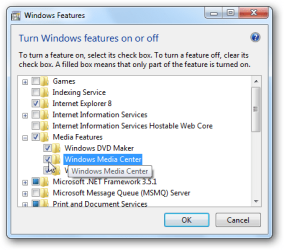
Did you try disabling WMP rebooting, restarting WMP and rebooting?
Works for many WMP issues!

In searchbox type or copy and paste
Turn Windows Features Off
reboot
Turn on again
Reboot.

12diswmc.png
 

My Computer My Computer

At a glance

Win 10 x64, Linux Lite, Win 7 x64, BlackArch,...
Computer type
PC/Desktop
Computer Manufacturer/Model Number
HP Desktop & Compaq Laptop
OS
Win 10 x64, Linux Lite, Win 7 x64, BlackArch, & Kali
Hard Drives
Samsung 850 Pro 256Gb,
Hitachi HDD 1Tb,
Crucial MX SSD 250Gb
Segate 3Tb USB 3.0 Ext. Backup HDD
Internet Speed
150Mbps dn, 20Mbps up
Antivirus
Avast Free, Malwarebytes Anti-Exploit & Anti-Ransomware
Browser
Firefox, Chrome, Opera, & VPN
Back
Top