windows media player

vkristijan

New member
Local time
7:03 AM
Messages
16
when i try to open wmp a message box apears and it stand "Windows Media Player is not installed properly and must be reinstalled"
what shall i do?
 

Attachments

  • Untitled.jpg
    Untitled.jpg
    12 KB · Views: 2

My Computer

OS
windows 7
hello,
can you fill your spec more detail?? what os you're using..windows 7 ultimate? pro? premium?
 

My Computer

Computer Manufacturer/Model Number
built up
OS
windows 7
CPU
Phenom II AMD Dragon 3.5Ghz
Memory
DDR3 4GB
Graphics Card(s)
ATI Radeon 512Mb
Monitor(s) Displays
HP L1506
Screen Resolution
1152 x 864
Hard Drives
WDC 1 TB SATA-II Green Power
Keyboard
HP wireless keyboard
Mouse
HP Optic
Internet Speed
1GB
that's error means,your wmp 12 didn't installed as well. try to reinstall it.
 

My Computer

Computer Manufacturer/Model Number
built up
OS
windows 7
CPU
Phenom II AMD Dragon 3.5Ghz
Memory
DDR3 4GB
Graphics Card(s)
ATI Radeon 512Mb
Monitor(s) Displays
HP L1506
Screen Resolution
1152 x 864
Hard Drives
WDC 1 TB SATA-II Green Power
Keyboard
HP wireless keyboard
Mouse
HP Optic
Internet Speed
1GB
Use an elevated (run as administrator) command prompt and run the command "sfc /scannow". If that does nothing, another trick I've seen fix this is going to the Control Panel --> Programs and Features, and then going to "Turn Windows Features on and off". Ensure the Media Features are installed. If they are not, then just check the box and install them. If they are already installed and the error persists, try uninstalling them then reinstalling them.
 

My Computer

OS
Windows 7 Ultimate x64 SP1
CPU
Intel Core i3 530 2.93 Ghz Clarkdale
Motherboard
ASRock P55 PRO/USB3 LGA 1156
Memory
4 GB OCZ DDR3 1600 (PC12800) Low Voltage Desktop Memory
Graphics Card(s)
Nvidia GeForce GTX 550 Ti with 1 GB of RAM
Sound Card
Realtek HD ALC892
Monitor(s) Displays
20'' eMachines E202HDbmd Glare Panel Widescreen
Screen Resolution
1600 x 900
Hard Drives
Western Digital 1 TB Caviar Black Edition (7200 RPM) SATA
Hitachi Deskstar 500 GB (7200 RPM) SATA
Samsung SpinPoint 400 GB (7200 RPM) SATA
PSU
Rosewill Xtreme Series RX750-D-B ATX12V v2.2 & EPS12V (750W)
Case
Cooler Master Centurion 534 RC-534-KKN2-GP Mid-Tower
Cooling
Standard Case Fans and Stock CPU Heatsink
Keyboard
Microsoft Wireless Optical Desktop Elite
Mouse
Microsoft Wireless Optical Desktop Elite
Internet Speed
7.1 Mbps Verizon DSL
that's error means,your wmp 12 didn't installed as well. try to reinstall it.
thanks for your answer, but i know what this error means, but don't know how to reinstall the wmp
 

My Computer

OS
windows 7
that's error means,your wmp 12 didn't installed as well. try to reinstall it.
thanks for your answer, but i know what this error means, but don't know how to reinstall the wmp
Unfortunately WMP is part of the system and is not easy to reinstall. What you can try is to rename the WMP folders in the x86 and x64 Program files (e.g. to WMP(2)) and copy WMP folders from another system into the program files. Not sure though whether that will completely sove your problem because if e.g. the registry entries are defunct, that would not cure it.
Note that for the renaming you have to take ownership of the folder.
 

My Computer

Computer Manufacturer/Model Number
HP, Dell, Gateway, Toshiba - 4 laptops and 2 desktops
OS
Vista, Windows7, Mint Mate, Zorin, Windows 8
CPU
from 1.6GHz Duo to i7
Monitor(s) Displays
2x HP w2207
Hard Drives
5x HDD, 7x SSD, 12x Externals
Keyboard
with trackball - no mices
Mouse
Trackball mice
Internet Speed
DSL 6000
Use an elevated (run as administrator) command prompt and run the command "sfc /scannow". If that does nothing, another trick I've seen fix this is going to the Control Panel --> Programs and Features, and then going to "Turn Windows Features on and off". Ensure the Media Features are installed. If they are not, then just check the box and install them. If they are already installed and the error persists, try uninstalling them then reinstalling them.
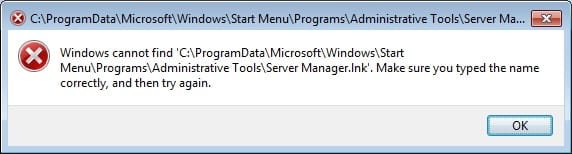
thanks for your help but i have a problem :(
when i tried with sfc /scannow it found no errors,
and when i tried with "Turn Windows Features on and off"
i recived this msgbox
 

Attachments

  • Untitled.jpg
    Untitled.jpg
    14.8 KB · Views: 5

My Computer

OS
windows 7

My Computer

Computer Manufacturer/Model Number
built up
OS
windows 7
CPU
Phenom II AMD Dragon 3.5Ghz
Memory
DDR3 4GB
Graphics Card(s)
ATI Radeon 512Mb
Monitor(s) Displays
HP L1506
Screen Resolution
1152 x 864
Hard Drives
WDC 1 TB SATA-II Green Power
Keyboard
HP wireless keyboard
Mouse
HP Optic
Internet Speed
1GB
sorry for the late reply.. wmp is include package on OS, like whs said, so repair install is the nice solution to solved it out.
 

My Computer

Computer Manufacturer/Model Number
built up
OS
windows 7
CPU
Phenom II AMD Dragon 3.5Ghz
Memory
DDR3 4GB
Graphics Card(s)
ATI Radeon 512Mb
Monitor(s) Displays
HP L1506
Screen Resolution
1152 x 864
Hard Drives
WDC 1 TB SATA-II Green Power
Keyboard
HP wireless keyboard
Mouse
HP Optic
Internet Speed
1GB
Back
Top