You are using an out of date browser. It may not display this or other websites correctly.
You should upgrade or use an
alternative browser.
How do I stop Messenger from opening up whenever I boot? Thanks in advance.
Jack
Start -> Run -> msconfig and in StartUp tab uncheck Windows Live Messenger.

- Computer type
- PC/Desktop
- Computer Manufacturer/Model Number
- Custom Build
- OS
- Windows 10 Pro x64
- CPU
- Intel Core i5 4440 @Stock
- Motherboard
- Gigabyte Z97 D3H
- Memory
- 4 x 4GB HyperX Fury DDR3
- Graphics Card(s)
- Gigabyte GTX 1050Ti O4G
- Sound Card
- Integrated
- Monitor(s) Displays
- Dell P2417H
- Screen Resolution
- 1920 x 1080
- Hard Drives
- Samsung EVO 850 120GB / Toshiba DT01ACA050 1TB 7200prm 32MB
- PSU
- Riotoro Onyx 750W
- Case
- NZXT H500 Black-Red
- Cooling
- Stock CPU + NZXT 120mm + 2x120mm red fans
- Keyboard
- Modecom Volcano Lanparty
- Mouse
- Asus ROG Gladius / DeepCool E-Pad Plus
- Internet Speed
- DOCSIS 50/3 Mbit
- Browser
- Google Chrome
- Other Info
- Asus K55VJ(i5 3210M, GT635M / 2GB, 8GB DDR3, 500GB HDD)
An Angry Old Man
Guru
VIP
SF Team
Click your username top left on
Messenger, select
More options from context menu:
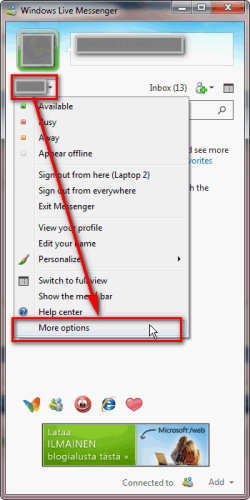
Select
Sign in from left pane, unselect
Start Messenger when I log on to my computer:
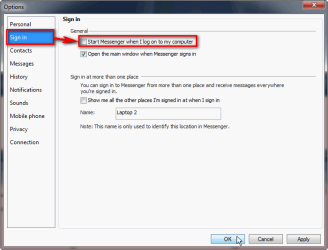
Click
OK to save settings.
Kari
- Computer type
- Laptop
- Computer Manufacturer/Model Number
- HP ENVY 17-1150eg
- OS
- Windows 10 Pro x64 EN-GB
- CPU
- 1.6 GHz Intel Core i7-720QM Processor
- Memory
- 6 GB
- Graphics Card(s)
- ATI Mobility Radeon HD 5850 Graphics
- Sound Card
- Beats sound system with integrated subwoofer
- Monitor(s) Displays
- 17" laptop display, 22" LED and 32" Full HD TV through HDMI
- Screen Resolution
- 1600*900 (1), 1920*1080 (2&3)
- Hard Drives
- Internal: 2 x 500 GB SATA Hard Disk Drive 7200 rpm
External: 2TB for backups, 3TB USB3 network drive for media
- Cooling
- As Envy runs a bit warm, I have it on a Cooler Master pad
- Keyboard
- Logitech diNovo Media Desktop Laser (bluetooth)
- Mouse
- Logitech Performance Mouse MX
- Internet Speed
- 50/10 Mbps VDSL
- Antivirus
- Windows Defender 4.3.9431.0
- Browser
- Maxthon 3.5.2., IE11


