Windows Monthly Rollup failure for over a year

UsualNoise

New member
Local time
6:19 AM
Messages
9
Hi all - per the instructions I've run the SURT, SFC /scannow, and am including my CBS.zip file below (dropbox link).

All updates work on my Windows 7 Home Premium 64-bit machine *except* the monthly rollup, which has continuously failed for over a year now. The current error code for the June update is 80073712. Any assistance would be greatly appreciated. Thanks!

Dropbox - CBS.zip - Simplify your life
 

My Computer My Computer

At a glance

Windows 7 Home Premium 64-bit
Computer type
PC/Desktop
OS
Windows 7 Home Premium 64-bit
HiUsualNoise,
Welcome to SevenForums!
Please download and run AutoSURT64, then post CheckSUR.log from the CBS folder that will appear on your desktop when AutoSURT completes.
Perusing your CBS.log: [HRESULT = 0x80073712 - ERROR_SXS_COMPONENT_STORE_CORRUPT]
Set Windows Update to NEVER.
Please download Uninstall Windows Updates unzip/extract & run
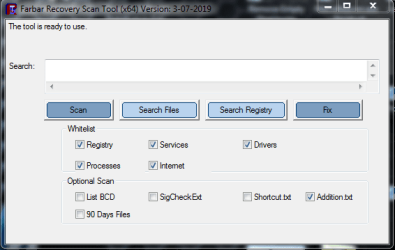
Please download FRST64, place on your desktop & run
Copy paste
KB4503277;KB4499178;4493453;KB4489892;KB4486565;KB4480955;KB4467108;KB4462927;KB4457139
KB4343894
into searchbox
Click Search Registry
Capture.PNG
Please post logs that appear on your desktop
I'll prepare a fix for the registry if needed.
Good Night!
 
Last edited:

My Computer My Computer

At a glance

Win 10 x64, Linux Lite, Win 7 x64, BlackArch,...
Computer type
PC/Desktop
Computer Manufacturer/Model Number
HP Desktop & Compaq Laptop
OS
Win 10 x64, Linux Lite, Win 7 x64, BlackArch, & Kali
Hard Drives
Samsung 850 Pro 256Gb,
Hitachi HDD 1Tb,
Crucial MX SSD 250Gb
Segate 3Tb USB 3.0 Ext. Backup HDD
Internet Speed
150Mbps dn, 20Mbps up
Antivirus
Avast Free, Malwarebytes Anti-Exploit & Anti-Ransomware
Browser
Firefox, Chrome, Opera, & VPN
Thanks so much!

I've completed all the steps listed in your post. Added the log files, let me know if you need anything else!
 

Attachments

Last edited:

My Computer My Computer

At a glance

Windows 7 Home Premium 64-bit
Computer type
PC/Desktop
OS
Windows 7 Home Premium 64-bit
No problem, that's why we are here!
Directions followed perfectly! :thumbsup:
No dumb Questions!!!
From CheckSUR
Summary:
Seconds executed: 656
Found 3 errors
Fixed 3 errors
CSI Manifest Missing Total count: 3
Fixed: CSI Manifest Missing. Total count: 3
Please download, fixlist.zip, unzip it to your desktop.
Open FRST still on your desktop
Click fix
Post logs please.
 
Last edited:

My Computer My Computer

At a glance

Win 10 x64, Linux Lite, Win 7 x64, BlackArch,...
Computer type
PC/Desktop
Computer Manufacturer/Model Number
HP Desktop & Compaq Laptop
OS
Win 10 x64, Linux Lite, Win 7 x64, BlackArch, & Kali
Hard Drives
Samsung 850 Pro 256Gb,
Hitachi HDD 1Tb,
Crucial MX SSD 250Gb
Segate 3Tb USB 3.0 Ext. Backup HDD
Internet Speed
150Mbps dn, 20Mbps up
Antivirus
Avast Free, Malwarebytes Anti-Exploit & Anti-Ransomware
Browser
Firefox, Chrome, Opera, & VPN
Ran the fix, attaching the resulting log file. Thanks again!
 

Attachments

My Computer My Computer

At a glance

Windows 7 Home Premium 64-bit
Computer type
PC/Desktop
OS
Windows 7 Home Premium 64-bit
OK
FRST again with this fixlist.zip
Same procedure please
 

My Computer My Computer

At a glance

Win 10 x64, Linux Lite, Win 7 x64, BlackArch,...
Computer type
PC/Desktop
Computer Manufacturer/Model Number
HP Desktop & Compaq Laptop
OS
Win 10 x64, Linux Lite, Win 7 x64, BlackArch, & Kali
Hard Drives
Samsung 850 Pro 256Gb,
Hitachi HDD 1Tb,
Crucial MX SSD 250Gb
Segate 3Tb USB 3.0 Ext. Backup HDD
Internet Speed
150Mbps dn, 20Mbps up
Antivirus
Avast Free, Malwarebytes Anti-Exploit & Anti-Ransomware
Browser
Firefox, Chrome, Opera, & VPN
Hmm - I tried, but FRST64 popped up a box saying "Warning: Looks you don't know what to do. To prevent damage to the system the tool will exit."
 

My Computer My Computer

At a glance

Windows 7 Home Premium 64-bit
Computer type
PC/Desktop
OS
Windows 7 Home Premium 64-bit
Yea, I figured that might happen.
Keys don't want to auto-delete with FRST I believe being that Windows Update Services & Bits are running.
The last fixlist was delete registry value for the offending botch update not the key itself. Kinda knew it wouldn't work. :rolleyes:
OK let me put the fix together again. I'll give you a link to a script to stop the aforementioned services and start after running FRST.

Ok here we go
Windows update should still be set to NEVER
Unzip and run Stop Windows Update Service & Bits
Unzip fixlist & place on desktop
Run FRST which should still be on your desktop and click FIX
Unzip and run Start Windows Update Service & Bits
Post fixlog please which should be on your desktop after the FRST run.
 

My Computer My Computer

At a glance

Win 10 x64, Linux Lite, Win 7 x64, BlackArch,...
Computer type
PC/Desktop
Computer Manufacturer/Model Number
HP Desktop & Compaq Laptop
OS
Win 10 x64, Linux Lite, Win 7 x64, BlackArch, & Kali
Hard Drives
Samsung 850 Pro 256Gb,
Hitachi HDD 1Tb,
Crucial MX SSD 250Gb
Segate 3Tb USB 3.0 Ext. Backup HDD
Internet Speed
150Mbps dn, 20Mbps up
Antivirus
Avast Free, Malwarebytes Anti-Exploit & Anti-Ransomware
Browser
Firefox, Chrome, Opera, & VPN
Unfortunately I'm still getting the exact same error after running the 'Stop' batch file. I noticed the SoftwareDistribution folder rename was commented out in the 'Stop' file, I uncommented it just to see if it would make a difference, but it didn't. Any other ideas? Appreciate all the help.

I also restarted the PC and that didn't change anything.
 

My Computer My Computer

At a glance

Windows 7 Home Premium 64-bit
Computer type
PC/Desktop
OS
Windows 7 Home Premium 64-bit
Yea, I slightly modified my script for renaming the Software Distribution Folder (SDF) just to start then just to stop Win update service and Bits. It didn't hurt anything to rename software distribution folder, however, the new generated folder will not contain a list of windows updates, i.e. the History.
Going to shoot you a PM (private message) check your user profile. That won't matter if you agree to the PM request.
FYI: rename of SDF works on error code 0x0100
Have a look at a Repair Install
Repair Install to Fix Windows 7 Without Reformatting


My Computer My Computer

At a glance

Win 10 x64, Linux Lite, Win 7 x64, BlackArch,...
Computer type
PC/Desktop
Computer Manufacturer/Model Number
HP Desktop & Compaq Laptop
OS
Win 10 x64, Linux Lite, Win 7 x64, BlackArch, & Kali
Hard Drives
Samsung 850 Pro 256Gb,
Hitachi HDD 1Tb,
Crucial MX SSD 250Gb
Segate 3Tb USB 3.0 Ext. Backup HDD
Internet Speed
150Mbps dn, 20Mbps up
Antivirus
Avast Free, Malwarebytes Anti-Exploit & Anti-Ransomware
Browser
Firefox, Chrome, Opera, & VPN
PMed you!
 

My Computer My Computer

At a glance

Win 10 x64, Linux Lite, Win 7 x64, BlackArch,...
Computer type
PC/Desktop
Computer Manufacturer/Model Number
HP Desktop & Compaq Laptop
OS
Win 10 x64, Linux Lite, Win 7 x64, BlackArch, & Kali
Hard Drives
Samsung 850 Pro 256Gb,
Hitachi HDD 1Tb,
Crucial MX SSD 250Gb
Segate 3Tb USB 3.0 Ext. Backup HDD
Internet Speed
150Mbps dn, 20Mbps up
Antivirus
Avast Free, Malwarebytes Anti-Exploit & Anti-Ransomware
Browser
Firefox, Chrome, Opera, & VPN

My Computer My Computer

At a glance

Win 10 x64, Linux Lite, Win 7 x64, BlackArch,...
Computer type
PC/Desktop
Computer Manufacturer/Model Number
HP Desktop & Compaq Laptop
OS
Win 10 x64, Linux Lite, Win 7 x64, BlackArch, & Kali
Hard Drives
Samsung 850 Pro 256Gb,
Hitachi HDD 1Tb,
Crucial MX SSD 250Gb
Segate 3Tb USB 3.0 Ext. Backup HDD
Internet Speed
150Mbps dn, 20Mbps up
Antivirus
Avast Free, Malwarebytes Anti-Exploit & Anti-Ransomware
Browser
Firefox, Chrome, Opera, & VPN
Sure, I installed TeamViewer, but couldn't figure out how to PM you back.
 

My Computer My Computer

At a glance

Windows 7 Home Premium 64-bit
Computer type
PC/Desktop
OS
Windows 7 Home Premium 64-bit
Also, I undid the SoftwareDistribution rename so I didn't lose the history.

I might just try a repair install to fix this. The computer is our media PC and it's in use right now for TV watching. :) If I can't fix it I'll come back and ask for more help.

Thanks for all the help!
 
Last edited:

My Computer My Computer

At a glance

Windows 7 Home Premium 64-bit
Computer type
PC/Desktop
OS
Windows 7 Home Premium 64-bit
Here's the scoop on Repair Install. If you don't have Win7 ISO or DVD those links won't work.
PM be by answering the PM I sent you or clicking my Username Snick and the view public profile.
From there private message,.
Here the Repair Install Instructions.
 

My Computer My Computer

At a glance

Win 10 x64, Linux Lite, Win 7 x64, BlackArch,...
Computer type
PC/Desktop
Computer Manufacturer/Model Number
HP Desktop & Compaq Laptop
OS
Win 10 x64, Linux Lite, Win 7 x64, BlackArch, & Kali
Hard Drives
Samsung 850 Pro 256Gb,
Hitachi HDD 1Tb,
Crucial MX SSD 250Gb
Segate 3Tb USB 3.0 Ext. Backup HDD
Internet Speed
150Mbps dn, 20Mbps up
Antivirus
Avast Free, Malwarebytes Anti-Exploit & Anti-Ransomware
Browser
Firefox, Chrome, Opera, & VPN
Thanks, I'll give it a shot.

Perhaps as a new member I don't have access to posting messages privately? When I click "Respond to sender" it brings me to a new page but there is nowhere to type or enter a new message. It's fine, I have my Win7 install disc so I should have what I need to attempt the repair install.
 

My Computer My Computer

At a glance

Windows 7 Home Premium 64-bit
Computer type
PC/Desktop
OS
Windows 7 Home Premium 64-bit
It goes below my message in the same window. Or, click on my username Snick then you want the messages tab. Type the message, click Post Message. If you @Snick I get a notification as I have mine user profile set that way. I also get an email for replies/responses to threads I've posted on or subscribed to.
Just run your Disk from within windows, have your 25 character product key, and when you get to the screen you want UPGRADE then use DISM++ to install the updates you want. You don't have to reboot until you are done installing updates, not so with Win Update.
Does your Win7 have SP1 included?
 

My Computer My Computer

At a glance

Win 10 x64, Linux Lite, Win 7 x64, BlackArch,...
Computer type
PC/Desktop
Computer Manufacturer/Model Number
HP Desktop & Compaq Laptop
OS
Win 10 x64, Linux Lite, Win 7 x64, BlackArch, & Kali
Hard Drives
Samsung 850 Pro 256Gb,
Hitachi HDD 1Tb,
Crucial MX SSD 250Gb
Segate 3Tb USB 3.0 Ext. Backup HDD
Internet Speed
150Mbps dn, 20Mbps up
Antivirus
Avast Free, Malwarebytes Anti-Exploit & Anti-Ransomware
Browser
Firefox, Chrome, Opera, & VPN
Yes, I do have SP1. I watched the video that said you have to uninstall that first, so I'll do that prior to the repair install.
 

My Computer My Computer

At a glance

Windows 7 Home Premium 64-bit
Computer type
PC/Desktop
OS
Windows 7 Home Premium 64-bit
If your Disk has SP1 you do not have to uninstall it, just run the setup.exe from the disk via computer, DVD drive, setup.exe, or as default, Win7 auto starts the DVD, so that's it.

The ISO download of Win7 is with SP1.
 

My Computer My Computer

At a glance

Win 10 x64, Linux Lite, Win 7 x64, BlackArch,...
Computer type
PC/Desktop
Computer Manufacturer/Model Number
HP Desktop & Compaq Laptop
OS
Win 10 x64, Linux Lite, Win 7 x64, BlackArch, & Kali
Hard Drives
Samsung 850 Pro 256Gb,
Hitachi HDD 1Tb,
Crucial MX SSD 250Gb
Segate 3Tb USB 3.0 Ext. Backup HDD
Internet Speed
150Mbps dn, 20Mbps up
Antivirus
Avast Free, Malwarebytes Anti-Exploit & Anti-Ransomware
Browser
Firefox, Chrome, Opera, & VPN
Back
Top