Windows Network Map

BlueSlushies

New member
Local time
1:15 PM
Messages
10
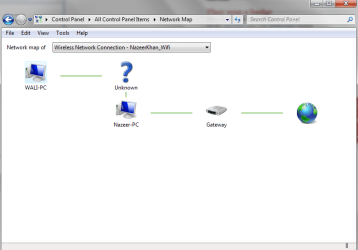
I'm new to this website :D , but i got a problem with my laptop's network map , My laptop is connected to an Unknown and that unknown is connected to my pc in my other room and then my pc is connected to my gateway. I don't why my laptop is connected to an unknown and how i'm getting internet on my laptop even though it shows i have no connections to the gateway.
 

Attachments

  • Capture.PNG
    Capture.PNG
    80.8 KB · Views: 40
Last edited:

My Computer

OS
Windows 7 Home premium 64-bit
Do you have a Router? If so, the unknown is probably the router though your configuration looks a bit strange for that. Normally the Router would be connected to the gateway (broadband modem).

Please describe your network setup.
 

My Computer

Computer type
PC/Desktop
Computer Manufacturer/Model Number
Lenovo IdeaCenter 450
OS
Windows 10 Pro X64
CPU
Intel Quad Core i7-4770 @ 3.4Ghz
Memory
16.0GB PC3-12800 DDR3 SDRAM 1600 MHz
Graphics Card(s)
Intel Integrated HD Graphics
Sound Card
Realtek HD Audio
Monitor(s) Displays
HP 22" LCD
Screen Resolution
1680 x 1050
Hard Drives
250GB Samsung EVO SATA-3 SSD
2TB Seagate ST2000DM001 SATA-2
1.5TB Seagate ST3150041AS SATA
Keyboard
Dell USB
Mouse
Lenovo USB
Internet Speed
Cable via Road Runner 3MB Upload, 30MB Download
Antivirus
Windows Defender, MBAM Pro, MBAE
Browser
Seamonkey
Other Info
UEFI/GPT
PLDS DVD-RW DH16AERSH
Well the gateway is my modem/router so I usually connect to that if thats what you mean , but i also have my pc directly connected to the modem but it shows that my laptop cannot be mapped.
 

My Computer

OS
Windows 7 Home premium 64-bit
Well the gateway is my modem/router so I usually connect to that if thats what you mean , but i also have my pc directly connected to the modem but it shows that my laptop cannot be mapped.

You just described what I see in the map which is that you have your PC connected directly to the modem which is showing as a ?.

If you want the map to look right you need to connect everything to the router not the modem and not to another PC like you mentioned.

As for the laptop not showing up, if it's an XP laptop then you would need to install SP3 and a hotfix for it to show up on a Win7 map.

http://www.sevenforums.com/tutorials/67636-xp-computers-windows-7-network-map.html
 

My Computer

Computer type
PC/Desktop
Computer Manufacturer/Model Number
Home built
OS
Windows 7 Ult, Windows 8.1 Pro,
CPU
Q9650-4.275GHz, E8600 4.5GHz, E6750-3.8GHz
Motherboard
Evga 780i FTW
Memory
G.Skill PC2 9600 1200Mhz 5 5 5 15 2T
Graphics Card(s)
GTX480
Sound Card
Asus Xonar D2
Monitor(s) Displays
HannsG
Screen Resolution
1680X1050
Hard Drives
GSkill Phoenix Pro 120GB SSD
PSU
ThermalTake Toughpower 1000Watt modular
Case
ThermalTake XaserV
Cooling
Xigmatek S1283
Keyboard
Logitech G15
Mouse
Logitech G9
Internet Speed
T1
my pc is connected directly to the modem/router and my laptop is wirelessly connected , what i don't understand is how my laptop is connected to the blue question mark and how that question mark is connected to my pc.

(My laptop is windows 7 home premium 64-bit and my PC is also windows 7 Home premium 64-bit)
 

My Computer

OS
Windows 7 Home premium 64-bit
This network map is with my ISP with rogers , with my other modem which is connected to bell ( I am switching to rogers in a month but i got rogers a month early) so that network map looks better compared to this network map.
 

My Computer

OS
Windows 7 Home premium 64-bit
Please describe exactly what components make up your network.

You have a Broadband modem supplied by your ISP, what make.
Do you have a separate Router. If so, make.

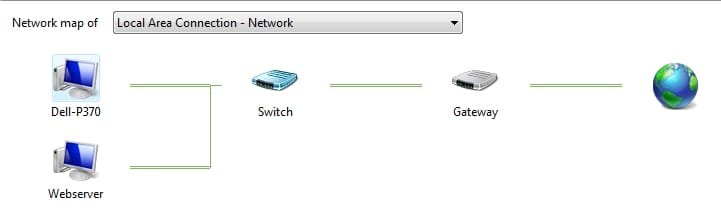
For instance, I have Brighthouse Cable as my ISP (Gateway) and it provided me with a Scientific Atlanta modem.
I also have a Dell Wireless router (Switch) . My network map looks like this.

NetMap.jpg
 

My Computer

Computer type
PC/Desktop
Computer Manufacturer/Model Number
Lenovo IdeaCenter 450
OS
Windows 10 Pro X64
CPU
Intel Quad Core i7-4770 @ 3.4Ghz
Memory
16.0GB PC3-12800 DDR3 SDRAM 1600 MHz
Graphics Card(s)
Intel Integrated HD Graphics
Sound Card
Realtek HD Audio
Monitor(s) Displays
HP 22" LCD
Screen Resolution
1680 x 1050
Hard Drives
250GB Samsung EVO SATA-3 SSD
2TB Seagate ST2000DM001 SATA-2
1.5TB Seagate ST3150041AS SATA
Keyboard
Dell USB
Mouse
Lenovo USB
Internet Speed
Cable via Road Runner 3MB Upload, 30MB Download
Antivirus
Windows Defender, MBAM Pro, MBAE
Browser
Seamonkey
Other Info
UEFI/GPT
PLDS DVD-RW DH16AERSH
Alright , so my Modem is a SMC Network and thats about it I don't have a router.

Rogers hi speed internet is my Gateway which provided me a SMC Network Modem.
 

My Computer

OS
Windows 7 Home premium 64-bit
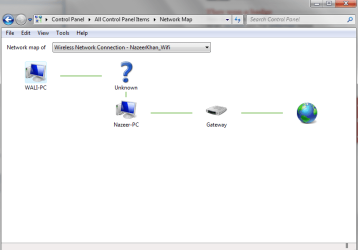
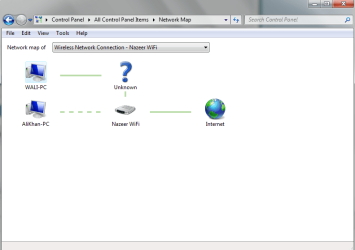
The first Network Map is my current ISP the second Network Map was my old ISP
 

Attachments

  • Capture.PNG
    Capture.PNG
    80.8 KB · Views: 7
  • Capture1.PNG
    Capture1.PNG
    77.5 KB · Views: 11

My Computer

OS
Windows 7 Home premium 64-bit
What's bothering me is that the 1st one is connected to my pc not to my gateway while the 2nd shows that my laptop is connected to the gateway.

1st network map ISP : Rogers
2nd network map ISP : Bell
 

My Computer

OS
Windows 7 Home premium 64-bit
VM Software?

Are you running any Virtual Machine software?

My Windows 7 Network Map turns into complete gibberish, when I am running VMware Workstation.

The Sys Tray icon also claims that I have no Internet connectivity (although I can use the Internet from my VM or Host PC with no problems).
 

My Computer

Computer type
PC/Desktop
Computer Manufacturer/Model Number
n/a
OS
W7 Ultimate SP1, LM19.2 MATE, W10 Home 1703, W10 Pro 1703 VM, #All 64 bit
CPU
AMD Phenom II x6 1100T, 3.3 GHz
Motherboard
ASUS M4A88T-M/USB3 (AM3)
Memory
12GB DDR3 1333 G-Skill (4GB x 2), G-Skill (2GB x 2)
Graphics Card(s)
NVIDIA GeForce GTX 660
Sound Card
Realtek?
Monitor(s) Displays
Samsung S23B350
Screen Resolution
1920x1080
Hard Drives
WD Green 2TB (SATA), WD Green 3TB (SATA), WD Blue 4TB (SATA), WD Blue 6TB (SATA)
PSU
Cooler Master
Case
Antec GX300 Tower
Cooling
3x Antec TRICOOL 120mm Fans
Mouse
Wired Optical
Internet Speed
DSL
Antivirus
Avast
Browser
Pale Moon (64 bit)
Other Info
2018-12-27 Upgraded HDDs
2015-12-10 Upgraded case, graphics card, storage
2015-08-15 Upgraded motherboard & RAM
2015-07-15 Upgraded LM17.1 to LM17.2
Nah I'm not running any virtual machines :O I would be satisfied why my laptop is connected to my pc when it should be connected to my gateway like in my 2nd Network Map...
 

My Computer

OS
Windows 7 Home premium 64-bit
I have seen this before. I hope I can remember why this was happening. At the time I knew it was not a problem so I did not troubleshoot it.

If I remember correctly the SMC Modem/Router/Switch was giving out 192.168.0.1/24 -> 192.168.0.100/24 as IP addresses for devices that are wired directly to the SMC. Then it was giving out 192.168.1.1/24 -> 192.168.1.100/24 for the wireless devices......or....maybe that was Switch giving out 192.168.0.1/25 -> 192.168.0.127/25 ans the wireless was 192.168.0.128/25 -> 192.168.0.254/25 or was the wire less on 192.168.0.101/24 -> 192.168.0.200/24 for the wireless. :(

What was happening is Windows Discovery is thinking there was a ROUTER between the 2 different networks (i.e. your 2 computers) and you get the "?". Windows thinks the computers are routed with a different device when they are really connected to the same device. Windows then displays the device between the computers because the computers are really on 2 different networks. :)

Edit: Ops Forgot the subnet masks.
 

My Computer

Computer type
PC/Desktop
Computer Manufacturer/Model Number
Dell OP7010
OS
Windows 7 Enterprise (x64); Windows Server 2008 R2 (x64)
Memory
16GB
Monitor(s) Displays
4 Dell 24" LCD
Screen Resolution
1280x1024
Keyboard
Dell
Mouse
Dell Optical
Internet Speed
40meg
Back
Top