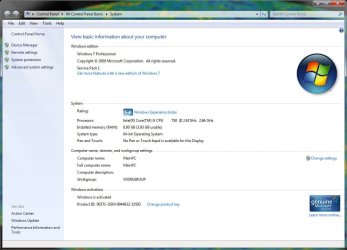
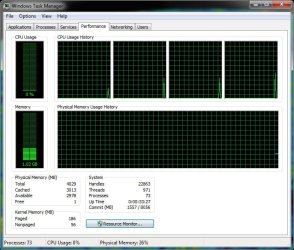
Windows no longer utilizes 8GB. Now only uses 4GB

mojobone

New member
Local time
7:50 AM
Messages
4
This is odd. I have had my system now for just under a year and all of a sudden, my system is not utilizing 4GB of the 8GB on board.

Steps I have taken:

* Replaced all of the RAM.
* Replaced the motherboard.
* Checked BIOS settings.

Been building my own PC's since 1993 and I have never seen this. My parts supplier is stumped. Microsoft support is useless.

System Specs:

*Intel DQ67SW Motherboard
*Intel i5 650 3.2 GHz 4MB Cache
* 4x 2GB DDR2 PC6400 SODIMM Modules
* NVidia GTX480 1.5GB Video Card
* Intel 30GB SSD Hard Drive (boot)
* Western Dig 350GB Hard Drive (apps)
* Western Dig 1TB Hard Drive (data)
* Liteon Blu Ray Player/ DVD&CD Burner
* Cisco AM10 USB Wireless Adapter

I am defintely :confused:. Any suggestions would be appreciated.

Thanks!
 

Attachments

  • System Info.jpg
    System Info.jpg
    88.5 KB · Views: 54
  • Task Manager.jpg
    Task Manager.jpg
    95.9 KB · Views: 29

My Computer My Computer

At a glance

Windows 7 Professional 64-bitIntel i58GB DDR3Nvidia GTX480
OS
Windows 7 Professional 64-bit
CPU
Intel i5
Motherboard
Intel
Memory
8GB DDR3
Graphics Card(s)
Nvidia GTX480
Sound Card
Onboard Realtek HD Audio
Monitor(s) Displays
Insignia 32' 1080p Monitor
Hard Drives
Intel 30GB SSD (Boot Drive)
Western Digital 320GB Caviar Blue (Apps Drive)
Western Digital 1TB Caviar Blue (Data Drive)
Case
Antech
Cooling
Liquid cooled CPU Fan
Very interesting indeed. What specific motherboard, CPU, and RAM combination are in that machine specifically?
 

My Computer My Computer

At a glance

Windows 10 Pro x64Intel Core i7 4790K @ 4.5GHz32GB DDR3Nvidia GeForce GTX970
Computer type
PC/Desktop
Computer Manufacturer/Model Number
Custom
OS
Windows 10 Pro x64
CPU
Intel Core i7 4790K @ 4.5GHz
Motherboard
Asus Maximus Hero VII
Memory
32GB DDR3
Graphics Card(s)
Nvidia GeForce GTX970
Sound Card
Realtek HD Audio
Screen Resolution
1920x1200
Hard Drives
1x Samsung 250GB SSD
4x WD RE 2TB (RAIDZ)
PSU
Corsair AX760i
Case
Fractal Design Define R4
Cooling
Noctua NH-D15
*Intel DQ67SW Motherboard
*Intel i5 650 3.2 GHz 4MB Cache
* 4x 2GB DDR2 PC6400 SODIMM Modules

I hope this helps.

Thank you in advance!

(PS - I tried the MSCONFIG trick - did nothing)
 

My Computer My Computer

At a glance

Windows 7 Professional 64-bitIntel i58GB DDR3Nvidia GTX480
OS
Windows 7 Professional 64-bit
CPU
Intel i5
Motherboard
Intel
Memory
8GB DDR3
Graphics Card(s)
Nvidia GTX480
Sound Card
Onboard Realtek HD Audio
Monitor(s) Displays
Insignia 32' 1080p Monitor
Hard Drives
Intel 30GB SSD (Boot Drive)
Western Digital 320GB Caviar Blue (Apps Drive)
Western Digital 1TB Caviar Blue (Data Drive)
Case
Antech
Cooling
Liquid cooled CPU Fan
The 3.93GB Usable seems to be a possible problem ... Not 100% Sure

Are you using Onboard Graphics? Clearly Not

Have you checked your BIOS for a RAM Remap as this could help
 

My Computer My Computer

At a glance

Windows 7 Professional x64 SP1 ; Windows Serv...Intel Core i5 2400 @ 3.10GHz8.0GB DDR3 @ 665MHz (2GBx4)AMD Radeon HD 6870
Computer type
PC/Desktop
Computer Manufacturer/Model Number
Custom Built
OS
Windows 7 Professional x64 SP1 ; Windows Server 2012 R2 Standard
CPU
Intel Core i5 2400 @ 3.10GHz
Motherboard
Foxconn H67MP-S/-V/H67MP
Memory
8.0GB DDR3 @ 665MHz (2GBx4)
Graphics Card(s)
AMD Radeon HD 6870
Sound Card
Realtek High Definition Audio
Monitor(s) Displays
AOC 2243W & SMB1930NW
Screen Resolution
1440x900 & 1920x1080
Hard Drives
977GB Seagate ST31000524AS ATA Drive (SATA)
250GB WD iSCSI attached Drive
PSU
750W Gaming PSU
Case
Novatech Night
Cooling
Fan
Keyboard
Dell Standard PS/2 Keyboard
Mouse
R.A.T 07 Gaming Mouse
Internet Speed
Download: 10 Mbps Ping: 30ms Upload: 0.81 Mbps
Browser
Google Chrome
Other Info
Optiarc DVD RW AD-5260S ATA Device
I havent got one but read that the i5's on chip memory controler can handle 2 channels,AFAIK dual channel mode negates the fact that there 4 modules as it's installed as 2 channels of 2, Is dual channel mode enabled in the BIOS.

I'm a little confused though as you have changed the Motherboard and the RAM, i'm assuming you have re-installed the OS.

SODIMMS? Are you sure these fit in this motherboad.
 

My Computer My Computer

At a glance

Windows 7 Ultimate x64Intel Core2 Quad Q8300 2.5GhzKingston HyperX 4x1GB DDR2 1066MhzAsus/Nvidia 9500GT 1GB
Computer type
PC/Desktop
Computer Manufacturer/Model Number
Self Build
OS
Windows 7 Ultimate x64
CPU
Intel Core2 Quad Q8300 2.5Ghz
Motherboard
Asus P5QD Turbo
Memory
Kingston HyperX 4x1GB DDR2 1066Mhz
Graphics Card(s)
Asus/Nvidia 9500GT 1GB
Sound Card
On-Board HD
Monitor(s) Displays
22" Widescreen TFT
Screen Resolution
1920x1080
Hard Drives
2x 320Gb Seagate SATAII RAID 0
2x 80Gb Seagate SATAII RAID 0
1x 1tb hybrid (8gb ssd)
PSU
650w
Case
ATX
Cooling
140mm front, 120mm Rear, 80mm Chipset + stock CPU and GPU
Keyboard
Plastic one
Mouse
Plastic one
Internet Speed
4Mbps
Other Info
Laptop: HP Elitebook 2560p
i5 @2.7Ghz 4GB DDR3
Checked the bios, step by step. The bios is seeing all 8GB. There is not the ability to remap RAM in the BIOS. I am really stumped. I am about ready to pull out a spare HDD and do a clean install and see what happens.
 

My Computer My Computer

At a glance

Windows 7 Professional 64-bitIntel i58GB DDR3Nvidia GTX480
OS
Windows 7 Professional 64-bit
CPU
Intel i5
Motherboard
Intel
Memory
8GB DDR3
Graphics Card(s)
Nvidia GTX480
Sound Card
Onboard Realtek HD Audio
Monitor(s) Displays
Insignia 32' 1080p Monitor
Hard Drives
Intel 30GB SSD (Boot Drive)
Western Digital 320GB Caviar Blue (Apps Drive)
Western Digital 1TB Caviar Blue (Data Drive)
Case
Antech
Cooling
Liquid cooled CPU Fan
I havent got one but read that the i5's on chip memory controler can handle 2 channels,AFAIK dual channel mode negates the fact that there 4 modules as it's installed as 2 channels of 2, Is dual channel mode enabled in the BIOS.

I'm a little confused though as you have changed the Motherboard and the RAM, i'm assuming you have re-installed the OS.

I took the unit over to the parts supplier and we put in a new Intel DQ67SW MB, and tried with the old RAM and NEW RAM, with no joy.

I have not done a clean install yet. Way too much work to do right now to have my system down for a couple of days...

At least right now, the machine works.
 

My Computer My Computer

At a glance

Windows 7 Professional 64-bitIntel i58GB DDR3Nvidia GTX480
OS
Windows 7 Professional 64-bit
CPU
Intel i5
Motherboard
Intel
Memory
8GB DDR3
Graphics Card(s)
Nvidia GTX480
Sound Card
Onboard Realtek HD Audio
Monitor(s) Displays
Insignia 32' 1080p Monitor
Hard Drives
Intel 30GB SSD (Boot Drive)
Western Digital 320GB Caviar Blue (Apps Drive)
Western Digital 1TB Caviar Blue (Data Drive)
Case
Antech
Cooling
Liquid cooled CPU Fan
using this post will probably be of great benefit to your situation to use sysprep to reinstall the OS and keep most your files and settings.
 

My Computer My Computer

At a glance

Windows 7 Ultimate x64Intel Core2 Quad Q8300 2.5GhzKingston HyperX 4x1GB DDR2 1066MhzAsus/Nvidia 9500GT 1GB
Computer type
PC/Desktop
Computer Manufacturer/Model Number
Self Build
OS
Windows 7 Ultimate x64
CPU
Intel Core2 Quad Q8300 2.5Ghz
Motherboard
Asus P5QD Turbo
Memory
Kingston HyperX 4x1GB DDR2 1066Mhz
Graphics Card(s)
Asus/Nvidia 9500GT 1GB
Sound Card
On-Board HD
Monitor(s) Displays
22" Widescreen TFT
Screen Resolution
1920x1080
Hard Drives
2x 320Gb Seagate SATAII RAID 0
2x 80Gb Seagate SATAII RAID 0
1x 1tb hybrid (8gb ssd)
PSU
650w
Case
ATX
Cooling
140mm front, 120mm Rear, 80mm Chipset + stock CPU and GPU
Keyboard
Plastic one
Mouse
Plastic one
Internet Speed
4Mbps
Other Info
Laptop: HP Elitebook 2560p
i5 @2.7Ghz 4GB DDR3
On the Task Manager window (performance tab), click on 'Resource Monitor' and select the memory tab... It might help you figure it out...
 

My Computer My Computer

At a glance

Windows 7 Professional 64 bit8 GBnVidia
Computer type
PC/Desktop
Computer Manufacturer/Model Number
Dell Inspiron 530
OS
Windows 7 Professional 64 bit
Memory
8 GB
Graphics Card(s)
nVidia
Monitor(s) Displays
2
Also try refreshing your Windows Experience Index. I found that this got rid of my (X.YZ Usable) Label
 

My Computer My Computer

At a glance

Windows 7 Professional x64 SP1 ; Windows Serv...Intel Core i5 2400 @ 3.10GHz8.0GB DDR3 @ 665MHz (2GBx4)AMD Radeon HD 6870
Computer type
PC/Desktop
Computer Manufacturer/Model Number
Custom Built
OS
Windows 7 Professional x64 SP1 ; Windows Server 2012 R2 Standard
CPU
Intel Core i5 2400 @ 3.10GHz
Motherboard
Foxconn H67MP-S/-V/H67MP
Memory
8.0GB DDR3 @ 665MHz (2GBx4)
Graphics Card(s)
AMD Radeon HD 6870
Sound Card
Realtek High Definition Audio
Monitor(s) Displays
AOC 2243W & SMB1930NW
Screen Resolution
1440x900 & 1920x1080
Hard Drives
977GB Seagate ST31000524AS ATA Drive (SATA)
250GB WD iSCSI attached Drive
PSU
750W Gaming PSU
Case
Novatech Night
Cooling
Fan
Keyboard
Dell Standard PS/2 Keyboard
Mouse
R.A.T 07 Gaming Mouse
Internet Speed
Download: 10 Mbps Ping: 30ms Upload: 0.81 Mbps
Browser
Google Chrome
Other Info
Optiarc DVD RW AD-5260S ATA Device
I concur that you might want to take a look at the task manager's resources window. I was shocked the other day when a program (I forget which one) was eating up 4GB of memory all on its own for no apparent reason. It was something stupid like the Intel Turbo Boost program sucking all the RAM.

If I hadn't been running Process Explorer at the time, I never would have suspected anything. I just happened to notice its memory window was telling me that just about all of my 6GB had been allocated.
 

My Computer My Computer

At a glance

Win 7 Pro x64i7 2630QM @ 2Ghz6 GBMobile Intel HD / Radeon 6650M
Computer Manufacturer/Model Number
Acer Aspire 7750G-9657
OS
Win 7 Pro x64
CPU
i7 2630QM @ 2Ghz
Memory
6 GB
Graphics Card(s)
Mobile Intel HD / Radeon 6650M
Screen Resolution
1600x900
Hard Drives
Toshiba 750GB
Case
Laptop
Mouse
Logitech M305 USB Wireless Mouse
Internet Speed
Whatever I can get for free. :)
Back
Top