Solved Windows Not Booting From Correct Drive

hurrdurriwizard

New member
Local time
9:16 PM
Messages
6
Hey everyone! Long time listener first time caller, I have a quick question about booting from a new drive.

I just installed an SSD with the intention of copying my system files over from my old standard HD and using the new one exclusively to boot off of (using this old guide) and despite a couple of hiccups the whole process has gone smoothly. Now I'm at the stage where everything is copied to the new hard drive, but when I go into the BIOS and change the boot order the computer still wants to boot from the old drive. So basically my question is: is this normal?

When I start up normally I can see the new drive (240GB) and the old drive (2TB), but it appears that Windows is running off of the old drive, which is still reading as the C: drive. Furthermore, when I either unplug the old drive or set the BIOS to only boot from the new drive, I get a "Reboot and Select proper Boot device or Insert Boot Media in selected Boot device and press a key" message upon startup. I'm pretty sure it should change the new drive to the C: drive once I format my old drive, and I have everything backed up in multiple places so I shouldn't be too worried, but I just want to be extra paranoid about my data and make sure nothing catastrophic happens before I do the any formatting. Any help or clarification would be appreciated, thanks in advance!
 

My Computer

Computer type
PC/Desktop
Computer Manufacturer/Model Number
Custom Build
OS
Windows 7 Professional x64
CPU
AMD Phenom II X4 975
Memory
3x 4GB
Graphics Card(s)
ATI FirePro V4800
Hard Drives
2TB Western Digital SATA HD
1TB Seagate SATA HD
240 GB Adata SP550 SDD
Browser
Firefox
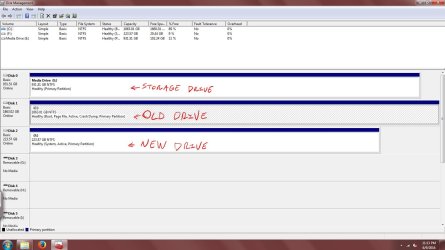
Please post a screen shot of Windows Disk Management that shows all partitions on all drives.

Was your "standard HD" connected to your motherboard when you installed Windows on the new SSD?
 

My Computer

Computer type
PC/Desktop
Computer Manufacturer/Model Number
Ignatz Special; 4 speed manual gearbox; factory air conditioning; one of one
OS
Windows 7 Home Premium SP1, 64-bit
CPU
Intel Skylake i5-6600K, not overclocked
Motherboard
AsRock Z170M Extreme 4, micro ATX
Memory
8 GB HyperX DDR4-2666 (2 x 4 GB)
Graphics Card(s)
none; graphics are integrated on CPU
Sound Card
onboard: Realtek ALC1150; external: USB Behringer UF0-202
Monitor(s) Displays
Dell S2340M 23 inch IPS
Screen Resolution
1600 x 900
Hard Drives
System: Crucial MX100 series SSD, 128 GB;
Data: Samsung Spinpoint 103SJ, 1 TB;
Backup: WD Caviar Green WD30EZRX-00D8PB0, 3 TB
PSU
Rosewill SilentNight 500 watt fanless, semi-modular
Case
Antec Solo II
Cooling
Noctua NH-U12S; Noctua F12 intake, Noctua S12A exhaust
Keyboard
Microsoft 200 6JH-00001 USB
Mouse
Dell or Microsoft optical wired; USB
Antivirus
Microsoft Security Essentials and Malwarebytes Premium
Browser
Pale Moon
Other Info
All fans PWM; speeds at idle: CPU circa 500 rpm; intake circa 600 rpm; exhaust circa 600 rpm; CPU temps 27 idle and 47 C load in a warm room (27 C/81 F) when running Intel Extreme Tuning Utility stress test.
Please post a screen shot of Windows Disk Management that shows all partitions on all drives.

Was your "standard HD" connected to your motherboard when you installed Windows on the new SSD?
Screenshot attached! Yes, both hard drives were connected and are currently connected to the motherboard (along with my third drive which is purely for storage), the only difference is I tried switching the SATA ports around to see if that would do anything a couple of minutes after I started this thread. Also, I didn't install Windows onto the new SSD from a disc or download, I cloned it using a program called EaseUs Todo Backup Free (EaseUS Todo Backup software for data backup and recovery in Windows PC & Server.) as per the guide I mentioned in my initial post (How to Migrate to a Solid-State Drive Without Reinstalling Windows). It very well could be an issue with the software I used to clone the old drive, but from what I've gathered from other testimonials of the same guide that probably shouldn't be the case.
 

Attachments

  • DiskManagement.JPG
    DiskManagement.JPG
    132.3 KB · Views: 4

My Computer

Computer type
PC/Desktop
Computer Manufacturer/Model Number
Custom Build
OS
Windows 7 Professional x64
CPU
AMD Phenom II X4 975
Memory
3x 4GB
Graphics Card(s)
ATI FirePro V4800
Hard Drives
2TB Western Digital SATA HD
1TB Seagate SATA HD
240 GB Adata SP550 SDD
Browser
Firefox
Clarify this point:

If you disconnect the old drive, can you boot from the SSD? Yes or no.

If yes, does the SSD then show as C, with Windows Disk Management then indicating that the SSD is in fact boot, active, system, page file, crash dump, and primary??

If yes, do all of those characteristics persist through several boot cycles?

If yes again, I'd assume all is well and you don't need the standard hard drive for Windows or booting purposes and can do what you want with it.

If not, advise what of the above is not true.
 

My Computer

Computer type
PC/Desktop
Computer Manufacturer/Model Number
Ignatz Special; 4 speed manual gearbox; factory air conditioning; one of one
OS
Windows 7 Home Premium SP1, 64-bit
CPU
Intel Skylake i5-6600K, not overclocked
Motherboard
AsRock Z170M Extreme 4, micro ATX
Memory
8 GB HyperX DDR4-2666 (2 x 4 GB)
Graphics Card(s)
none; graphics are integrated on CPU
Sound Card
onboard: Realtek ALC1150; external: USB Behringer UF0-202
Monitor(s) Displays
Dell S2340M 23 inch IPS
Screen Resolution
1600 x 900
Hard Drives
System: Crucial MX100 series SSD, 128 GB;
Data: Samsung Spinpoint 103SJ, 1 TB;
Backup: WD Caviar Green WD30EZRX-00D8PB0, 3 TB
PSU
Rosewill SilentNight 500 watt fanless, semi-modular
Case
Antec Solo II
Cooling
Noctua NH-U12S; Noctua F12 intake, Noctua S12A exhaust
Keyboard
Microsoft 200 6JH-00001 USB
Mouse
Dell or Microsoft optical wired; USB
Antivirus
Microsoft Security Essentials and Malwarebytes Premium
Browser
Pale Moon
Other Info
All fans PWM; speeds at idle: CPU circa 500 rpm; intake circa 600 rpm; exhaust circa 600 rpm; CPU temps 27 idle and 47 C load in a warm room (27 C/81 F) when running Intel Extreme Tuning Utility stress test.
Clarify this point:

If you disconnect the old drive, can you boot from the SSD? Yes or no.

If yes, does the SSD then show as C, with Windows Disk Management then indicating that the SSD is in fact boot, active, system, page file, crash dump, and primary??

If yes, do all of those characteristics persist through several boot cycles?

If yes again, I'd assume all is well and you don't need the standard hard drive for Windows or booting purposes and can do what you want with it.

If not, advise what of the above is not true.

If I disconnect the old drive windows will not start up, it goes straight from the post screen to one that says "Reboot and Select proper Boot device or Insert Boot Media in selected Boot device and press a key."
 

My Computer

Computer type
PC/Desktop
Computer Manufacturer/Model Number
Custom Build
OS
Windows 7 Professional x64
CPU
AMD Phenom II X4 975
Memory
3x 4GB
Graphics Card(s)
ATI FirePro V4800
Hard Drives
2TB Western Digital SATA HD
1TB Seagate SATA HD
240 GB Adata SP550 SDD
Browser
Firefox
If I disconnect the old drive windows will not start up, it goes straight from the post screen to one that says "Reboot and Select proper Boot device or Insert Boot Media in selected Boot device and press a key."

What, if anything, have you done to comply with those instructions--to "select proper boot device"?
 

My Computer

Computer type
PC/Desktop
Computer Manufacturer/Model Number
Ignatz Special; 4 speed manual gearbox; factory air conditioning; one of one
OS
Windows 7 Home Premium SP1, 64-bit
CPU
Intel Skylake i5-6600K, not overclocked
Motherboard
AsRock Z170M Extreme 4, micro ATX
Memory
8 GB HyperX DDR4-2666 (2 x 4 GB)
Graphics Card(s)
none; graphics are integrated on CPU
Sound Card
onboard: Realtek ALC1150; external: USB Behringer UF0-202
Monitor(s) Displays
Dell S2340M 23 inch IPS
Screen Resolution
1600 x 900
Hard Drives
System: Crucial MX100 series SSD, 128 GB;
Data: Samsung Spinpoint 103SJ, 1 TB;
Backup: WD Caviar Green WD30EZRX-00D8PB0, 3 TB
PSU
Rosewill SilentNight 500 watt fanless, semi-modular
Case
Antec Solo II
Cooling
Noctua NH-U12S; Noctua F12 intake, Noctua S12A exhaust
Keyboard
Microsoft 200 6JH-00001 USB
Mouse
Dell or Microsoft optical wired; USB
Antivirus
Microsoft Security Essentials and Malwarebytes Premium
Browser
Pale Moon
Other Info
All fans PWM; speeds at idle: CPU circa 500 rpm; intake circa 600 rpm; exhaust circa 600 rpm; CPU temps 27 idle and 47 C load in a warm room (27 C/81 F) when running Intel Extreme Tuning Utility stress test.
If I disconnect the old drive windows will not start up, it goes straight from the post screen to one that says "Reboot and Select proper Boot device or Insert Boot Media in selected Boot device and press a key."

What, if anything, have you done to comply with those instructions--to "select proper boot device"?

I've changed the boot order in the BIOS and also tried switching SATA ports when that didn't help, but that's about all I can think to do. When I hit f10 to try to select the boot device manually this is what I get:


"Edit Windows boot option for: Windows 7

Path: \Windows\system32\winload.exe

Partition: 1
Hard Disk: 80768076

[/NOEXECUTE=OPTIN"


And then it boots from the old drive.
 

My Computer

Computer type
PC/Desktop
Computer Manufacturer/Model Number
Custom Build
OS
Windows 7 Professional x64
CPU
AMD Phenom II X4 975
Memory
3x 4GB
Graphics Card(s)
ATI FirePro V4800
Hard Drives
2TB Western Digital SATA HD
1TB Seagate SATA HD
240 GB Adata SP550 SDD
Browser
Firefox
My hope was that the menu you are apparently shown with F10 would give you a choice for the SSD and that you could choose it and boot from it.

I gather that you CAN choose the SSD from that menu, but CANNOT then boot from it?

If that's true, I'd guess there is some way to manually edit something that would then allow the SSD to boot.

But, that's beyond my knowledge level.

What would I do?

I'd re-do it, using imaging, NOT cloning.

Make an image of the necessary partitions on the old HD (C and any other partition shown as "system" in Windows Disk Management.)

Save that image file to some other drive, not the SSD and not the drive containing C.

Then disconnect ALL drives other than the SSD.

Then restore that image file to the SSD.

There's a learning curve involved with that.

You may or may not find that learning curve easier to climb than figuring out how to unf$#% your current situation.

Imaging is usually found to be less problematic than cloning. I don't clone for that reason.

Someone else may come along who has a better idea for you.

It may be as simple as disconnecting the hard drive and running System Repair several times, but I'm not sure.

I can't offer anything further--you can wait for other comment, try System Repair, or consider imaging.
 

My Computer

Computer type
PC/Desktop
Computer Manufacturer/Model Number
Ignatz Special; 4 speed manual gearbox; factory air conditioning; one of one
OS
Windows 7 Home Premium SP1, 64-bit
CPU
Intel Skylake i5-6600K, not overclocked
Motherboard
AsRock Z170M Extreme 4, micro ATX
Memory
8 GB HyperX DDR4-2666 (2 x 4 GB)
Graphics Card(s)
none; graphics are integrated on CPU
Sound Card
onboard: Realtek ALC1150; external: USB Behringer UF0-202
Monitor(s) Displays
Dell S2340M 23 inch IPS
Screen Resolution
1600 x 900
Hard Drives
System: Crucial MX100 series SSD, 128 GB;
Data: Samsung Spinpoint 103SJ, 1 TB;
Backup: WD Caviar Green WD30EZRX-00D8PB0, 3 TB
PSU
Rosewill SilentNight 500 watt fanless, semi-modular
Case
Antec Solo II
Cooling
Noctua NH-U12S; Noctua F12 intake, Noctua S12A exhaust
Keyboard
Microsoft 200 6JH-00001 USB
Mouse
Dell or Microsoft optical wired; USB
Antivirus
Microsoft Security Essentials and Malwarebytes Premium
Browser
Pale Moon
Other Info
All fans PWM; speeds at idle: CPU circa 500 rpm; intake circa 600 rpm; exhaust circa 600 rpm; CPU temps 27 idle and 47 C load in a warm room (27 C/81 F) when running Intel Extreme Tuning Utility stress test.
My hope was that the menu you are apparently shown with F10 would give you a choice for the SSD and that you could choose it and boot from it.

I gather that you CAN choose the SSD from that menu, but CANNOT then boot from it?

If that's true, I'd guess there is some way to manually edit something that would then allow the SSD to boot.

But, that's beyond my knowledge level.

What would I do?

I'd re-do it, using imaging, NOT cloning.

Make an image of the necessary partitions on the old HD (C and any other partition shown as "system" in Windows Disk Management.)

Save that image file to some other drive, not the SSD and not the drive containing C.

Then disconnect ALL drives other than the SSD.

Then restore that image file to the SSD.

There's a learning curve involved with that.

You may or may not find that learning curve easier to climb than figuring out how to unf$#% your current situation.

Imaging is usually found to be less problematic than cloning. I don't clone for that reason.

Someone else may come along who has a better idea for you.

It may be as simple as disconnecting the hard drive and running System Repair several times, but I'm not sure.

I can't offer anything further--you can wait for other comment, try System Repair, or consider imaging.

I'll give some of hose things a shot, I'll probably also try re-cloning the old drive using different software. Thanks for your help!
 

My Computer

Computer type
PC/Desktop
Computer Manufacturer/Model Number
Custom Build
OS
Windows 7 Professional x64
CPU
AMD Phenom II X4 975
Memory
3x 4GB
Graphics Card(s)
ATI FirePro V4800
Hard Drives
2TB Western Digital SATA HD
1TB Seagate SATA HD
240 GB Adata SP550 SDD
Browser
Firefox

My Computer

Computer type
PC/Desktop
Computer Manufacturer/Model Number
home built
OS
Multi-Boot W7_Pro_x64 W8.1_Pro_x64 W10_Pro_x64 +Linux_VMs +Chromium_VM
CPU
AMD Athlon II x4 620
Motherboard
Gigabyte GA-MA785G-UD3H
Memory
6GB GSkill DDR2 800
Graphics Card(s)
AMD 4670 GPU + AMD 4200 IGP
Sound Card
on board Realtek ALC889A
Monitor(s) Displays
RCA 40" LCD TV, Insignia 32" LCD TV, HP 15" LCD monitor
Screen Resolution
1680 x 1050
Hard Drives
OCZ Vertex 3 120GB,
Samsung F3 1TB (3),
Several others - WD, Seagate, Hitachi, ...
PSU
Corsair 500 W
Case
Rosewill mid tower
Cooling
CM 90mm rifle
Keyboard
Gyration wireless, Logitech wireless, Dell USB wired
Mouse
Gyration wireless, Logitech wireless, V7 USB wired
Internet Speed
Spectrum - 100Mbps D / 10Mbps U
Antivirus
Avast, MBAM3, EMET, WinPatrol
Browser
Pale Moon, Firefox, IE
Other Info
2 multi-boot PC's
Mainly HTPC/Office/Gen purpose (no gaming).
Trendnet USB KVM.
LG DVD burner/Blue Ray Player.
Tray system for removable SATA backup drives.

Not currently OCd, under-volted.
I use Hybrid sleep, rarely re-boot or shutdown.

Hauppauge HD-PVR, Avermedia PCIe TV Tuner, Hauppauge PCI TV Tuner.

My Computer

Computer type
PC/Desktop
Computer Manufacturer/Model Number
Custom Build
OS
Windows 7 Professional x64
CPU
AMD Phenom II X4 975
Memory
3x 4GB
Graphics Card(s)
ATI FirePro V4800
Hard Drives
2TB Western Digital SATA HD
1TB Seagate SATA HD
240 GB Adata SP550 SDD
Browser
Firefox
That's awesome, glad to see you got it working :party:
Now, you should be able to do whatever you want with the old HD.

Sometimes it takes running Startup Repair up to 3 times to get everything working.
Maybe you only ran it 1 time, and running it again finished fixing the new drive bootloader.
 

My Computer

Computer type
PC/Desktop
Computer Manufacturer/Model Number
home built
OS
Multi-Boot W7_Pro_x64 W8.1_Pro_x64 W10_Pro_x64 +Linux_VMs +Chromium_VM
CPU
AMD Athlon II x4 620
Motherboard
Gigabyte GA-MA785G-UD3H
Memory
6GB GSkill DDR2 800
Graphics Card(s)
AMD 4670 GPU + AMD 4200 IGP
Sound Card
on board Realtek ALC889A
Monitor(s) Displays
RCA 40" LCD TV, Insignia 32" LCD TV, HP 15" LCD monitor
Screen Resolution
1680 x 1050
Hard Drives
OCZ Vertex 3 120GB,
Samsung F3 1TB (3),
Several others - WD, Seagate, Hitachi, ...
PSU
Corsair 500 W
Case
Rosewill mid tower
Cooling
CM 90mm rifle
Keyboard
Gyration wireless, Logitech wireless, Dell USB wired
Mouse
Gyration wireless, Logitech wireless, V7 USB wired
Internet Speed
Spectrum - 100Mbps D / 10Mbps U
Antivirus
Avast, MBAM3, EMET, WinPatrol
Browser
Pale Moon, Firefox, IE
Other Info
2 multi-boot PC's
Mainly HTPC/Office/Gen purpose (no gaming).
Trendnet USB KVM.
LG DVD burner/Blue Ray Player.
Tray system for removable SATA backup drives.

Not currently OCd, under-volted.
I use Hybrid sleep, rarely re-boot or shutdown.

Hauppauge HD-PVR, Avermedia PCIe TV Tuner, Hauppauge PCI TV Tuner.
Back
Top