Windows not genuine build 7601

Bumpers

New member
Local time
9:29 AM
Messages
5
Attempting to run FIX for not genuine windows build 7601. Enter SLMGR -REARM and get error - reset too many times? What now?
 

My Computer My Computer

Computer type
PC/Desktop
Computer Manufacturer/Model Number
HP
OS
Windows 7 Home Premium 32bit
Antivirus
AVG - free edition
Browser
Mozello

My Computer My Computer

Computer type
PC/Desktop
Computer Manufacturer/Model Number
Lenovo IdeaCenter 450
OS
Windows 10 Pro X64
CPU
Intel Quad Core i7-4770 @ 3.4Ghz
Memory
16.0GB PC3-12800 DDR3 SDRAM 1600 MHz
Graphics Card(s)
Intel Integrated HD Graphics
Sound Card
Realtek HD Audio
Monitor(s) Displays
HP 22" LCD
Screen Resolution
1680 x 1050
Hard Drives
250GB Samsung EVO SATA-3 SSD
2TB Seagate ST2000DM001 SATA-2
1.5TB Seagate ST3150041AS SATA
Keyboard
Dell USB
Mouse
Lenovo USB
Internet Speed
Cable via Road Runner 3MB Upload, 30MB Download
Antivirus
Windows Defender, MBAM Pro, MBAE
Browser
Seamonkey
Other Info
UEFI/GPT
PLDS DVD-RW DH16AERSH

My Computer My Computer

Computer type
PC/Desktop
Computer Manufacturer/Model Number
Home made Desktop
OS
Windows 10 Pro. 64/ version 1709 Windows 7 Pro/64
CPU
Intel i7-6800K @ 4.3
Motherboard
ASUS X-99 Deluxe II
Memory
Corsair Platinum 16 gig @2400
Graphics Card(s)
EVGA GTX 1070 OC
Monitor(s) Displays
Asus 27" LED LCD/VE278Q
Screen Resolution
1920-1080 or 1280-720 HDMI
Hard Drives
INTEL SSD 730-240 Gb Sata 3.0/
PSU
EVGA Platium 1200W
Case
Phanteks Luxe Tempered Glass 8 fans/ one radiator
Cooling
XSPC/ Water Cooled CPU
Keyboard
Das 4 Professional
Mouse
Logitech M705/MX Anywhere 2-S
Internet Speed
100 mbits
Antivirus
Microsoft Security Essentials/ Malwarebytes Premium 3.0/ SAS
Browser
I.E. 11 default/Firefox/ ISP Time Warner Cable/Spectrum
Other Info
LG BluRay Burner/
Sound system-KLipsch-THX/
Icy Dock ssd Hot Swap bays.
This computer was purchased from a supplier that I have purchased several computers from over the past 15 years. They are reputable and I have never had any problems like this before.
It was suggested to check the Windows updates for KB971033 and uninstall. Found that and did so. That update was dated 8-1-2015 and coincided with the approximate time this problem started.
Have SLMG -REARM several times. Now it tells me I have exceeded the number of times I can do this.
I am not a computer wizard, but, I can follow instructions.
Is there a permanent, from behind the keyboard, fix for this problem?
Any assistance or suggestions would be appreciated.
 
Last edited:

My Computer My Computer

Computer type
PC/Desktop
Computer Manufacturer/Model Number
HP
OS
Windows 7 Home Premium 32bit
Antivirus
AVG - free edition
Browser
Mozello
SLMG -REARM is just a temporary measure to extend the so-called grace period before a serial is entered - it's not an activation fix. IIRC you get 3 shots at re-arm.
 

My Computer My Computer

Computer type
PC/Desktop
Computer Manufacturer/Model Number
self build
OS
W10 Pro x64, W7 Pro x64 in VMware
CPU
i7 2600K @ 4.4GHz
Motherboard
MSI Z68A-GD80
Memory
8GB Mushkin @ 1600MHz
Graphics Card(s)
Nvidia GTX 750 Ti
Monitor(s) Displays
27" Benq + 27" LG
Screen Resolution
1080p
Hard Drives
500GB 850 Evo SSD + 3 * 2TB Seagate
PSU
EVGA 650 GS modular
Case
Antec 300
Cooling
Seidon 120V v2
Internet Speed
62/18 Mbps
Antivirus
Defender (W10) + MSE (W7)
Browser
Firefox

My Computer My Computer

Computer type
PC/Desktop
Computer Manufacturer/Model Number
Home made Desktop
OS
Windows 10 Pro. 64/ version 1709 Windows 7 Pro/64
CPU
Intel i7-6800K @ 4.3
Motherboard
ASUS X-99 Deluxe II
Memory
Corsair Platinum 16 gig @2400
Graphics Card(s)
EVGA GTX 1070 OC
Monitor(s) Displays
Asus 27" LED LCD/VE278Q
Screen Resolution
1920-1080 or 1280-720 HDMI
Hard Drives
INTEL SSD 730-240 Gb Sata 3.0/
PSU
EVGA Platium 1200W
Case
Phanteks Luxe Tempered Glass 8 fans/ one radiator
Cooling
XSPC/ Water Cooled CPU
Keyboard
Das 4 Professional
Mouse
Logitech M705/MX Anywhere 2-S
Internet Speed
100 mbits
Antivirus
Microsoft Security Essentials/ Malwarebytes Premium 3.0/ SAS
Browser
I.E. 11 default/Firefox/ ISP Time Warner Cable/Spectrum
Other Info
LG BluRay Burner/
Sound system-KLipsch-THX/
Icy Dock ssd Hot Swap bays.
The update removal suggestion was found on-line, before I found this site.
 

My Computer My Computer

Computer type
PC/Desktop
Computer Manufacturer/Model Number
HP
OS
Windows 7 Home Premium 32bit
Antivirus
AVG - free edition
Browser
Mozello
Code:
Diagnostic Report (1.9.0027.0):
-----------------------------------------
Windows Validation Data-->
 
Validation Code: 50
Cached Online Validation Code: 0x0
Windows Product Key: *****-*****-QCPVQ-KHRB8-RMV82
Windows Product Key Hash: +Rj3N34NLM2JqoBO/OzgzTZXgbY=
Windows Product ID: 00359-OEM-8992687-00095
Windows Product ID Type: 2
Windows License Type: OEM SLP
Windows OS version: 6.1.7601.2.00010300.1.0.003
ID: {5AAA21EA-CBB4-47E7-BF0F-18E45F202A8A}(1)
Is Admin: Yes
TestCab: 0x0
LegitcheckControl ActiveX: N/A, hr = 0x80070002
Signed By: N/A, hr = 0x80070002
Product Name: Windows 7 Home Premium
Architecture: 0x00000009
Build lab: 7601.win7sp1_gdr.150715-0600
TTS Error: 
Validation Diagnostic: 
Resolution Status: N/A
 
Vista WgaER Data-->
ThreatID(s): N/A, hr = 0x80070002
Version: N/A, hr = 0x80070002
 
Windows XP Notifications Data-->
Cached Result: N/A, hr = 0x80070002
File Exists: No
Version: N/A, hr = 0x80070002
WgaTray.exe Signed By: N/A, hr = 0x80070002
WgaLogon.dll Signed By: N/A, hr = 0x80070002
 
OGA Notifications Data-->
Cached Result: N/A, hr = 0x80070002
Version: N/A, hr = 0x80070002
OGAExec.exe Signed By: N/A, hr = 0x80070002
OGAAddin.dll Signed By: N/A, hr = 0x80070002
 
OGA Data-->
Office Status: 109 N/A
OGA Version: N/A, 0x80070002
Signed By: N/A, hr = 0x80070002
Office Diagnostics: 025D1FF3-364-80041010_025D1FF3-229-80041010_025D1FF3-230-1_025D1FF3-517-80040154_025D1FF3-237-80040154_025D1FF3-238-2_025D1FF3-244-80070002_025D1FF3-258-3
 
Browser Data-->
Proxy settings: N/A
User Agent: Mozilla/4.0 (compatible; MSIE 8.0; Win32)
Default Browser: C:\Program Files (x86)\Mozilla Firefox\firefox.exe
Download signed ActiveX controls: Prompt
Download unsigned ActiveX controls: Disabled
Run ActiveX controls and plug-ins: Allowed
Initialize and script ActiveX controls not marked as safe: Disabled
Allow scripting of Internet Explorer Webbrowser control: Disabled
Active scripting: Allowed
Script ActiveX controls marked as safe for scripting: Allowed
 
File Scan Data-->
File Mismatch: C:\windows\system32\wat\watadminsvc.exe[Hr = 0x80070003]
File Mismatch: C:\windows\system32\wat\npwatweb.dll[Hr = 0x80070003]
File Mismatch: C:\windows\system32\wat\watux.exe[Hr = 0x80070003]
File Mismatch: C:\windows\system32\wat\watweb.dll[Hr = 0x80070003]
 
Other data-->
Office Details: <GenuineResults><MachineData><UGUID>{5AAA21EA-CBB4-47E7-BF0F-18E45F202A8A}</UGUID><Version>1.9.0027.0</Version><OS>6.1.7601.2.00010300.1.0.003</OS><Architecture>x64</Architecture><PKey>*****-*****-*****-*****-RMV82</PKey><PID>00359-OEM-8992687-00095</PID><PIDType>2</PIDType><SID>S-1-5-21-2871924681-4257897937-1097869944</SID><SYSTEM><Manufacturer>Hewlett-Packard</Manufacturer><Model>HP Compaq 6005 Pro SFF PC</Model></SYSTEM><BIOS><Manufacturer>Hewlett-Packard</Manufacturer><Version>786G6 v01.15</Version><SMBIOSVersion major="2" minor="6"/><Date>20110802000000.000000+000</Date></BIOS><HWID>8A6E3C07018400F4</HWID><UserLCID>0409</UserLCID><SystemLCID>0409</SystemLCID><TimeZone>Central Standard Time(GMT-06:00)</TimeZone><iJoin>0</iJoin><SBID><stat>3</stat><msppid></msppid><name></name><model></model></SBID><OEM><OEMID>HPQOEM</OEMID><OEMTableID>SLIC-BPC</OEMTableID></OEM><GANotification/></MachineData><Software><Office><Result>109</Result><Products/><Applications/></Office></Software></GenuineResults>  
 
Spsys.log Content: 0x80070002
 
Licensing Data-->
Software licensing service version: 6.1.7601.17514
 
Name: Windows(R) 7, HomePremium edition
Description: Windows Operating System - Windows(R) 7, OEM_SLP channel
Activation ID: d2c04e90-c3dd-4260-b0f3-f845f5d27d64
Application ID: 55c92734-d682-4d71-983e-d6ec3f16059f
Extended PID: 00359-00178-926-800095-02-1033-7601.0000-2082015
Installation ID: 002024354255342812521693987293362714631871271966831045
Processor Certificate URL: [URL="http://go.microsoft.com/fwlink/?LinkID=88338"]SpcService Web Service[/URL]
Machine Certificate URL: [URL="http://go.microsoft.com/fwlink/?LinkID=88339"]RacService Web Service[/URL]
Use License URL: [URL="http://go.microsoft.com/fwlink/?LinkID=88341"]UseLicenseService Web Service[/URL]
Product Key Certificate URL: [URL="http://go.microsoft.com/fwlink/?LinkID=88340"]PkcService Web Service[/URL]
Partial Product Key: RMV82
License Status: Notification
Notification Reason: 0xC004F063.
Remaining Windows rearm count: 0
Trusted time: 12/3/2015 7:06:37 PM
 
Windows Activation Technologies-->
HrOffline: 0x00000000
HrOnline: 0x00000000
HealthStatus: 0x0000000000000000
Event Time Stamp: 11:3:2015 17:01
ActiveX: Not Registered - 0x80040154
Admin Service: Not Registered - 0x80040154
HealthStatus Bitmask Output:
 
 
HWID Data-->
HWID Hash Current: LAAAAAEAAgABAAEAAAABAAAAAQABAAEAJJTcsvaZVPn2kQybct8iODo0Kj8=
 
OEM Activation 1.0 Data-->
N/A
 
OEM Activation 2.0 Data-->
BIOS valid for OA 2.0: yes
Windows marker version: 0x20001
OEMID and OEMTableID Consistent: yes
BIOS Information: 
  ACPI Table Name    OEMID Value    OEMTableID Value
  APIC            COMPAQ        HP_RS880
  FACP            COMPAQ        HP_RS880
  HPET            COMPAQ        HP_RS880
  MCFG            COMPAQ        HP_RS880
  ASF!            COMPAQ        HP_RS880
  TCPA            COMPAQ        HP_RS880
  SLIC            HPQOEM        SLIC-BPC
 
This is the result of my attempt to follow the Brink download.  ??

 
Last edited by a moderator:

My Computer My Computer

Computer type
PC/Desktop
Computer Manufacturer/Model Number
HP
OS
Windows 7 Home Premium 32bit
Antivirus
AVG - free edition
Browser
Mozello
The problem is because of these.

File Scan Data-->
File Mismatch: C:\windows\system32\wat\watadminsvc.exe[Hr = 0x80070003]
File Mismatch: C:\windows\system32\wat\npwatweb.dll[Hr = 0x80070003]
File Mismatch: C:\windows\system32\wat\watux.exe[Hr = 0x80070003]
File Mismatch: C:\windows\system32\wat\watweb.dll[Hr = 0x80070003]

The reason for the above is because you have a product I.D. for a Dell computer installed
for a BIOS><Manufacturer>Hewlett-Packard computer.

This is a counterfeit installation of Windows 7 on this computer.
It will never activate properly.

You need to do a Clean Install of Windows 7 with the proper matching COA key.

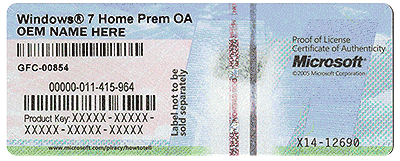
Do you have a Microsoft sticker on the computer.
It looks something like this.

COA-Certificate-of-Authenticity.gif
 

My Computer My Computer

Computer type
PC/Desktop
Computer Manufacturer/Model Number
Home made Desktop
OS
Windows 10 Pro. 64/ version 1709 Windows 7 Pro/64
CPU
Intel i7-6800K @ 4.3
Motherboard
ASUS X-99 Deluxe II
Memory
Corsair Platinum 16 gig @2400
Graphics Card(s)
EVGA GTX 1070 OC
Monitor(s) Displays
Asus 27" LED LCD/VE278Q
Screen Resolution
1920-1080 or 1280-720 HDMI
Hard Drives
INTEL SSD 730-240 Gb Sata 3.0/
PSU
EVGA Platium 1200W
Case
Phanteks Luxe Tempered Glass 8 fans/ one radiator
Cooling
XSPC/ Water Cooled CPU
Keyboard
Das 4 Professional
Mouse
Logitech M705/MX Anywhere 2-S
Internet Speed
100 mbits
Antivirus
Microsoft Security Essentials/ Malwarebytes Premium 3.0/ SAS
Browser
I.E. 11 default/Firefox/ ISP Time Warner Cable/Spectrum
Other Info
LG BluRay Burner/
Sound system-KLipsch-THX/
Icy Dock ssd Hot Swap bays.
Layback Bear and others who have responded to my cry for help.
THANK YOU!!!
I will now go back to the vendor and get this resolved.
 

My Computer My Computer

Computer type
PC/Desktop
Computer Manufacturer/Model Number
HP
OS
Windows 7 Home Premium 32bit
Antivirus
AVG - free edition
Browser
Mozello
Please keep us informed. Wish you luck.
 

My Computer My Computer

Computer type
PC/Desktop
Computer Manufacturer/Model Number
Home made Desktop
OS
Windows 10 Pro. 64/ version 1709 Windows 7 Pro/64
CPU
Intel i7-6800K @ 4.3
Motherboard
ASUS X-99 Deluxe II
Memory
Corsair Platinum 16 gig @2400
Graphics Card(s)
EVGA GTX 1070 OC
Monitor(s) Displays
Asus 27" LED LCD/VE278Q
Screen Resolution
1920-1080 or 1280-720 HDMI
Hard Drives
INTEL SSD 730-240 Gb Sata 3.0/
PSU
EVGA Platium 1200W
Case
Phanteks Luxe Tempered Glass 8 fans/ one radiator
Cooling
XSPC/ Water Cooled CPU
Keyboard
Das 4 Professional
Mouse
Logitech M705/MX Anywhere 2-S
Internet Speed
100 mbits
Antivirus
Microsoft Security Essentials/ Malwarebytes Premium 3.0/ SAS
Browser
I.E. 11 default/Firefox/ ISP Time Warner Cable/Spectrum
Other Info
LG BluRay Burner/
Sound system-KLipsch-THX/
Icy Dock ssd Hot Swap bays.
The problem here is nothing to do with the KB971033 update being uninstalled - it's simply because the OEM_SLP Key in use here has been applied to a machine when installing with retail media - or the wrong media were used.
This Key is ONLY valid when using the correct manufacturer's Recovery media.

You simply need to change the Key to the one on your COA sticker on the machine's case and activate that.
 

My Computer My Computer

Computer type
Laptop
Computer Manufacturer/Model Number
Asus K52F or Lenovo B51-80
OS
Win 7 x64 Home Premium (and x86 VirtualBox VM)/Win10
CPU
i3 370M/i7 6500U
Motherboard
Asus/Lenovo
Memory
8GB - finally :)/8GB
Graphics Card(s)
it's an i3, dude!/dual Intel&nVidia
Sound Card
onboard
Monitor(s) Displays
15.6" built-in
Screen Resolution
1366x768/1920x1080
Hard Drives
750GB Seagate internal
Sundry external drives attached to other computers on the local network
1TB SSD on the Lenovo
PSU
n/a
Internet Speed
as much as I can get - usually on a dongle/phone, so <1MB/s
Antivirus
MSE/Defender
Browser
IE11/12/Edge/Chrome/FF(if I must)
Back
Top