Windows not getting Restore

Ben Saeed

New member
Local time
9:55 PM
Messages
4
Greetings.

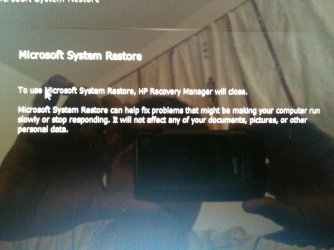
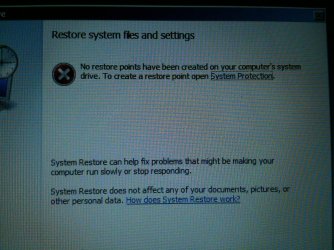
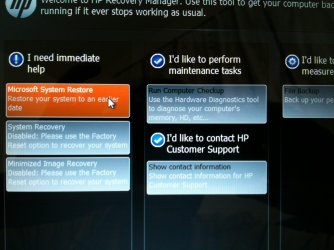
After making partition my windows 7 is not working. After startup windows I always reached into the HP window where there option I found 1)Microsoft System restore 2) i'd like to perform maintenance tasks. On selecting Microsoft restore there is an Error coming up "NO RESTORE POINTS HAVE BEEN CREATED ON YOUR COMPUTER SYSTEM DRIVE. TO CREATE A RESTORE POINT OPEN SYSTEM PROTECTION".

As soon as I click "System Protection" there is another error came up "YOUR COMPUTER IS RUNNING IN A LIMITED DIAGNOSTIC STATE. IF YOU USE SYSTEM RESTORE IN THIS LIMITED STATE, YOU CONNOT UNDO THE RESTORE OPERATION" after clicking OK nothing happend.

I have just bought HP Pavilion g6 and nothing important data inside also I dont have windows 7 installation disc as usually HP provide installed Windows in their product. Please note every Windows files are in the system rightnow.

Looking forward to your very kind help.

Ben
 

My Computer

Computer Manufacturer/Model Number
HP Pavilion g6
OS
windows 7 64 bit
CPU
Intell 2.6G
Memory
4 GB
Hard Drives
Toshiba
You say you made a partition. Why? What was the purpose of doing that?

You can make an installation disc if necessary by downloading a Windows 7 ISO file from mydigitallife.info and burning it to a disc, IF you have a 25 character Product Key found on a sticker somewhere on your PC.

You may also be able to restore to factory out-of-the-box state by using a recovery partition that HP likely put on your hard drive.

A screen shot of your current Windows Disk Management would help.
 

My Computer

Computer type
PC/Desktop
Computer Manufacturer/Model Number
Ignatz Special; 4 speed manual gearbox; factory air conditioning; one of one
OS
Windows 7 Home Premium SP1, 64-bit
CPU
Intel Skylake i5-6600K, not overclocked
Motherboard
AsRock Z170M Extreme 4, micro ATX
Memory
8 GB HyperX DDR4-2666 (2 x 4 GB)
Graphics Card(s)
none; graphics are integrated on CPU
Sound Card
onboard: Realtek ALC1150; external: USB Behringer UF0-202
Monitor(s) Displays
Dell S2340M 23 inch IPS
Screen Resolution
1600 x 900
Hard Drives
System: Crucial MX100 series SSD, 128 GB;
Data: Samsung Spinpoint 103SJ, 1 TB;
Backup: WD Caviar Green WD30EZRX-00D8PB0, 3 TB
PSU
Rosewill SilentNight 500 watt fanless, semi-modular
Case
Antec Solo II
Cooling
Noctua NH-U12S; Noctua F12 intake, Noctua S12A exhaust
Keyboard
Microsoft 200 6JH-00001 USB
Mouse
Dell or Microsoft optical wired; USB
Antivirus
Microsoft Security Essentials and Malwarebytes Premium
Browser
Pale Moon
Other Info
All fans PWM; speeds at idle: CPU circa 500 rpm; intake circa 600 rpm; exhaust circa 600 rpm; CPU temps 27 idle and 47 C load in a warm room (27 C/81 F) when running Intel Extreme Tuning Utility stress test.
Thanks for the reply.

Actually I have just purchased new laptop and wanted to transfer data from previous to new one in the same manner as I have 3 partition in the previous laptop.

I think to the best way is to recover data from recovery partition which is still exist in my laptop, I will much appreciate if you could help me to restore factory settings from recovery folder.

Thanks
Ben
 

My Computer

Computer Manufacturer/Model Number
HP Pavilion g6
OS
windows 7 64 bit
CPU
Intell 2.6G
Memory
4 GB
Hard Drives
Toshiba
See comments in bold:


Thanks for the reply.

Actually I have just purchased new laptop and wanted to transfer data from previous to new one in the same manner as I have 3 partition in the previous laptop.

If you want to move data (not installed applications or Windows itself) from the old laptop to the new laptop, I'd just use a USB thumb drive or possibly temporarily connect the drive from the old laptop to the new laptop.

That doesn't require a new partition.

If you want to put it on a separate partition on the new laptop, make a new partition on the new laptop and move the individual files to it----rather than move the partition from the old laptop to the new laptop.


I think to the best way is to recover data from recovery partition which is still exist in my laptop, I will much appreciate if you could help me to restore factory settings from recovery folder.

This is confusing. Did you place some of your personal data in the recovery partition on the old laptop? That's not a good idea. If you did, I would copy it the new laptop in the same way I'd copy any data--probably through a thumb drive. But the recovery partition shouldn't be used for personal data.

I think to the best way is to recover data from recovery partition which is still exist in my laptop, I will much appreciate if you could help me to restore factory settings from recovery folder.

This is also confusing, since I don't know what data you are talking about.

How many gigabytes of data are involved?

Recovery partitions are used to restore the laptop on which they reside to factory conditions.

If your old laptop has a recovery partition, you could restore it to factory conditions. If the new laptop has a recovery partition, you could restore it to factory conditions.

Which laptop do you want to restore to factory conditions?

If you do that, all personal data on the laptop will be lost.

You need to post a screenshot of Windows Disk Management for the laptops in question.


My Computer

Computer type
PC/Desktop
Computer Manufacturer/Model Number
Ignatz Special; 4 speed manual gearbox; factory air conditioning; one of one
OS
Windows 7 Home Premium SP1, 64-bit
CPU
Intel Skylake i5-6600K, not overclocked
Motherboard
AsRock Z170M Extreme 4, micro ATX
Memory
8 GB HyperX DDR4-2666 (2 x 4 GB)
Graphics Card(s)
none; graphics are integrated on CPU
Sound Card
onboard: Realtek ALC1150; external: USB Behringer UF0-202
Monitor(s) Displays
Dell S2340M 23 inch IPS
Screen Resolution
1600 x 900
Hard Drives
System: Crucial MX100 series SSD, 128 GB;
Data: Samsung Spinpoint 103SJ, 1 TB;
Backup: WD Caviar Green WD30EZRX-00D8PB0, 3 TB
PSU
Rosewill SilentNight 500 watt fanless, semi-modular
Case
Antec Solo II
Cooling
Noctua NH-U12S; Noctua F12 intake, Noctua S12A exhaust
Keyboard
Microsoft 200 6JH-00001 USB
Mouse
Dell or Microsoft optical wired; USB
Antivirus
Microsoft Security Essentials and Malwarebytes Premium
Browser
Pale Moon
Other Info
All fans PWM; speeds at idle: CPU circa 500 rpm; intake circa 600 rpm; exhaust circa 600 rpm; CPU temps 27 idle and 47 C load in a warm room (27 C/81 F) when running Intel Extreme Tuning Utility stress test.
Ben,
First:
1 license = 1 machine
1 machine = 1 license

In other words, you must have a separate license for each and every computer.

Do you have license for the desired destination computer?

Please use following to complete the specs for the computer with the problem.

Update your SevenForums System Specs
User CP (located on the top menu bar) |
Your Profile | Edit System Spec
(left-hand column)

To gather info, use Speccy (my favorite) or SIW or System Info

In the System Manufacturer Block, enter:
Ø Manufacturer and Model OR Custom build.
Ø ADD the word laptop, desktop, netbook or tablet.
For example:
Toshiba Satellite L305D notebook.

Provide full windows version info, for example:
MS Windows 7 Ultimate SP1 64-bit

Use the “Other Info” block for Optical Reader,
Mouse, touchpad, wifi adapter, speakers, monitor, etc

Scroll down and click on SAVE CHANGES.

With Speccy, you can select with your mouse/touchpad info from the display
and paste that info into your specs.

SIW is a marvelous program, but the free version does not offer
this capability.

=================================

I'll await the requested info and actions before proceeding.

Karl
 

My Computer

Computer Manufacturer/Model Number
Toshiba Satellite S875D-S7239 laptop
OS
MS Windows 7 Ultimate SP1 64-bit
CPU
AMD A10-4600M
Motherboard
AMD Pumori (Socket FT1)
Memory
6.00 GB Dual-Channel DDR3 @ 798MHz (11-11-12-28)
Graphics Card(s)
AMD Radeon HD 7660G
Sound Card
High Definition Audio Device
Monitor(s) Displays
Generic PnP Monitor (1600x900@60Hz)
Screen Resolution
1600x900@60Hz
Hard Drives
SSD 119GB Corsair CSSD-V128GB2 ATA Device
Keyboard
Standard PS/2 Keyboard
Mouse
HP Wireless Optical Mobile Mouse Model FHA-3410
Internet Speed
What the local pub, local coffee shop offers.
Other Info
Optical Drive:MATSHITA BD-CMB UJ160B ATA Device


Also have an Asus ha1002xp netbook with Win 7 Ultimate installed.
Thanks for your reply.
Dont confuse please, let me simplify you the situation.

I just purchased new Laptop HP Pavilion g6, and I have not any personal data in this laptop rightnow, laptop does have only WIndows 7 and MS office (Installed by HP). Please forget my previous laptop this can make you confuse, As I have huge capacity hardisk (430GB) so thats why I tried to make partition in the new laptop and afterward all of this disaster came on my head.

I am getting the following steps after starting of my laptop.
1 - Loading windows files
2 - Windows 7 startup logo
3 - HP Recovery manager ( I Have enclosed the image)
a) In the HP recovery manager there are 3 Menu.
- 1) I need immediate help 2) I'd like perform maintenance tasks 3) i'd like to take safety measures.
b) In the 1) menu there is only one option is active which is "Microsoft System Restore"
c) By clicking "M S R" I reached window "Restore system files and settings" and error you can see.

After above there is nothing work more.

Please help me.

Regards,
Ben
 

Attachments

  • Picture or Video 002.jpg
    Picture or Video 002.jpg
    332.6 KB · Views: 7
  • Picture or Video 003.jpg
    Picture or Video 003.jpg
    663.5 KB · Views: 7
  • Picture or Video 001.jpg
    Picture or Video 001.jpg
    273 KB · Views: 8

My Computer

Computer Manufacturer/Model Number
HP Pavilion g6
OS
windows 7 64 bit
CPU
Intell 2.6G
Memory
4 GB
Hard Drives
Toshiba
It's difficult to say exactly what you did with your partitioning attempt, since you can't or won't post a screenshot of Windows Disk Management. You may have made it difficult or impossible to reset to factory conditions.

I assume you cannot boot to a normal desktop. If this is not true, correct me.

I assume HP did not supply any type of discs with this laptop. If this is not true, correct me.

I assume you did not make recovery disks after you bought the laptop. If this is not true, correct me.

You need to access the HP factory reset partition OR contact HP and have them send you some recovery disks.

I think the recovery partition is accessed on most HP laptops by holding down the F11 key during the boot process. Advise if that works.
 

My Computer

Computer type
PC/Desktop
Computer Manufacturer/Model Number
Ignatz Special; 4 speed manual gearbox; factory air conditioning; one of one
OS
Windows 7 Home Premium SP1, 64-bit
CPU
Intel Skylake i5-6600K, not overclocked
Motherboard
AsRock Z170M Extreme 4, micro ATX
Memory
8 GB HyperX DDR4-2666 (2 x 4 GB)
Graphics Card(s)
none; graphics are integrated on CPU
Sound Card
onboard: Realtek ALC1150; external: USB Behringer UF0-202
Monitor(s) Displays
Dell S2340M 23 inch IPS
Screen Resolution
1600 x 900
Hard Drives
System: Crucial MX100 series SSD, 128 GB;
Data: Samsung Spinpoint 103SJ, 1 TB;
Backup: WD Caviar Green WD30EZRX-00D8PB0, 3 TB
PSU
Rosewill SilentNight 500 watt fanless, semi-modular
Case
Antec Solo II
Cooling
Noctua NH-U12S; Noctua F12 intake, Noctua S12A exhaust
Keyboard
Microsoft 200 6JH-00001 USB
Mouse
Dell or Microsoft optical wired; USB
Antivirus
Microsoft Security Essentials and Malwarebytes Premium
Browser
Pale Moon
Other Info
All fans PWM; speeds at idle: CPU circa 500 rpm; intake circa 600 rpm; exhaust circa 600 rpm; CPU temps 27 idle and 47 C load in a warm room (27 C/81 F) when running Intel Extreme Tuning Utility stress test.
Ben,
You do not need to worry. I will not confuse you with sound advice.
Have a nice day.
 

My Computer

Computer Manufacturer/Model Number
Toshiba Satellite S875D-S7239 laptop
OS
MS Windows 7 Ultimate SP1 64-bit
CPU
AMD A10-4600M
Motherboard
AMD Pumori (Socket FT1)
Memory
6.00 GB Dual-Channel DDR3 @ 798MHz (11-11-12-28)
Graphics Card(s)
AMD Radeon HD 7660G
Sound Card
High Definition Audio Device
Monitor(s) Displays
Generic PnP Monitor (1600x900@60Hz)
Screen Resolution
1600x900@60Hz
Hard Drives
SSD 119GB Corsair CSSD-V128GB2 ATA Device
Keyboard
Standard PS/2 Keyboard
Mouse
HP Wireless Optical Mobile Mouse Model FHA-3410
Internet Speed
What the local pub, local coffee shop offers.
Other Info
Optical Drive:MATSHITA BD-CMB UJ160B ATA Device


Also have an Asus ha1002xp netbook with Win 7 Ultimate installed.
It's difficult to say exactly what you did with your partitioning attempt, since you can't or won't post a screenshot of Windows Disk Management. You may have made it difficult or impossible to reset to factory conditions.

I assume you cannot boot to a normal desktop. If this is not true, correct me.
No, my system cannot boot to a normal desktop
I assume HP did not supply any type of discs with this laptop. If this is not true, correct me.
HP did not supply me recover disc
I assume you did not make recovery disks after you bought the laptop. If this is not true, correct me.
No, I could not make
You need to access the HP factory reset partition OR contact HP and have them send you some recovery disks.
I have order but its taking 10 days.
I think the recovery partition is accessed on most HP laptops by holding down the F11 key during the boot process. Advise if that works.
F11 works but as I click Microsoft system recovery its went to the another option which says NO RESTORE POINT HAS BEEN CREATED
 

My Computer

Computer Manufacturer/Model Number
HP Pavilion g6
OS
windows 7 64 bit
CPU
Intell 2.6G
Memory
4 GB
Hard Drives
Toshiba
Back
Top