Solved Windows not loading after the system shutdown due to USB cable

ksharma

New member
Local time
5:22 PM
Messages
4
Location
Australia
Hi,
I plugged in my old usb cable (iPhone charger which was a bit worn out) to my laptop and immediately it shut down with a flickering sound as if something fused inside. Now it's switching on but Windows isn't loading. Every time it shows an error screen stating that Windows failed to start due to a recent hardware or software change. Loads till the point where Windows 7 logo appears and four animated dots come up, then BSOD appears for a fraction of seconds and it crashes. It also shows some recovery options (including the command prompt) which I tried and none worked. Not starting in safe mode too, crashes and restarts. There's no restore point available to restore it back. Tried disabling the USB port from bios too thinking if there was short circuit in the port, but in vain. Could anyone help with any DIY suggestions?
Thanks!
 

My Computer My Computer

Computer type
Laptop
Computer Manufacturer/Model Number
HCL
OS
Windows 7
Hello and welcome ksharma what you said furst up doesn't sound good. Now as a general rule laptops have a dedicated power take off USB port even though all ports have power to them one is usually used for doing what you are doing ie it can handle higher currents.

It is in my experience the USB port to the right of the keyboard and sometimes nearest the operator - the front edge of the machine. Now it was probably the old cable that may have caused some sort of short circuit inside the machine either at the port or internally - never a good idea mate to use really worn out stuff like that as they are so cheap anyway.

Have a look with a very bright light inside that port and see if there is any burnt or melted looking terminals and report back please.

Also some system specs would be very handy even the machine brand and model would be better than nothing .http://www.sevenforums.com/tutorials/180324-system-info-see-your-system-specs.html
 

My Computer My Computer

Computer type
PC/Desktop
Computer Manufacturer/Model Number
Own build (new) Desk1 / Asus ROG Win 7 / Desk2 1st build
OS
Desk1 7 Home Prem / Desk2 10 Pro / Main lap Asus ROG 10 Pro 2 laptop Toshiba 7 Pro Asus P2520 7 & 10
CPU
Desk1 i5 3750K / Laptop i7 GTX 860M / Desk2 i5 2500
Motherboard
Desk1 Asus P877-V / Desk2 Gigabyte H67 UD3H / Laptop ?
Memory
Desk1 8GB (1866) / Desk2 16GB (1333) / Laptop 8Gb DDR3
Graphics Card(s)
Desk 1& 2NVidia GTX 650 & Laptops on board Intel
Sound Card
Desk 1 & 2 -XONAR DG Realtek High Def audio Laptop
Monitor(s) Displays
Desk 1 Benq HD 2450 / Desk2 Philips 24" / Laptop 17.5"
Screen Resolution
1920x1080 D1 & D2 & Laptop 1
Hard Drives
Desk1 Samsung 120GB 830 SSD
Asus ROG 256GB 850 Pro SSD
Desk2 Samsung 840 256 SSD
Toshiba 120GB EVO
PSU
Desk 1 Corsair HX 1050/ Laptop ? / Desk 2 Corsair HX 650
Case
Desk 1 Cooler HAF XM ? Toshiba laptop / Desk2 Coolermaster
Cooling
Fans on all Desk1 -2 Desk2 - all Coolermasters 5 Laptop ?
Keyboard
Desk 1 MS Sidewinder X6 Desk 2 MS Sidewinder X 4
Mouse
Desk 1&2 - Gigabyte MS 900 gamer - laptop - Logitec wireless
Internet Speed
ADSL2+
Other Info
One other Desktop (tester) and spare Toshba laptop both with SSD's
Running Kaspersky 2016 ISS on all machines config'd identically
Logitec audio stereo systems on each machine (x3)
Canon MG5250MFC
Router/modem TP-Link running WPA2SK
Thanks, yeah that was stupid of me to use that old cable. I checked the port (it's one in the group of ports on left), no signs of burnt or melted elements. And since I can't start the laptop it's not possible to check full spec. However the brand and model are as follows:
HCL leaptop B24 C2D, S. No : A084AX158628
 

My Computer My Computer

Computer type
Laptop
Computer Manufacturer/Model Number
HCL
OS
Windows 7
No mate it wasn't stupid we have all done something like that before. Now the uSB port cannot disabled from the machine because it is part of the physical circuitry the only thing you do by disabling is using it as a boot device - unless I have it terribly wrong.

The actual damage if not visible there at the port may well be on the printed circuit board further inside the machine or may have blown another component remebering soem of the caps and resistors diodes etc are exceedingly small these days. The only way you are ogijing to be able to see is to disassemble the machine I'm afraid.

Now if you can bear with me try this
BOOTABLE UBUNTU
Make a bootable Ubuntu disk Download Ubuntu Desktop | Download | Ubuntu
Set the BIOS to boot from the optical when the machine boots it will show you a screen with TRY or INSTALL > select TRY not INSTALL
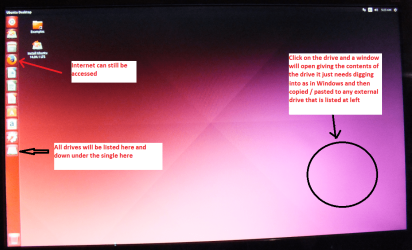
When it is finished - it takes very little time you will get a screen like in the pic .
Open the drive you want > User and dig down until you get to the data / settings you may be able to copy / paste the material you want to an external source or other installed drive doing this.
I am not sure if it will but I have recovered tons of data etc using this method both on "dead" or just plain drives that you cannot get data from using Windows.

Now if the machine boots from this then it will be a good sign that something drastic has not happened. Also if you have data on that machine that may be lost if you have to do a re install this will be a way to recover it and put it onto external drives sticks or spinners or even an SSD if you wanted.
 

Attachments

  • UBUNTU SCREEN X2.PNG
    UBUNTU SCREEN X2.PNG
    272.7 KB · Views: 0

My Computer My Computer

Computer type
PC/Desktop
Computer Manufacturer/Model Number
Own build (new) Desk1 / Asus ROG Win 7 / Desk2 1st build
OS
Desk1 7 Home Prem / Desk2 10 Pro / Main lap Asus ROG 10 Pro 2 laptop Toshiba 7 Pro Asus P2520 7 & 10
CPU
Desk1 i5 3750K / Laptop i7 GTX 860M / Desk2 i5 2500
Motherboard
Desk1 Asus P877-V / Desk2 Gigabyte H67 UD3H / Laptop ?
Memory
Desk1 8GB (1866) / Desk2 16GB (1333) / Laptop 8Gb DDR3
Graphics Card(s)
Desk 1& 2NVidia GTX 650 & Laptops on board Intel
Sound Card
Desk 1 & 2 -XONAR DG Realtek High Def audio Laptop
Monitor(s) Displays
Desk 1 Benq HD 2450 / Desk2 Philips 24" / Laptop 17.5"
Screen Resolution
1920x1080 D1 & D2 & Laptop 1
Hard Drives
Desk1 Samsung 120GB 830 SSD
Asus ROG 256GB 850 Pro SSD
Desk2 Samsung 840 256 SSD
Toshiba 120GB EVO
PSU
Desk 1 Corsair HX 1050/ Laptop ? / Desk 2 Corsair HX 650
Case
Desk 1 Cooler HAF XM ? Toshiba laptop / Desk2 Coolermaster
Cooling
Fans on all Desk1 -2 Desk2 - all Coolermasters 5 Laptop ?
Keyboard
Desk 1 MS Sidewinder X6 Desk 2 MS Sidewinder X 4
Mouse
Desk 1&2 - Gigabyte MS 900 gamer - laptop - Logitec wireless
Internet Speed
ADSL2+
Other Info
One other Desktop (tester) and spare Toshba laptop both with SSD's
Running Kaspersky 2016 ISS on all machines config'd identically
Logitec audio stereo systems on each machine (x3)
Canon MG5250MFC
Router/modem TP-Link running WPA2SK
Thanks! I'm able to boot my laptop from Ubuntu. Made an Ubuntu bootable usb stick and used it (in another USB port). But I'm still not sure what needs to be done to boot from Windows. Seems like Windows needs to be reinstalled and I don't have the Windows bootable disk. I had a back up of data so don't need to take another one.
 

My Computer My Computer

Computer type
Laptop
Computer Manufacturer/Model Number
HCL
OS
Windows 7
Well at least it boots which means the CPU and RAM are ok you just need to explore that drive now and retrieve data while you can to another drive stick whatever.

Plus lets see what is in that drive and another option is to boot from this https://www.partitionwizard.com/partition-wizard-bootable-cd.html I persnally would like to see a pic of what that comes up with.
 

My Computer My Computer

Computer type
PC/Desktop
Computer Manufacturer/Model Number
Own build (new) Desk1 / Asus ROG Win 7 / Desk2 1st build
OS
Desk1 7 Home Prem / Desk2 10 Pro / Main lap Asus ROG 10 Pro 2 laptop Toshiba 7 Pro Asus P2520 7 & 10
CPU
Desk1 i5 3750K / Laptop i7 GTX 860M / Desk2 i5 2500
Motherboard
Desk1 Asus P877-V / Desk2 Gigabyte H67 UD3H / Laptop ?
Memory
Desk1 8GB (1866) / Desk2 16GB (1333) / Laptop 8Gb DDR3
Graphics Card(s)
Desk 1& 2NVidia GTX 650 & Laptops on board Intel
Sound Card
Desk 1 & 2 -XONAR DG Realtek High Def audio Laptop
Monitor(s) Displays
Desk 1 Benq HD 2450 / Desk2 Philips 24" / Laptop 17.5"
Screen Resolution
1920x1080 D1 & D2 & Laptop 1
Hard Drives
Desk1 Samsung 120GB 830 SSD
Asus ROG 256GB 850 Pro SSD
Desk2 Samsung 840 256 SSD
Toshiba 120GB EVO
PSU
Desk 1 Corsair HX 1050/ Laptop ? / Desk 2 Corsair HX 650
Case
Desk 1 Cooler HAF XM ? Toshiba laptop / Desk2 Coolermaster
Cooling
Fans on all Desk1 -2 Desk2 - all Coolermasters 5 Laptop ?
Keyboard
Desk 1 MS Sidewinder X6 Desk 2 MS Sidewinder X 4
Mouse
Desk 1&2 - Gigabyte MS 900 gamer - laptop - Logitec wireless
Internet Speed
ADSL2+
Other Info
One other Desktop (tester) and spare Toshba laptop both with SSD's
Running Kaspersky 2016 ISS on all machines config'd identically
Logitec audio stereo systems on each machine (x3)
Canon MG5250MFC
Router/modem TP-Link running WPA2SK
It's been a while since I worked on my laptop but the good news is that it's fine now. Formatted the partition and reinstalled Windows and it works now! Seems like Windows (I had two versions installed in different partitions) were corrupted, though not sure how. Anyway, it's resolved now. Thanks a lot, wouldn't have been possible without your suggestion to use Ubuntu.
Cheers!
 

My Computer My Computer

Computer type
Laptop
Computer Manufacturer/Model Number
HCL
OS
Windows 7
No problems ksharma that is a little tool to keep in mind because I have even pulled data from apparently dead drives and friends who have forgotten their password to get into Windows for their data etc.
For example very handy when dealing with old spinners.


Corruption takes many forms mate and sometimes it can be very simple and then extremely difficult.
 

My Computer My Computer

Computer type
PC/Desktop
Computer Manufacturer/Model Number
Own build (new) Desk1 / Asus ROG Win 7 / Desk2 1st build
OS
Desk1 7 Home Prem / Desk2 10 Pro / Main lap Asus ROG 10 Pro 2 laptop Toshiba 7 Pro Asus P2520 7 & 10
CPU
Desk1 i5 3750K / Laptop i7 GTX 860M / Desk2 i5 2500
Motherboard
Desk1 Asus P877-V / Desk2 Gigabyte H67 UD3H / Laptop ?
Memory
Desk1 8GB (1866) / Desk2 16GB (1333) / Laptop 8Gb DDR3
Graphics Card(s)
Desk 1& 2NVidia GTX 650 & Laptops on board Intel
Sound Card
Desk 1 & 2 -XONAR DG Realtek High Def audio Laptop
Monitor(s) Displays
Desk 1 Benq HD 2450 / Desk2 Philips 24" / Laptop 17.5"
Screen Resolution
1920x1080 D1 & D2 & Laptop 1
Hard Drives
Desk1 Samsung 120GB 830 SSD
Asus ROG 256GB 850 Pro SSD
Desk2 Samsung 840 256 SSD
Toshiba 120GB EVO
PSU
Desk 1 Corsair HX 1050/ Laptop ? / Desk 2 Corsair HX 650
Case
Desk 1 Cooler HAF XM ? Toshiba laptop / Desk2 Coolermaster
Cooling
Fans on all Desk1 -2 Desk2 - all Coolermasters 5 Laptop ?
Keyboard
Desk 1 MS Sidewinder X6 Desk 2 MS Sidewinder X 4
Mouse
Desk 1&2 - Gigabyte MS 900 gamer - laptop - Logitec wireless
Internet Speed
ADSL2+
Other Info
One other Desktop (tester) and spare Toshba laptop both with SSD's
Running Kaspersky 2016 ISS on all machines config'd identically
Logitec audio stereo systems on each machine (x3)
Canon MG5250MFC
Router/modem TP-Link running WPA2SK
Back
Top