Windows not recognizing onboard LAN controller. Driver issue.

jman3000

New member
Local time
7:12 PM
Messages
8
I recently upgraded my GPU and when I restarted the system after downloading the drivers my internet connection was down. I checked devices and there wasn't even a network adapter detected. I narrowed it down to a driver issue, but on the MSI installation disc there 6 options: Chipset, VGA, LAN, Audio, USB 3, and RAID drivers... unfortunately the LAN option is not highlighted. When I manually enter the install disc and access the Realtek driver folder it downloads but then says it could not find a network adapter to load to.

I've tried resetting my MoBo, purging drivers, switching RAM, and probably a dozen other things. Nothing seems to work. It's as if the LAN controller on my MoBo simply disappeared.

It's not my internet connection because I'm typing this from a laptop using the same CAT5 and same router as my CPU uses, and I really don't think I damaged the MoBo because everything is fine except for the LAN.

Any help would be greatly appreciated.
 

My Computer

OS
Windows 64 bit home premium
Hello there, welcome to sevenforums!

Could you tell me exactly your motherboard model? since you've already stated that MSI is the manufacturer.

I'm not sure how could it disappear, but things happen.. are you sure you're unable to find it inside Device Manager?
 

My Computer

Computer type
PC/Desktop
OS
Windows
Thank you for the welcome.

It's an MSI 890gxm-g65. I recently installed a Sapphire 6870 GPU and that's when the problem started. CMD line ipconfig confrims there is no device detected.
 

My Computer

OS
Windows 64 bit home premium
Ok, it seems that your LAN is a Realtek 8111DL

What happens if you remove your video card? can you install the LAN driver?

And have you tried to download the driver from the Realtek website?

Here: Realtek
 

My Computer

Computer type
PC/Desktop
OS
Windows
I've tried installing it with the card in and out.. .no difference. I even did a system restore to an earlier time and it still is not showing up.

Device manager looks like this:
Big Red (comps name)
-computer
-disk drives
-display adapters
-dvd/cd rom drives
-human interface devices
-IDE ATA/ATAPI controllers
-Imaging devices
-Keyboards
-Mice and other pointing devices
-Portable devices
-Ports
-Processors
-Sound, video, and game controllers
-System devices
-Universal Serial Bus controllers.

I installed the latest driver onto a USB device from my laptop and inserted it into my PC. It did the exact same thing as the MSI driver disc.

Push comes to shove I guess ill just buy a PCI adapter card or wireless adapter... but id rather not.
 

My Computer

OS
Windows 64 bit home premium
It seems weird enough for me.

If you check for "Hardware Changes" in Device Manager (using right click)? nothing shows up?

It could be that the LAN device somehow damaged itself. but i can't figure out why it would..

I guess the cheapest solution in that case would be buying a pci network card (which shouldn't be the solution)

Here: Newegg.com - NETGEAR GA311 Gigabit Adapter with Jumbo Frame support 10/ 100/ 1000Mbps PCI 1 x RJ45

Although if your motherboard still has its warranty, you could ask for a refund/exchange.


EDIT: meh, even better.

Here: Newegg.com - ENCORE ENLGA-1320 Ethernet Card 10/ 100/ 1000Mbps PCI 1 x RJ45

23$ is way too much for a network card, haha. 10$ is better :D
 

My Computer

Computer type
PC/Desktop
OS
Windows
Hello.
You said that you tried resetting the Mobo.
I would just make sure that the Onboard LAN Controller is enabled, before anything else.
Is it enabled?

Capture 2.PNG
 

My Computer

Computer type
PC/Desktop
Computer Manufacturer/Model Number
Custom Build
OS
Windows 7 Home Premium 64 bit
CPU
Intel Core i7-4790
Motherboard
GA-Z87X-D3H
Memory
G.SKILL 8GB (2 x 4GB) DDR3 F3-10666CL9D-8GBNT
Graphics Card(s)
AMD Radeon R7 250
Sound Card
Realtek ALC892
Monitor(s) Displays
Samsung UN32EH5000, Dell 1703FPT
Screen Resolution
1920 x 1080, 1280 x 1024
Hard Drives
WD5003AZEX
WD10EZEX
Samsung HD103SJ
Samsung 128 GB 840 PRO
PSU
SeaSonic M12II SS-500GM
Case
Fractal Design Define R4
Cooling
Zalman CNPS9900ALED
Keyboard
Logitech K800
Mouse
Logitech M705
Internet Speed
16 Mbps
Antivirus
Avast
Browser
Firefox
Other Info
Bose Companion 2 Multimedia Speakers
Hello.
You said that you tried resetting the Mobo.
I would just make sure that the Onboard LAN Controller is enabled, before anything else.
Is it enabled?

View attachment 173588

Didn't think about that.. but, isn't the LAN device already enabled with the default/safe setting on the BIOS? :huh::o
 

My Computer

Computer type
PC/Desktop
OS
Windows
Hello.
You said that you tried resetting the Mobo.
I would just make sure that the Onboard LAN Controller is enabled, before anything else.
Is it enabled?

View attachment 173588

Didn't think about that.. but, isn't the LAN device already enabled with the default/safe setting on the BIOS? :huh::o

True, but the Op said he tried to reset the mobo, but never confirmed that the controller was enabled. I think that if he confirms that it's enabled, then that should eliminate it as the source of the problem.:)
 

My Computer

Computer type
PC/Desktop
Computer Manufacturer/Model Number
Custom Build
OS
Windows 7 Home Premium 64 bit
CPU
Intel Core i7-4790
Motherboard
GA-Z87X-D3H
Memory
G.SKILL 8GB (2 x 4GB) DDR3 F3-10666CL9D-8GBNT
Graphics Card(s)
AMD Radeon R7 250
Sound Card
Realtek ALC892
Monitor(s) Displays
Samsung UN32EH5000, Dell 1703FPT
Screen Resolution
1920 x 1080, 1280 x 1024
Hard Drives
WD5003AZEX
WD10EZEX
Samsung HD103SJ
Samsung 128 GB 840 PRO
PSU
SeaSonic M12II SS-500GM
Case
Fractal Design Define R4
Cooling
Zalman CNPS9900ALED
Keyboard
Logitech K800
Mouse
Logitech M705
Internet Speed
16 Mbps
Antivirus
Avast
Browser
Firefox
Other Info
Bose Companion 2 Multimedia Speakers
Another thing to think about, did you pull and Jumpers out of the mother board when you took the old card out.
 

My Computer

Computer Manufacturer/Model Number
Home Build.
OS
Windows 7 Home Pre
CPU
Q8200 Intell 2.333
Motherboard
Asus P5Q3 Delux
Memory
DDR3 1333 4gig
Graphics Card(s)
Ati HD4870
Sound Card
Onboard Soundmax. 7.1
Monitor(s) Displays
1, 20" Samsung
Screen Resolution
1600/900
PSU
Good enough
Case
Le Shark
Cooling
FAN FAN FAN FAN, Thermaltake Minitype 90 with speed fan 4.
Keyboard
Standard, Gaming Wolfking
Mouse
Cm-storm-inferno-wired-gaming-mouse
Internet Speed
Sky Crappy upto 20meg I get a whapping 5.8mbs.
I had to change my username because the forum didn't recognize my password for some reason... didn't recognize the temporary password it gave me either.

I'm actually typing this from my main computer. I ended up taking apart a piece of computer art I had made my GF that had an old 10/100 LAN card on it lol. Very surprised it worked because it was screwed to an old ddr ram stick that formed an L.

BIOS looked exactly like the one posted above. LAN controller was enabled.

When I pulled the old card out I took out the 4 pin CPU cable and the 6 pin cable from the GPU. When I put the new GPU in I reinstalled the 4 pin and 2 6 pins.

I'm still baffled as to what happened.
 

My Computer

OS
Windows 64 bit home premium
Windows detected and installed drivers for the new LAN card almost instantly and I was able to get online within about 5 seconds of the desktop popping up.
 

My Computer

OS
Windows 64 bit home premium
Wait.

Does this mean that the problem solved itself? or did you use a network card?

And if it resolved itself, what did you do? :shock:
 

My Computer

Computer type
PC/Desktop
OS
Windows
I installed an old network card into the PCI slot. The issue is resolved but not to my liking because the onboard LAN is apparently not working.

I'm actually glad this stumped other people because I consider myself somewhat tech savvy and I was completely baffled by this :p
 

My Computer

OS
Windows 64 bit home premium
I installed an old network card into the PCI slot. The issue is resolved but not to my liking because the onboard LAN is apparently not working.

I'm actually glad this stumped other people because I consider myself somewhat tech savvy and I was completely baffled by this :p

Glad to know the issue has been solved :D even though it wasn't solved the way you wanted to be, now you're connected to the internet in your main PC.

But now you have to explain your GF that you took apart the fine piece of computer art she made :shock: good luck with that :eek::p
 

My Computer

Computer type
PC/Desktop
OS
Windows
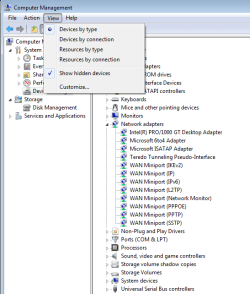
One last thing....what does the following show.....anything?

Capture 6.PNG
 

My Computer

Computer type
PC/Desktop
Computer Manufacturer/Model Number
Custom Build
OS
Windows 7 Home Premium 64 bit
CPU
Intel Core i7-4790
Motherboard
GA-Z87X-D3H
Memory
G.SKILL 8GB (2 x 4GB) DDR3 F3-10666CL9D-8GBNT
Graphics Card(s)
AMD Radeon R7 250
Sound Card
Realtek ALC892
Monitor(s) Displays
Samsung UN32EH5000, Dell 1703FPT
Screen Resolution
1920 x 1080, 1280 x 1024
Hard Drives
WD5003AZEX
WD10EZEX
Samsung HD103SJ
Samsung 128 GB 840 PRO
PSU
SeaSonic M12II SS-500GM
Case
Fractal Design Define R4
Cooling
Zalman CNPS9900ALED
Keyboard
Logitech K800
Mouse
Logitech M705
Internet Speed
16 Mbps
Antivirus
Avast
Browser
Firefox
Other Info
Bose Companion 2 Multimedia Speakers
Mine shows verbatim when viewing hidden devices:
-Microsoft ISATAP adapter
-RAS async Adapter
-Realtek rt8139/810x family fast ethernet NIC (this is the one I installed)
-Teredo tunneling pseudo interface
-wan miniport (ikev2)
-Wan Miniport (IP
-Wan miniport
-wan miniport
-wan miniport
-wan miniport
-wan miniport
-wan miniport
 

My Computer

OS
Windows 64 bit home premium
Network adapters was not even an option when I was having problems hidden or unhidden. I'm most likely going to sell my motherboard with the pci card thrown in because this really shouldn't have happened. Plus the pci card basically means I can never have the option to crossfire my gpu's seeing as how this is a mATX motherboard with only 2x PCI e x16 slots, a pci slot and a pci e slot.
 

My Computer

OS
Windows 64 bit home premium
Back
Top