Windows.old: The confusion is over.

Orbital Shark

New member
Guru
Gold Member
VIP
Local time
11:38 AM
Messages
6,298
Location
Milton Keynes, United Kingdom
After reading various posts regarding the Windows.old directory I have re-installed build 7100 for the sole purpose of confirming what the Windows.old directory actually is.

When installing Vista/Windows 7 you can choose to install over the existing OS (not upgrade) without formatting the partition. Windows 7 (not sure about Vista) seems to have a sort of 'Intelligent Install' as to what it keeps and what it moves to Windows.old (and i'll get into this later).

For the purpose of this test I have intentionally kept files in my user folders that I wish to keep.

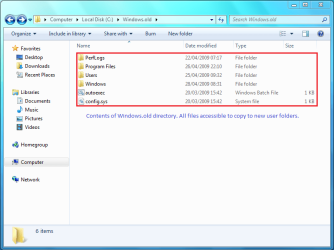
After installing i'm faced with my desktop, clean, fresh, just 1 icon (the recycle bin). Upon opening explorer and viewing 'Computer' it is clear that there is still a multitude of files still on the HD (an extra 12GB in my case). Access the main (Windows 7) drive and you will see several directories, 1 of which is Windows.old directory (See Pic 1).

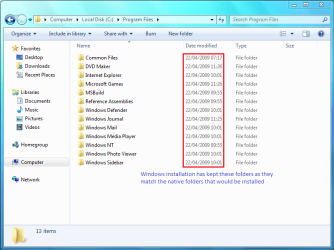
Upon inspection of this directory it's plain to see that it is a mirror of your previous drive structure (See Pic 2). You can now access your media in the user directory and Move it to your new user folders (Documents, Music, Videos etc). Once you are happy that all files have been moved you can now delete the directory to free up a large amount of disk space.

NOTE: You will have a few UAC (User Account Control) prompts but this is normal, you can continue.

Now for the Inteligent Install:

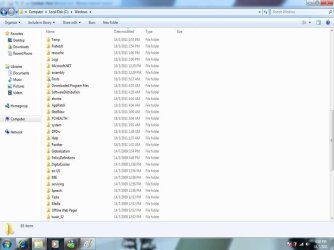
You will notice that i've highlighted several key areas in Pic 1 and Pic 3. Notice the date? (Fresh install date it 28/04/2009).

My belief is that Windows recognises certain folders as being independent from any install process and keeps them on the active root directory (Media Player Classic in my case was not installed so no previous registry key was created). See Pic 1

Next is the 'Program Files' folder, you will notice that, according to Pic 3 they have not been changed. Windows seems to have recognised the files & folders contained here as native to the installation and has kept them as no changes have been made to them.


Hope you find this solves any questions you have regarding the Windows.old directory :)
 

Attachments

  • Capture.PNG
    Capture.PNG
    31.7 KB · Views: 347
  • Capture1.PNG
    Capture1.PNG
    31.6 KB · Views: 786
  • Capture2.PNG
    Capture2.PNG
    32.8 KB · Views: 284
Last edited:

My Computer My Computer

Computer Manufacturer/Model Number
Compaq Desktop
OS
Windows 7 Ultimate x64
CPU
AMD Sempron Dual Core
Memory
3GB
Graphics Card(s)
NVIDIA GeForce 6150SE nForce 430
Screen Resolution
1024x768
Hard Drives
150GB Sata
I'm not sure I understand.

Though it's interesting the installation may not have overwritten a couple manually installed folders in pic 1, I'm not understanding pic 3 in particular.

I believe the dates/times for PerfLogs in pic 1 and everything in pic 3 -- anything dated 4/22 -- is "standard" and don't understand what was intelligently "retained."

Windows.old is simply an automatically saved backup of prior installed folders, like the prior Windows folder, Users, Program Files, and Program Data. You could do a backup like that manually yourself before fresh installing. You can go through it after an install if you need to retrieve settings, some documents, fonts, etc., that you may have forgotten to back up.

Everything else has been freshly installed and given the date of 4/22. It appears some files are likely modified in Windows and Users during install resulting in the install date getting applied to those, in this case 4/28. But nothing in C:\Program Files was "kept" in C:\Program Files (??). I don't believe there's any "intelligent install" going on -- just a basic automatic backup folder.
 

My Computer My Computer

OS
Windows7
The date of 4/22 you're seeing is from when i last installed build 7100 (for more test purposes). Windows has 'chosen' to keep the original folders & files as it saw no need to replace them.

Some people don't have the luxury of backing up (sometimes 15-20GB or more) data to secondary drives, this has been written as confirmation that your original media will be safe if you choose to clean install Windows without formatting.
 

My Computer My Computer

Computer Manufacturer/Model Number
Compaq Desktop
OS
Windows 7 Ultimate x64
CPU
AMD Sempron Dual Core
Memory
3GB
Graphics Card(s)
NVIDIA GeForce 6150SE nForce 430
Screen Resolution
1024x768
Hard Drives
150GB Sata
Hi Guys,

If you have a look at this Tutorial of Brink's over at Vista Forums,

Repair Install For Vista - Vista Forums

you'll see that this feature was also in Vista.

As I understand it it also works for windows 7 install over Vista, (not actually tried it , so please check before you try ;) )
 

My Computers My Computers

System One System Two

  • Computer type
    PC/Desktop
    Computer Manufacturer/Model Number
    ChillBlast - Custom to my design
    OS
    Windows 11 Pro x64 [Latest Release and Release Preview]
    CPU
    Ryzen 9 5950X, 3.8 - 5.2 MHz
    Motherboard
    Asus Prime X570-Pro
    Memory
    64GB [2 x 32GB] DDR4 3200MHz
    Graphics Card(s)
    4GB NVIDIA GEFORCE GTX 1650 Ti
    Sound Card
    On-board SPDIF to 5.1 System + HDMI [5.1 system]
    Monitor(s) Displays
    32" UHD 32 Bit HDR Monitor + 43" UHD 4K 32Bit HDR TV
    Screen Resolution
    2 x 3840 x 2160 @60Hz
    Hard Drives
    1TB M2 SSD OS, 500GB Fast Access SSD, 2 x 8TB Data + Various Externals from 1TB to 4TB, 10TB NAS
    PSU
    NZXT C750 80 PLUS Gold 750W Modular PSU
    Case
    Workstation Case [Matt Black]
    Cooling
    NZXT Kraken X63 280mm CPU Cooler +2x Quiet Case fans
    Keyboard
    Logitech Wireless MX Keys & K400 + others
    Mouse
    Logitech Wireless MX Master 3S
    Internet Speed
    920 MB Down 50 MB Up
    Antivirus
    BitDefender Total Security Pro
    Browser
    Chrome (always run latest Non-Beta)
    Other Info
    Also run ...
    Laptop - Quad 8GB - Windows 10 Pro x64
    Nexus 7 Android tablet x2
    Samsung 10.2" tablet
    Blackview TAB 8 4G Android Tablet c/w Keyboard
    Wacom Intuos Pro Medium Pen Pad
    Wacom Intuos Pro Small Pen Pad
    Wacom Expresskeys Remote
    Loopdeck+ Graphics Controller
    Shuttle Pro v2 Control
  • Computer type
    Laptop
    System Manufacturer/Model Number
    Dell XPS 17 10750H
    OS
    Windows 11 Pro x64 Latest RP
    CPU
    Intel I7 10750H 5.0GHz
    Motherboard
    Dell XPS
    Memory
    32GB [2x16GB] DDR4 2933 MHz
    Graphics Card(s)
    nVidia GTX1650Ti 4 GB GDDR6
    Sound Card
    Stock [Realtek] 4 Speaker
    Monitor(s) Displays
    17" IPS UHD+ Infinity Edge Touchscreen
    Screen Resolution
    3840 x 2400
    Hard Drives
    2TB M2 NVMe, 4TB External + various 500GB & 1TB External NVMe (also have access to spinner HDD from
    PSU
    Stock
    Case
    Stock XPS Aluminium & Carbon Fibre
    Cooling
    Stock - Active Fan Control
    Keyboard
    Backlit + Various Logitech
    Mouse
    Stock Track Pad + Logitech MX Trackball
    Internet Speed
    72 MB Down 18MB Up
    Browser
    Chrome
    Other Info
    Also run ...
    Laptop - Quad 8GB - Windows 10 Pro x64
    Nexus 7 Android tablet x2
    10.2" tablet
    Sony Z3 Android Smartphone
    Wacom Intuos Pro Medium Pen Pad
    Wacom Intuos Pro Small Pen Pad
    Wacom Expresskeys Remote
    Loopdeck+ Graphics Controller
    Shuttle Pro v2 Control Pad
    10TB NAS
Good call Nigel,

I would think that 7 would treat the Vista partition as just another 'Windows' installation but as the version numbers of files in the 'Program Files' folder will be different then a complete overwright would happen and everything would be moved to the Windows.old folder.


Jeff
 

My Computer My Computer

Computer Manufacturer/Model Number
Compaq Desktop
OS
Windows 7 Ultimate x64
CPU
AMD Sempron Dual Core
Memory
3GB
Graphics Card(s)
NVIDIA GeForce 6150SE nForce 430
Screen Resolution
1024x768
Hard Drives
150GB Sata
Hi Jeff

Then again the norm with an existing Vista install would be to upgrade the install on a particular partition, or create a dual boot on a separate partition,

This would be a nice safety system if you choose to install fresh over an existing Vista partition in error, [and as long of course as you didn't format the partition during install], at least your data files should be safe.

It's not the best way to upgrade but I'm sure as Windows 7 is released quite a few will be grateful that Microsoft have designed thing this way ;)
 

My Computers My Computers

System One System Two

  • Computer type
    PC/Desktop
    Computer Manufacturer/Model Number
    ChillBlast - Custom to my design
    OS
    Windows 11 Pro x64 [Latest Release and Release Preview]
    CPU
    Ryzen 9 5950X, 3.8 - 5.2 MHz
    Motherboard
    Asus Prime X570-Pro
    Memory
    64GB [2 x 32GB] DDR4 3200MHz
    Graphics Card(s)
    4GB NVIDIA GEFORCE GTX 1650 Ti
    Sound Card
    On-board SPDIF to 5.1 System + HDMI [5.1 system]
    Monitor(s) Displays
    32" UHD 32 Bit HDR Monitor + 43" UHD 4K 32Bit HDR TV
    Screen Resolution
    2 x 3840 x 2160 @60Hz
    Hard Drives
    1TB M2 SSD OS, 500GB Fast Access SSD, 2 x 8TB Data + Various Externals from 1TB to 4TB, 10TB NAS
    PSU
    NZXT C750 80 PLUS Gold 750W Modular PSU
    Case
    Workstation Case [Matt Black]
    Cooling
    NZXT Kraken X63 280mm CPU Cooler +2x Quiet Case fans
    Keyboard
    Logitech Wireless MX Keys & K400 + others
    Mouse
    Logitech Wireless MX Master 3S
    Internet Speed
    920 MB Down 50 MB Up
    Antivirus
    BitDefender Total Security Pro
    Browser
    Chrome (always run latest Non-Beta)
    Other Info
    Also run ...
    Laptop - Quad 8GB - Windows 10 Pro x64
    Nexus 7 Android tablet x2
    Samsung 10.2" tablet
    Blackview TAB 8 4G Android Tablet c/w Keyboard
    Wacom Intuos Pro Medium Pen Pad
    Wacom Intuos Pro Small Pen Pad
    Wacom Expresskeys Remote
    Loopdeck+ Graphics Controller
    Shuttle Pro v2 Control
  • Computer type
    Laptop
    System Manufacturer/Model Number
    Dell XPS 17 10750H
    OS
    Windows 11 Pro x64 Latest RP
    CPU
    Intel I7 10750H 5.0GHz
    Motherboard
    Dell XPS
    Memory
    32GB [2x16GB] DDR4 2933 MHz
    Graphics Card(s)
    nVidia GTX1650Ti 4 GB GDDR6
    Sound Card
    Stock [Realtek] 4 Speaker
    Monitor(s) Displays
    17" IPS UHD+ Infinity Edge Touchscreen
    Screen Resolution
    3840 x 2400
    Hard Drives
    2TB M2 NVMe, 4TB External + various 500GB & 1TB External NVMe (also have access to spinner HDD from
    PSU
    Stock
    Case
    Stock XPS Aluminium & Carbon Fibre
    Cooling
    Stock - Active Fan Control
    Keyboard
    Backlit + Various Logitech
    Mouse
    Stock Track Pad + Logitech MX Trackball
    Internet Speed
    72 MB Down 18MB Up
    Browser
    Chrome
    Other Info
    Also run ...
    Laptop - Quad 8GB - Windows 10 Pro x64
    Nexus 7 Android tablet x2
    10.2" tablet
    Sony Z3 Android Smartphone
    Wacom Intuos Pro Medium Pen Pad
    Wacom Intuos Pro Small Pen Pad
    Wacom Expresskeys Remote
    Loopdeck+ Graphics Controller
    Shuttle Pro v2 Control Pad
    10TB NAS
I did a fresh install from 7077 to 7100 without formatting.

One peculiar thing is that windows kept all my pinned menu items in it's appropriate directory, but did not actually pin them to the start menu or taksbar. When I got around to installing all my programs and pinning them, they duplicated inside that directory. Not sure why windows would keep the old pinned information, but I'm starting to think it kept alot more info as well.

I'm gonna do a format/fresh install cause I don't like the idea of having an os with superflous stuff hanging around.
 

My Computer My Computer

OS
7264x64/7260x86
I went thru the same issue when I installed Vista. Seven, like vista, even if you do a fresh install, and it sees that there was an existing system, will save the windows folder, and rename it. I like that feature, it is almost like a back for me. I can still access my "Users" folder from my old win7 build. If you decide to delete the old windows folder, you have to get past the permission issues, and that can be a pain sometimes. I reboot into erd commander or BartPE and delete if from there.
 

My Computer My Computer

Computer Manufacturer/Model Number
Gigabyte
OS
Windows 7 Ultimate
CPU
Intel Core(TM)2 Quad- Q9550, 2.83GHz
Motherboard
G31M-ES2L
Memory
4GB
Graphics Card(s)
ATI Radeon HD4600
Sound Card
On Board:
Monitor(s) Displays
Acer AL2223W, Acer AL1916
Screen Resolution
1680 x 1050, 1280 x 1024
Hard Drives
160GB
350GB
250GB
250GB
PSU
600W
Case
Cooler Master
Keyboard
Microsoft Laser 6000
Mouse
Logitech Optical Trackman
Internet Speed
1.5MB
Other Info
I am also running a quasar gamatron flux capacitor with twin pulse tronic phasers......jk, I have no such stuff.
windows.old has been around since at least XP

The custom overwrite install option is in a zone between upgrade and clean install from disk, since it bundles all of your files from the previous OS install into the windows.old folder so that it can clean install the new OS, but it is a clean install without formatting so I consider it inferior. Why not save your files on a disk or USB drive instead to get a cleaner wipe if u aren't doing upgrade which keeps everything in place?

The usefulness of the .old folder for me is to immediately move quickly all my user files back into place in the same folders in the new OS, then I quickly delete the entire windows.old folder because it contains the entire previous operating system which could conceivably begin running programs if somehow executed.

Good brain tickler, too!
 
look at mine! the dates are 2 years apart!

win 7 problem.jpg
 

My Computer My Computer

OS
Windows 7 32 bit
Back
Top