Windows partition and Windows folder on different drives

blckninja

New member
Local time
1:08 AM
Messages
10
SETUP:
Windows 7 Pro
ASUS P8Z68 DELUXE/GEN3
Intel i5-3570K
NVIDIA GTX 660
Mushkin Chronos 240 GB SATA 6.0 Gb-s 2.5-Inch Solid State Drive MKNSSDCR
Seagate Barracuda ST2000DM001 2TB
Western Digital Blue WD10EALS 1TB

Originally I had my windows partition and windows folder on my muskin drive, according to Disk Management it says the system reserved partition is on my WD drive but my Windows folder is still on my Mushkin drive. My boot times also take longer than they normally take and that just happened this week.
 

My Computer

Computer type
PC/Desktop
OS
Windows 7 Ultimate x64
I have to leave for home real soon, however, it seems that the System Reserved partition needs to be present on the Mushkin HD. In short, which HD is supposed to contain both the System Reserved partition and the Windows OS partition? Mushkin or WD? I'm shutting down my laptop and leaving for home. Hopefully, based on your answer, the next person or persons posting will give you the answers you need.
 

My Computer

Computer type
PC/Desktop
Computer Manufacturer/Model Number
Antec desktop; Acer Aspire laptops
OS
Windows 7 Professional 64-bit
CPU
Desktop i5; Acers i5 & i7
Memory
desktop 16GB; 1 Acer 8GB & 1 Acer 16GB
Hard Drives
1TB split into 2 equal partitions [OS and data] usable by RJS
Internet Speed
AT&T DSL
Browser
FF, GChrome, msIE
Other Info
Windows 7 Firewall, Emsisoft AM/AV, MSE [scan-only], SpywareBlaster, Ruiware/BillP combine
I have to leave for home real soon, however, it seems that the System Reserved partition needs to be present on the Mushkin HD. In short, which HD is supposed to contain both the System Reserved partition and the Windows OS partition? Mushkin or WD? I'm shutting down my laptop and leaving for home. Hopefully, based on your answer, the next person or persons posting will give you the answers you need.

You are correct, the partitions should be on the Mushkin drive; however, according to the disk management window the system reserved partition is not on the Mushkin drive. In the picture Disk 0 is WD, Disk 1 is Mushkin, and Disc 2 is Seagate.

TkksTA4.png
 

My Computer

Computer type
PC/Desktop
OS
Windows 7 Ultimate x64
Hi blckninja,

I've found a solution for you, unplug the two HDD's and put in the Windows 7 CD and boot from it, select your region and language, and click the repair button. The repair should create the System Reserved for the E-drive, and I think when you installed Windows it automatically thought that the C-drive was the OS drive and that is why it created the SR for Disk 0 rather than Disk 1.

And when you plug in the HDD's you'll need to delete the SR from the WD drive.

I hope this will help you with your issue!

Kind regards

Boris :)
 

My Computer

Computer type
PC/Desktop
Computer Manufacturer/Model Number
Custom build
OS
Windows 7 Home Premium
CPU
i5-3570k
Motherboard
ASUS Sabertooth z77
Memory
16 GB DDR3 G Skill Sniper
Graphics Card(s)
GIGABYTE GeForce GTX 970 GV-N970WF3OC-4GD
Monitor(s) Displays
ASUS ROG PG278Q
Screen Resolution
2560x1440@60Hz/120Hz/144Hz
Hard Drives
56GB KINGSTON SVP200S37A60G
512GB Crucial MX100
1863GB Seagate ST2000DM001-1CH164
2795GB Seagate ST3000DM001-9YN166
PSU
Corsair GS800
Case
Storm Trooper Stryker White
Keyboard
Logitech G910 Orion Spark
Mouse
Logitech G502
Antivirus
MSE
Browser
Firefox/Chrome
Other Info
Logitech G633
Logitech Mouse Matt
Update time.

My Win 7 disk I have is unreadable for some reason, I don't know why. I tried multiple times to boot through the CD drive and that didn't work, I also tried booting normally but still not able to read the disk there. Currently I'm trying to make a repair disk to use but the issue i'm having with that is that I can't access the recovery folder.
 

My Computer

Computer type
PC/Desktop
OS
Windows 7 Ultimate x64
you could also image disk0 and dump the images on the Mushkin.
 

My Computer

Computer Manufacturer/Model Number
HP, Dell, Gateway, Toshiba - 4 laptops and 2 desktops
OS
Vista, Windows7, Mint Mate, Zorin, Windows 8
CPU
from 1.6GHz Duo to i7
Monitor(s) Displays
2x HP w2207
Hard Drives
5x HDD, 7x SSD, 12x Externals
Keyboard
with trackball - no mices
Mouse
Trackball mice
Internet Speed
DSL 6000
Your screen print in post #3 shows your BOOT partition is [E].
In Disk Management the BOOT partition is where Windows is installed and running from.

Did you install another Windows on Disk 1 while you were running Windows from Disk 0 ?
 

My Computer

Computer type
PC/Desktop
Computer Manufacturer/Model Number
home built
OS
Multi-Boot W7_Pro_x64 W8.1_Pro_x64 W10_Pro_x64 +Linux_VMs +Chromium_VM
CPU
AMD Athlon II x4 620
Motherboard
Gigabyte GA-MA785G-UD3H
Memory
6GB GSkill DDR2 800
Graphics Card(s)
AMD 4670 GPU + AMD 4200 IGP
Sound Card
on board Realtek ALC889A
Monitor(s) Displays
RCA 40" LCD TV, Insignia 32" LCD TV, HP 15" LCD monitor
Screen Resolution
1680 x 1050
Hard Drives
OCZ Vertex 3 120GB,
Samsung F3 1TB (3),
Several others - WD, Seagate, Hitachi, ...
PSU
Corsair 500 W
Case
Rosewill mid tower
Cooling
CM 90mm rifle
Keyboard
Gyration wireless, Logitech wireless, Dell USB wired
Mouse
Gyration wireless, Logitech wireless, V7 USB wired
Internet Speed
Spectrum - 100Mbps D / 10Mbps U
Antivirus
Avast, MBAM3, EMET, WinPatrol
Browser
Pale Moon, Firefox, IE
Other Info
2 multi-boot PC's
Mainly HTPC/Office/Gen purpose (no gaming).
Trendnet USB KVM.
LG DVD burner/Blue Ray Player.
Tray system for removable SATA backup drives.

Not currently OCd, under-volted.
I use Hybrid sleep, rarely re-boot or shutdown.

Hauppauge HD-PVR, Avermedia PCIe TV Tuner, Hauppauge PCI TV Tuner.
I'm able to run my Win 7 disk now, looks like my optical drive wasn't working on the sata port i had it plugged into.

It's definitely possible I did that but if I did it would have been a long time ago, close to a year ago. Could I just copy everything from Disk 0 and 1, put it on Disk 2, wipe 0 and 1 and install fresh on 1?

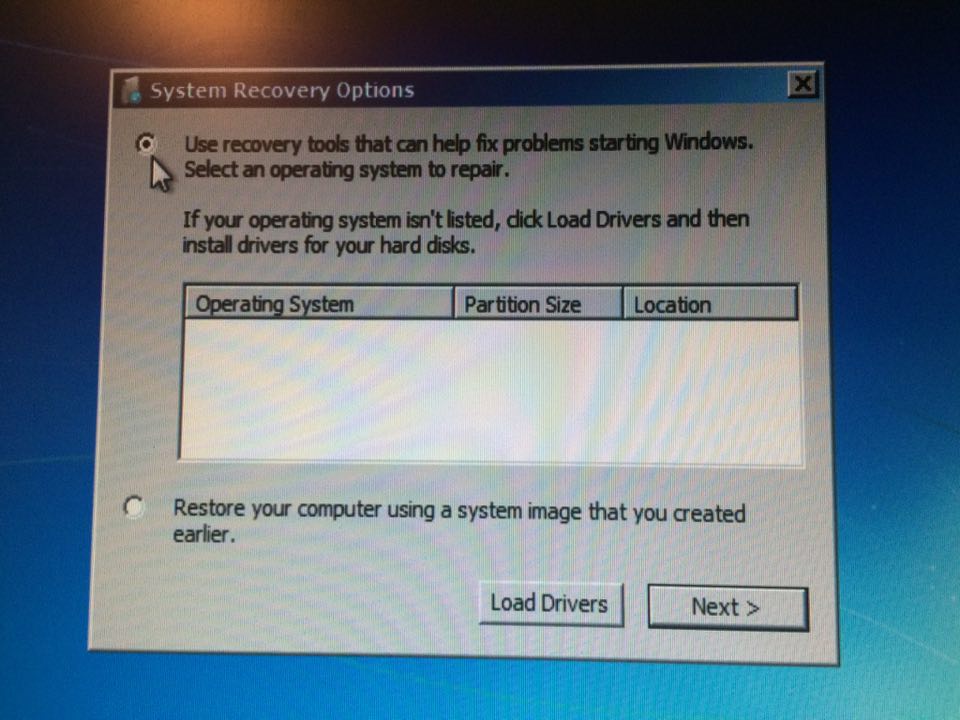
Also, below is what happened when I tried running the repair from the disk, that doesn't look good.

z8losoO.jpg
 

My Computer

Computer type
PC/Desktop
OS
Windows 7 Ultimate x64
I would try the one-time boot option to see if i could choose which device to boot from, and see if i can boot from either the Disk 0 or Disk 1
It looks like they each have a Windows OS installed on your PC, to me.

The key to display the "one-time boot option" should be displayed when you boot the PC
, or be documented in your PC/motherboard manual.

You can't just "copy" everything from a Windows OS partition.
You should make BACKUP IMAGES of everything.
I use Macrium Reflect free for backup images.
Macrium Reflect Free

The advice from whs in post #6 may be easiest and work, but you might need to do a startup repair after the image restore.
 

My Computer

Computer type
PC/Desktop
Computer Manufacturer/Model Number
home built
OS
Multi-Boot W7_Pro_x64 W8.1_Pro_x64 W10_Pro_x64 +Linux_VMs +Chromium_VM
CPU
AMD Athlon II x4 620
Motherboard
Gigabyte GA-MA785G-UD3H
Memory
6GB GSkill DDR2 800
Graphics Card(s)
AMD 4670 GPU + AMD 4200 IGP
Sound Card
on board Realtek ALC889A
Monitor(s) Displays
RCA 40" LCD TV, Insignia 32" LCD TV, HP 15" LCD monitor
Screen Resolution
1680 x 1050
Hard Drives
OCZ Vertex 3 120GB,
Samsung F3 1TB (3),
Several others - WD, Seagate, Hitachi, ...
PSU
Corsair 500 W
Case
Rosewill mid tower
Cooling
CM 90mm rifle
Keyboard
Gyration wireless, Logitech wireless, Dell USB wired
Mouse
Gyration wireless, Logitech wireless, V7 USB wired
Internet Speed
Spectrum - 100Mbps D / 10Mbps U
Antivirus
Avast, MBAM3, EMET, WinPatrol
Browser
Pale Moon, Firefox, IE
Other Info
2 multi-boot PC's
Mainly HTPC/Office/Gen purpose (no gaming).
Trendnet USB KVM.
LG DVD burner/Blue Ray Player.
Tray system for removable SATA backup drives.

Not currently OCd, under-volted.
I use Hybrid sleep, rarely re-boot or shutdown.

Hauppauge HD-PVR, Avermedia PCIe TV Tuner, Hauppauge PCI TV Tuner.
you could also image disk0 and dump the images on the Mushkin.

Sorry whs I missed this, I'm not very technically savvy with software so I might misunderstand what I should do. So what I would do is just reimage my disk0, that would clear everything on the disk and install a fresh image or fresh OS right? And then just move everything from that disk onto my Mushkin?

I would try the one-time boot option to see if i could choose which device to boot from, and see if i can boot from either the Disk 0 or Disk 1
It looks like they each have a Windows OS installed on your PC, to me.

The key to display the "one-time boot option" should be displayed when you boot the PC
, or be documented in your PC/motherboard manual.

You can't just "copy" everything from a Windows OS partition.
You should make BACKUP IMAGES of everything.
I use Macrium Reflect free for backup images.
Macrium Reflect Free

The advice from whs in post #6 may be easiest and work, but you might need to do a startup repair after the image restore.

Right right, I meant backup I was just being lazy.

I have been using the one time boot option to successfully boot my computer but it only works if I select Disk 0, and it will take about a minute for it to work IF it works. About half of the time I select Disk 0 it doesn't boot and will hang on the Windows logo. Now if I select Disk 1, it will not boot at all and will hang on a black screen with a flashing cursor in the upper left corner.
 

My Computer

Computer type
PC/Desktop
OS
Windows 7 Ultimate x64
Back
Top