Windows Photo Viewer permision problems - please help!

farolita

New member
Local time
8:05 AM
Messages
2
Hi all,

Just got a new PC with Windows 7 last week and have hit a glitch I hope you can help me sort out!

When I right-click on photos within my library in Windows Explorer and select preview, Windows Photo Viewer opens and shows them without problems.

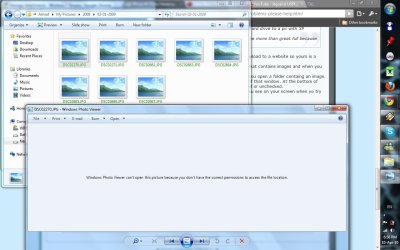
However, when I am trying to upload photos to a website and try to do the same within the Explorer window, it will not preview. A message appears saying 'Windows Photo Viewer can't open this picture because you don't have the correct permissions to access the file location'.

To be clearer on when exactly this happens: when you click on 'Add Photos' on the website, the Explorer 'Open' window appears so you can select the photo to upload. If I then right-click on a photo and select 'Preview' so I can decide whether the photo is of good enough quality, that's when the problem occurs.

Hope this is all clear enough but if not please say so and I will try again! Thanks in advance for your wisdom!
 

My Computer

Computer Manufacturer/Model Number
Dell Inspiron
OS
Windows 7
Anyone?
 

My Computer

Computer Manufacturer/Model Number
Dell Inspiron
OS
Windows 7
im having the same exact problem. if anyone knows how to fix it please share!!!
 

My Computer

OS
none
If its not to late to try to help I'll have a go. Can't see why this topic has missed out on a reply sooner. I missed it altogether and for that I apologise.
Can you say what website you are uploading to so that i can try to replicate this.
 

My Computer

Computer type
PC/Desktop
OS
Microsoft Windows 7 Home Premium 64-bit 7601 Multiprocessor Free Service Pack 1
CPU
Intel(R) Core(TM) i7-3770 CPU @ 3.40GHz
Motherboard
ASUSTeK COMPUTER INC. P8H77-M
Memory
8.00 GB
Graphics Card(s)
Intel(R) HD Graphics 4000
Sound Card
On Board
Monitor(s) Displays
Dell 24"
Screen Resolution
1920 x 1080
Hard Drives
(1) INTEL SSDSC2CT180A3 ATA Device (2) ST500DM002-1BD142 ATA Device (3) WDC WD3200AAKS-75L9A0 ATA Device (4) Generic- Compact Flash USB Device (5) Generic- MS/MS-Pro USB Device (6) Generic- SD/MMC USB Device (7) Generic- SM/xD-Picture USB
PSU
500w Corsair
Case
Cooler Master
Cooling
3 Fans
Keyboard
Logitech MK300
Mouse
Logitech WOM
Internet Speed
75Mb
Antivirus
Norton 360
Browser
Firefox, Opera, IE
hey mitchell65,
im not trying to upload them on any site all im trying to do is simply open them pictures!
i worked on this problem for more than 4 hours and that didn't get me anywhere, there for i think the only solution for that problem is to replug the external hard drive to a pc with XP windows on it and reconfigure administrative settings!
if you got another way to figure that out via Windows 7, i would be more than great full because these days its kinda hard to find a pc/laptop with XP on it :P
 

My Computer

OS
none
hey mitchell65,
im not trying to upload them on any site all im trying to do is simply open them pictures!
i worked on this problem for more than 4 hours and that didn't get me anywhere, there for i think the only solution for that problem is to replug the external hard drive to a pc with XP windows on it and reconfigure administrative settings!
if you got another way to figure that out via Windows 7, i would be more than great full because these days its kinda hard to find a pc/laptop with XP on it :P
Sorry i was replying to the original poster here and he was trying to upload to a website so yours is a different problem.
So what you are saying now is that you have an external hard drive that contains images and when you plug that into your Windows 7 PC you can't view the images.
If that is the case, first does the PC recognise the Ext HD. If so can you open a folder containg an image. If yes right click on the image file and click Properties at the bottom of that window. At the bottom of that window there are two boxes next to Attributes. Are they checked or unchecked.
If none of the above applies please give full details of exactly what you see on your screen when yo try to open a file, screen shots would be helpful.
 

My Computer

Computer type
PC/Desktop
OS
Microsoft Windows 7 Home Premium 64-bit 7601 Multiprocessor Free Service Pack 1
CPU
Intel(R) Core(TM) i7-3770 CPU @ 3.40GHz
Motherboard
ASUSTeK COMPUTER INC. P8H77-M
Memory
8.00 GB
Graphics Card(s)
Intel(R) HD Graphics 4000
Sound Card
On Board
Monitor(s) Displays
Dell 24"
Screen Resolution
1920 x 1080
Hard Drives
(1) INTEL SSDSC2CT180A3 ATA Device (2) ST500DM002-1BD142 ATA Device (3) WDC WD3200AAKS-75L9A0 ATA Device (4) Generic- Compact Flash USB Device (5) Generic- MS/MS-Pro USB Device (6) Generic- SD/MMC USB Device (7) Generic- SM/xD-Picture USB
PSU
500w Corsair
Case
Cooler Master
Cooling
3 Fans
Keyboard
Logitech MK300
Mouse
Logitech WOM
Internet Speed
75Mb
Antivirus
Norton 360
Browser
Firefox, Opera, IE
thanks man :)
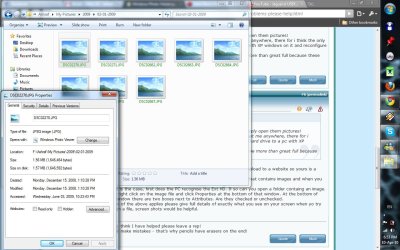
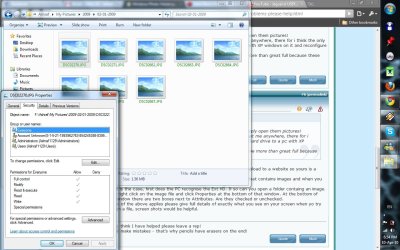
well yeah my external is recognized by the PC, and not all of the pictures are "band" from seeing, others that are located in different folders are just fine. i took some screen shoots of the properties, with the "general" and "security".
notice in screen shot "2.jpg" in the "group or user names" there is a user with a question mark on it, i think thats my problem but i cant remove that "group" and changing the owner of the file also didn't help because the group with the question mark dose not allow full control of the file to other "groups"
if there is any other kind of info that i can provide you please don't hesitate to ask. i really appreciate it!
 

Attachments

  • 1.jpg
    1.jpg
    134.7 KB · Views: 735
  • 2.jpg
    2.jpg
    137.4 KB · Views: 668
  • 3.jpg
    3.jpg
    99.7 KB · Views: 643

My Computer

OS
none

My Computer

Computer type
PC/Desktop
OS
Microsoft Windows 7 Home Premium 64-bit 7601 Multiprocessor Free Service Pack 1
CPU
Intel(R) Core(TM) i7-3770 CPU @ 3.40GHz
Motherboard
ASUSTeK COMPUTER INC. P8H77-M
Memory
8.00 GB
Graphics Card(s)
Intel(R) HD Graphics 4000
Sound Card
On Board
Monitor(s) Displays
Dell 24"
Screen Resolution
1920 x 1080
Hard Drives
(1) INTEL SSDSC2CT180A3 ATA Device (2) ST500DM002-1BD142 ATA Device (3) WDC WD3200AAKS-75L9A0 ATA Device (4) Generic- Compact Flash USB Device (5) Generic- MS/MS-Pro USB Device (6) Generic- SD/MMC USB Device (7) Generic- SM/xD-Picture USB
PSU
500w Corsair
Case
Cooler Master
Cooling
3 Fans
Keyboard
Logitech MK300
Mouse
Logitech WOM
Internet Speed
75Mb
Antivirus
Norton 360
Browser
Firefox, Opera, IE
thanks man :)
well yeah my external is recognized by the PC, and not all of the pictures are "band" from seeing, others that are located in different folders are just fine. i took some screen shoots of the properties, with the "general" and "security".
notice in screen shot "2.jpg" in the "group or user names" there is a user with a question mark on it, i think thats my problem but i cant remove that "group" and changing the owner of the file also didn't help because the group with the question mark dose not allow full control of the file to other "groups"
if there is any other kind of info that i can provide you please don't hesitate to ask. i really appreciate it!

http://www.sevenforums.com/tutorials/1911-take-ownership-shortcut.html

Be sure and then give yourself permission. Just taking ownership means you can change permissions. You might find that you need to give yourself permissions.

Take ownership of the entire external drive.
 
Last edited:

My Computer

Computer Manufacturer/Model Number
Toshiba Satellite S875D-S7239 laptop
OS
MS Windows 7 Ultimate SP1 64-bit
CPU
AMD A10-4600M
Motherboard
AMD Pumori (Socket FT1)
Memory
6.00 GB Dual-Channel DDR3 @ 798MHz (11-11-12-28)
Graphics Card(s)
AMD Radeon HD 7660G
Sound Card
High Definition Audio Device
Monitor(s) Displays
Generic PnP Monitor (1600x900@60Hz)
Screen Resolution
1600x900@60Hz
Hard Drives
SSD 119GB Corsair CSSD-V128GB2 ATA Device
Keyboard
Standard PS/2 Keyboard
Mouse
HP Wireless Optical Mobile Mouse Model FHA-3410
Internet Speed
What the local pub, local coffee shop offers.
Other Info
Optical Drive:MATSHITA BD-CMB UJ160B ATA Device


Also have an Asus ha1002xp netbook with Win 7 Ultimate installed.
Are you running Chrome with UAC on? If that that is good but this issue might occur because Chrome is running in a low privileged sandbox. Its access outside of this is severely limited. Any process spawned from Chrome will share the same restrictive sandbox.
 

My Computer

Computer type
PC/Desktop
Computer Manufacturer/Model Number
Alienware Aurora ALX R4
OS
Windows 10 Pro (x64)
CPU
Intel Core i7-3930K (3.2GHz - 4.5GHz)
Motherboard
Alienware Aurora-R4 x79
Memory
4x Samsung 4GB PC3-12800 DDR3 (16GB 1600MHz)
Graphics Card(s)
Nvidia Geforce GTX 690
Sound Card
SteelSeries Siberia Elite
Monitor(s) Displays
Dell UltraSharp U3011
Screen Resolution
2560x1600
Hard Drives
Samsung 850 Pro 256 GB, Seagate 1TB Desktop Hybrid HDD, 2x Western Digital 4TB Green HDD
PSU
875W Some Dell PSU <.<
Case
Alienware Aurora ALX
Cooling
Custom Liquid Cooling (EK CPU & GPU blocks) dual EK 480RAD
Keyboard
Logitech G710+ Mechanical
Mouse
Logitech G700s
Internet Speed
Verizon Fios (50 mbps average)
Other Info
Server: Intel NUC D54250WYK: i5-4250U, 16GB, 256 GB mSATA, Windows Server 2012 R2
Back
Top