windows photo viewer problem

mickey megabyte

мιи∂вℓσ&#9
the same image displayed in photoshop and windows photo viewer...

live_or_dead.jpg


colour photos aren't as badly affected - white is the worst. windows live viewer also has same problem.

image thumbnails appear fine in windows explorer...

anyone else seen this, or better, know how to fix it?

i've already tried sfc /scannow - "Windows Resource Protection did not find any integrity violations."
 

My Computer

Computer Manufacturer/Model Number
mickey megabyte 1234
OS
ultimate 64 sp1
CPU
i5 2500K [email protected]
Motherboard
MSI P67A-GD53
Memory
8 gigs GSkill Ripjaws 1600
Graphics Card(s)
amd hd6950
Sound Card
creative x-fi gamer
Monitor(s) Displays
samsung 24"
Screen Resolution
1920x1080
Hard Drives
ocz vertex 2e 60 gig, samsung f3 1tb, buffalo 2tb ext
PSU
antec 550
Case
antec three hundred
Cooling
i'm a cooling fan
Keyboard
saitek eclipse ii
Mouse
logitech g3
Internet Speed
about 4 Mbps
Other Info
i love win7
SOLVED!

google was my friend!

"The symptom is likely to occur after update of incompatible monitor driver, especially on Samsung LCD flat panel monitor driver update via Windows Update. The cause for the error is the usage of incorrect color profile for the monitor in Color Management setting."

i really am getting weary of windows updating my drivers..back to diy approach methinks...
 

My Computer

Computer Manufacturer/Model Number
mickey megabyte 1234
OS
ultimate 64 sp1
CPU
i5 2500K [email protected]
Motherboard
MSI P67A-GD53
Memory
8 gigs GSkill Ripjaws 1600
Graphics Card(s)
amd hd6950
Sound Card
creative x-fi gamer
Monitor(s) Displays
samsung 24"
Screen Resolution
1920x1080
Hard Drives
ocz vertex 2e 60 gig, samsung f3 1tb, buffalo 2tb ext
PSU
antec 550
Case
antec three hundred
Cooling
i'm a cooling fan
Keyboard
saitek eclipse ii
Mouse
logitech g3
Internet Speed
about 4 Mbps
Other Info
i love win7
yap I used samsung LCD monitor too (P2350).
so, how to fix this windows photo editor error?
 

My Computer

OS
windows 7 ultimate
Monitor(s) Displays
SAMSUNG P2350
hi cupumanic, welcome to sevenforums

i've just replied to your pm, but here's a bit more detail for other people if they have the same problem...

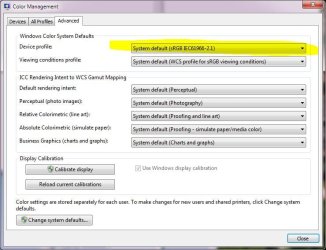
right-click on desktop >> screen resolution >> advanced settings >> color management

i can't remember now exactly what i did next, it was 4 weeks ago...

but i think i deleted the samsung profile, and i made 'sRGB display profile' the default.

reboot, and colour should be ok.

*edit* or you can go to to the advanced tab of colour management, and set default device profile there - see attached

BUT windows update will try to update it again, so check for updates, if you see anything like 'samsung display monitor color profile', then untick the box and right-click >> hide update so you won't see it again.
 

Attachments

  • coloman.JPG
    coloman.JPG
    85.4 KB · Views: 1,609
Last edited:

My Computer

Computer Manufacturer/Model Number
mickey megabyte 1234
OS
ultimate 64 sp1
CPU
i5 2500K [email protected]
Motherboard
MSI P67A-GD53
Memory
8 gigs GSkill Ripjaws 1600
Graphics Card(s)
amd hd6950
Sound Card
creative x-fi gamer
Monitor(s) Displays
samsung 24"
Screen Resolution
1920x1080
Hard Drives
ocz vertex 2e 60 gig, samsung f3 1tb, buffalo 2tb ext
PSU
antec 550
Case
antec three hundred
Cooling
i'm a cooling fan
Keyboard
saitek eclipse ii
Mouse
logitech g3
Internet Speed
about 4 Mbps
Other Info
i love win7

My Computer

OS
Win 7 Ultimate x64
CPU
Intel i7 950 OC'd @ 4.0Ghz (SpeedStep ON)
Motherboard
ASUS P6X58D-E BIOS 0303
Memory
3x2GB Patriot Extreme Viper II Sector 7 DDR3 @ 1600mhz
Graphics Card(s)
ATI MSI 5870 900mhz/1300mhz
Sound Card
Onboard Realtek ALC889
Monitor(s) Displays
2 X 24" BenQ G2412HD
Screen Resolution
1920x1080p
Hard Drives
Intel X25-M 80 GB (SSD)
W.D. Caviar Black 1TB (SATA)
Seagate Barricuda 1TB (SATA)
Seagate Barricuda 80GB (SATA)
PSU
Corsair AX850
Case
Antec 1200
Cooling
Lots and Lots of Air!
Keyboard
Razer Lycosa
Mouse
Microsoft Sidewinder
Internet Speed
25Mbps/1Mbps
Back
Top