Windows picture editor auto save problem

alik11

New member
Local time
5:47 AM
Messages
3
I just edited a load of pictures in Windows picture editor, which automatically 'auto save's and now I can't find them. Where do they save to? Is there an option to 'file' 'save' so \I can save to the file I want on my pc?

Help!

Thanks...
 

My Computer

OS
Windows 7
I just edited a load of pictures in Windows picture editor, which automatically 'auto save's and now I can't find them. Where do they save to? Is there an option to 'file' 'save' so \I can save to the file I want on my pc?

Help!

Thanks...

Did you name your pictures? If you did, just look for them via the start menu.
 

My Computer

Computer Manufacturer/Model Number
Hewlett-Packard HPG72 Notebook PC
OS
Windows 7 Ultimate 64-bit
CPU
Intel Core i3
Memory
4 GB
Graphics Card(s)
Intel GMA HD
Did you name your pictures? If you did, just look for them via the start menu.[/QUOTE]

It wouldn't let me name them. It just autosaved the file name from when I imported from my camera, ie P001.jpg. I just looked in my Start menu and there are a few there, but when I click on them it just gives me an error message.

AND...I just realised that I was using Windows Live Photo Gallery, not picture editor as I said previous. I don't know if you have advice on that instead? I went into 'Windows Live' via my hotmail and no pics there either.
 

My Computer

OS
Windows 7
I think Windows Live Photo gallery overwrites your originals but keeps a backup of the originals for a period (not sure how long) which you can only recover from within WLPG (revert to Original button).
 

My Computer

Computer type
Laptop
Computer Manufacturer/Model Number
Hewlett-Packard/G62-107SA Notebook
OS
Microsoft Windows 7 Home Premium 64-bit Service Pack 1
CPU
Intel(R) Core(TM) i3 CPU M 330 @ 2.13GHz
Motherboard
Hewlett-Packard 1425
Memory
8 GB DDR3
Graphics Card(s)
Intel(R) HD Graphics
Sound Card
Realtek High Definition Audio
Monitor(s) Displays
Builtin
Screen Resolution
1366 x 768 x 32 bits (4294967296 colors) @ 60 Hz
Hard Drives
250 GB SATA Hard Disk Drive 7200 rpm
2TB Seagate GoFlex USB 2 Drive
1TB Iomega Prestige USB 2 Drive
1.5TB Iomega Prestige USB 2 Drive (Samsung)
2TB WD MyBook Live NAS.
Mouse
Logitech Anywhere MX
Internet Speed
152 Mbs download 10 Mbs upload
Antivirus
Norton 360
Browser
Chrome
Yes, but I don't want to revert to original, I want to find and save the edited pictures to my hardrive. its the edited pictures I can't find anywhere on my pc. I'm running out of time (4 hours doing this now), so I guess I'll have to reload them from my camera and use a non-Microsoft option. Thanks for suggestions anyway!
 

My Computer

OS
Windows 7
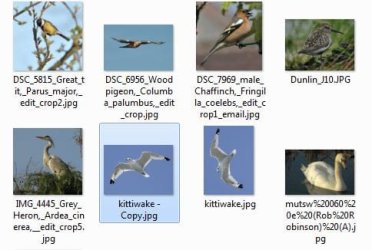
The edited pictures replaces the original. Look at the screenshots. I created kitiwake - copy as a copy of kitiwake. I then used WLPG to rotate Kitiwake and exited WLPG. It had auto-saved the rotated Kitiwake in place of the original.

Capture.JPG

I then used WLPG to rotate it back.

Capture2.JPG
 

My Computer

Computer type
Laptop
Computer Manufacturer/Model Number
Hewlett-Packard/G62-107SA Notebook
OS
Microsoft Windows 7 Home Premium 64-bit Service Pack 1
CPU
Intel(R) Core(TM) i3 CPU M 330 @ 2.13GHz
Motherboard
Hewlett-Packard 1425
Memory
8 GB DDR3
Graphics Card(s)
Intel(R) HD Graphics
Sound Card
Realtek High Definition Audio
Monitor(s) Displays
Builtin
Screen Resolution
1366 x 768 x 32 bits (4294967296 colors) @ 60 Hz
Hard Drives
250 GB SATA Hard Disk Drive 7200 rpm
2TB Seagate GoFlex USB 2 Drive
1TB Iomega Prestige USB 2 Drive
1.5TB Iomega Prestige USB 2 Drive (Samsung)
2TB WD MyBook Live NAS.
Mouse
Logitech Anywhere MX
Internet Speed
152 Mbs download 10 Mbs upload
Antivirus
Norton 360
Browser
Chrome
Back
Top