Solved Windows Platform Update KB2670838 Broke MUCH More Than Just Aero!

HeroKhar

New member
Local time
4:40 PM
Messages
9
Hello SevenForums,

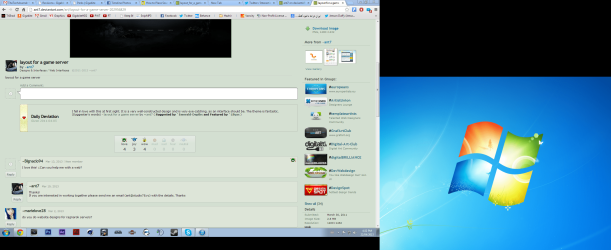
I am a new user, this is my very first post here despite being a fairly regular user here without an account. Anyway, I have come you to solve a major problem I've had for ~2 weeks. After the IE10 update and Platform Update KB2670838, I have scoured the Internet for an answer to my problems AFTER installing the "innocent" update. Now how is this a problem? Well many have said simply uninstall the updates, restart a couple times and you're good to go. Unfortunately after installation, it was too late. I have a rather different case that I haven't found online. Not only did it break Aero Glass and it's beautiful slick features and animations, it made my PC rather "bland" by locking me in Windows Basic. I can live with that, sort of. The second very unusual problem is that it added a second "ghost" display, keep in mind before and after the update, I had no secondary display connected, so whenever out of habit I move to the bottom right corner to display desktop (currently using Win+D) I can't as I feel like there's a second display and the cursor shifts to that one. Even my screenshots are messed up, showing the "ghost" display: http://imgur.com/1zn6V4a (same as the attachment)

I even had a graphics driver update for my GeForce FT 440, rolled that back and still nothing. I check all my settings, (Right-clicking "Computer">Properties>"Adjust for best appearance"), ran the System Rating test again, checked the windows appearance settings and clicked a few Aero Glass themes to see if it would return and no dice. Unfortunately it didn't make a system restore point, nor did I know it would cause all this so I could make one, so I cannot revert to a past point, I don't even have ANY after the 13th of May, 2013.

~~~~~~~~~~~~~~~~~~~~~~~~~~~~~~~~~~~~~~~~~~~~~~~~
Thank you for taking the time to read this, if it is too long, here's the summary:

-Update KB2670838 and IE10 install broke Aero Glass
-After uninstalling said updates, many reboots, frustration and more, Aero Glass has still not returned
-Stuck on Windows Basic Theme
-Checked all Aero Glass and appearance settings and all are set to Aero Glass, yet no dice
-Installed graphics card update for GeForce GT 440, then rolled it back and still no dice


Thank you for your time!
~HeroKhar
 

Attachments
  • oh snap.PNG
    oh snap.PNG
    349.4 KB · Views: 9
Last edited:

My Computer My Computer

At a glance

Windows 7 Ultimate x64Intel Core2 Quad4GBGeForce 440
Computer type
PC/Desktop
Computer Manufacturer/Model Number
HP
OS
Windows 7 Ultimate x64
CPU
Intel Core2 Quad
Memory
4GB
Graphics Card(s)
GeForce 440
Antivirus
AVG 2013
Browser
Chrome
Welcome to Seven Forums HeroKhar. Let's look at one problem at a time. The "ghost" display.

Right click on desktop> Screen resolution

Do you show more then one display?

Right click on desktop> Nvidia control panel> Select a task> Display> Set up multiple displays

Do you show more then one display?

Let's start there. Post screenshots if yes on either/both

http://www.sevenforums.com/tutorials/9733-screenshots-files-upload-post-seven-forums.html

A Guy
 

My Computer My Computer

At a glance

Windows 10 Home x64INTEL Core i5-750 Quad-Core 3.37GHzHyperX Fury Black Series 8GB (2 x 4GB) 1866MhzEVGA GeForce GTX 750 Superclocked 1GB 128-Bit...
Computer type
PC/Desktop
OS
Windows 10 Home x64
CPU
INTEL Core i5-750 Quad-Core 3.37GHz
Motherboard
ASUS P7P55D
Memory
HyperX Fury Black Series 8GB (2 x 4GB) 1866Mhz
Graphics Card(s)
EVGA GeForce GTX 750 Superclocked 1GB 128-Bit GDDR5
Monitor(s) Displays
LG 32MA68HY 32" IPS
Screen Resolution
1920 x 1080
Hard Drives
Samsung 840 Evo 120GB, SEAGATE 500GB Barracuda® 7200.12, SATA 3 Gb/s, 7200 RPM, 16MB cache
PSU
ANTEC TruePower New TP-550, 80 PLUS, 550W
Case
ANTEC Three Hundred Illusion
Cooling
COOLER MASTER Hyper 212 Plus, 4 x 120mm 1 x 140mm Noctua's
Internet Speed
85 + Mbps
Antivirus
Avast
Browser
Vivaldi
Welcome to Seven Forums HeroKhar. Let's look at one problem at a time. The "ghost" display.

Right click on desktop> Screen resolution

Do you show more then one display?

Right click on desktop> Nvidia control panel> Select a task> Display> Set up multiple displays

Do you show more then one display?

Let's start there. Post screenshots if yes on either/both

http://www.sevenforums.com/tutorials/9733-screenshots-files-upload-post-seven-forums.html

A Guy

Hello Sir!

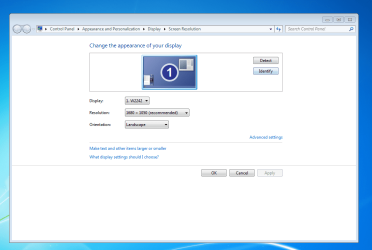
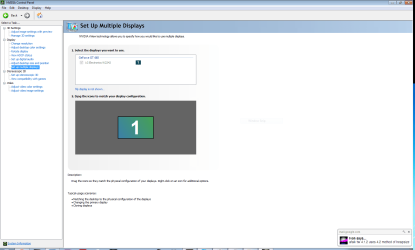
Thanks for the reply, I am a power user, therefore I have checked these settings already and they're fine. With that, here are the screenshots you've kindly requested. Not sure how useful they may be.

Thanks,
HeroKhar
 

Attachments

  • number 1.PNG
    number 1.PNG
    43.8 KB · Views: 1
  • number 2.PNG
    number 2.PNG
    40.5 KB · Views: 2

My Computer My Computer

At a glance

Windows 7 Ultimate x64Intel Core2 Quad4GBGeForce 440
Computer type
PC/Desktop
Computer Manufacturer/Model Number
HP
OS
Windows 7 Ultimate x64
CPU
Intel Core2 Quad
Memory
4GB
Graphics Card(s)
GeForce 440
Antivirus
AVG 2013
Browser
Chrome
OK, we always need to establish what's been done, posters "level", etc. ;)

If you open Device manager and expand Monitors, is there only one listed?

While we're at it, for the aero issue.

Open task manager, is dwm.exe showing in processes tab? The Themes service is started and set to automatic?

A Guy
 

My Computer My Computer

At a glance

Windows 10 Home x64INTEL Core i5-750 Quad-Core 3.37GHzHyperX Fury Black Series 8GB (2 x 4GB) 1866MhzEVGA GeForce GTX 750 Superclocked 1GB 128-Bit...
Computer type
PC/Desktop
OS
Windows 10 Home x64
CPU
INTEL Core i5-750 Quad-Core 3.37GHz
Motherboard
ASUS P7P55D
Memory
HyperX Fury Black Series 8GB (2 x 4GB) 1866Mhz
Graphics Card(s)
EVGA GeForce GTX 750 Superclocked 1GB 128-Bit GDDR5
Monitor(s) Displays
LG 32MA68HY 32" IPS
Screen Resolution
1920 x 1080
Hard Drives
Samsung 840 Evo 120GB, SEAGATE 500GB Barracuda® 7200.12, SATA 3 Gb/s, 7200 RPM, 16MB cache
PSU
ANTEC TruePower New TP-550, 80 PLUS, 550W
Case
ANTEC Three Hundred Illusion
Cooling
COOLER MASTER Hyper 212 Plus, 4 x 120mm 1 x 140mm Noctua's
Internet Speed
85 + Mbps
Antivirus
Avast
Browser
Vivaldi
OK, we always need to establish what's been done, posters "level", etc. ;)

If you open Device manager and expand Monitors, is there only one listed?

While we're at it, for the aero issue.

Open task manager, is dwm.exe showing in processes tab? The Themes service is started and set to automatic?

A Guy

I understand what you mean, of course that's necessary ;) As for Device Manager, I didn't think of that nor Desktop Window Manager process check. There's only one monitor (Generic PnP) and oddly, dwm.exe IS running yet no dice with Aero unfortunately. Completely stumped. I really do appreciate your time with this Sir!

Thanks,
HeroKhar
 

My Computer My Computer

At a glance

Windows 7 Ultimate x64Intel Core2 Quad4GBGeForce 440
Computer type
PC/Desktop
Computer Manufacturer/Model Number
HP
OS
Windows 7 Ultimate x64
CPU
Intel Core2 Quad
Memory
4GB
Graphics Card(s)
GeForce 440
Antivirus
AVG 2013
Browser
Chrome

My Computer My Computer

At a glance

Windows 10 Home x64INTEL Core i5-750 Quad-Core 3.37GHzHyperX Fury Black Series 8GB (2 x 4GB) 1866MhzEVGA GeForce GTX 750 Superclocked 1GB 128-Bit...
Computer type
PC/Desktop
OS
Windows 10 Home x64
CPU
INTEL Core i5-750 Quad-Core 3.37GHz
Motherboard
ASUS P7P55D
Memory
HyperX Fury Black Series 8GB (2 x 4GB) 1866Mhz
Graphics Card(s)
EVGA GeForce GTX 750 Superclocked 1GB 128-Bit GDDR5
Monitor(s) Displays
LG 32MA68HY 32" IPS
Screen Resolution
1920 x 1080
Hard Drives
Samsung 840 Evo 120GB, SEAGATE 500GB Barracuda® 7200.12, SATA 3 Gb/s, 7200 RPM, 16MB cache
PSU
ANTEC TruePower New TP-550, 80 PLUS, 550W
Case
ANTEC Three Hundred Illusion
Cooling
COOLER MASTER Hyper 212 Plus, 4 x 120mm 1 x 140mm Noctua's
Internet Speed
85 + Mbps
Antivirus
Avast
Browser
Vivaldi
I'm usually reticent to go straight to the System File Checker, especially in Customization as it will reset most customizations, but it could speak to both problems.

http://www.sevenforums.com/tutorials/1538-sfc-scannow-command-system-file-checker.html

Please, Sir is not necessary, Bill or A Guy ;)

A Guy

Thanks again for your lightening-fast response, unfortunately I had done that already with the results coming up as negative for any integrity violations.

Thank you Bill, appreciate the suggestion, my apologies for using your time.

Thanks,
HeroKhar
 

My Computer My Computer

At a glance

Windows 7 Ultimate x64Intel Core2 Quad4GBGeForce 440
Computer type
PC/Desktop
Computer Manufacturer/Model Number
HP
OS
Windows 7 Ultimate x64
CPU
Intel Core2 Quad
Memory
4GB
Graphics Card(s)
GeForce 440
Antivirus
AVG 2013
Browser
Chrome
No apologies, that's what we're here for. You have a puzzler. I am assuming you don't have a system restore point from before this began? I know most are not thrilled to restore to a point 2 weeks ago, but you can see what programs are affected, and your documents would remain. A Guy
 

My Computer My Computer

At a glance

Windows 10 Home x64INTEL Core i5-750 Quad-Core 3.37GHzHyperX Fury Black Series 8GB (2 x 4GB) 1866MhzEVGA GeForce GTX 750 Superclocked 1GB 128-Bit...
Computer type
PC/Desktop
OS
Windows 10 Home x64
CPU
INTEL Core i5-750 Quad-Core 3.37GHz
Motherboard
ASUS P7P55D
Memory
HyperX Fury Black Series 8GB (2 x 4GB) 1866Mhz
Graphics Card(s)
EVGA GeForce GTX 750 Superclocked 1GB 128-Bit GDDR5
Monitor(s) Displays
LG 32MA68HY 32" IPS
Screen Resolution
1920 x 1080
Hard Drives
Samsung 840 Evo 120GB, SEAGATE 500GB Barracuda® 7200.12, SATA 3 Gb/s, 7200 RPM, 16MB cache
PSU
ANTEC TruePower New TP-550, 80 PLUS, 550W
Case
ANTEC Three Hundred Illusion
Cooling
COOLER MASTER Hyper 212 Plus, 4 x 120mm 1 x 140mm Noctua's
Internet Speed
85 + Mbps
Antivirus
Avast
Browser
Vivaldi
No apologies, that's what we're here for. You have a puzzler. I am assuming you don't have a system restore point from before this began? I know most are not thrilled to restore to a point 2 weeks ago, but you can see what programs are affected, and your documents would remain. A Guy

I did also check my restore points, none were created just before the update, nor any before April 13th, which I updated April 10th. Now that I check it...those two are gone, assuming the PC deleted them in order to save space which is rather odd. Not sure about a virus either, I do have AVG anivirus installed and scans every so often, but this all happened immediately after updating. I am thinking of backing up everything and making a system image (not even a restore point!) onto the external HDD I use for backup then reinstalling Windows completely or even (possibly) upgrading to Windows 8. I have many Photoshop and Video projects on this PC, so reinstalling Windows would be a huge royal pain, but if it's to fix these problems, I guess it's worth it, but that's my last resort. Again, thank you very much for your valuable time, Bill. I really appreciate it!

Thanks,
HeroKhar
 

My Computer My Computer

At a glance

Windows 7 Ultimate x64Intel Core2 Quad4GBGeForce 440
Computer type
PC/Desktop
Computer Manufacturer/Model Number
HP
OS
Windows 7 Ultimate x64
CPU
Intel Core2 Quad
Memory
4GB
Graphics Card(s)
GeForce 440
Antivirus
AVG 2013
Browser
Chrome
Before a clean install, a repair install may be a better alternative. I see a plethora of issues caused by KB2670838, including aero, gaming displays, even black background in office apps. I have yet to find any fix beyond most uninstalling the update. You might wait and see if other members don't chime in here, we are all over the world.

http://www.sevenforums.com/tutorials/3413-repair-install.html

I'll keep looking. A Guy
 

My Computer My Computer

At a glance

Windows 10 Home x64INTEL Core i5-750 Quad-Core 3.37GHzHyperX Fury Black Series 8GB (2 x 4GB) 1866MhzEVGA GeForce GTX 750 Superclocked 1GB 128-Bit...
Computer type
PC/Desktop
OS
Windows 10 Home x64
CPU
INTEL Core i5-750 Quad-Core 3.37GHz
Motherboard
ASUS P7P55D
Memory
HyperX Fury Black Series 8GB (2 x 4GB) 1866Mhz
Graphics Card(s)
EVGA GeForce GTX 750 Superclocked 1GB 128-Bit GDDR5
Monitor(s) Displays
LG 32MA68HY 32" IPS
Screen Resolution
1920 x 1080
Hard Drives
Samsung 840 Evo 120GB, SEAGATE 500GB Barracuda® 7200.12, SATA 3 Gb/s, 7200 RPM, 16MB cache
PSU
ANTEC TruePower New TP-550, 80 PLUS, 550W
Case
ANTEC Three Hundred Illusion
Cooling
COOLER MASTER Hyper 212 Plus, 4 x 120mm 1 x 140mm Noctua's
Internet Speed
85 + Mbps
Antivirus
Avast
Browser
Vivaldi
Before a clean install, a repair install may be a better alternative. I see a plethora of issues caused by KB2670838, including aero, gaming displays, even black background in office apps. I have yet to find any fix beyond most uninstalling the update. You might wait and see if other members don't chime in here, we are all over the world.

http://www.sevenforums.com/tutorials/3413-repair-install.html

I'll keep looking. A Guy

Thank you Bill for your speedy reply. I had also looked into the problems and there's indeed a very long list of issues that this nasty update has caused. I will definitely look into the repair install and prepare my computer for it. I highly appreciate the valuable time you have put into helping me, I will see what I can do and will keep tabs on this thread.

Thanks,
HeroKhar
 

My Computer My Computer

At a glance

Windows 7 Ultimate x64Intel Core2 Quad4GBGeForce 440
Computer type
PC/Desktop
Computer Manufacturer/Model Number
HP
OS
Windows 7 Ultimate x64
CPU
Intel Core2 Quad
Memory
4GB
Graphics Card(s)
GeForce 440
Antivirus
AVG 2013
Browser
Chrome
Just as a test, boot to safe mode and see if your mouse still goes off screen. Not sure if you can try a screen shot in safe mode. Do you have a 2nd monitor to hook up? Started searching "phantom monitors", but most either had a 2nd monitor at some point, had the phantom showing in device manager, or resolution settings, etc. A Guy
 

My Computer My Computer

At a glance

Windows 10 Home x64INTEL Core i5-750 Quad-Core 3.37GHzHyperX Fury Black Series 8GB (2 x 4GB) 1866MhzEVGA GeForce GTX 750 Superclocked 1GB 128-Bit...
Computer type
PC/Desktop
OS
Windows 10 Home x64
CPU
INTEL Core i5-750 Quad-Core 3.37GHz
Motherboard
ASUS P7P55D
Memory
HyperX Fury Black Series 8GB (2 x 4GB) 1866Mhz
Graphics Card(s)
EVGA GeForce GTX 750 Superclocked 1GB 128-Bit GDDR5
Monitor(s) Displays
LG 32MA68HY 32" IPS
Screen Resolution
1920 x 1080
Hard Drives
Samsung 840 Evo 120GB, SEAGATE 500GB Barracuda® 7200.12, SATA 3 Gb/s, 7200 RPM, 16MB cache
PSU
ANTEC TruePower New TP-550, 80 PLUS, 550W
Case
ANTEC Three Hundred Illusion
Cooling
COOLER MASTER Hyper 212 Plus, 4 x 120mm 1 x 140mm Noctua's
Internet Speed
85 + Mbps
Antivirus
Avast
Browser
Vivaldi
Just as a test, boot to safe mode and see if your mouse still goes off screen. Not sure if you can try a screen shot in safe mode. Do you have a 2nd monitor to hook up? Started searching "phantom monitors", but most either had a 2nd monitor at some point, had the phantom showing in device manager, or resolution settings, etc. A Guy

Hello Bill, thanks for your reply, I will try booting onto Safe Mode when I get the chance, defnitely something to try. I am beginning to think that the update my have remove my Windows 7 Graphics Stacks were removed and replaced with Windows 8's, then Win8's was removed after uninstalling the updates (IE10 and Platform Update) and Win7's not restored. Windows 8's Graphics Stack doesn't have Aero Glass, so it's just not there to support it and the necessary processes are running (dwm.exe, etc) but as there aren't the Stacks, it cannot be displayed. Is there any way of putting the Win7 Stacks back? I think it was a part of DirectX or something and not standalone, but I am not totally sure.

I am probably not making sense here (It's late at night haha) but that's another thing I can come up with. I hope you can make sense of it and hopefully give my a response :)

Thanks again for your time!
HeroKhar
 

My Computer My Computer

At a glance

Windows 7 Ultimate x64Intel Core2 Quad4GBGeForce 440
Computer type
PC/Desktop
Computer Manufacturer/Model Number
HP
OS
Windows 7 Ultimate x64
CPU
Intel Core2 Quad
Memory
4GB
Graphics Card(s)
GeForce 440
Antivirus
AVG 2013
Browser
Chrome
The repair install would have the best chance of restoring anything missing. If you have never had windows 8, I don't see any way that update would have that effect. It is a precursor to IE10, but not as it relates to Windows 8. A Guy
 

My Computer My Computer

At a glance

Windows 10 Home x64INTEL Core i5-750 Quad-Core 3.37GHzHyperX Fury Black Series 8GB (2 x 4GB) 1866MhzEVGA GeForce GTX 750 Superclocked 1GB 128-Bit...
Computer type
PC/Desktop
OS
Windows 10 Home x64
CPU
INTEL Core i5-750 Quad-Core 3.37GHz
Motherboard
ASUS P7P55D
Memory
HyperX Fury Black Series 8GB (2 x 4GB) 1866Mhz
Graphics Card(s)
EVGA GeForce GTX 750 Superclocked 1GB 128-Bit GDDR5
Monitor(s) Displays
LG 32MA68HY 32" IPS
Screen Resolution
1920 x 1080
Hard Drives
Samsung 840 Evo 120GB, SEAGATE 500GB Barracuda® 7200.12, SATA 3 Gb/s, 7200 RPM, 16MB cache
PSU
ANTEC TruePower New TP-550, 80 PLUS, 550W
Case
ANTEC Three Hundred Illusion
Cooling
COOLER MASTER Hyper 212 Plus, 4 x 120mm 1 x 140mm Noctua's
Internet Speed
85 + Mbps
Antivirus
Avast
Browser
Vivaldi
The repair install would have the best chance of restoring anything missing. If you have never had windows 8, I don't see any way that update would have that effect. It is a precursor to IE10, but not as it relates to Windows 8. A Guy

Hey Bill, it's been a while since I've been on the forums. But I just reinstalled Windows 7. I did a 100% clean install and backup beforehand of course. I decided it was time to do one anyway and that my PC had been way past the point of being repairable through a repair install so I did a clean install to speed it up (it was sluggish) and just get back on my feet with my trusty PC :)

Thank you so much for your help, I really appreciate it! All my problems are fixed, got Aero Glass, more responsive and just overall better which is expected from a brand new installation. Thanks again for your kind and thoughtful assistance, I hope to see you again some time on the forums!

Best wishes,
HeroKhar
 

My Computer My Computer

At a glance

Windows 7 Ultimate x64Intel Core2 Quad4GBGeForce 440
Computer type
PC/Desktop
Computer Manufacturer/Model Number
HP
OS
Windows 7 Ultimate x64
CPU
Intel Core2 Quad
Memory
4GB
Graphics Card(s)
GeForce 440
Antivirus
AVG 2013
Browser
Chrome
Good to hear. A suggestion may be to make system images of it in it's current state, after updates, and programs, etc. A better starting point then a clean install in the future, just a thought. Glad you are motoring along again as usual ;)

A Guy
 

My Computer My Computer

At a glance

Windows 10 Home x64INTEL Core i5-750 Quad-Core 3.37GHzHyperX Fury Black Series 8GB (2 x 4GB) 1866MhzEVGA GeForce GTX 750 Superclocked 1GB 128-Bit...
Computer type
PC/Desktop
OS
Windows 10 Home x64
CPU
INTEL Core i5-750 Quad-Core 3.37GHz
Motherboard
ASUS P7P55D
Memory
HyperX Fury Black Series 8GB (2 x 4GB) 1866Mhz
Graphics Card(s)
EVGA GeForce GTX 750 Superclocked 1GB 128-Bit GDDR5
Monitor(s) Displays
LG 32MA68HY 32" IPS
Screen Resolution
1920 x 1080
Hard Drives
Samsung 840 Evo 120GB, SEAGATE 500GB Barracuda® 7200.12, SATA 3 Gb/s, 7200 RPM, 16MB cache
PSU
ANTEC TruePower New TP-550, 80 PLUS, 550W
Case
ANTEC Three Hundred Illusion
Cooling
COOLER MASTER Hyper 212 Plus, 4 x 120mm 1 x 140mm Noctua's
Internet Speed
85 + Mbps
Antivirus
Avast
Browser
Vivaldi
Good to hear. A suggestion may be to make system images of it in it's current state, after updates, and programs, etc. A better starting point then a clean install in the future, just a thought. Glad you are motoring along again as usual ;)

A Guy

Of course, I should do that. I will keep it in mind for the future as it would be VERY helpful. Thank you for your help! :)

~HeroKhar
 

My Computer My Computer

At a glance

Windows 7 Ultimate x64Intel Core2 Quad4GBGeForce 440
Computer type
PC/Desktop
Computer Manufacturer/Model Number
HP
OS
Windows 7 Ultimate x64
CPU
Intel Core2 Quad
Memory
4GB
Graphics Card(s)
GeForce 440
Antivirus
AVG 2013
Browser
Chrome
Back
Top