Linkofpower
New member
- Local time
- 3:43 PM
- Messages
- 5
.. I've been at this all day, but windows 7's networking capability is just.. hilariously oversimplified to the point it's mystifying.
I have a connection, using a Linksys 160N router with DD-WRT, I get a solid enough signal.. runs fine.. but it randomly disconnects every couple hours/minutes/seconds.. lol
I tried seeing if it was the router or network card, so I switched to ubuntu, ran for 14 hours under load with no issue, so.. definitely 7.
I came back, tried to identify the problem, and noticed that every time it disconnected, two networks popped up, Bluecat and Bluecat-guest -- my neighbors router, both at 1 bar of signal strength (My network stays at 4)
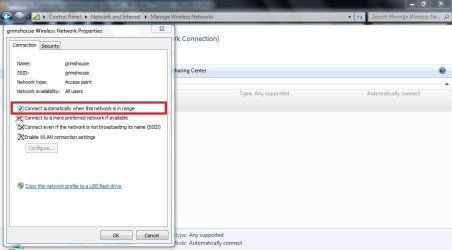
Further investigation shows that Bluecat is set to connect automatically, and unchecking that box does nothing, it's just checked the moment I click away.
SO I tried telling it to diagnose the adapter, it manually disconnected my internet connection and told me the problem was that Bluecat-Guest was set to manually connect.. yea, right. wut.
So, my problem seems to be that Windows 7 thinks I should be connecting to my neighbors connection and not my own.. is there some way to tell windows to ignore the other connection, or just.. not find it?
I have a connection, using a Linksys 160N router with DD-WRT, I get a solid enough signal.. runs fine.. but it randomly disconnects every couple hours/minutes/seconds.. lol
I tried seeing if it was the router or network card, so I switched to ubuntu, ran for 14 hours under load with no issue, so.. definitely 7.
I came back, tried to identify the problem, and noticed that every time it disconnected, two networks popped up, Bluecat and Bluecat-guest -- my neighbors router, both at 1 bar of signal strength (My network stays at 4)
Further investigation shows that Bluecat is set to connect automatically, and unchecking that box does nothing, it's just checked the moment I click away.
SO I tried telling it to diagnose the adapter, it manually disconnected my internet connection and told me the problem was that Bluecat-Guest was set to manually connect.. yea, right. wut.
So, my problem seems to be that Windows 7 thinks I should be connecting to my neighbors connection and not my own.. is there some way to tell windows to ignore the other connection, or just.. not find it?
My Computer
At a glance
7
- OS
- 7