Windows programs automatically "fading out"

PSXStar

New member
Local time
10:11 AM
Messages
3
Hi guys, I recently noticed that my computer (Win 7) have this issue where by it seems to automatically "fade out" after a super short "idle time".

Lets say i'm reading a forum thread... I am using my mouse scroll button to scroll down, stopped to read the thread, after which I wanted to resume my scrolling but it seems like the OS do not think that my active window is still firefox. I have to left click on the page again, before it allow me to resume scrolling. Even when i am typing this question, after pausing for maybe 3-4s, the OS might "switch out" again and I have to click on the textbox before i can resume typing in it.

This issue have happened on all my programs, even when I am playing StarCraft2, sometimes it just stop taking my SC2 as the active program and i have to just simply left click again to make SC2 my active window..

I hope someone understand what is this problem as I myself do not know how to begin searching on how to troubleshoot this..

Any help will be appreciated!
 

My Computer

Computer Manufacturer/Model Number
Desktop
OS
Windows 7 Home Premium 64Bits SP1
CPU
Intel i5 760 2.8GHZ
Motherboard
ASUS P7P55D-LE
Memory
Kingston 8GB DDR3 1333Mhz
Graphics Card(s)
MSI GTX460
Monitor(s) Displays
LG W2252TQ
Hard Drives
WD 640GB Black
PSU
Seasonic M12-II 520W
Case
Coolermaster Elite 310 Black Edition Chassis
Keyboard
Filco 104 Keys
Mouse
SteelSeries XAI
Internet Speed
Fibre Optic
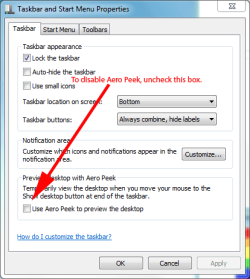
Are you rolling your mouse to the lower right corner of the screen by chance? If so, that is the "Aero peek" button...it's clearly visible.
 

My Computer

Computer Manufacturer/Model Number
Custom
OS
Windows 7 Ultimate RTM (Technet)
CPU
3.00 gigahertz Intel Core2 Duo E8400
Motherboard
ASUSTeK Computer INC. P5K/EPU Rev 1.xx
Memory
4GB
Graphics Card(s)
ATI Radeon X1950 Pro
Sound Card
Built in HD Audio
Monitor(s) Displays
22" Gateway LCD
Screen Resolution
1920 x 1200
Hard Drives
ST3160023A [Hard drive] (160.04 GB) -- drive 0, rev 8.01, ST3500630AS [Hard drive] (500.11 GB) -- drive 2, rev 3.AAK
ST3500630AS [Hard drive] (500.11 GB) -- drive 1, rev 3.AAK
Keyboard
Logitech G11
Mouse
Microsoft Wireless Laser Mouse 5000
Internet Speed
13.44 Mbps
If it is Aero Peek and you want to disable it, right-click the taskbar and uncheck the Aero Peek checkbox then click Apply.

TB.PNG
 

My Computer

Computer Manufacturer/Model Number
HP Pavilion Elite 495UK
OS
Windows 7 Ultimate SP1 64-Bit
CPU
Intel Core i7 870 @ 2.93GHz
Motherboard
MSI 2A9C (CPU1)
Memory
8Gb Dual-Channel DDR3 @ 664MHz
Graphics Card(s)
nVidia GeForce GTX 460 1024MB dedicated RAM
Sound Card
Realtek HD Audio
Monitor(s) Displays
HP2310i
Screen Resolution
1920 x 1080
Hard Drives
1x1954GB Hitachi HDS22020ALA 330 (RAID), 1x1954GB Hitachi External for backup and storage
PSU
460W
Case
HP Elite
Cooling
Air cooled
Keyboard
Logitech K750 solar-powered keyboard
Mouse
Logitech Wireless M180 mouse
Internet Speed
2Mb
Other Info
Pure Avanti Flow Internet Radio with iPod Dock, 64Gb iPod, HP USB Speakers, Sony MDR-V500 Headphones, Sony Vaio F-Series Laptop
its not the aero peek, I have already disabled it but I still have the same issue.
 

My Computer

Computer Manufacturer/Model Number
Desktop
OS
Windows 7 Home Premium 64Bits SP1
CPU
Intel i5 760 2.8GHZ
Motherboard
ASUS P7P55D-LE
Memory
Kingston 8GB DDR3 1333Mhz
Graphics Card(s)
MSI GTX460
Monitor(s) Displays
LG W2252TQ
Hard Drives
WD 640GB Black
PSU
Seasonic M12-II 520W
Case
Coolermaster Elite 310 Black Edition Chassis
Keyboard
Filco 104 Keys
Mouse
SteelSeries XAI
Internet Speed
Fibre Optic
Is your monitor set to sleep in advanced power options?
 

My Computer

Computer type
PC/Desktop
Computer Manufacturer/Model Number
Home Built Desktop By DataTech
OS
Windows 7 Ultimate X64 SP1
CPU
Intel i5-2550K, Differing ~4.4-4.8GHz No built in GPU
Motherboard
ASUS P8Z68-V PRO/GEN3
Memory
16GB G.Skill Sniper 1866MHz @ 2133MHz 2x8GB
Graphics Card(s)
ASUS GTX650TIB-DC2OC-2GD5, (650TI Boost)
Sound Card
Onboard Realtek 5-1
Monitor(s) Displays
Samsung P2570HD
Screen Resolution
1920x1080
Hard Drives
Samsung 840 Pro 256GB SSD for OS, 500GB Seagate Constellation (Enterprise drive) for Data
PSU
Corsair HX650W
Case
Inwin Dragon Rider
Cooling
Hyper 212 EVO w/two Noctua fans, push-pull, @1300 RPM
Keyboard
E-Z Eyes, bright yellow keys with large characters
Mouse
steelseries SENSEI Laser Pro Gaming
Internet Speed
48-51Mbs Mbs down, 11 Mbs up Xfinity Cable
Antivirus
Norton Internet Security 2013
Browser
IE 10, Opera, Pale Moon if needed
Other Info
4 case fans, LG BluRay-RE, ASUS DVD-RW, Mr. Fusion power supply, 1.21 gigawatts.

My Computer

Computer Manufacturer/Model Number
Desktop
OS
Windows 7 Home Premium 64Bits SP1
CPU
Intel i5 760 2.8GHZ
Motherboard
ASUS P7P55D-LE
Memory
Kingston 8GB DDR3 1333Mhz
Graphics Card(s)
MSI GTX460
Monitor(s) Displays
LG W2252TQ
Hard Drives
WD 640GB Black
PSU
Seasonic M12-II 520W
Case
Coolermaster Elite 310 Black Edition Chassis
Keyboard
Filco 104 Keys
Mouse
SteelSeries XAI
Internet Speed
Fibre Optic
I'm having the exact same problem. If anyone has found out an answer PLEASE let me know!!!
 

My Computer

OS
windows 7

My Computer

Computer type
PC/Desktop
Computer Manufacturer/Model Number
Home Built Desktop By DataTech
OS
Windows 7 Ultimate X64 SP1
CPU
Intel i5-2550K, Differing ~4.4-4.8GHz No built in GPU
Motherboard
ASUS P8Z68-V PRO/GEN3
Memory
16GB G.Skill Sniper 1866MHz @ 2133MHz 2x8GB
Graphics Card(s)
ASUS GTX650TIB-DC2OC-2GD5, (650TI Boost)
Sound Card
Onboard Realtek 5-1
Monitor(s) Displays
Samsung P2570HD
Screen Resolution
1920x1080
Hard Drives
Samsung 840 Pro 256GB SSD for OS, 500GB Seagate Constellation (Enterprise drive) for Data
PSU
Corsair HX650W
Case
Inwin Dragon Rider
Cooling
Hyper 212 EVO w/two Noctua fans, push-pull, @1300 RPM
Keyboard
E-Z Eyes, bright yellow keys with large characters
Mouse
steelseries SENSEI Laser Pro Gaming
Internet Speed
48-51Mbs Mbs down, 11 Mbs up Xfinity Cable
Antivirus
Norton Internet Security 2013
Browser
IE 10, Opera, Pale Moon if needed
Other Info
4 case fans, LG BluRay-RE, ASUS DVD-RW, Mr. Fusion power supply, 1.21 gigawatts.
Back
Top