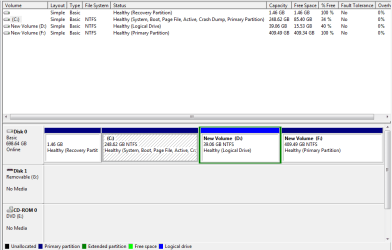
I installed a new hard drive twice the size (750GB v 320GB) of the old one. I have Windows 7 64bit on the primary partition and Windows Vista on a secondary partition in order to run some old 32bit programs. I tried to expand the existing partitions to take advantage of the nearly 400GB of unallocated space. Performing this operation in Disk Management from the primary partition, I clicked on the partition I wanted to expand. I should then be able to click on the “Extend Volume” option to extend into the unallocated space. However, the Extend Volume option is grayed out – I can’t click it.
What gives?
What gives?
My Computer
- Computer Manufacturer/Model Number
- Toshiba Satellite C655
- OS
- Windows 7 Home Premium 64bit
- CPU
- Pentium(R) Dual-Core CPU T4500 @ 2.30GHz
- Memory
- 4.00 GB