

Just recently I started getting an error when I boot up and I have no idea how to get rid of it. I have tried finding it in the task manager processes and stopping its startup, but I couldn't not find it there, and I also can't find it in the location specified by the error.
In the picture below is the error that pops up when I start up my computer (on right)
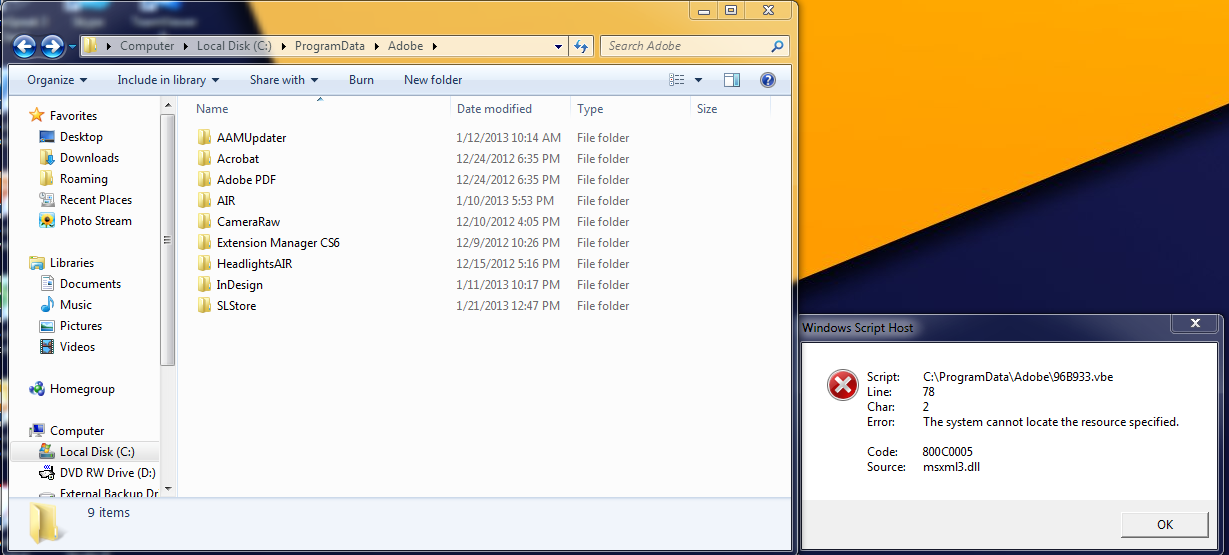
Anyone have a quick fix or know the steps necessary to remove this error?
In the picture below is the error that pops up when I start up my computer (on right)
Anyone have a quick fix or know the steps necessary to remove this error?
My Computer
- Computer Manufacturer/Model Number
- Home Built
- OS
- Windows 7 Ultimate x64 / Windows 8 Pro x64
- CPU
- Intel i7-3770k
- Motherboard
- Asus Sabertooth Z77
- Memory
- 4x4GB 1600mhz
- Graphics Card(s)
- EVGA SuperClocked+ GeForce GTX 660 Ti 3GB 192-bit
- Sound Card
- Integrated Realtek ALC892
- Monitor(s) Displays
- x2 Asus VW-246H 24" LCD
- Screen Resolution
- 1920x1080
- Hard Drives
- SanDisk Extreme 256GB SSD; 1TB External Seagate HDD
- PSU
- Corsair HX750
- Case
- Corsair Obsidian 650D
- Cooling
- Thermaltake Water 2.0 Extreme Water Cooling
- Keyboard
- Logitech K750 Black Wireless solar-powered
- Mouse
- Logitech M705 Wireless Laser Marathon