windows security cente can't be started

jomon

New member
Local time
1:26 PM
Messages
1
hi
i am unable to start windows security service centre

my laptop is dell inspiron
intel celeron
and i have installed avira antivirus and thats all the information i have.

thank you

jomon
 

My Computer

Computer Manufacturer/Model Number
Dell Inspiron
OS
windows 7
CPU
intel celeron
Motherboard
intel celeron
Memory
1 gb
Graphics Card(s)
no
Sound Card
no
Monitor(s) Displays
14
Hello jomon and welcome to Seven Forums.

Couple of things you can try:

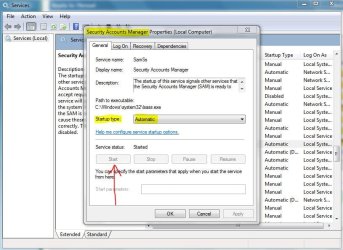
1. Make sure the security center services are started.
- Click the Start button > type services.msc in the search box > click enter.
- In the services dialog box that opens, use the Extended tab (lower left.) Scroll down to to the services called:
Security Accounts Manager
Security Center
- Both should have a Started status and Automatic Startup type.
- If they don't, double click one at a time to change to Automatic. Click Start button to get service to run. (If services are already started, the start button will be grayed out.) Reboot the computer for changed to take effect.

services.JPG services2.JPG

2. If this doesn't work you might have damaged or corrupt system files. Run a system file checker scan from an elevated command prompt (option two.) If problems are found, run the scan 3 times and reboot your computer after each scan.

http://www.sevenforums.com/tutorials/1538-sfc-scannow-command-system-file-checker.html

Please post back if anything helped or not.
 

My Computer

Computer type
Laptop
Computer Manufacturer/Model Number
Sony Vaio VPCEB47GM Laptop
OS
Win 7 Pro 64-bit
CPU
Intel i5 2.4 Ghz
Memory
8GB DDR3
Graphics Card(s)
Intel HD 3000
Sound Card
IDT High Definition
Monitor(s) Displays
15.6 WGXA Anti-Glare LED
Screen Resolution
1280x800
Hard Drives
640Gb 7200rpm
Antivirus
MSE
Browser
Opera (primary) with IE9 backup
Back
Top