Solved Window's Security Center cannot start.

johnwillyums

New member
Guru
Gold Member
VIP
Local time
7:49 PM
Messages
4,286
Location
Colne, Lancashire, UK
Hi folks,
I did a clean install of W7 x64 this week and have been setting everything back up all week.
A lot of updates have been coming down over the week and yesterday I finally got SP1 along with lots of securuty updates. Now security center won't start. I have a red cross on the flag logo on the task bar.
This gives me a message saying that security center won't start.
Also MSE won't open. It flashes open briefly, showing red, and closes instantly.
I've installed AVG to protect my pc but I'm concerned that something has gone amiss.
I've tried uninstalling and re installing MSE but it just won't open.
Anyone got any ideas on this.
Cheers, John
 

My Computer

Computer Manufacturer/Model Number
The Monolith. 3.1
OS
Windows 7 Home Premium 64 bit
CPU
i7 [email protected]
Motherboard
Gigabyte Z77-D3H
Memory
2x4GB Corsair Vegeance DDR3
Graphics Card(s)
XFX GTX 260 Black Edition
Sound Card
none-through large stereo hi fi
Monitor(s) Displays
Croosover 27MDP LED IPS Dell 2408 WFP
Screen Resolution
2560x1440 1920x1200
Hard Drives
1x Samsung 840Pro 128GB SSD
1x Samsung Spinpoint F1 1TB
PSU
Corsair AX 850 Watt
Case
Cooler Master ACTS 840
Cooling
Be Quiet! Dark Rock Pro
Keyboard
Enermax Aurora
Mouse
Logitech Ballmouse
Internet Speed
20MBPS
To start off, download and run the free malwarebytes antimalware. Run a full scan, let it clean whatever it wants, reboot, then let us know.
 

My Computer

Computer Manufacturer/Model Number
Too many to describe...
OS
Windows 7 x64 pro/ Windows 7 x86 Pro/ XP SP3 x86
Hi Bill2. I already ran MBytes and SUPERAntispyware scans. Picked up some adware but nothing else.
I just came in from work and booted up. I still have a cross on my flag and "Windows security center service can't be started" message.
If I try and open MSE it flashes up with red start box for a millisecond and it's then gone.
I might try system restore to before SP1 because it was all right before that.
What do you think? John:)
 

My Computer

Computer Manufacturer/Model Number
The Monolith. 3.1
OS
Windows 7 Home Premium 64 bit
CPU
i7 [email protected]
Motherboard
Gigabyte Z77-D3H
Memory
2x4GB Corsair Vegeance DDR3
Graphics Card(s)
XFX GTX 260 Black Edition
Sound Card
none-through large stereo hi fi
Monitor(s) Displays
Croosover 27MDP LED IPS Dell 2408 WFP
Screen Resolution
2560x1440 1920x1200
Hard Drives
1x Samsung 840Pro 128GB SSD
1x Samsung Spinpoint F1 1TB
PSU
Corsair AX 850 Watt
Case
Cooler Master ACTS 840
Cooling
Be Quiet! Dark Rock Pro
Keyboard
Enermax Aurora
Mouse
Logitech Ballmouse
Internet Speed
20MBPS
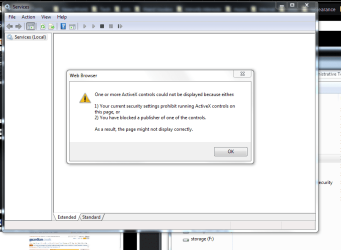
I just checked services via control panel and I get this. The plot thickens.
 

Attachments

  • services.PNG
    services.PNG
    30.5 KB · Views: 344

My Computer

Computer Manufacturer/Model Number
The Monolith. 3.1
OS
Windows 7 Home Premium 64 bit
CPU
i7 [email protected]
Motherboard
Gigabyte Z77-D3H
Memory
2x4GB Corsair Vegeance DDR3
Graphics Card(s)
XFX GTX 260 Black Edition
Sound Card
none-through large stereo hi fi
Monitor(s) Displays
Croosover 27MDP LED IPS Dell 2408 WFP
Screen Resolution
2560x1440 1920x1200
Hard Drives
1x Samsung 840Pro 128GB SSD
1x Samsung Spinpoint F1 1TB
PSU
Corsair AX 850 Watt
Case
Cooler Master ACTS 840
Cooling
Be Quiet! Dark Rock Pro
Keyboard
Enermax Aurora
Mouse
Logitech Ballmouse
Internet Speed
20MBPS
Did you try starting the security center service from the services mmc? Click Start orb, type services.msc, hit Enter. Scroll down to security center and make sure its started and set to start automatically at startup.

If that doesnt help run a sfc scan, you know how to do it.

Also try uninstalling and reinstalling mse.
 

My Computer

Computer Manufacturer/Model Number
Too many to describe...
OS
Windows 7 x64 pro/ Windows 7 x86 Pro/ XP SP3 x86
Hi Bill. Things are getting worse. I have 4 browsers installed and all of them are returning page errors. Just running VIPRERescue and it's taking ages.
It immediately told me that it's rootkit scan couldn't function so it may be one of those.
Sophos?
I'll try what you suggest when the scan has finished.

Thanks for your support, John
 

My Computer

Computer Manufacturer/Model Number
The Monolith. 3.1
OS
Windows 7 Home Premium 64 bit
CPU
i7 [email protected]
Motherboard
Gigabyte Z77-D3H
Memory
2x4GB Corsair Vegeance DDR3
Graphics Card(s)
XFX GTX 260 Black Edition
Sound Card
none-through large stereo hi fi
Monitor(s) Displays
Croosover 27MDP LED IPS Dell 2408 WFP
Screen Resolution
2560x1440 1920x1200
Hard Drives
1x Samsung 840Pro 128GB SSD
1x Samsung Spinpoint F1 1TB
PSU
Corsair AX 850 Watt
Case
Cooler Master ACTS 840
Cooling
Be Quiet! Dark Rock Pro
Keyboard
Enermax Aurora
Mouse
Logitech Ballmouse
Internet Speed
20MBPS
If I may ask, what prompted you to do the clean install in the first place? Did you reformat the drive before installing?
 

My Computer

Computer Manufacturer/Model Number
Dell Studio 15
OS
Windows 7 Ultimate 64 bit
Download DDS from one of these links:
Mirror 1 Mirror 2 Mirror 3
  • Disable any script blocking protection
  • Double click the dds icon to run the tool.
  • When done, DDS will open two (2) logs:
    1. DDS.txt
    2. Attach.txt <-- this will be minimized in the task tray
  • Save both reports to your desktop.
Include the contents of both logs in your new topic.
The scan will instruct you to post Attach.txt as an attachment
 

My Computer

Computer type
PC/Desktop
Computer Manufacturer/Model Number
Bruce ... somewhere in his 40's
OS
Windows 7 Ultimate 32bit SP1
CPU
Intel(R) Core(TM)2 Quad CPU @ 2.40GHz, 2400 MHz
Motherboard
INTEL/D975XBX2
Memory
4 GB
Graphics Card(s)
ATI Radeon HD 2600 Pro
Monitor(s) Displays
Samsung SyncMaster 914v
Screen Resolution
1280 x 1024
Hard Drives
2/500GB each ... ST3500630AS ATA Device.
One is not connected
PSU
Rocketfish 700 W
Case
G.Skill Gigabyte Chassis
Keyboard
Standard PS/2 Keyboard
Mouse
Microsoft PS/2 Mouse
Internet Speed
DSL
Antivirus
Avira Internet Security
Browser
IE 11
Other Info
ATI HDMI Audio
Thanks folks. Just running Sophos Antirootkit. struggling to post as all my browsers are screwing up. I may go to Linux and post from there.
 

My Computer

Computer Manufacturer/Model Number
The Monolith. 3.1
OS
Windows 7 Home Premium 64 bit
CPU
i7 [email protected]
Motherboard
Gigabyte Z77-D3H
Memory
2x4GB Corsair Vegeance DDR3
Graphics Card(s)
XFX GTX 260 Black Edition
Sound Card
none-through large stereo hi fi
Monitor(s) Displays
Croosover 27MDP LED IPS Dell 2408 WFP
Screen Resolution
2560x1440 1920x1200
Hard Drives
1x Samsung 840Pro 128GB SSD
1x Samsung Spinpoint F1 1TB
PSU
Corsair AX 850 Watt
Case
Cooler Master ACTS 840
Cooling
Be Quiet! Dark Rock Pro
Keyboard
Enermax Aurora
Mouse
Logitech Ballmouse
Internet Speed
20MBPS
Hmmn. Things seem to be ok on this browser at the moment (Lunascape6/Gecko) so I'll try and post again. Sophos is still running.
@Carolyn. I did the clean install (and formatted) because I was running a dul boot with Linux Mint and was going through GRUB initially and then into Windows boot loader.
Either this or the fact that I had a custom theme seemed to be preventing SP1 from installing. Also I like to do a clean install once a year.
@Jacee. Thanks, I'll try your suggestion and post the logs as soon as this rootkit scan is finished.
 

My Computer

Computer Manufacturer/Model Number
The Monolith. 3.1
OS
Windows 7 Home Premium 64 bit
CPU
i7 [email protected]
Motherboard
Gigabyte Z77-D3H
Memory
2x4GB Corsair Vegeance DDR3
Graphics Card(s)
XFX GTX 260 Black Edition
Sound Card
none-through large stereo hi fi
Monitor(s) Displays
Croosover 27MDP LED IPS Dell 2408 WFP
Screen Resolution
2560x1440 1920x1200
Hard Drives
1x Samsung 840Pro 128GB SSD
1x Samsung Spinpoint F1 1TB
PSU
Corsair AX 850 Watt
Case
Cooler Master ACTS 840
Cooling
Be Quiet! Dark Rock Pro
Keyboard
Enermax Aurora
Mouse
Logitech Ballmouse
Internet Speed
20MBPS
Hi. I've had to boot into Linux Mint, which is on another drive to post. Things are rapidly deteriorating in my Windows install, all the browsers are returning page errors, a lot of the system admin services won't display and various other issues.
My thought is to abandon this install. I only did it on Monday so it was only half set up anyway, as I only have the evenings to do stuff.
I need to avoid the same mistake again. Everything seemed fine at first so I'm tempted to think it was either an infected download from a legit site. I was putting on a lot of freeware, such as CCleaner, ISOrecorder, Rocket Dock etc etc.
Also coincident with this happening was me using EasyBCD to access my Linux install and the arrival of numerous security updates plus SP1. One of the updates appeared as cancelled but I didn't cancel it knowingly so either I did it accidently or I don't know what.
I reckon it will be easier to do another clean install as W7 is swiftly becoming unusable.
What do you think folks and thanks very much for your support, John
 

My Computer

Computer Manufacturer/Model Number
The Monolith. 3.1
OS
Windows 7 Home Premium 64 bit
CPU
i7 [email protected]
Motherboard
Gigabyte Z77-D3H
Memory
2x4GB Corsair Vegeance DDR3
Graphics Card(s)
XFX GTX 260 Black Edition
Sound Card
none-through large stereo hi fi
Monitor(s) Displays
Croosover 27MDP LED IPS Dell 2408 WFP
Screen Resolution
2560x1440 1920x1200
Hard Drives
1x Samsung 840Pro 128GB SSD
1x Samsung Spinpoint F1 1TB
PSU
Corsair AX 850 Watt
Case
Cooler Master ACTS 840
Cooling
Be Quiet! Dark Rock Pro
Keyboard
Enermax Aurora
Mouse
Logitech Ballmouse
Internet Speed
20MBPS
I reckon it will be easier to do another clean install as Windows 7 is swiftly becoming unusable.

I think that's a very good idea. Before you begin the re-installation (if you decide to do so), use your Linux box to download the security programs you will be using and save them to a flash drive. That way you can install them before you go online with the Windows 7 computer. ;)
 

My Computer

Computer Manufacturer/Model Number
Dell Studio 15
OS
Windows 7 Ultimate 64 bit
Well. I took the easy way out and I'm now in yet another clean install of Windows 7. I've only installed MSE and Google Chrome so far.
I think this time I'll wait until all the updates and SP1 are in before doing much else. I can reconnect my other two drives and access my media but I'll wait for SP1 before accessing Linux through EasyBCD.
I doubt that had anything to do with my problem but I can eliminate. Also I'll put very little software on until then as well. Just some utilities.
Thanks again for great support, John:D
 

My Computer

Computer Manufacturer/Model Number
The Monolith. 3.1
OS
Windows 7 Home Premium 64 bit
CPU
i7 [email protected]
Motherboard
Gigabyte Z77-D3H
Memory
2x4GB Corsair Vegeance DDR3
Graphics Card(s)
XFX GTX 260 Black Edition
Sound Card
none-through large stereo hi fi
Monitor(s) Displays
Croosover 27MDP LED IPS Dell 2408 WFP
Screen Resolution
2560x1440 1920x1200
Hard Drives
1x Samsung 840Pro 128GB SSD
1x Samsung Spinpoint F1 1TB
PSU
Corsair AX 850 Watt
Case
Cooler Master ACTS 840
Cooling
Be Quiet! Dark Rock Pro
Keyboard
Enermax Aurora
Mouse
Logitech Ballmouse
Internet Speed
20MBPS
Back
Top