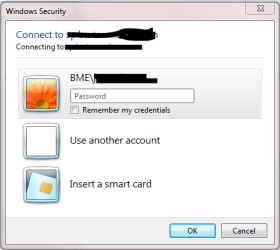
Windows Security Logon

Biaviian

New member
Local time
3:57 PM
Messages
2
I have an issue. How do I change the domain when the attached window pops up? As of now the domain defaults in as the computer name. This isn't an issue if you are only connecting to one domain all the time but that isn't real-world for consultants.

So, every time I connect to another client's share-point I have to change my user-name to be their domain name. For instance, in this example my computer name is BME but what if I have to connect to a domain that is ADS? This is the only issue I have with Windows 7 so any help would be appreciated!

attachment.php
 

Attachments

  • Windows Security.PNG
    Windows Security.PNG
    12.6 KB · Views: 3,634

My Computer

OS
Windows 7
Press "Use another account" then use ADS\username for the username.
 

My Computer

Computer Manufacturer/Model Number
Too many to list.
OS
XP, Seven, 2008R2
CPU
AMD, Intel, VIA
Motherboard
Various
Memory
Corsair, Kingston, etc.
Graphics Card(s)
ATI, NVIDIA
Monitor(s) Displays
Samsung
Hard Drives
Maxtor, Western Digital
Keyboard
qwerty
Internet Speed
22 Mb/s @ home, 1 Gb/s @ server
Other Info
All of my systems still run fastest on XP 32-bit for the most part. Win7 is fun to play with, but I still prefer XP for raw speed, security, and functionality.
Oh, I've never tried that. So you can change the domain by using it as part of your user name? Thanks. I'll have to give it a shot.
 

My Computer

OS
Windows 7
You're welcome.

Yes, you can specify domain two ways

domain\user

or

user@domain

also, in place of the domain you can substitute it for a computer name. It all depends on which credentials you know (the credentials of a computer versus credentials of the domain).
 

My Computer

Computer Manufacturer/Model Number
Too many to list.
OS
XP, Seven, 2008R2
CPU
AMD, Intel, VIA
Motherboard
Various
Memory
Corsair, Kingston, etc.
Graphics Card(s)
ATI, NVIDIA
Monitor(s) Displays
Samsung
Hard Drives
Maxtor, Western Digital
Keyboard
qwerty
Internet Speed
22 Mb/s @ home, 1 Gb/s @ server
Other Info
All of my systems still run fastest on XP 32-bit for the most part. Win7 is fun to play with, but I still prefer XP for raw speed, security, and functionality.
Back
Top