Windows security service not working!!!

Aravintharajan

New member
Member
Local time
1:00 AM
Messages
41
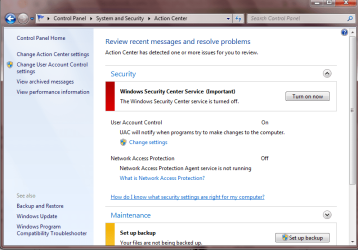
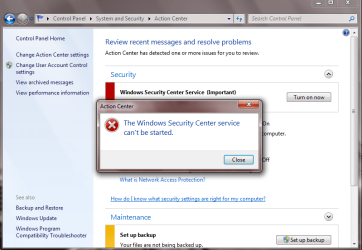
suddenly my Windows security service stopped working its not turning on........


it says turned off...........but its not switchin on..........
 

Attachments

  • Capture.PNG
    Capture.PNG
    42.5 KB · Views: 23
  • Capture1.PNG
    Capture1.PNG
    46.7 KB · Views: 17

My Computer

OS
windows 7
Motherboard
core2duo
Memory
2GB
Graphics Card(s)
256MB
Run a scan with MBAM.
 

My Computer

Computer Manufacturer/Model Number
Too many to describe...
OS
Windows 7 x64 pro/ Windows 7 x86 Pro/ XP SP3 x86
Download Malwarebytes here. Malwarebytes

Click the Free version at the top left of page.

Install then open. Click Update tab and update.

Click Scanner tab and select "Full" scan.

Remove/delete what ever it finds.

It will make a report. Save it to the desktop or where you can find it and please upload to this thread.
This will show you how to upload on the forum.
http://www.sevenforums.com/852738-post3.html

Mike
 

My Computer

Computer Manufacturer/Model Number
Hopalong/ Godzilla
OS
Windows7 Pro 64bit SP-1; Windows XP Pro 32bit
CPU
Intel Core i7-870 Lynnfield 2.93GHz LGA 1156 95W Quad-Core
Motherboard
ASUS P7P55D-E PRO
Memory
8GB@1400MHz Crucial Ballistix DDR3-1600 4x2GB
Graphics Card(s)
ASUS ENGTX460 DirectCU/2DI/1GD5 1GB 256-bit GDDR5
Sound Card
VIA Onboard
Monitor(s) Displays
Asus VS248H-P 24"; Samsung SyncMaster 941BW 19"ws
Screen Resolution
1920x1080; 1440x900
Hard Drives
Samsung 830 120GB SSD
Intel 320 120GB SSD
Western Digital Caviar Black WD7501AALS 750GB 7200 RPM SATA 3.0Gb/s
Western Digital Caviar Black WD6401AALS 640GB 7200 RPM SATA 3.0Gb/s
PSU
COOLER MASTER Silent Pro RS850-AMBAJ3-US 850W Modular
Case
COOLER MASTER HAF 932 RC-932-KKN5-GP Black
Cooling
Scythe "Mugen-2 Rev.B" (2 ScytheKaze-Jyuni PWM fans)
Keyboard
Logitech K-320
Mouse
Kensington
Antivirus
Avast Inernet Suite
Browser
IE 9 ; Chrome
ok folks somehow i ve found that it is due to csrss.exe now help me to clear it.......plpz thanks in advance.......
 

My Computer

OS
windows 7
Motherboard
core2duo
Memory
2GB
Graphics Card(s)
256MB
Hmm.....did you run the scan with MBAM? Does it ask you to reboot to clean the infection? Then reboot and let us know whether the infection comes back. Its not a pretty situation.
 

My Computer

Computer Manufacturer/Model Number
Too many to describe...
OS
Windows 7 x64 pro/ Windows 7 x86 Pro/ XP SP3 x86
this time i ve scanned usin MBAM.....but no infection was found but still i cant switch on......
 

My Computer

OS
windows 7
Motherboard
core2duo
Memory
2GB
Graphics Card(s)
256MB
So where exactly is csrss.exe indicated?
 

My Computer

Computer Manufacturer/Model Number
Too many to describe...
OS
Windows 7 x64 pro/ Windows 7 x86 Pro/ XP SP3 x86
its given in task manager wer i couldnt end its task..........and wen i googled it some said its like virus do u ve any idea abt it............and i can see csrss.exe twice in the task manager
 

My Computer

OS
windows 7
Motherboard
core2duo
Memory
2GB
Graphics Card(s)
256MB
Csrss is a legit windows component, located in C:\windows\system32. Right click on the process in the task manager, then click on "Open file location", if its system32 theres nothing to worry about. I just checked, I also have 2 csrss processes in my task manager.

Is your computer behaving wierdly E.g. are you getting virus notifications from the AV or mbam, or are webpages being redirected or are their random popup windows? If not, chill.
 

My Computer

Computer Manufacturer/Model Number
Too many to describe...
OS
Windows 7 x64 pro/ Windows 7 x86 Pro/ XP SP3 x86
its given in task manager wer i couldnt end its task..........and wen i googled it some said its like virus do u ve any idea abt it............and i can see csrss.exe twice in the task manager

What user is it running under and it's path?
 

My Computer

Computer Manufacturer/Model Number
HCL
OS
Winbdows 7 ultimate x64 | Ubuntu 12.04 x64 LTS
CPU
Core 2 Duo e7400 @ 2.90GHz
Motherboard
Gigabyte G31M-ES2L
Memory
3GB DDR2
Graphics Card(s)
Asus Nvidia GTX 560Ti 1GB
Sound Card
On-board
Monitor(s) Displays
HCL eZeeBee 18.5" LCD
Screen Resolution
1366x768 @ 60Hz
Hard Drives
Western Digital 320GB
PSU
Corsair CX500 V2 500W
Cooling
Stock
Keyboard
Stock
Mouse
Stock
Internet Speed
15-25kBps D/L | 10kBps U/L | Hey Don't laugh
no its not acting weird but the security center and windows defender is not workin...........


i cant get the path thing...........
 

My Computer

OS
windows 7
Motherboard
core2duo
Memory
2GB
Graphics Card(s)
256MB
ya its redirected to random pop windows plus i cant open windows security center and windows defender..........plz tell........
 

My Computer

OS
windows 7
Motherboard
core2duo
Memory
2GB
Graphics Card(s)
256MB
Well for one, run a full scan with MBAM again.

Also, click on Start orb, type services.msc. In the services console, locate Security center and make sure it is started and set to Automatic startup type. Also, make sure the dependencies- RPC and WMI are running and set to automatic startup.

And why cant you get the path? You just need to right click on the process and choose "Open file location".
 

My Computer

Computer Manufacturer/Model Number
Too many to describe...
OS
Windows 7 x64 pro/ Windows 7 x86 Pro/ XP SP3 x86
i ve opened the service and made security center RPC and WMI to automatic and gave start.............but the security center get back to disabled automatically......


finally wen give the open location nothing is opening..........
 

My Computer

OS
windows 7
Motherboard
core2duo
Memory
2GB
Graphics Card(s)
256MB
sorry got the location "C:\Windows\System32" for both.........
 

My Computer

OS
windows 7
Motherboard
core2duo
Memory
2GB
Graphics Card(s)
256MB
MBAM is still runing....and i ve did sfc long b4..............k can i get rid off by backuping reinstalling windows in C drive alone............and restoring it back........
 

My Computer

OS
windows 7
Motherboard
core2duo
Memory
2GB
Graphics Card(s)
256MB
Run sfc 3-4 times again.

And can you elaborate what webpages are being redirected to malicious sites?
 

My Computer

Computer Manufacturer/Model Number
Too many to describe...
OS
Windows 7 x64 pro/ Windows 7 x86 Pro/ XP SP3 x86
no no it was once redirecting but i scaned via escan........now its not redirecting.......i think i am goin to reinstall my os.........
 

My Computer

OS
windows 7
Motherboard
core2duo
Memory
2GB
Graphics Card(s)
256MB
Various types of malware can pretend to be csrss.exe. The malware can allow hackers to access your computer remotely and steal private information such as credit card numbers, bank data, birth dates and passwords. Some viruses, spyware and worms can also disguise themselves as csrss.exe. The original csrss.exe file is an essential part of the windows operating system and deleting it can cause stop errors. Use a updated malware remover to decipher whether your PC has been infected with a virus.
I would advise you to change all your passwords. Do a 'clean' install!
 

My Computer

Computer type
PC/Desktop
Computer Manufacturer/Model Number
Bruce ... somewhere in his 40's
OS
Windows 7 Ultimate 32bit SP1
CPU
Intel(R) Core(TM)2 Quad CPU @ 2.40GHz, 2400 MHz
Motherboard
INTEL/D975XBX2
Memory
4 GB
Graphics Card(s)
ATI Radeon HD 2600 Pro
Monitor(s) Displays
Samsung SyncMaster 914v
Screen Resolution
1280 x 1024
Hard Drives
2/500GB each ... ST3500630AS ATA Device.
One is not connected
PSU
Rocketfish 700 W
Case
G.Skill Gigabyte Chassis
Keyboard
Standard PS/2 Keyboard
Mouse
Microsoft PS/2 Mouse
Internet Speed
DSL
Antivirus
Avira Internet Security
Browser
IE 11
Other Info
ATI HDMI Audio
Back
Top