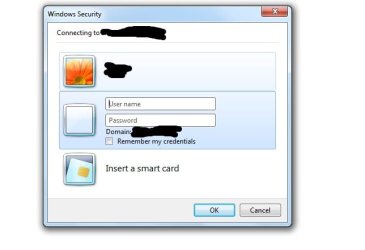
Windows Security

union122

New member
Local time
7:06 PM
Messages
10
Hello all,

Trying to help a user, Windows 7 Pro & IE8. User needs to log into a password protected site. When using IE, it prompts for username and password, the issue is with the username needs to have the log in without the domain before the username.
By default now windows security is using the domain of the user credentials of the network domain.
I tried the \ for removing the domain field. no luck yet.

Works in chrome and FF, as both browsers prompt for username and password doesnt add the domain to the username.
 

My Computer

OS
7 pro 64 nit
I don't know if this will help, but you could check the Credential Manager in Control Panel. You could also reset IE: Tools/Internet Options/Reset.
 

My Computer

Computer type
PC/Desktop
Computer Manufacturer/Model Number
OQO 2+
OS
Windows 8 Pro w/MC 32-bit
CPU
Intel Atom 1.86 GHz
Motherboard
OQO 2+
Memory
2 GB
Graphics Card(s)
Intel GMA 500
Sound Card
IDT
Monitor(s) Displays
LCD
Screen Resolution
800 x 480 (portable) 1280 x 1024 (docked)
Hard Drives
64 GB SSD
PSU
9 Ah Battery (portable) or OQO Brick (docked)
Case
Shirt Pocket Sized
Cooling
Tiny Fan
Keyboard
Slide out (portable) DiNovo Edge (docked)
Mouse
Eraser head (portable) Logitech Bluetooth (docked)
Internet Speed
WWAN or 802.11G (portable) T1 (docked)
Browser
IE 10
Other Info
DVD-RW OQO Docking Station
Thanks, tried both.. but didn't help. IE stills wants to have domain\username structure.
 

My Computer

OS
7 pro 64 nit
Thanks, tried both.. but didn't help. IE stills wants to have domain\username structure.
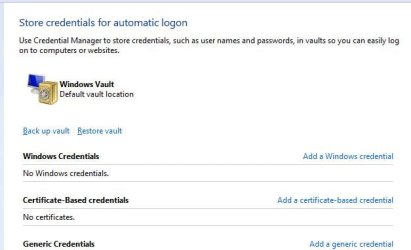
Does the credential manager look like this?
 

Attachments

  • Credential Mgr.JPG
    Credential Mgr.JPG
    29.3 KB · Views: 7

My Computer

Computer type
PC/Desktop
Computer Manufacturer/Model Number
OQO 2+
OS
Windows 8 Pro w/MC 32-bit
CPU
Intel Atom 1.86 GHz
Motherboard
OQO 2+
Memory
2 GB
Graphics Card(s)
Intel GMA 500
Sound Card
IDT
Monitor(s) Displays
LCD
Screen Resolution
800 x 480 (portable) 1280 x 1024 (docked)
Hard Drives
64 GB SSD
PSU
9 Ah Battery (portable) or OQO Brick (docked)
Case
Shirt Pocket Sized
Cooling
Tiny Fan
Keyboard
Slide out (portable) DiNovo Edge (docked)
Mouse
Eraser head (portable) Logitech Bluetooth (docked)
Internet Speed
WWAN or 802.11G (portable) T1 (docked)
Browser
IE 10
Other Info
DVD-RW OQO Docking Station
I would like to enter the username without the domain
 

Attachments

  • Untitled.jpg
    Untitled.jpg
    22.5 KB · Views: 4

My Computer

OS
7 pro 64 nit
That looks like the log in to a computer on a network. If you are going to a website, you should see the website's login page in your browser. What is the url you are going to in the browser?
 

My Computer

Computer type
PC/Desktop
Computer Manufacturer/Model Number
OQO 2+
OS
Windows 8 Pro w/MC 32-bit
CPU
Intel Atom 1.86 GHz
Motherboard
OQO 2+
Memory
2 GB
Graphics Card(s)
Intel GMA 500
Sound Card
IDT
Monitor(s) Displays
LCD
Screen Resolution
800 x 480 (portable) 1280 x 1024 (docked)
Hard Drives
64 GB SSD
PSU
9 Ah Battery (portable) or OQO Brick (docked)
Case
Shirt Pocket Sized
Cooling
Tiny Fan
Keyboard
Slide out (portable) DiNovo Edge (docked)
Mouse
Eraser head (portable) Logitech Bluetooth (docked)
Internet Speed
WWAN or 802.11G (portable) T1 (docked)
Browser
IE 10
Other Info
DVD-RW OQO Docking Station
Correct, it is a network / domain PC.. The url is an intranet site.
But works in FF and Chrome, as both browsers doesn't use windows auth.
thanks
 

My Computer

OS
7 pro 64 nit
I'm still confused. I have a website and a webcam admin page on my LAN but they still use a website address accessible from the LAN and the Internet. The only difference is that the webcam admin page puts up a login page when going there in the browser. Works fine in IE8. I had a problem with the login page once but was able to fix it with an IE8 reset. Perhaps if you provide the url the forum members can try it from our IE8 installs and take a screen shot of what we see and what happens when we attempt to log in w/o the correct login info.
 

My Computer

Computer type
PC/Desktop
Computer Manufacturer/Model Number
OQO 2+
OS
Windows 8 Pro w/MC 32-bit
CPU
Intel Atom 1.86 GHz
Motherboard
OQO 2+
Memory
2 GB
Graphics Card(s)
Intel GMA 500
Sound Card
IDT
Monitor(s) Displays
LCD
Screen Resolution
800 x 480 (portable) 1280 x 1024 (docked)
Hard Drives
64 GB SSD
PSU
9 Ah Battery (portable) or OQO Brick (docked)
Case
Shirt Pocket Sized
Cooling
Tiny Fan
Keyboard
Slide out (portable) DiNovo Edge (docked)
Mouse
Eraser head (portable) Logitech Bluetooth (docked)
Internet Speed
WWAN or 802.11G (portable) T1 (docked)
Browser
IE 10
Other Info
DVD-RW OQO Docking Station
Back
Top