Windows Services required to attend a webinar

harin35

New member
Local time
11:15 AM
Messages
15
I have disabled many Windows Services corresponding to connecting with remote networks, remote registry etc., to maximize security. Running WIN7 64.

I would like to know which services need to be turned on automatically or manually, before attending a webinar.

Thanks in advance.
 

My Computer My Computer

OS
Windows 7 Ultimate x 64
The Defaults are in the first column on the Black Viper's chart suggesting edits. » Black Viper’s Windows 7 Service Pack 1 Service Configurations

But those of us who've been with WIn7 since beta know that there is nothing to be gained whatsoever from service edits in Win7, because it's developers set all unneeded-at-start Services to Manual on Fast Triggers, thereby making it the Black Viper.

So I would suggest leaving the services as they are set because you will not gain a shred of performance from editing services in WIn7, already a perfectly balanced OS which is feather light and instantaneous with a perfect install on adequate tested hardware.

Here are tips for getting and keeping a perfect Clean Reinstall - Factory OEM Windows 7
which are the same for retail.

Your hardware will be evaluated by running Windows 7 Upgrade Advisor
 
Greg is right. Mucking with the services spells trouble. Many services serve multiple purposes that are not obvious from the service name. E.g. if you disable the disk Defrag service, you cannot shrink a partition with Disk Management. So better leave those services as they are.
 

My Computer My Computer

Computer Manufacturer/Model Number
HP, Dell, Gateway, Toshiba - 4 laptops and 2 desktops
OS
Vista, Windows7, Mint Mate, Zorin, Windows 8
CPU
from 1.6GHz Duo to i7
Monitor(s) Displays
2x HP w2207
Hard Drives
5x HDD, 7x SSD, 12x Externals
Keyboard
with trackball - no mices
Mouse
Trackball mice
Internet Speed
DSL 6000
So far I have not had any trouble after having selectively disabled some services.

Unfortunately, the answers do not really address my question. Allow me to rephrase it:

Which services are needed to be able to attend a webinar?

Or

Which services should not be disabled to successfully attend a webinar?
 

My Computer My Computer

OS
Windows 7 Ultimate x 64
It is hard to say - this stuff is complicated.

My guess is that nothing that you disabled will impact the webinar.

Is there a test webinar stream that you could use ahead of time?
 
Last edited:

My Computer My Computer

Computer type
Laptop
Computer Manufacturer/Model Number
Employer provided Dell Latitude
OS
W7 Pro SP1 64bit
CPU
i7
Memory
8GB
Graphics Card(s)
Intel HD Graphics
Hard Drives
crappy SSD
Antivirus
Employer mandated Symantec Endpoint Protection
Browser
Pale Moon 64bit, IE11 64bit & Chrome 64bit
The OP listed remote registry as an example. This is a perceived security issue, not a performance one. I'll not get into the merits of disabling that service.


OPs should not use W7 default service settings in certain work environments. There are several services that companies disable for various reasons. Virtual Wi-Fi is but one such service. There are many more services that can safely be disabled. Those doing this disabling should be the ones to support that setup. So, OPs should seek the help of their IT department for work owned/controlled computers. Any problem discovered in the setup can benefit the entire company.


If an OP admits to disabling services, then the OP can be assured that a large number of forum members will not help until the default settings are restored. It is hard enough attempting to help people via forums. Hopefully, OPs can see why starting from default settings is a reasonable request. If the OP moves away from those settings on a personally owned computer, then the OP might be on their own for support.

 

My Computer My Computer

Computer type
Laptop
Computer Manufacturer/Model Number
Employer provided Dell Latitude
OS
W7 Pro SP1 64bit
CPU
i7
Memory
8GB
Graphics Card(s)
Intel HD Graphics
Hard Drives
crappy SSD
Antivirus
Employer mandated Symantec Endpoint Protection
Browser
Pale Moon 64bit, IE11 64bit & Chrome 64bit
I had a recent bad experience with disabling a system service. I have long advised against disabling services but this time I violated my own advice. Due to a change in circumstances the service became necessary. If I had left the services alone it would have saved me a great deal of time and trouble.

Which services should not be disabled to successfully attend a webinar?

To be completely honest I don't know. The problem is this is a complex matter and there are no easy answers. Many services rely on others and will not start unless they are running. Disable the wrong service and a whole series of others may not run, no matter how they are configured. To further complicate matters Microsoft has never fully documented what each service does. And apparently the only configuration that has been tested is the default one.

As said by whs:

Many services serve multiple purposes that are not obvious from the service name.

So very true.

Many "tweaking" guides advise that setting a service to "manual" startup is a safe alternative to disabling it. The reasoning being that if the service is needed then the system or application will start it as required. A reasonable assumption but not at all true. A service set to manual CAN be started if necessary but you cannot assume that either the system or application will actually do do. Typically unless the default state of the service is manual this will NOT happen. In my case the service was set to manual startup but it was not started, although you might reasonably assume it would be.

Regarding security: Often people spend a great deal of time and effort on things that matter little while ignoring more serious issues.
 

My Computer My Computer

Computer type
PC/Desktop
Computer Manufacturer/Model Number
HP
OS
Windows 7 Pro 64 bit
CPU
Xeon W3520
Memory
8 GB
Graphics Card(s)
Nvidia Geforce 210
We realize that we are ducking your question. But not because we don't want to give you an answer, but because we don't know the answer.

We are a bunch of volunteers that are trying to help to the best of our knowledge. But your question exceeds our knowledge and a half cooked answer could get you into a lot of trouble. I hope you appreciate that we do not want to expose you to trouble.

The only person I can think of that might know the answer to your question is Mark Rossinovic at Microsoft. Maybe you can get in touch with him.

Another option is trial and errior. But for that make sure you have a solid set of system images because your system might go belly-up a few times.
 

My Computer My Computer

Computer Manufacturer/Model Number
HP, Dell, Gateway, Toshiba - 4 laptops and 2 desktops
OS
Vista, Windows7, Mint Mate, Zorin, Windows 8
CPU
from 1.6GHz Duo to i7
Monitor(s) Displays
2x HP w2207
Hard Drives
5x HDD, 7x SSD, 12x Externals
Keyboard
with trackball - no mices
Mouse
Trackball mice
Internet Speed
DSL 6000
....or work out these types of things using a Virtual Machine :-)
 

My Computer My Computer

Computer type
Laptop
Computer Manufacturer/Model Number
Employer provided Dell Latitude
OS
W7 Pro SP1 64bit
CPU
i7
Memory
8GB
Graphics Card(s)
Intel HD Graphics
Hard Drives
crappy SSD
Antivirus
Employer mandated Symantec Endpoint Protection
Browser
Pale Moon 64bit, IE11 64bit & Chrome 64bit
....or work out these types of things using a Virtual Machine :-)
Good idea. But you still have to back that up too. That is easy though because you just have to copy the VM folder.
 

My Computer My Computer

Computer Manufacturer/Model Number
HP, Dell, Gateway, Toshiba - 4 laptops and 2 desktops
OS
Vista, Windows7, Mint Mate, Zorin, Windows 8
CPU
from 1.6GHz Duo to i7
Monitor(s) Displays
2x HP w2207
Hard Drives
5x HDD, 7x SSD, 12x Externals
Keyboard
with trackball - no mices
Mouse
Trackball mice
Internet Speed
DSL 6000
Thank you all for your honesty and the time you spent.

This discussion is amicably closed.
 

My Computer My Computer

OS
Windows 7 Ultimate x 64

My Computer My Computer

Computer Manufacturer/Model Number
HP, Dell, Gateway, Toshiba - 4 laptops and 2 desktops
OS
Vista, Windows7, Mint Mate, Zorin, Windows 8
CPU
from 1.6GHz Duo to i7
Monitor(s) Displays
2x HP w2207
Hard Drives
5x HDD, 7x SSD, 12x Externals
Keyboard
with trackball - no mices
Mouse
Trackball mice
Internet Speed
DSL 6000
....or work out these types of things using a Virtual Machine :-)
Good idea. But you still have to back that up too. That is easy though because you just have to copy the VM folder.
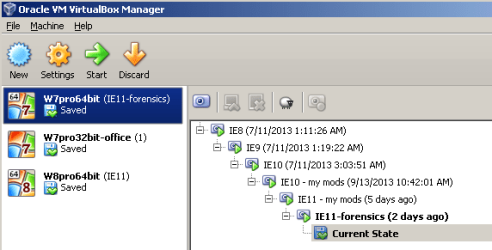
Each time that I close the VM, I have it revert to a known good snapshot.

The oldest snapshot is the OS install without any changes\patches.

One can load any of those snapshots and play from there :-)

The files for these snapshots record incremental changes - so they don't take up as much space.

VB-VM.png

From the time that I start the VM to the time that I can type inside the VM is between 5 and 7 seconds - depending on how many other VMs that I have running at the time :-)

The snapshot with forensics in its name will be deleted once I'm thru playing in this confusing thread:
http://www.sevenforums.com/browsers...-dat-vs-index-dat-files-how-clear-delete.html
 

My Computer My Computer

Computer type
Laptop
Computer Manufacturer/Model Number
Employer provided Dell Latitude
OS
W7 Pro SP1 64bit
CPU
i7
Memory
8GB
Graphics Card(s)
Intel HD Graphics
Hard Drives
crappy SSD
Antivirus
Employer mandated Symantec Endpoint Protection
Browser
Pale Moon 64bit, IE11 64bit & Chrome 64bit
Someone may still come along who's knowlegeable about webinars. But I'd imagine that each uses different software.

I still don't see how you could go wrong setting the Services to defaults which I provided for you. No software is going to expect you to have other than the default settings without notification.

I recently had to install Java Runtime for the first time in years after having been warned that many programs need it. It was a single survey that notified me it needed to be installed to complete it. I installed it and then after the survey uninstalled it. You may want to do similar with your Service edits if you like them.
 
Back
Top