
Windows Seven Install - Drive losing space

kidicarus

Banned
Hi,

I've had Seven installed for a about 6 months, two days ago I got a message saying I was running low on hard drive space, so I have allocated another 10 gig from my other partition, but I'm sill somehow losing space, with the pc idle, not downloading, if I go to the list of drives and refresh I can see the space going down, yesterday I had 9 GB free, its now gone down to 7, so can anyone explain where its going? I have turned off system restore and protection so I dont think its that, anyhelp would be appreciated.
Thanks
 

My Computer

Computer Manufacturer/Model Number
Self Build
OS
Windows 7 Ultimate 32bit
CPU
AMD Athlon 64 X2 6400+
Motherboard
ALiveNF6G-VSTA
Memory
4GB DDR2 800
Graphics Card(s)
GEFORCE 8600GT 256MB
Sound Card
ONBOARD
Monitor(s) Displays
17" TEO TL766
Hard Drives
156GB SAMSUNG SAMSUNG SP1604N/R ATA Device (PATA)
161GB Hitachi HDT722516DLAT80 ATA Device (PATA)
313GB Western Digital WDC WD32 00BEVT-75ZCT SCSI Disk Device (ATA)
244GB Hitachi Hitachi HDT725025VLA SCSI Disk Device (ATA)
Cooling
Arctic Cooling Freezer 64 Pro
The space is being used by shadow copies. If you turn off your system restore and then turn it back you lose those copies (so make one right away so you have at least one point to use if needed). It is also being taken by system image, the copies of your hard drive.

To be sure take a anti virus scan and download and use malwarebytes.
http://www.malwarebytes.org/mbam.php
 

My Computer

Computer type
PC/Desktop
Computer Manufacturer/Model Number
Dell XPS 420
OS
Windows 10, Home Clean Install
CPU
Intel Core2 processsor Q8200(2.33Ghz 1333FSB) Quad Core Tech
Motherboard
Dell
Memory
6 gb
Graphics Card(s)
ATI Radeon 256MB HD3650
Sound Card
Intergrated 7.1 Channel Audio
Monitor(s) Displays
Dell SP2009W 20"
Hard Drives
640 GB Serial ATA Hard drive
Cooling
Fan
Keyboard
Dell USB Keyboard
Mouse
Dell Premium Optical USB
Internet Speed
DSL 2.85
The space is being used by shadow copies. If you turn off your system restore and then turn it back you lose those copies (so make one right away so you have at least one point to use if needed). It is also being taken by system image, the copies of your hard drive.

To be sure take a anti virus scan and download and use malwarebytes.
Malwarebytes' Anti-Malware: Malwarebytes

So how can I stop the services from using my drive space? I dont have any data on my Seven drive as i'm using as an OS drive and not data, so i'm not concerned about having a backup, I can if necessary just do a re-install.
 

My Computer

Computer Manufacturer/Model Number
Self Build
OS
Windows 7 Ultimate 32bit
CPU
AMD Athlon 64 X2 6400+
Motherboard
ALiveNF6G-VSTA
Memory
4GB DDR2 800
Graphics Card(s)
GEFORCE 8600GT 256MB
Sound Card
ONBOARD
Monitor(s) Displays
17" TEO TL766
Hard Drives
156GB SAMSUNG SAMSUNG SP1604N/R ATA Device (PATA)
161GB Hitachi HDT722516DLAT80 ATA Device (PATA)
313GB Western Digital WDC WD32 00BEVT-75ZCT SCSI Disk Device (ATA)
244GB Hitachi Hitachi HDT725025VLA SCSI Disk Device (ATA)
Cooling
Arctic Cooling Freezer 64 Pro
You can keep system restore turned off, but then you lose that feature if you have a problem. If you do turn it off make sure that you back up everything and have an OS system image on an external hard drive.
 

My Computer

Computer type
PC/Desktop
Computer Manufacturer/Model Number
Dell XPS 420
OS
Windows 10, Home Clean Install
CPU
Intel Core2 processsor Q8200(2.33Ghz 1333FSB) Quad Core Tech
Motherboard
Dell
Memory
6 gb
Graphics Card(s)
ATI Radeon 256MB HD3650
Sound Card
Intergrated 7.1 Channel Audio
Monitor(s) Displays
Dell SP2009W 20"
Hard Drives
640 GB Serial ATA Hard drive
Cooling
Fan
Keyboard
Dell USB Keyboard
Mouse
Dell Premium Optical USB
Internet Speed
DSL 2.85
Hi,

I've had Seven installed for a about 6 months, two days ago I got a message saying I was running low on hard drive space, so I have allocated another 10 gig from my other partition, but I'm sill somehow losing space, with the pc idle, not downloading, if I go to the list of drives and refresh I can see the space going down, yesterday I had 9 GB free, its now gone down to 7, so can anyone explain where its going? I have turned off system restore and protection so I dont think its that, anyhelp would be appreciated.
Thanks

Hi kidicarus and welcome to the forums,

Have you turned on any logging recently, such as antivirus or network logging? Outside of the shadow copies that richc46 mentioned, log files swamping your disk space can occur.

Another culprit maybe any drive clearing programs that you might have installed and scheduled. I'm talking about the sort that wipe all free space back to zero or random letters.

I've attached a little program that will show you what is taking up the space on your computer. Extract it from the zip file, install it and run. You can then see the file/s taking up the space and perhaps put a stop to it.

Timo
 

Attachments

My Computer

Computer Manufacturer/Model Number
Custom Hack job
OS
Windows 7 Ultimate 64 bit
CPU
Intel(R) Core(TM)2 Quad CPU Q8200 @ 2.33GHz
Motherboard
GigaByte EP45-UD3
Memory
8 GB Kingston
Graphics Card(s)
Nvidia GeForce 9600GT
Sound Card
Soundblaster Audigy
Monitor(s) Displays
AOC x2 22"
Hard Drives
2 x Samsung 500GB (RAID)
2 x Samsung 2TB
1 x WD Green 2TB
1 x Seagate 1TB
1 x Samsung 500GB
PSU
Thermaltake QFan 750W
Case
CM Scout Gaming
Cooling
Coolermaster V10
Keyboard
Microsoft Wireless Keyboard 1000
Mouse
Microsoft Wireless Optical 2000
Internet Speed
320
Other Info
Winfast PVR2000CP
LG DVD-RAM DVD/RW/DL Super Multi
Linksys WMP300Nx2 Wireless Adapter

My Computer

Computer Manufacturer/Model Number
Self Build
OS
Windows 7 Ultimate 32bit
CPU
AMD Athlon 64 X2 6400+
Motherboard
ALiveNF6G-VSTA
Memory
4GB DDR2 800
Graphics Card(s)
GEFORCE 8600GT 256MB
Sound Card
ONBOARD
Monitor(s) Displays
17" TEO TL766
Hard Drives
156GB SAMSUNG SAMSUNG SP1604N/R ATA Device (PATA)
161GB Hitachi HDT722516DLAT80 ATA Device (PATA)
313GB Western Digital WDC WD32 00BEVT-75ZCT SCSI Disk Device (ATA)
244GB Hitachi Hitachi HDT725025VLA SCSI Disk Device (ATA)
Cooling
Arctic Cooling Freezer 64 Pro
It would also seem that windows media player is downloading all the artwork for music I have stored in my itunes folder!!
 

My Computer

Computer Manufacturer/Model Number
Self Build
OS
Windows 7 Ultimate 32bit
CPU
AMD Athlon 64 X2 6400+
Motherboard
ALiveNF6G-VSTA
Memory
4GB DDR2 800
Graphics Card(s)
GEFORCE 8600GT 256MB
Sound Card
ONBOARD
Monitor(s) Displays
17" TEO TL766
Hard Drives
156GB SAMSUNG SAMSUNG SP1604N/R ATA Device (PATA)
161GB Hitachi HDT722516DLAT80 ATA Device (PATA)
313GB Western Digital WDC WD32 00BEVT-75ZCT SCSI Disk Device (ATA)
244GB Hitachi Hitachi HDT725025VLA SCSI Disk Device (ATA)
Cooling
Arctic Cooling Freezer 64 Pro
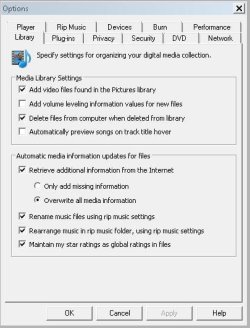
I agree with you :-), it look like you have the retrieve additional information text box ticked. I guess you can either add more space and leave it overnight to update or turn this feature off. Pagefile and hiberfil look normal.
 

Attachments

  • Capture.JPG
    Capture.JPG
    51.9 KB · Views: 31

My Computer

Computer Manufacturer/Model Number
Custom Hack job
OS
Windows 7 Ultimate 64 bit
CPU
Intel(R) Core(TM)2 Quad CPU Q8200 @ 2.33GHz
Motherboard
GigaByte EP45-UD3
Memory
8 GB Kingston
Graphics Card(s)
Nvidia GeForce 9600GT
Sound Card
Soundblaster Audigy
Monitor(s) Displays
AOC x2 22"
Hard Drives
2 x Samsung 500GB (RAID)
2 x Samsung 2TB
1 x WD Green 2TB
1 x Seagate 1TB
1 x Samsung 500GB
PSU
Thermaltake QFan 750W
Case
CM Scout Gaming
Cooling
Coolermaster V10
Keyboard
Microsoft Wireless Keyboard 1000
Mouse
Microsoft Wireless Optical 2000
Internet Speed
320
Other Info
Winfast PVR2000CP
LG DVD-RAM DVD/RW/DL Super Multi
Linksys WMP300Nx2 Wireless Adapter
I agree with you :-), it look like you have the retrieve additional information text box ticked. I guess you can either add more space and leave it overnight to update or turn this feature off. Pagefile and hiberfil look normal.

Recently I shared my pc with another machine so I could share music with a machine I have in another room and it would appear that WMP has been downloading the folder art for those files, it started losing the space when I did that and so far has used 12 GB of space! Is it ok to delete that file and reclaim the space?
 

My Computer

Computer Manufacturer/Model Number
Self Build
OS
Windows 7 Ultimate 32bit
CPU
AMD Athlon 64 X2 6400+
Motherboard
ALiveNF6G-VSTA
Memory
4GB DDR2 800
Graphics Card(s)
GEFORCE 8600GT 256MB
Sound Card
ONBOARD
Monitor(s) Displays
17" TEO TL766
Hard Drives
156GB SAMSUNG SAMSUNG SP1604N/R ATA Device (PATA)
161GB Hitachi HDT722516DLAT80 ATA Device (PATA)
313GB Western Digital WDC WD32 00BEVT-75ZCT SCSI Disk Device (ATA)
244GB Hitachi Hitachi HDT725025VLA SCSI Disk Device (ATA)
Cooling
Arctic Cooling Freezer 64 Pro
Yes it is and you also may decide to turn off media streaming in the Control Panel Items\Network and Sharing Center\Advanced sharing settings. This will stop other media machines being detected.
 

My Computer

Computer Manufacturer/Model Number
Custom Hack job
OS
Windows 7 Ultimate 64 bit
CPU
Intel(R) Core(TM)2 Quad CPU Q8200 @ 2.33GHz
Motherboard
GigaByte EP45-UD3
Memory
8 GB Kingston
Graphics Card(s)
Nvidia GeForce 9600GT
Sound Card
Soundblaster Audigy
Monitor(s) Displays
AOC x2 22"
Hard Drives
2 x Samsung 500GB (RAID)
2 x Samsung 2TB
1 x WD Green 2TB
1 x Seagate 1TB
1 x Samsung 500GB
PSU
Thermaltake QFan 750W
Case
CM Scout Gaming
Cooling
Coolermaster V10
Keyboard
Microsoft Wireless Keyboard 1000
Mouse
Microsoft Wireless Optical 2000
Internet Speed
320
Other Info
Winfast PVR2000CP
LG DVD-RAM DVD/RW/DL Super Multi
Linksys WMP300Nx2 Wireless Adapter
Back
Top