
ShadePopping
New member
- Local time
- 5:14 PM
- Messages
- 33
This is what happens when I try to use the search feature on the start menu... as you can see it isn't working properly...
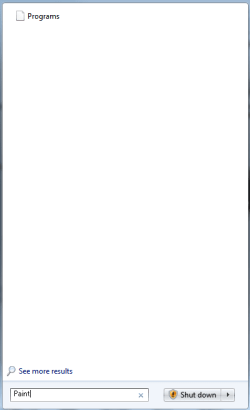
I've looked already to see what possible fixes there are and have come across renaming/deleting the key HKEY_CURRENT_USER\Software\Microsoft\Windows\Curre ntVersion\Explorer\FolderTypes\{ef87b4cb-f2ce-4785-8658-4ca6c63e38c6}
But... I cannot find it in my registry editor.
I've also come across restarting the search service, rebuilding the index, and applying the hotfix, none of which worked. That and the hotfix wasn't even compatible for some reason, any other suggestions?
I've looked already to see what possible fixes there are and have come across renaming/deleting the key HKEY_CURRENT_USER\Software\Microsoft\Windows\Curre ntVersion\Explorer\FolderTypes\{ef87b4cb-f2ce-4785-8658-4ca6c63e38c6}
But... I cannot find it in my registry editor.
I've also come across restarting the search service, rebuilding the index, and applying the hotfix, none of which worked. That and the hotfix wasn't even compatible for some reason, any other suggestions?
My Computer
- OS
- Windows 7 Ultimate 64-bit
- CPU
- Intel(R) Core(TM) i7 CPU 920 @ 2.67GHz (8 CPUs), ~2.7GHz
- Motherboard
- Intel Corporation DX58SO (J1PR)
- Memory
- 6.0GB Triple-Channel DDR3 @ 533MHz (8-8-8-20) CORSAIR
- Graphics Card(s)
- ATI Radeon HD 5700 Series (5770)
- Sound Card
- ATI High Definition Audio Device
- Monitor(s) Displays
- Panasonic-TV
- Screen Resolution
- 1280x720
- Hard Drives
- INTEL SSDSA2M080G2GN ATA Device
WDC WD1001FALS-00J7B1 ATA Device
Hitachi HDT725032VLA380 ATA Device
Hitachi HDT725032VLA380 ATA Device
WD My Book IEEE 1394 SBP2 Device (External)
- Case
- Thermaltake VI1000BWS M9 ATX Mid-Tower Case
- Keyboard
- Logitech HID-Compliant Keyboard
- Mouse
- Logitech HID-compliant Cordless Mouse


