Windows Start Up - Printer Problem

ViperMWC

New member
Member
Local time
6:21 AM
Messages
54
Hello all,
This I think is connected to my HP F2280 Printer.

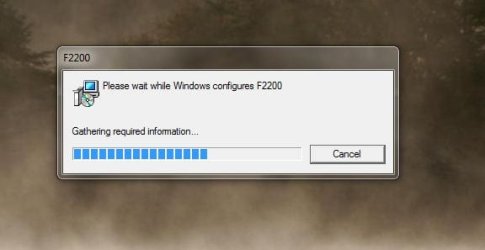
On Windows start up as the system is loading I am getting this dialogue box popping up.
Capture 001.JPG
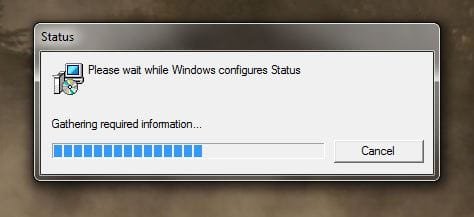
This runs and runs, with another message appearing now and then.
Capture 002.JPG
It seems to be repeatedly gathering information but doing nothing.
It will be at least a minute or two before this finally stops.
Can anyone tell me why this is happening and how to stop it.
I have already unistalled the printer software and drivers and reinstalled.
The printer works fine too.
Any advice greatly apprecuated.

All the best.
Mick C.
 

My Computer

Computer type
PC/Desktop
Computer Manufacturer/Model Number
Arbico i7 PC
OS
Windows 7 Home Premium 64 bit - SP1
CPU
Intel Core i7 920 (2.66GHz 8MB L2 Cache)
Motherboard
Asus P6X58D-E
Memory
6Gb (3 x Kingston 2Gb PC12800 DDR3 1600MHZ)
Graphics Card(s)
ATI Radeon HD 5850 1Gb
Sound Card
AMD HIgh Def HDMI
Monitor(s) Displays
LG 24EB23 Digital
Screen Resolution
1920x1080 (32bit) (60Hz)
Hard Drives
Samsung HD103SJ
Samsung HD5021J
Samsung HD204UI
Samsung M3 External USB 3
PSU
Nexus RX-8500 850w
Case
NZXT Hush Black ATA
Cooling
3 x Xilence Red Wing 120mm Case Fans
Keyboard
Microsoft Wireless Keyboard 6000 v3.0
Mouse
Microsoft Wireless Laser Mouse 6000 v 2.0
Internet Speed
60.0 Mbps Average
Antivirus
Spybot Search & Destroy
Browser
Avant Browser
Can't guarantee this fix will work, but it's worth a try:

Launch msconfig and click the Services tab and turn on 'Bluetooth Support Service' then click Apply followed by OK.
 

My Computer

Computer Manufacturer/Model Number
HP Pavilion Elite 495UK
OS
Windows 7 Ultimate SP1 64-Bit
CPU
Intel Core i7 870 @ 2.93GHz
Motherboard
MSI 2A9C (CPU1)
Memory
8Gb Dual-Channel DDR3 @ 664MHz
Graphics Card(s)
nVidia GeForce GTX 460 1024MB dedicated RAM
Sound Card
Realtek HD Audio
Monitor(s) Displays
HP2310i
Screen Resolution
1920 x 1080
Hard Drives
1x1954GB Hitachi HDS22020ALA 330 (RAID), 1x1954GB Hitachi External for backup and storage
PSU
460W
Case
HP Elite
Cooling
Air cooled
Keyboard
Logitech K750 solar-powered keyboard
Mouse
Logitech Wireless M180 mouse
Internet Speed
2Mb
Other Info
Pure Avanti Flow Internet Radio with iPod Dock, 64Gb iPod, HP USB Speakers, Sony MDR-V500 Headphones, Sony Vaio F-Series Laptop

Can't guarantee this fix will work, but it's worth a try:

Launch msconfig and click the Services tab and turn on 'Bluetooth Support Service' then click Apply followed by OK.

Hello,
Many thanks for the reply, had a look in MSCONFIG and the bluetooth thing was alreadty enabled. Had a check about and decided to remove the HP software piece by piece to see what was making this happen.

During all this Soluto popped a crash message up about one of the driver loader dll's. I replaced that file and it seemed to remove the problem... BUT !! lol A bit more unistalling and installing and I've found that there is something amiss with the HP installation files, everything seems to install ok, and it configures the printer, but when I open the Solution Center (The Deskjets dedicated software) it just halts and tells me the device hasn't been installed correctly !!

Have decided now to use the printer through the Windows 7 controls, looks like once again HP have produced a piece of software unfit for purpose.

Will leave this thread open in case anyone has any ideas, or more likely a lump of rock from Mars lands in my garden !!

Thanks for the try, greatly appreciated the effort, and at least it's led me to see what isn't working !!

All the best,
Mick C.

P.S. Sea Vixen... a great aircraft :D
 

My Computer

Computer type
PC/Desktop
Computer Manufacturer/Model Number
Arbico i7 PC
OS
Windows 7 Home Premium 64 bit - SP1
CPU
Intel Core i7 920 (2.66GHz 8MB L2 Cache)
Motherboard
Asus P6X58D-E
Memory
6Gb (3 x Kingston 2Gb PC12800 DDR3 1600MHZ)
Graphics Card(s)
ATI Radeon HD 5850 1Gb
Sound Card
AMD HIgh Def HDMI
Monitor(s) Displays
LG 24EB23 Digital
Screen Resolution
1920x1080 (32bit) (60Hz)
Hard Drives
Samsung HD103SJ
Samsung HD5021J
Samsung HD204UI
Samsung M3 External USB 3
PSU
Nexus RX-8500 850w
Case
NZXT Hush Black ATA
Cooling
3 x Xilence Red Wing 120mm Case Fans
Keyboard
Microsoft Wireless Keyboard 6000 v3.0
Mouse
Microsoft Wireless Laser Mouse 6000 v 2.0
Internet Speed
60.0 Mbps Average
Antivirus
Spybot Search & Destroy
Browser
Avant Browser
You're very welcome. At least it was a step in the right direction.

As for the Sea Vixen, I love watching it fly now, but it was a different story in the 1960s. A twelve-hour nightshift on a freezing cold flight deck trying to repair a Sea Vixen's AI18 radar was no joke. Happy days! :rolleyes:
 

My Computer

Computer Manufacturer/Model Number
HP Pavilion Elite 495UK
OS
Windows 7 Ultimate SP1 64-Bit
CPU
Intel Core i7 870 @ 2.93GHz
Motherboard
MSI 2A9C (CPU1)
Memory
8Gb Dual-Channel DDR3 @ 664MHz
Graphics Card(s)
nVidia GeForce GTX 460 1024MB dedicated RAM
Sound Card
Realtek HD Audio
Monitor(s) Displays
HP2310i
Screen Resolution
1920 x 1080
Hard Drives
1x1954GB Hitachi HDS22020ALA 330 (RAID), 1x1954GB Hitachi External for backup and storage
PSU
460W
Case
HP Elite
Cooling
Air cooled
Keyboard
Logitech K750 solar-powered keyboard
Mouse
Logitech Wireless M180 mouse
Internet Speed
2Mb
Other Info
Pure Avanti Flow Internet Radio with iPod Dock, 64Gb iPod, HP USB Speakers, Sony MDR-V500 Headphones, Sony Vaio F-Series Laptop
Back
Top