
Windows starts very slowly, when it starts

accordeoniste

New member
Member
Local time
11:37 AM
Messages
74
Location
Sedona, Arizona
I was trying to remove Windows Defender this morning as I'm running MS Security Essentials. I thought the two programs might be conflicting with each other. MsMpEng.exe was using over 260K of physical RAM which I thought was excessive. At one point I suspended the MsMpEng.exe process while in Resource Monitor. My system immediately crashed. After rebooting, I discovered that I couldn't start Windows (7) again.

Thinking that I damaged one or more critical system files when I suspended MsMpEng.exe, I booted to Safe Mode with networking and restored Windows using a system restore point from yesterday. I was able to log into my user account after the system restored. Everything worked fine. However, my relief was short-lived: I wasn't able to log in again to my user account after re-booting without waiting fifteen minutes or longer. There are no earlier restore points I can use. Starting with the last known good configuration didn't work. I tried rebooting and running Startup repair. That didn't work either. The message it gave was that my problem booting was probably due to a change in configuration.

Shortly before the crash I ran Malware Anti-Malware Bytes and AdwCleaner. All instances of malware and adware were removed. After the crash I ran MS Security Essentials. No viruses were found.

Please advise if I need to upload a system configuration file, and if so, what program I can use to capture it to a file. I haven't done this for a while since before today, my system has been running smoothly, so please bear with me. I'd much appreciate any help. I'll do a repair installation but only if absolutely necessary. I'm typing this from within Windows in Normal mode.
 
Last edited:

My Computer My Computer

At a glance

Windows 7 64 bitIntel Core i3 CPU M330 @2.13 GHz8 GBIntel Graphics Media Accelerator HD
Computer type
Laptop
Computer Manufacturer/Model Number
HP
OS
Windows 7 64 bit
CPU
Intel Core i3 CPU M330 @2.13 GHz
Memory
8 GB
Graphics Card(s)
Intel Graphics Media Accelerator HD
Sound Card
Intel
Monitor(s) Displays
Generic PnP monitor
Screen Resolution
1366 x 768
Hard Drives
ST9500420AS Internal 500 GB
Seagate External 110 GB
Seagate FreeAgent GoFlex External 1 TB
Keyboard
Microsoft
Mouse
Microsoft
Internet Speed
87 Mbps download speed, 12.16 Mbps upload speed
Antivirus
Microsoft Security Essentials
Browser
MS IE, Google Chrome, Mozilla Firefox, Apple Safari
Well you can't really 'remove' windows defender per se, but you can disable it. Also, windows defender is not an antivirus, but anti spyware. Essentials is anti virus.

1) open windows defender

2) Click Tools, and then click Options.

3) Click Administrator, select or clear the Use this program check box, and then click Save. Administrator permission required If you're prompted for an administrator password or confirmation, type the password or provide confirmation.

also uninstall essentials after this. See if there's any improvement.
 

My Computer My Computer

At a glance

Windows 7 Pro 64 bit SP1Intel Core i7 950 Quad OC'ed to 3.2 GHZ12GB DDR 3Radeon HD 5870 1GB
Computer type
PC/Desktop
OS
Windows 7 Pro 64 bit SP1
CPU
Intel Core i7 950 Quad OC'ed to 3.2 GHZ
Motherboard
ASRock X58
Memory
12GB DDR 3
Graphics Card(s)
Radeon HD 5870 1GB
Sound Card
Onboard
Monitor(s) Displays
23" Acer HD
Screen Resolution
1920x1080
Hard Drives
128GB SSD
PSU
700W
Case
Coolermaster
Antivirus
Avast Free
Browser
Firefox
Well you can't really 'remove' windows defender per se, but you can disable it. Also, windows defender is not an antivirus, but anti spyware. Essentials is anti virus.

1) open windows defender

2) Click Tools, and then click Options.

3) Click Administrator, select or clear the Use this program check box, and then click Save. Administrator permission required If you're prompted for an administrator password or confirmation, type the password or provide confirmation.

also uninstall essentials after this. See if there's any improvement.

I tried this and saw no improvement, so I reinstalled MS Sec Essentials and disabled Win Defender.

I see that Essentials is also a malware program per the license terms. I've also run Malwarebytes Anti-Malware lately. Could there have been a conflict when I ran it, since Essentials was running in the background?

Next I'll run sfc / scannow and report the results here.

If that doesn't work I'll run a full scan using Essentials in Safe Mode, and report the results.

Please send other suggestions if you think of any.
 

My Computer My Computer

At a glance

Windows 7 64 bitIntel Core i3 CPU M330 @2.13 GHz8 GBIntel Graphics Media Accelerator HD
Computer type
Laptop
Computer Manufacturer/Model Number
HP
OS
Windows 7 64 bit
CPU
Intel Core i3 CPU M330 @2.13 GHz
Memory
8 GB
Graphics Card(s)
Intel Graphics Media Accelerator HD
Sound Card
Intel
Monitor(s) Displays
Generic PnP monitor
Screen Resolution
1366 x 768
Hard Drives
ST9500420AS Internal 500 GB
Seagate External 110 GB
Seagate FreeAgent GoFlex External 1 TB
Keyboard
Microsoft
Mouse
Microsoft
Internet Speed
87 Mbps download speed, 12.16 Mbps upload speed
Antivirus
Microsoft Security Essentials
Browser
MS IE, Google Chrome, Mozilla Firefox, Apple Safari
Hi,
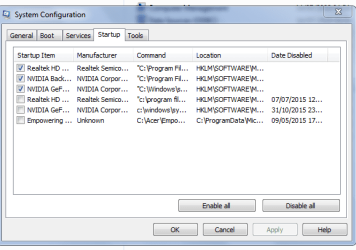
Can you post a copy of your startup files.
Controlpanel>Admintools>systemConfig>boot/services(check hide MS) and startup.

Roy
 

Attachments

  • bootserv.PNG
    bootserv.PNG
    13.2 KB · Views: 46

My Computer My Computer

At a glance

W7 home premium 32bit/W7HP 64bit/w10 tp insid...E5300 dual core3gbNvidia Geforce 7100 Nforce 630i
Computer type
PC/Desktop
Computer Manufacturer/Model Number
medionl/Aspire 6930G/acer x55a
OS
W7 home premium 32bit/W7HP 64bit/w10 tp insider ring
CPU
E5300 dual core
Motherboard
medion MS7366
Memory
3gb
Graphics Card(s)
Nvidia Geforce 7100 Nforce 630i
Monitor(s) Displays
avixc
Internet Speed
n (isp resticted to 72)
Antivirus
mse/pands
Browser
palemoon
Other Info
Belkin Fd7050 n USB using Railink RT2870 drivers, more upto date
I highly doubt terminating a processes would damage anything. It's looking more coincidental at this point. Try creating and logging into a newly created windows profile and see if you experience the slowness.

The primary problem you are having is slow logging into your profile or pc startup time in general??
 

My Computer My Computer

At a glance

Windows 7 Pro 64 bit SP1Intel Core i7 950 Quad OC'ed to 3.2 GHZ12GB DDR 3Radeon HD 5870 1GB
Computer type
PC/Desktop
OS
Windows 7 Pro 64 bit SP1
CPU
Intel Core i7 950 Quad OC'ed to 3.2 GHZ
Motherboard
ASRock X58
Memory
12GB DDR 3
Graphics Card(s)
Radeon HD 5870 1GB
Sound Card
Onboard
Monitor(s) Displays
23" Acer HD
Screen Resolution
1920x1080
Hard Drives
128GB SSD
PSU
700W
Case
Coolermaster
Antivirus
Avast Free
Browser
Firefox

My Computer My Computer

At a glance

Vista, Windows7, Mint Mate, Zorin, Windows 8from 1.6GHz Duo to i7
Computer Manufacturer/Model Number
HP, Dell, Gateway, Toshiba - 4 laptops and 2 desktops
OS
Vista, Windows7, Mint Mate, Zorin, Windows 8
CPU
from 1.6GHz Duo to i7
Monitor(s) Displays
2x HP w2207
Hard Drives
5x HDD, 7x SSD, 12x Externals
Keyboard
with trackball - no mices
Mouse
Trackball mice
Internet Speed
DSL 6000
He said it was taking 15 mins to boot, thats why i asked for those SS's, even before login, read posts.

Roy
 

My Computer My Computer

At a glance

W7 home premium 32bit/W7HP 64bit/w10 tp insid...E5300 dual core3gbNvidia Geforce 7100 Nforce 630i
Computer type
PC/Desktop
Computer Manufacturer/Model Number
medionl/Aspire 6930G/acer x55a
OS
W7 home premium 32bit/W7HP 64bit/w10 tp insider ring
CPU
E5300 dual core
Motherboard
medion MS7366
Memory
3gb
Graphics Card(s)
Nvidia Geforce 7100 Nforce 630i
Monitor(s) Displays
avixc
Internet Speed
n (isp resticted to 72)
Antivirus
mse/pands
Browser
palemoon
Other Info
Belkin Fd7050 n USB using Railink RT2870 drivers, more upto date
Your specs show this.

GoFlex External 1 TB
Antivirus Advanced System Care
Browser MS IE, Google Chrome, Mozilla Firefox, Apple Safari
Please explain Advanced System Care by IObits.
 

My Computer My Computer

At a glance

Windows 10 Pro. 64/ version 1709 Windows 7 Pr...Intel i7-6800K @ 4.3Corsair Platinum 16 gig @2400EVGA GTX 1070 OC
Computer type
PC/Desktop
Computer Manufacturer/Model Number
Home made Desktop
OS
Windows 10 Pro. 64/ version 1709 Windows 7 Pro/64
CPU
Intel i7-6800K @ 4.3
Motherboard
ASUS X-99 Deluxe II
Memory
Corsair Platinum 16 gig @2400
Graphics Card(s)
EVGA GTX 1070 OC
Monitor(s) Displays
Asus 27" LED LCD/VE278Q
Screen Resolution
1920-1080 or 1280-720 HDMI
Hard Drives
INTEL SSD 730-240 Gb Sata 3.0/
PSU
EVGA Platium 1200W
Case
Phanteks Luxe Tempered Glass 8 fans/ one radiator
Cooling
XSPC/ Water Cooled CPU
Keyboard
Das 4 Professional
Mouse
Logitech M705/MX Anywhere 2-S
Internet Speed
100 mbits
Antivirus
Microsoft Security Essentials/ Malwarebytes Premium 3.0/ SAS
Browser
I.E. 11 default/Firefox/ ISP Time Warner Cable/Spectrum
Other Info
LG BluRay Burner/
Sound system-KLipsch-THX/
Icy Dock ssd Hot Swap bays.
Now I need help just getting my system running again. After last posting to this forum, I rebooted again to test a boot option in msconfig. I planned to upload the boot/services/startup copy here. I didn't have the chance. My Registry was reported as being corrupt and I can no longer boot. Startup Repair reported the corruption but could do nothing to fix it.

I have the Win 7 recovery disks I made when I purchased the computer. It didn't come with the Win installation disk. I also have two Win x64 images I made last year so that I could do a repair installation. I want to replace my corrupt registry with one that isn't corrupt, but I don't know where to find one on the three recovery disks. I don't think I have a backup on my system. I think it's premature to do a repair install. I don't know if I can do it anyway. I can't even log into Safe mode.

Again, any suggestions for how I can get up and running again will be very much appreciated.

I'm writing this on my iPOD.
 

My Computer My Computer

At a glance

Windows 7 64 bitIntel Core i3 CPU M330 @2.13 GHz8 GBIntel Graphics Media Accelerator HD
Computer type
Laptop
Computer Manufacturer/Model Number
HP
OS
Windows 7 64 bit
CPU
Intel Core i3 CPU M330 @2.13 GHz
Memory
8 GB
Graphics Card(s)
Intel Graphics Media Accelerator HD
Sound Card
Intel
Monitor(s) Displays
Generic PnP monitor
Screen Resolution
1366 x 768
Hard Drives
ST9500420AS Internal 500 GB
Seagate External 110 GB
Seagate FreeAgent GoFlex External 1 TB
Keyboard
Microsoft
Mouse
Microsoft
Internet Speed
87 Mbps download speed, 12.16 Mbps upload speed
Antivirus
Microsoft Security Essentials
Browser
MS IE, Google Chrome, Mozilla Firefox, Apple Safari

My Computer My Computer

At a glance

W7 home premium 32bit/W7HP 64bit/w10 tp insid...E5300 dual core3gbNvidia Geforce 7100 Nforce 630i
Computer type
PC/Desktop
Computer Manufacturer/Model Number
medionl/Aspire 6930G/acer x55a
OS
W7 home premium 32bit/W7HP 64bit/w10 tp insider ring
CPU
E5300 dual core
Motherboard
medion MS7366
Memory
3gb
Graphics Card(s)
Nvidia Geforce 7100 Nforce 630i
Monitor(s) Displays
avixc
Internet Speed
n (isp resticted to 72)
Antivirus
mse/pands
Browser
palemoon
Other Info
Belkin Fd7050 n USB using Railink RT2870 drivers, more upto date
If you have ever used Advanced System Care by IObit on this system I recommend completing this tutorial by Brink.
It will save you a ton of work and headaches.

http://www.sevenforums.com/tutorials/1649-clean-install-windows-7-a.html

If you have a method of getting your system back to the way it was when you first got it, (Factory Recovery) that should work also.
 

My Computer My Computer

At a glance

Windows 10 Pro. 64/ version 1709 Windows 7 Pr...Intel i7-6800K @ 4.3Corsair Platinum 16 gig @2400EVGA GTX 1070 OC
Computer type
PC/Desktop
Computer Manufacturer/Model Number
Home made Desktop
OS
Windows 10 Pro. 64/ version 1709 Windows 7 Pro/64
CPU
Intel i7-6800K @ 4.3
Motherboard
ASUS X-99 Deluxe II
Memory
Corsair Platinum 16 gig @2400
Graphics Card(s)
EVGA GTX 1070 OC
Monitor(s) Displays
Asus 27" LED LCD/VE278Q
Screen Resolution
1920-1080 or 1280-720 HDMI
Hard Drives
INTEL SSD 730-240 Gb Sata 3.0/
PSU
EVGA Platium 1200W
Case
Phanteks Luxe Tempered Glass 8 fans/ one radiator
Cooling
XSPC/ Water Cooled CPU
Keyboard
Das 4 Professional
Mouse
Logitech M705/MX Anywhere 2-S
Internet Speed
100 mbits
Antivirus
Microsoft Security Essentials/ Malwarebytes Premium 3.0/ SAS
Browser
I.E. 11 default/Firefox/ ISP Time Warner Cable/Spectrum
Other Info
LG BluRay Burner/
Sound system-KLipsch-THX/
Icy Dock ssd Hot Swap bays.
Torchwood, thanks for the HP link, but I'd rather repair my system some other way than by using HP's recovery program. The last time I used it after my system crashed I lost more than half my data files because HP's backup program was defective. I'm referring to the one that's part of the Recovery program. Can I simply replace the corrupt registry file from my recovery disks, or do I need a Win installation CD? Will a repair install work?
 

My Computer My Computer

At a glance

Windows 7 64 bitIntel Core i3 CPU M330 @2.13 GHz8 GBIntel Graphics Media Accelerator HD
Computer type
Laptop
Computer Manufacturer/Model Number
HP
OS
Windows 7 64 bit
CPU
Intel Core i3 CPU M330 @2.13 GHz
Memory
8 GB
Graphics Card(s)
Intel Graphics Media Accelerator HD
Sound Card
Intel
Monitor(s) Displays
Generic PnP monitor
Screen Resolution
1366 x 768
Hard Drives
ST9500420AS Internal 500 GB
Seagate External 110 GB
Seagate FreeAgent GoFlex External 1 TB
Keyboard
Microsoft
Mouse
Microsoft
Internet Speed
87 Mbps download speed, 12.16 Mbps upload speed
Antivirus
Microsoft Security Essentials
Browser
MS IE, Google Chrome, Mozilla Firefox, Apple Safari
Layback bear, I'm not interested in doing a clean Windows install. I want to keep my data. Thanks anyway.
 

My Computer My Computer

At a glance

Windows 7 64 bitIntel Core i3 CPU M330 @2.13 GHz8 GBIntel Graphics Media Accelerator HD
Computer type
Laptop
Computer Manufacturer/Model Number
HP
OS
Windows 7 64 bit
CPU
Intel Core i3 CPU M330 @2.13 GHz
Memory
8 GB
Graphics Card(s)
Intel Graphics Media Accelerator HD
Sound Card
Intel
Monitor(s) Displays
Generic PnP monitor
Screen Resolution
1366 x 768
Hard Drives
ST9500420AS Internal 500 GB
Seagate External 110 GB
Seagate FreeAgent GoFlex External 1 TB
Keyboard
Microsoft
Mouse
Microsoft
Internet Speed
87 Mbps download speed, 12.16 Mbps upload speed
Antivirus
Microsoft Security Essentials
Browser
MS IE, Google Chrome, Mozilla Firefox, Apple Safari
You could if you desire back up your data to a external drive and then do a Clean Install.

The reason I didn't recommend a Repair Install is because I don't know if it will repair all the damage that IObit products do.

Using a Factory Recovery will also require you to backup your data to a external drive for safe keeping.
 

My Computer My Computer

At a glance

Windows 10 Pro. 64/ version 1709 Windows 7 Pr...Intel i7-6800K @ 4.3Corsair Platinum 16 gig @2400EVGA GTX 1070 OC
Computer type
PC/Desktop
Computer Manufacturer/Model Number
Home made Desktop
OS
Windows 10 Pro. 64/ version 1709 Windows 7 Pro/64
CPU
Intel i7-6800K @ 4.3
Motherboard
ASUS X-99 Deluxe II
Memory
Corsair Platinum 16 gig @2400
Graphics Card(s)
EVGA GTX 1070 OC
Monitor(s) Displays
Asus 27" LED LCD/VE278Q
Screen Resolution
1920-1080 or 1280-720 HDMI
Hard Drives
INTEL SSD 730-240 Gb Sata 3.0/
PSU
EVGA Platium 1200W
Case
Phanteks Luxe Tempered Glass 8 fans/ one radiator
Cooling
XSPC/ Water Cooled CPU
Keyboard
Das 4 Professional
Mouse
Logitech M705/MX Anywhere 2-S
Internet Speed
100 mbits
Antivirus
Microsoft Security Essentials/ Malwarebytes Premium 3.0/ SAS
Browser
I.E. 11 default/Firefox/ ISP Time Warner Cable/Spectrum
Other Info
LG BluRay Burner/
Sound system-KLipsch-THX/
Icy Dock ssd Hot Swap bays.
Does Windows offer a way to replace a corrupted registry without having to do a clean install? I understand a repair install isn't possible outside Win 7. I'm trying to avoid having to copy all those files to an external HD and then re-install them. The HP recovery program is inadequate.
 

My Computer My Computer

At a glance

Windows 7 64 bitIntel Core i3 CPU M330 @2.13 GHz8 GBIntel Graphics Media Accelerator HD
Computer type
Laptop
Computer Manufacturer/Model Number
HP
OS
Windows 7 64 bit
CPU
Intel Core i3 CPU M330 @2.13 GHz
Memory
8 GB
Graphics Card(s)
Intel Graphics Media Accelerator HD
Sound Card
Intel
Monitor(s) Displays
Generic PnP monitor
Screen Resolution
1366 x 768
Hard Drives
ST9500420AS Internal 500 GB
Seagate External 110 GB
Seagate FreeAgent GoFlex External 1 TB
Keyboard
Microsoft
Mouse
Microsoft
Internet Speed
87 Mbps download speed, 12.16 Mbps upload speed
Antivirus
Microsoft Security Essentials
Browser
MS IE, Google Chrome, Mozilla Firefox, Apple Safari
When the registry is corrupted, that's pretty much the end of the line.
 

My Computer My Computer

At a glance

Vista, Windows7, Mint Mate, Zorin, Windows 8from 1.6GHz Duo to i7
Computer Manufacturer/Model Number
HP, Dell, Gateway, Toshiba - 4 laptops and 2 desktops
OS
Vista, Windows7, Mint Mate, Zorin, Windows 8
CPU
from 1.6GHz Duo to i7
Monitor(s) Displays
2x HP w2207
Hard Drives
5x HDD, 7x SSD, 12x Externals
Keyboard
with trackball - no mices
Mouse
Trackball mice
Internet Speed
DSL 6000
He said it was taking 15 mins to boot, thats why i asked for those SS's, even before login, read posts.

Roy

I'm guessing that was directed to me. If you have a problem with me asking questions, we can take it outside.
 

My Computer My Computer

At a glance

Windows 7 Pro 64 bit SP1Intel Core i7 950 Quad OC'ed to 3.2 GHZ12GB DDR 3Radeon HD 5870 1GB
Computer type
PC/Desktop
OS
Windows 7 Pro 64 bit SP1
CPU
Intel Core i7 950 Quad OC'ed to 3.2 GHZ
Motherboard
ASRock X58
Memory
12GB DDR 3
Graphics Card(s)
Radeon HD 5870 1GB
Sound Card
Onboard
Monitor(s) Displays
23" Acer HD
Screen Resolution
1920x1080
Hard Drives
128GB SSD
PSU
700W
Case
Coolermaster
Antivirus
Avast Free
Browser
Firefox
When the registry is corrupted, that's pretty much the end of the line.

You're right, it was. I hired a computer consultant who identified the problem as a failing boot drive. I brought my notebook to him, he backed up all my files, ordered a replacement HD, made a backup image with which he restored all the files to the new HD, and reinstalled Win 7 Pro. After getting the old HD back, I temporarily replaced the new one with the old one and ran chkdsk /f on the old one. Everything looked okay until I saw index entries being repeated or updated in an unending loop. Then I knew it was time to quit that exercise. Additionally, the long HD diagnostic test in my computer's BIOS stopped while testing the HD.

Before bringing the system in for repair, and while in recovery mode at the command prompt, I copied the contents of c:\Windows\System32\config\RegBack to c:\Windows\System32\config. That accomplished nothing as the registry restore files in RegBack were too recent. Only after having the computer repaired did I notice a backed-up registry from 2013 among the restored files. I don't yet know how I could've used this to repair the system and restart Windows. Would it have been possible to, by restoring that backup?

The system runs fine now that Windows has been reinstalled. Does anyone have a suggestion for the best program for creating a recovery backup image? Is it Macrium Reflect or Acronis?
 

My Computer My Computer

At a glance

Windows 7 64 bitIntel Core i3 CPU M330 @2.13 GHz8 GBIntel Graphics Media Accelerator HD
Computer type
Laptop
Computer Manufacturer/Model Number
HP
OS
Windows 7 64 bit
CPU
Intel Core i3 CPU M330 @2.13 GHz
Memory
8 GB
Graphics Card(s)
Intel Graphics Media Accelerator HD
Sound Card
Intel
Monitor(s) Displays
Generic PnP monitor
Screen Resolution
1366 x 768
Hard Drives
ST9500420AS Internal 500 GB
Seagate External 110 GB
Seagate FreeAgent GoFlex External 1 TB
Keyboard
Microsoft
Mouse
Microsoft
Internet Speed
87 Mbps download speed, 12.16 Mbps upload speed
Antivirus
Microsoft Security Essentials
Browser
MS IE, Google Chrome, Mozilla Firefox, Apple Safari
I prefer Macrium. But that may be just me.
 

My Computer My Computer

At a glance

Vista, Windows7, Mint Mate, Zorin, Windows 8from 1.6GHz Duo to i7
Computer Manufacturer/Model Number
HP, Dell, Gateway, Toshiba - 4 laptops and 2 desktops
OS
Vista, Windows7, Mint Mate, Zorin, Windows 8
CPU
from 1.6GHz Duo to i7
Monitor(s) Displays
2x HP w2207
Hard Drives
5x HDD, 7x SSD, 12x Externals
Keyboard
with trackball - no mices
Mouse
Trackball mice
Internet Speed
DSL 6000
Back
Top