JavaScript is disabled. For a better experience, please enable JavaScript in your browser before proceeding.
You are using an out of date browser. It may not display this or other websites correctly.
You should upgrade or use an
alternative browser .
Windows startup speed is very low
Windows startup speed is very low, approximately 2 minutes.
Computer Manufacturer/Model Number dell 1558 OS windows 7 home preminm x64 CPU i7 Motherboard dell Memory DDR3 4G Graphics Card(s) ATI HD 5470 1G Monitor(s) Displays 15.6 LED Hard Drives Hitachi 500G
New member
Guru
Gold Member
VIP
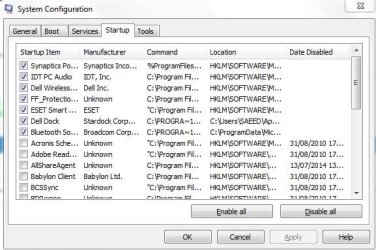
For starters I would disable ALL startup programs -but not the AV program and those that you started yourself.
Computer Manufacturer/Model Number HP, Dell, Gateway, Toshiba - 4 laptops and 2 desktops OS Vista, Windows7, Mint Mate, Zorin, Windows 8 CPU from 1.6GHz Duo to i7 Monitor(s) Displays 2x HP w2207 Hard Drives 5x HDD, 7x SSD, 12x Externals Keyboard with trackball - no mices Mouse Trackball mice Internet Speed DSL 6000
New member
Member
VIP
Thread Starter
I disable ALL startup programs Except the following:
but not usefull
Computer Manufacturer/Model Number dell 1558 OS windows 7 home preminm x64 CPU i7 Motherboard dell Memory DDR3 4G Graphics Card(s) ATI HD 5470 1G Monitor(s) Displays 15.6 LED Hard Drives Hitachi 500G
Try cleaning up your computer for junk and registry issues. A good free program is CCleaner
https://www.piriform.com/ccleaner
Quick and easy tutorial - goo.gl/8pjXoZ
Computer type PC/Desktop OS Windows 7 Ultimate SP1 x64
New member
Member
VIP
Thread Starter
I've used this software but not helpful
Computer Manufacturer/Model Number dell 1558 OS windows 7 home preminm x64 CPU i7 Motherboard dell Memory DDR3 4G Graphics Card(s) ATI HD 5470 1G Monitor(s) Displays 15.6 LED Hard Drives Hitachi 500G
New member
Guru
Gold Member
VIP
Those startups are OK. Do the following:eventvwr into start search and hit Enter Details tab and copy the information out of there
Computer Manufacturer/Model Number HP, Dell, Gateway, Toshiba - 4 laptops and 2 desktops OS Vista, Windows7, Mint Mate, Zorin, Windows 8 CPU from 1.6GHz Duo to i7 Monitor(s) Displays 2x HP w2207 Hard Drives 5x HDD, 7x SSD, 12x Externals Keyboard with trackball - no mices Mouse Trackball mice Internet Speed DSL 6000
New member
Member
VIP
Thread Starter
Log Name: Microsoft-Windows-Diagnostics-Performance/Operational
Computer Manufacturer/Model Number dell 1558 OS windows 7 home preminm x64 CPU i7 Motherboard dell Memory DDR3 4G Graphics Card(s) ATI HD 5470 1G Monitor(s) Displays 15.6 LED Hard Drives Hitachi 500G
New member
Guru
Gold Member
VIP
This boot took 59 seconds. But there is really nothing unusual going on. I suspect it is a slow disk that just cannot boot any faster.
Computer Manufacturer/Model Number HP, Dell, Gateway, Toshiba - 4 laptops and 2 desktops OS Vista, Windows7, Mint Mate, Zorin, Windows 8 CPU from 1.6GHz Duo to i7 Monitor(s) Displays 2x HP w2207 Hard Drives 5x HDD, 7x SSD, 12x Externals Keyboard with trackball - no mices Mouse Trackball mice Internet Speed DSL 6000
New member
Member
VIP
Thread Starter
The solution is to replace the hard drive??
Computer Manufacturer/Model Number dell 1558 OS windows 7 home preminm x64 CPU i7 Motherboard dell Memory DDR3 4G Graphics Card(s) ATI HD 5470 1G Monitor(s) Displays 15.6 LED Hard Drives Hitachi 500G
New member
Guru
Gold Member
VIP
I do not know whether that is practical for you since that is a laptop. But with a SSD, the boot times would be in the 15 to 20 seconds and the rest of the operation (e.g. program fetch) is also snappier.
Computer Manufacturer/Model Number HP, Dell, Gateway, Toshiba - 4 laptops and 2 desktops OS Vista, Windows7, Mint Mate, Zorin, Windows 8 CPU from 1.6GHz Duo to i7 Monitor(s) Displays 2x HP w2207 Hard Drives 5x HDD, 7x SSD, 12x Externals Keyboard with trackball - no mices Mouse Trackball mice Internet Speed DSL 6000
New member
Member
VIP
Thread Starter
What is the solution to your view?
Computer Manufacturer/Model Number dell 1558 OS windows 7 home preminm x64 CPU i7 Motherboard dell Memory DDR3 4G Graphics Card(s) ATI HD 5470 1G Monitor(s) Displays 15.6 LED Hard Drives Hitachi 500G
New member
Guru
Gold Member
VIP
There is no solution. 59 seconds boot time is not unusual with a spinning disk. If that is a laptop, it is most likely a 5400 RPM HDD and those are really slow.
Computer Manufacturer/Model Number HP, Dell, Gateway, Toshiba - 4 laptops and 2 desktops OS Vista, Windows7, Mint Mate, Zorin, Windows 8 CPU from 1.6GHz Duo to i7 Monitor(s) Displays 2x HP w2207 Hard Drives 5x HDD, 7x SSD, 12x Externals Keyboard with trackball - no mices Mouse Trackball mice Internet Speed DSL 6000
New member
Member
VIP
Thread Starter
my RPM HDD is 7400.
Computer Manufacturer/Model Number dell 1558 OS windows 7 home preminm x64 CPU i7 Motherboard dell Memory DDR3 4G Graphics Card(s) ATI HD 5470 1G Monitor(s) Displays 15.6 LED Hard Drives Hitachi 500G
3 Brain Cells
Guru
Gold Member
VIP
Is your system a Laptop or a Desktop?
Computer type PC/Desktop Computer Manufacturer/Model Number Home made Desktop OS Windows 10 Pro. 64/ version 1709 Windows 7 Pro/64 CPU Intel i7-6800K @ 4.3 Motherboard ASUS X-99 Deluxe II Memory Corsair Platinum 16 gig @2400 Graphics Card(s) EVGA GTX 1070 OC Monitor(s) Displays Asus 27" LED LCD/VE278Q Screen Resolution 1920-1080 or 1280-720 HDMI Hard Drives INTEL SSD 730-240 Gb Sata 3.0/ PSU EVGA Platium 1200W Case Phanteks Luxe Tempered Glass 8 fans/ one radiator Cooling XSPC/ Water Cooled CPU Keyboard Das 4 Professional Mouse Logitech M705/MX Anywhere 2-S Internet Speed 100 mbits Antivirus Microsoft Security Essentials/ Malwarebytes Premium 3.0/ SAS Browser I.E. 11 default/Firefox/ ISP Time Warner Cable/Spectrum Other Info LG BluRay Burner/
New member
Member
VIP
Thread Starter
Computer Manufacturer/Model Number dell 1558 OS windows 7 home preminm x64 CPU i7 Motherboard dell Memory DDR3 4G Graphics Card(s) ATI HD 5470 1G Monitor(s) Displays 15.6 LED Hard Drives Hitachi 500G