Jarvismcjiggles
New member
- Local time
- 4:03 PM
- Messages
- 7
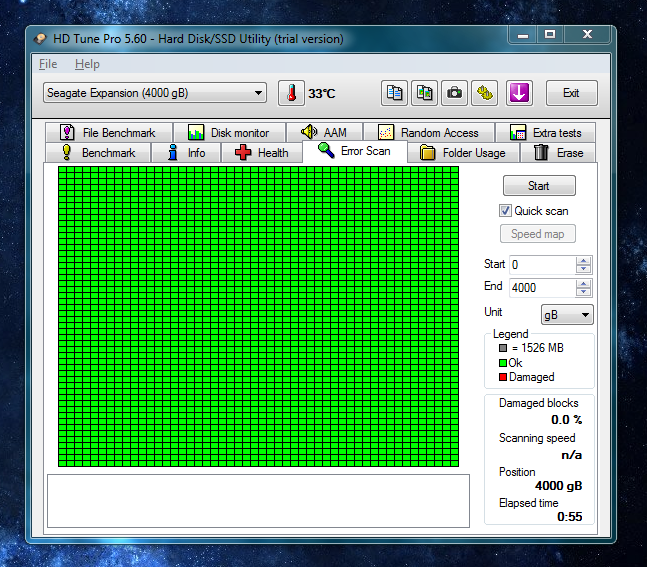
I have a five month old 4tb external Seagate drive that suddenly disappeared from Windows explorer & I couldn't access its data. After rebooting my PC, it showed up again, albeit with its custom icon missing (it has since reappeared after I unplugged & plugged the drive back in) & seems to be working fine at the moment.
I ran Seagates diagnostics software SeaTools & the short generic test failed despite that the drive shows 'healthy' in every other s.m.a.r.t. software. The SeaTools short drive self test passed & Crystal Disk, DiskCheckup & Windows disk management all say the drive is fine. I ran a short test with GSmartControl & it returned no errors & shows the drive as being healthy.
I'm skeptical of these 'fail' results because all three of my external USB drives fail the same test (two Seagates, one WD) while appearing healthy otherwise & passing other tests. I read online some other people whose drives failed the SeaTools short generic test but passed the longer more thorough version of the same test. This PC is about 9 years old so I don't know if the age of the usb ports plays a role.
What should I do? Run windows check disk or SeaTools 'fix'? Or should I assume the drive is fine?
EDIT: I'm becoming more convinced the software is faulty. From googling: http://forums.whirlpool.net.au/archive/2288784
Seagate Tools - HDD - Failing Short Generic Test - Normal?
I ran Seagates diagnostics software SeaTools & the short generic test failed despite that the drive shows 'healthy' in every other s.m.a.r.t. software. The SeaTools short drive self test passed & Crystal Disk, DiskCheckup & Windows disk management all say the drive is fine. I ran a short test with GSmartControl & it returned no errors & shows the drive as being healthy.
I'm skeptical of these 'fail' results because all three of my external USB drives fail the same test (two Seagates, one WD) while appearing healthy otherwise & passing other tests. I read online some other people whose drives failed the SeaTools short generic test but passed the longer more thorough version of the same test. This PC is about 9 years old so I don't know if the age of the usb ports plays a role.
What should I do? Run windows check disk or SeaTools 'fix'? Or should I assume the drive is fine?
EDIT: I'm becoming more convinced the software is faulty. From googling: http://forums.whirlpool.net.au/archive/2288784
I bought 3 brand new Seagate Expansion 2TB drives yesterday. Before using them, I ran Seagate diagnostic tools on both drives and both of them have failed the "Short Generic test".
I have not tested the 3rd hard drive yet.
My nextdoor neighbor also bought the same hard drive brand new, and it is also failing the same test.
4 new drives all failed the short generic test using SeaTools lol, so obviously there is a problem with the diagnostic software. All hard drives passed a full error scan in HD Tune with flying colours.
It's pretty bad though when you can't rely on the official diagnostic software for your drive (at least through usb interface as it does seem to be fine/accurate when scanning the drive through sata).
Seagate Tools - HDD - Failing Short Generic Test - Normal?
Why am I asking this? Well I've purchased a new Seagate Expansion HDD from NLG (around a month ago), upon testing it with Seatools right after purchase, the hdd failed the Short-Generic-Test. Went back to store, had a replaced, no fuss, and what do you know, same issue with the replacement, failed Short-Generic-Test. Ended up getting a store-credit.
Today, testing a hdd at work, same issue (failed Short-Generic-Test) (however reason for testing was that a proprietary app randomly freezing, so just going through the usual TS).
Last edited:
My Computer
At a glance
Microsoft Windows 7 Ultimate 64-bit 7601 Mult...Intel(R) Core(TM) i7-2600 CPU @ 3.40GHz16.00 GBNVIDIA GeForce GTX 1050 Ti 4GB
- Computer type
- PC/Desktop
- Computer Manufacturer/Model Number
- HP
- OS
- Microsoft Windows 7 Ultimate 64-bit 7601 Multiprocessor Free Service Pack 1
- CPU
- Intel(R) Core(TM) i7-2600 CPU @ 3.40GHz
- Motherboard
- Hewlett-Packard 1497
- Memory
- 16.00 GB
- Graphics Card(s)
- NVIDIA GeForce GTX 1050 Ti 4GB
- Sound Card
- ASUS XONAR U5
- Screen Resolution
- 2560 x 1440 x 32 bits @ 75 Hz
- Hard Drives
- (1) Samsung SSD 850 EVO 500GB ATA Device
(2) Seagate 4TB Expansion USB Device
- Browser
- Chrome