Windows system volume only controls left channel

bigblocktowncar

New member
Local time
9:50 AM
Messages
27
I am using a Xonar ST on Win 7 64bit......All of a sudden I noticed I was only getting sound on the right side. I reseated the card, reseated all of the connections, and changed the power connection from the PSU, and made sure on board audio was disabled.

I went into the control panel and balanced the audio....Left was set all the way down for some unknown reason. The volume on both sides will work at the proper level provided there is a separate control.....

The main system volume on the keyboard still only affects the left side. If I open winamp, the volume slider will control both left and right equally (provided the system volume is maxed out); turning down the system volume will leave the right channel at whatever level the winamp volume slider is set at.

I tried the latest driver, also tried the Uni driver. I also deleted the hsmgr file in windows/syswow64 that I saw people complaining about. I reinstalled the driver and hsmgr32 and hsmgr64 came back and are running at the same time. I unchecked them from msconfig so they do not start, but nothing has changed. Is this a driver problem or is there some other windows conflict. Since the programs seem to be able to individually control the volume I am thinking this is windows related. If I open youtube, the youtube volume slider controls both left and right. Does this have something to do with the soundcard exclusivity settings?

Is this a registry problem? It's like the volume is only monaural.

Thanks
 

My Computer

OS
Windows 7 Pro 64bit
CPU
Intel Core i7 920
Motherboard
evga x58
Memory
OCZ Gold 6gb
Graphics Card(s)
GTX285
Sound Card
asus xonar st
Monitor(s) Displays
Samsung T240HD
Hard Drives
3xWD black 500gb
PSU
Corsair 850watt
Case
Antec 900
Cooling
Xigmatek Dark Knight and stock Antec 900 fans
Keyboard
Logitech Illuminated
Mouse
Coolermaster Sentinel
Try the Windows uninstall/reinstall. Go to the Device Manger, in the Sound section RIGHT click on the entry for the Xonar to highlight it and then LEFT click on "Uninstall". DO NOT uninstall the drivers. Restart the PC and when Windows starts it will detect and reinstall the sound. This will correct any Windows corruptions with the sound card.
 

My Computer

Computer type
PC/Desktop
Computer Manufacturer/Model Number
My Own Build
OS
Windows 10 64 bit
CPU
Intel i7 6700K
Motherboard
ASUS ROG Maximus VIII Hero
Memory
16GB Corsair Dominator
Graphics Card(s)
Intel CPU Graphics
Sound Card
RealTek
Monitor(s) Displays
27" Dell S2719dgf
Screen Resolution
2560X1440
Hard Drives
1 TB Samsung 850 EVO SSD for Win 10 Pro
500GB Samsung 850 EVO SSD for Win 10 Insider
2 TB drive for backup
PSU
EVGA Supernova 750G2
Case
BeQuiet Silent Base 600
Cooling
Deepcool Captain 120EX
Keyboard
Microsoft Wireless 2000
Mouse
Microsoft wireless
Internet Speed
100 MB/sec (Cable)
Antivirus
Microsoft Defender and Malwarebytes
Browser
Edge/Firefox
Other Info
Cakewalk (Sonar) by BandLab and Studio One 4.1 Pro recording studio software. MOTU 896Mk3 Hybrid recording interface, Frontier Tranzport wireless control unit, Behringer X-Touch Control Surface.
Five USB connected optical drives for CD Audio production using Nero BurningROM
You mention that you use keyboard to control the sound volume - have you tried uninstalling the keyboard driver(+re install)?
 

My Computer

Computer type
PC/Desktop
Computer Manufacturer/Model Number
custom build
OS
w7 ultimate 64-bit sp1
CPU
i5 2500K @4.5
Motherboard
MSI P67A-GD65 rev2
Memory
2x4GB G.Skill Ripjaws-X 2,133 CL9
Graphics Card(s)
GTX 560Ti
Sound Card
on board
Monitor(s) Displays
BenQ G2410HD
Screen Resolution
1920x1080
Hard Drives
Samsung 2.5-Inch 250 GB 850 EVO
PSU
BeQuiet 600W
Keyboard
K65
Mouse
Razer Deathadder Ergonomic Gaming Mouse
Internet Speed
35Mbps
I got it to work using an older 1.64 UNi driver....not sure why it stopped in the first place, but I will keep the windows uninstall in mind for next time. There are 3 separate sound devices/drivers running at a time on this machine and it was difficult to get everything working within windows the first time.
 

My Computer

OS
Windows 7 Pro 64bit
CPU
Intel Core i7 920
Motherboard
evga x58
Memory
OCZ Gold 6gb
Graphics Card(s)
GTX285
Sound Card
asus xonar st
Monitor(s) Displays
Samsung T240HD
Hard Drives
3xWD black 500gb
PSU
Corsair 850watt
Case
Antec 900
Cooling
Xigmatek Dark Knight and stock Antec 900 fans
Keyboard
Logitech Illuminated
Mouse
Coolermaster Sentinel
Try the Windows uninstall/reinstall. Go to the Device Manger, in the Sound section RIGHT click on the entry for the Xonar to highlight it and then LEFT click on "Uninstall". DO NOT uninstall the drivers. Restart the PC and when Windows starts it will detect and reinstall the sound. This will correct any Windows corruptions with the sound card.

Thanks worked perfect, strange no idea what caused it but the main volume would only affect the left speaker.
Anyway thanks to you its fixed :D
 

My Computer

Computer type
PC/Desktop
Computer Manufacturer/Model Number
custum
OS
10/64
CPU
i7
Motherboard
ASUS
Memory
16GB
Graphics Card(s)
970
Hard Drives
150 SSD 2TB HD
Try the Windows uninstall/reinstall. Go to the Device Manger, in the Sound section RIGHT click on the entry for the Xonar to highlight it and then LEFT click on "Uninstall". DO NOT uninstall the drivers. Restart the PC and when Windows starts it will detect and reinstall the sound. This will correct any Windows corruptions with the sound card.

Sorry to necro, but I'm a firm believer in credit where it's due. (And in SEO for good solutions.)

I've had this issue for about four months, ever since I upgraded to from Windows 7 to Windows 10. After much frustration, many driver reinstallations, and lots of fruitless web searching, I found this, tried it, and it worked like a charm.

Thanks much!
 

My Computer

Computer type
PC/Desktop
OS
Windows 10 Enterprise 64-bit
It's March 2022 and I still have this issue. The uninstall/reinstall advice still works but it is a pain to have to do it frequently. Has anyone ever found a perminant solution? It's definately a Xonar driver issue but they haven't released new ones in years.
 

My Computer

Computer type
PC/Desktop
OS
Windows 10 Pro 64bit 2004
It's March 2022 and I still have this issue. The uninstall/reinstall advice still works but it is a pain to have to do it frequently. Has anyone ever found a perminant solution? It's definately a Xonar driver issue but they haven't released new ones in years.
It worked permanently for me. I haven't thought about this in a year.

Is it possible -- just spitballing here -- that some other Windows whatnot is updating your device in some way that causes this problem to reoccur?

I agree that we're never getting new Xonar drivers, alas.
 

My Computer

Computer type
PC/Desktop
OS
Windows 10 Enterprise 64-bit
It had worked for me for over a year, but recently the bug occured again and has reoccured several times since.

I have been playing Battlefield recently after a hiatus and also recently updated my graphics drivers. This enabled the "NVIDIA High Definition Audio" which I have just disabled. These are the only 2 things I can think of which could have changed to trigger it, apart from a feature update to Windows 10.

Do you happen to play any of the recent Battlefield series of games or have a GeForce graphics card? Do you have an AsRock motherboard by chance?

I'm fairly sure that something triggers the bug in the driver. I wish I could find out what configuration setting the reinstall of the drivers is resetting which fixes the issue.
 

My Computer

Computer type
PC/Desktop
OS
Windows 10 Pro 64bit 2004
Please describe your issue in its entirety because the OP's issue all those years ago could be vastly different than yours.

If it's related, I'm interested in knowing if you use a Logitech keyboard and its software? If so, uninstall that once and see what happens. Again, if the issue is the same as the OP's dated 30, Dec 2014 at 09:19 UTC (same time in London in the Winter). ;) Time Duration Calculator
 

My Computer

Computer type
PC/Desktop
OS
Windows 7 Ultimate x64
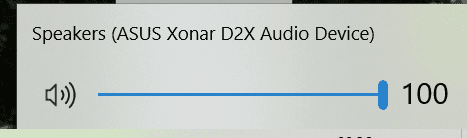
The volume in question is the main system:

image.png

If your keyboard has volume controls then this is what it controls. No driver is required and the issue is present regardless of whether the keyboard is used to control the volume or any other method. So this is a red herring I believe - it is just the easiest way to control the top level system (non-application) volume.

The problem is that the main system volume starts only controlling the left channel. The right channel remains always at a fixed value e.g. 100%. The only known fix is to reinstall the drivers and reboot, but the error state can reoccur based on an unknown trigger. It is an issue within the Xonar drivers (which the Unified drivers are based upon).
 

My Computer

Computer type
PC/Desktop
OS
Windows 10 Pro 64bit 2004
Do you happen to play any of the recent Battlefield series of games or have a GeForce graphics card? Do you have an AsRock motherboard by chance?

I do not play Battlefield. (But I do game. Cyberpunk 2077 and The Outer Wilds VR have been my poison lately.)
My motherboard is an Asus P8P67LE.

I DO have a GeForce GPU. It's a GTX 1070, installed five years ago.

I do not have a Logitech keyboard but DO have a Logitech mouse.

Having tried solving this problem last year (successfully, thanks to fireberd!), I am keenly aware that this thread right here is pretty close to the only place on the entire Internet where this particularly bizarre problem is being discussed. It is QUITE the necro, but there are not many better options (except, perhaps, a brand-new thread).
 

My Computer

Computer type
PC/Desktop
OS
Windows 10 Enterprise 64-bit
If you're using a software for a keyboard like the popular Logitech line of keyboards, it may cause driver conflics. That's what I was trying to elude to.

It seems to be some kind of "combat" between two drivers.


The volume in question is the main system:

View attachment 421081

If your keyboard has volume controls then this is what it controls. No driver is required and the issue is present regardless of whether the keyboard is used to control the volume or any other method. So this is a red herring I believe - it is just the easiest way to control the top level system (non-application) volume.

The problem is that the main system volume starts only controlling the left channel. The right channel remains always at a fixed value e.g. 100%. The only known fix is to reinstall the drivers and reboot, but the error state can reoccur based on an unknown trigger. It is an issue within the Xonar drivers (which the Unified drivers are based upon).

- - - Updated - - -

It could also be BS Nvidia's driver audio crap. When you install their driver, ONLY install the driver, no fluff, and no audio for their HDMI. Speaking of, turn off HDMI audio in the control panel, and/or play with that option.


Wait? My GPU is a Sound Card? - Probing Paul #51 - YouTube
 

My Computer

Computer type
PC/Desktop
OS
Windows 7 Ultimate x64
My motherboard is an Asus P8P67LE.
I have an LGA 1155 motherboard too (Asrock Z68, 32GB DDR3 2200Mhz, i7 3770k at 4.5Ghz) too. Good effort playing Cyberpunk on an 11 year old system, but unfortunate that we can't officially upgrade to Windows 11!

Maybe the bug only occurs on this chipset/similar. I believe this issue is the same one: Changing Volume Only Affects Left Speaker - Windows 10 Forums (sevenforums.com) (same chipset in the HT Omega Striker 7.1).
 

My Computer

Computer type
PC/Desktop
OS
Windows 10 Pro 64bit 2004
Back
Top