
You are using an out of date browser. It may not display this or other websites correctly.
You should upgrade or use an alternative browser.
You should upgrade or use an alternative browser.
Windows Task Scheduler
- Thread starter nxb
- Start date

bbearren
Banned
Is an instance of the task actually running? Check Task Manager to find out.
My Computer
- Computer Manufacturer/Model Number
- Dell Inspiron 580
- OS
- 7 Ultimate x64/7 Home Premium x64
- CPU
- Intel i3 550 3.2 GHz
- Motherboard
- Dell/Intel H57
- Memory
- Corsair 16 GB DDR3 (4 X 4GB)
- Graphics Card(s)
- Intel HD Graphics
- Sound Card
- Intel P55 HD Audio
- Monitor(s) Displays
- LG E2360 LED
- Screen Resolution
- 1920 X 1080
- Hard Drives
- Seagate 1TB X 2 Internal,
Seagate 1TB eSATA (Backup)
- PSU
- Dell 300W
- Case
- Dell Inspiron
- Cooling
- Dell/Intel
- Keyboard
- Microsoft Wireless Comfort Keyboard 5000
- Mouse
- Microsoft Wireless Mouse 5000
- Internet Speed
- 4,000 Mbit DSL
- Other Info
- Custom Installation -
OS separate on C:
Pagefile Separate on P:
Program Files Separate on U:
Users and ProgramData separate on V:
Is an instance of the task actually running? Check Task Manager to find out.
Yes there is but does not run and sometimes I get a 0x2 error which I cannot find in the windows task scheduler error list. How can I run the task every 12 hours, can you provide settings?
My Computer
- OS
- windows 7 home x64
bbearren
Banned
Will the task run if you launch it directly?
My Computer
- Computer Manufacturer/Model Number
- Dell Inspiron 580
- OS
- 7 Ultimate x64/7 Home Premium x64
- CPU
- Intel i3 550 3.2 GHz
- Motherboard
- Dell/Intel H57
- Memory
- Corsair 16 GB DDR3 (4 X 4GB)
- Graphics Card(s)
- Intel HD Graphics
- Sound Card
- Intel P55 HD Audio
- Monitor(s) Displays
- LG E2360 LED
- Screen Resolution
- 1920 X 1080
- Hard Drives
- Seagate 1TB X 2 Internal,
Seagate 1TB eSATA (Backup)
- PSU
- Dell 300W
- Case
- Dell Inspiron
- Cooling
- Dell/Intel
- Keyboard
- Microsoft Wireless Comfort Keyboard 5000
- Mouse
- Microsoft Wireless Mouse 5000
- Internet Speed
- 4,000 Mbit DSL
- Other Info
- Custom Installation -
OS separate on C:
Pagefile Separate on P:
Program Files Separate on U:
Users and ProgramData separate on V:
bbearren
Banned
What is this task? If it can effect system-wide changes it will probably be coded to run only one instance at a given time.
My Computer
- Computer Manufacturer/Model Number
- Dell Inspiron 580
- OS
- 7 Ultimate x64/7 Home Premium x64
- CPU
- Intel i3 550 3.2 GHz
- Motherboard
- Dell/Intel H57
- Memory
- Corsair 16 GB DDR3 (4 X 4GB)
- Graphics Card(s)
- Intel HD Graphics
- Sound Card
- Intel P55 HD Audio
- Monitor(s) Displays
- LG E2360 LED
- Screen Resolution
- 1920 X 1080
- Hard Drives
- Seagate 1TB X 2 Internal,
Seagate 1TB eSATA (Backup)
- PSU
- Dell 300W
- Case
- Dell Inspiron
- Cooling
- Dell/Intel
- Keyboard
- Microsoft Wireless Comfort Keyboard 5000
- Mouse
- Microsoft Wireless Mouse 5000
- Internet Speed
- 4,000 Mbit DSL
- Other Info
- Custom Installation -
OS separate on C:
Pagefile Separate on P:
Program Files Separate on U:
Users and ProgramData separate on V:
bbearren
Banned
Is it a batch file?
My Computer
- Computer Manufacturer/Model Number
- Dell Inspiron 580
- OS
- 7 Ultimate x64/7 Home Premium x64
- CPU
- Intel i3 550 3.2 GHz
- Motherboard
- Dell/Intel H57
- Memory
- Corsair 16 GB DDR3 (4 X 4GB)
- Graphics Card(s)
- Intel HD Graphics
- Sound Card
- Intel P55 HD Audio
- Monitor(s) Displays
- LG E2360 LED
- Screen Resolution
- 1920 X 1080
- Hard Drives
- Seagate 1TB X 2 Internal,
Seagate 1TB eSATA (Backup)
- PSU
- Dell 300W
- Case
- Dell Inspiron
- Cooling
- Dell/Intel
- Keyboard
- Microsoft Wireless Comfort Keyboard 5000
- Mouse
- Microsoft Wireless Mouse 5000
- Internet Speed
- 4,000 Mbit DSL
- Other Info
- Custom Installation -
OS separate on C:
Pagefile Separate on P:
Program Files Separate on U:
Users and ProgramData separate on V:
bbearren
Banned
Post it here so we can have a bit more to go on.
My Computer
- Computer Manufacturer/Model Number
- Dell Inspiron 580
- OS
- 7 Ultimate x64/7 Home Premium x64
- CPU
- Intel i3 550 3.2 GHz
- Motherboard
- Dell/Intel H57
- Memory
- Corsair 16 GB DDR3 (4 X 4GB)
- Graphics Card(s)
- Intel HD Graphics
- Sound Card
- Intel P55 HD Audio
- Monitor(s) Displays
- LG E2360 LED
- Screen Resolution
- 1920 X 1080
- Hard Drives
- Seagate 1TB X 2 Internal,
Seagate 1TB eSATA (Backup)
- PSU
- Dell 300W
- Case
- Dell Inspiron
- Cooling
- Dell/Intel
- Keyboard
- Microsoft Wireless Comfort Keyboard 5000
- Mouse
- Microsoft Wireless Mouse 5000
- Internet Speed
- 4,000 Mbit DSL
- Other Info
- Custom Installation -
OS separate on C:
Pagefile Separate on P:
Program Files Separate on U:
Users and ProgramData separate on V:
Well, it's not much in there that I think it would cause issues. Here is my settings for the task to run every 12 hours. Is this correct?
When I ran the task before as mentioned above it ran fine, then I get a 0x2 error.
Code:
starts on 3/30/2012 at 12 AM
Here is the trigger info;
Weekly - recur every week, on everyday
advanced settings
repeate task every 1 hour for a duration of 12 hours,
expire 3/31/2012 12 PM
When I ran the task before as mentioned above it ran fine, then I get a 0x2 error.
My Computer
- OS
- windows 7 home x64
bbearren
Banned
What I meant was, can you post the batch file code here?
My Computer
- Computer Manufacturer/Model Number
- Dell Inspiron 580
- OS
- 7 Ultimate x64/7 Home Premium x64
- CPU
- Intel i3 550 3.2 GHz
- Motherboard
- Dell/Intel H57
- Memory
- Corsair 16 GB DDR3 (4 X 4GB)
- Graphics Card(s)
- Intel HD Graphics
- Sound Card
- Intel P55 HD Audio
- Monitor(s) Displays
- LG E2360 LED
- Screen Resolution
- 1920 X 1080
- Hard Drives
- Seagate 1TB X 2 Internal,
Seagate 1TB eSATA (Backup)
- PSU
- Dell 300W
- Case
- Dell Inspiron
- Cooling
- Dell/Intel
- Keyboard
- Microsoft Wireless Comfort Keyboard 5000
- Mouse
- Microsoft Wireless Mouse 5000
- Internet Speed
- 4,000 Mbit DSL
- Other Info
- Custom Installation -
OS separate on C:
Pagefile Separate on P:
Program Files Separate on U:
Users and ProgramData separate on V:
I know what you meant but it cannot be the code it is only 2 lines. Download from the site and the other to redirect it to the proper folder ten compiling it.
In settings; repeat task every 1 hour for a duration of 12 hours. The max it can repeat is 1 hour or less than that. Must be my settings, I've tried every possible way thats why I ask if you know proper settings to run the task on every 12 hours.
In settings; repeat task every 1 hour for a duration of 12 hours. The max it can repeat is 1 hour or less than that. Must be my settings, I've tried every possible way thats why I ask if you know proper settings to run the task on every 12 hours.
My Computer
- OS
- windows 7 home x64

@NXB - you should answer the question asked by bbearren - "can you post the batch file code here?"
Right now nobody here really knows what your task tries to do except you.
If you look at your posts #7 and #14 you describe what this task does quite differently.
Post #7 mentions zipping and post #14 mentions compiling...
Looking at this thread I can't be sure if the task and/or bat file ever runs and ends correctly.
Do a Google for 0x41301 and start reading...
There are many threads saying the problem might be a hung VBS program.
Right now nobody here really knows what your task tries to do except you.
If you look at your posts #7 and #14 you describe what this task does quite differently.
Post #7 mentions zipping and post #14 mentions compiling...
Looking at this thread I can't be sure if the task and/or bat file ever runs and ends correctly.
Do a Google for 0x41301 and start reading...
There are many threads saying the problem might be a hung VBS program.
My Computer
- Computer type
- PC/Desktop
- Computer Manufacturer/Model Number
- home built
- OS
- Multi-Boot W7_Pro_x64 W8.1_Pro_x64 W10_Pro_x64 +Linux_VMs +Chromium_VM
- CPU
- AMD Athlon II x4 620
- Motherboard
- Gigabyte GA-MA785G-UD3H
- Memory
- 6GB GSkill DDR2 800
- Graphics Card(s)
- AMD 4670 GPU + AMD 4200 IGP
- Sound Card
- on board Realtek ALC889A
- Monitor(s) Displays
- RCA 40" LCD TV, Insignia 32" LCD TV, HP 15" LCD monitor
- Screen Resolution
- 1680 x 1050
- Hard Drives
- OCZ Vertex 3 120GB,
Samsung F3 1TB (3),
Several others - WD, Seagate, Hitachi, ...
- PSU
- Corsair 500 W
- Case
- Rosewill mid tower
- Cooling
- CM 90mm rifle
- Keyboard
- Gyration wireless, Logitech wireless, Dell USB wired
- Mouse
- Gyration wireless, Logitech wireless, V7 USB wired
- Internet Speed
- Spectrum - 100Mbps D / 10Mbps U
- Antivirus
- Avast, MBAM3, EMET, WinPatrol
- Browser
- Pale Moon, Firefox, IE
- Other Info
- 2 multi-boot PC's
Mainly HTPC/Office/Gen purpose (no gaming).
Trendnet USB KVM.
LG DVD burner/Blue Ray Player.
Tray system for removable SATA backup drives.
Not currently OCd, under-volted.
I use Hybrid sleep, rarely re-boot or shutdown.
Hauppauge HD-PVR, Avermedia PCIe TV Tuner, Hauppauge PCI TV Tuner.
This line would update files every 12 hours if there are files that need updating if not it won't download anything, is there are it would download then zip them into the folders where directed to.
Meant to mention zippping not compiling, I didn't ask what 0x41301 meant.
Code:
"C:\HldsUpdateTool.exe" -command update -game  -dir C:\games

"C:\Program Files\7-Zip\7z.exe" u -t7z -xr!*TCA.Mods\* -xr!*TCA.Maps\* -xr!*TCA.Patches\* "C:\games\CS.7z" -ir!"C:\games\CS"
Meant to mention zippping not compiling, I didn't ask what 0x41301 meant.
My Computer
- OS
- windows 7 home x64
bbearren
Banned
0x41301 is not an error code, it is a status code, and it means that the task is currently running.
Also, you're saying that you want it to update every twelve hours, but you're also saying that you want it to update every hour for twelve hours and then stop.
What is it exactly that you want this update tool to do?
Also, you're saying that you want it to update every twelve hours, but you're also saying that you want it to update every hour for twelve hours and then stop.
What is it exactly that you want this update tool to do?
My Computer
- Computer Manufacturer/Model Number
- Dell Inspiron 580
- OS
- 7 Ultimate x64/7 Home Premium x64
- CPU
- Intel i3 550 3.2 GHz
- Motherboard
- Dell/Intel H57
- Memory
- Corsair 16 GB DDR3 (4 X 4GB)
- Graphics Card(s)
- Intel HD Graphics
- Sound Card
- Intel P55 HD Audio
- Monitor(s) Displays
- LG E2360 LED
- Screen Resolution
- 1920 X 1080
- Hard Drives
- Seagate 1TB X 2 Internal,
Seagate 1TB eSATA (Backup)
- PSU
- Dell 300W
- Case
- Dell Inspiron
- Cooling
- Dell/Intel
- Keyboard
- Microsoft Wireless Comfort Keyboard 5000
- Mouse
- Microsoft Wireless Mouse 5000
- Internet Speed
- 4,000 Mbit DSL
- Other Info
- Custom Installation -
OS separate on C:
Pagefile Separate on P:
Program Files Separate on U:
Users and ProgramData separate on V:
The maximum value in the task scheduler settings for repeat task is 1 hour for a duration of 12 hours, I want to it to run automatically every 12 hours, I provided the settings of which I currently have in the task schueduler for this task.
My Computer
- OS
- windows 7 home x64
The maximum value in the drop down list is 1 hour, but you can type 12 hours into that field.
I'm assuming you are talking about the field i hi-lighted in my screen print.
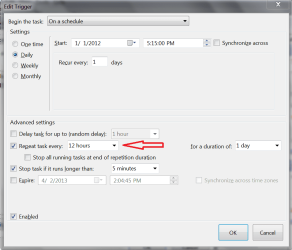
I'm assuming you are talking about the field i hi-lighted in my screen print.
My Computer
- Computer type
- PC/Desktop
- Computer Manufacturer/Model Number
- home built
- OS
- Multi-Boot W7_Pro_x64 W8.1_Pro_x64 W10_Pro_x64 +Linux_VMs +Chromium_VM
- CPU
- AMD Athlon II x4 620
- Motherboard
- Gigabyte GA-MA785G-UD3H
- Memory
- 6GB GSkill DDR2 800
- Graphics Card(s)
- AMD 4670 GPU + AMD 4200 IGP
- Sound Card
- on board Realtek ALC889A
- Monitor(s) Displays
- RCA 40" LCD TV, Insignia 32" LCD TV, HP 15" LCD monitor
- Screen Resolution
- 1680 x 1050
- Hard Drives
- OCZ Vertex 3 120GB,
Samsung F3 1TB (3),
Several others - WD, Seagate, Hitachi, ...
- PSU
- Corsair 500 W
- Case
- Rosewill mid tower
- Cooling
- CM 90mm rifle
- Keyboard
- Gyration wireless, Logitech wireless, Dell USB wired
- Mouse
- Gyration wireless, Logitech wireless, V7 USB wired
- Internet Speed
- Spectrum - 100Mbps D / 10Mbps U
- Antivirus
- Avast, MBAM3, EMET, WinPatrol
- Browser
- Pale Moon, Firefox, IE
- Other Info
- 2 multi-boot PC's
Mainly HTPC/Office/Gen purpose (no gaming).
Trendnet USB KVM.
LG DVD burner/Blue Ray Player.
Tray system for removable SATA backup drives.
Not currently OCd, under-volted.
I use Hybrid sleep, rarely re-boot or shutdown.
Hauppauge HD-PVR, Avermedia PCIe TV Tuner, Hauppauge PCI TV Tuner.