Windows Theme Changed After Returning From Safe Mode

Rick1441

New member
Local time
2:17 AM
Messages
34
It has been about five months since I moved from an XP laptop to 7.

At first I used a Classic Windows Theme. But I reluctantly gave it up for Aero when I learned that switching to Aero was the solution to the tearing I was experiencing when playing video files or streaming video.

For some reason Safe Mode still has my Windows Classic Theme (and I don't see a Personalization option in Safe Mode). But when I exit Safe Mode, I always find that "regular" Windows has switched me back to the Classic Theme. Odd. It's not currently a big deal, because I just go to Personalization and click on my customized Aero theme, and I'm back. In fact, I wouldn't give this behavior a second thought, except that at some future point I might have multiple Areo themes created, and when I return from Safe Mode I might not recall which one I had been using. Again, not a big deal, but it could be a bit of an inconvenience. Besides, I'm wondering why Safe Mode doesn't have Aero. Is that normal? And is it normal to revert back to Classic every time you exit Safe Mode?

After (continuing) to deal with a frustrating hardware issue, spending a few minutes on a relatively benign one like this is...refreshing. :)
 

My Computer

Computer type
PC/Desktop
Computer Manufacturer/Model Number
Lenovo
OS
Windows 7 Pro x64
In Safe mode you run with minimal drivers so there are no personalization options.
In normal mode, in services check if the Theme service is set to automatic.
Why did you have to go in Safe mode?
 

My Computer

Computer type
PC/Desktop
OS
windows 7 ultimate x64
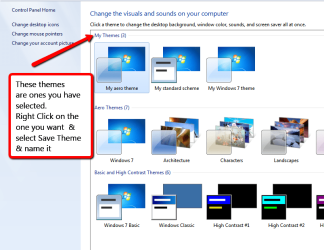
To save a theme or Aero theme, select Personalise by right clicking on Desktop or open Control Panel & select Personalise & follow the directions in the screen shot.

You can have quite a few themes under "My themes" if you wish, but if you name them then they will be easy to find & use again. If there are themes that don't want in "My themes" right click on them & select delete.

Aero_themes.png
 

My Computer

Computer type
PC/Desktop
Computer Manufacturer/Model Number
Self built using existing case
OS
Windows 7 Home Premium 64 bit sp1
CPU
Intel i5 3570 3.4Ghz Ivy Bridge SKT 1155 quad core
Motherboard
Gigabyte Z77-HD3 SKT 1155 2xSata 3, 4x USB 3.0
Memory
G-Skill Rip Jaws 16Gb (8x2) DDR3 -1600 PC3 12800 CL 10 red
Graphics Card(s)
Gigabyte NVIDIA GT610 1Gb DDR3 810/1200 PCI-E 2.0 Silent
Sound Card
NVIDIA High Definition & Realtech High Definition Audio
Monitor(s) Displays
2 x Philips 226V4L 16:9 aspect ratio
Screen Resolution
1920 x 1080 HD
Hard Drives
Samsung 840 Pro 256gb SSD, SATA 3.
Hitachi Touro Portable 1tb, USB 3.0 HDD used for image b/ups.
PSU
Corsair VS450
Case
Codeng
Cooling
PSU fan & CPU fan
Keyboard
Logitech
Mouse
Logitech Wireless trackball M570
Internet Speed
Wireless 3G. 3mg down & 550kb up.
Antivirus
Bitdefender Internet Security 2020
Browser
Opera (Current Version) & Firefox
Other Info
MS Office 2013 Pro. Davis weather station software. MGE Nova 600 avr UPS.
In Safe mode you run with minimal drivers so there are no personalization options.
In normal mode, in services check if the Theme service is set to automatic.
Why did you have to go in Safe mode?

I checked and, yes, the Theme service is set to automatic. I went into Safe Mode mode as part of trying to diagnose the (likely) hardware issue I mentioned in the last sentence. Didn't help. I've also used it for various diagnostics from time to time.
 

My Computer

Computer type
PC/Desktop
Computer Manufacturer/Model Number
Lenovo
OS
Windows 7 Pro x64
Ranger4 -

Thanks. I was actually aware of that capability, but my concern is if I want to identify a selected theme as my new favorite (with "favorite" possibly changing over time), especially if I have lots of themes saved. Is there a way to rename a theme?

Of course this is not a major issue. If they can't be renamed I can always simply maintain a document keeping track of the theme I'm currently using so that I know which one to go choose after returning from Safe Mode. If I recall to keep the list updated, that is... :)

Also, again part of the reason for this post is to see if anyone knows why the system might be reverting back to my old Windows Classic theme every time I return from Safe Mode.
 

My Computer

Computer type
PC/Desktop
Computer Manufacturer/Model Number
Lenovo
OS
Windows 7 Pro x64
Ranger4 -

Thanks. I was actually aware of that capability, but my concern is if I want to identify a selected theme as my new favorite (with "favorite" possibly changing over time), especially if I have lots of themes saved. Is there a way to rename a theme?

Of course this is not a major issue. If they can't be renamed I can always simply maintain a document keeping track of the theme I'm currently using so that I know which one to go choose after returning from Safe Mode. If I recall to keep the list updated, that is... :)

Also, again part of the reason for this post is to see if anyone knows why the system might be reverting back to my old Windows Classic theme every time I return from Safe Mode.

Yes they can be renamed. Select the appropriate theme, which will switch you that theme, then Right Click on it, as mentioned in my post #3 & name it.
 

My Computer

Computer type
PC/Desktop
Computer Manufacturer/Model Number
Self built using existing case
OS
Windows 7 Home Premium 64 bit sp1
CPU
Intel i5 3570 3.4Ghz Ivy Bridge SKT 1155 quad core
Motherboard
Gigabyte Z77-HD3 SKT 1155 2xSata 3, 4x USB 3.0
Memory
G-Skill Rip Jaws 16Gb (8x2) DDR3 -1600 PC3 12800 CL 10 red
Graphics Card(s)
Gigabyte NVIDIA GT610 1Gb DDR3 810/1200 PCI-E 2.0 Silent
Sound Card
NVIDIA High Definition & Realtech High Definition Audio
Monitor(s) Displays
2 x Philips 226V4L 16:9 aspect ratio
Screen Resolution
1920 x 1080 HD
Hard Drives
Samsung 840 Pro 256gb SSD, SATA 3.
Hitachi Touro Portable 1tb, USB 3.0 HDD used for image b/ups.
PSU
Corsair VS450
Case
Codeng
Cooling
PSU fan & CPU fan
Keyboard
Logitech
Mouse
Logitech Wireless trackball M570
Internet Speed
Wireless 3G. 3mg down & 550kb up.
Antivirus
Bitdefender Internet Security 2020
Browser
Opera (Current Version) & Firefox
Other Info
MS Office 2013 Pro. Davis weather station software. MGE Nova 600 avr UPS.
What is the hardware issue?
 

My Computer

Computer type
PC/Desktop
OS
windows 7 ultimate x64
Ranger 4 - Thanks for the tip.

cyanna -- I have two USB 3 ports, one stacked atop the other. I have an external DC-powered USB 3 hard drive that works fine when plugged into the top port, but only gives me USB 2 speeds when plugged into the bottom port (along with the Windows warning that "this device can perform faster if plugged into a high-speed port," or something along those lines). BUT, I also have a port-powered portable USB 3 external drive that gives me USB 3 speeds in both the top *and* bottom USB 3 ports, with no Windows "can perform faster" messages.
 

My Computer

Computer type
PC/Desktop
Computer Manufacturer/Model Number
Lenovo
OS
Windows 7 Pro x64
It seems that the port is working fine as it is working with another device.
Do you get that error message even if nothing is plugged in the top port? (top port empty, DC powered drive in the bottom port)
 

My Computer

Computer type
PC/Desktop
OS
windows 7 ultimate x64
It seems that the port is working fine as it is working with another device.
Do you get that error message even if nothing is plugged in the top port? (top port empty, DC powered drive in the bottom port)

Yes.

As for the bottom port working fine because it works with another device: I'm no hardware expert, but couldn't this be one of those weird situations where the bottom port is more "finicky" for some reason. By that I mean that maybe it has some slight design or electrical deficiency, that one device (or device cable?) may be able to "overcome," while another device/cable can't? i know I might not be making sense, but I'm thinking, for example, of how I once had two cell phones (call them A and B) of the same model, and also two identical chargers. The first charger was able to charge both phones just fine, but the second charger was only able to charge phone A. It couldn't charge B at all, even if I swapped A's battery into B after it drained.
 

My Computer

Computer type
PC/Desktop
Computer Manufacturer/Model Number
Lenovo
OS
Windows 7 Pro x64
Back
Top