Windows Time Losing an hour!

imacken

New member
Power User
VIP
Local time
7:55 PM
Messages
288
Weirdly, whenever I reboot in the last few days, my time is 1 hour behind.
I have to go to the time and date settings and re-sync with the time server to correct it. The Time Zone is set correctly.
Any ideas?
 

My Computer

OS
Windows 7 64-bit
CPU
Intel i7 920 @ 4GHz
Motherboard
Asus P6T Deluxe V2
Memory
6Gb
Graphics Card(s)
nVidia GTX 285
Sound Card
X-Fi Extreme Audio PCIe
Screen Resolution
1900x1200
must be some bios battery problem? do you have other operating system dual booted to confirm it?


everything works for me :D btw what build are you using? a bit more details would be helpful ;D
 

My Computer

OS
Windows 7 32bit RTM
Weirdly, whenever I reboot in the last few days, my time is 1 hour behind.
I have to go to the time and date settings and re-sync with the time server to correct it. The Time Zone is set correctly.
Any ideas?

is it correct before you restart?
might be a low mobo battery
does it do this with all OS`s?
does it go back an hr everytime you restart, like multiple times and it ends up 3-4 hrs behind w/out correcting it?
 

My Computer

OS
Windows 7 PRO x64
CPU
Phenom II 1090T @ 4.00GHz
Motherboard
Crosshair IV Formula
Memory
8gb DDR3
Graphics Card(s)
1x ATI Diamond 5850
Monitor(s) Displays
50in HDTV (HDMI)
Screen Resolution
1080P
Hard Drives
2x 1TB barracuda
1x 1TB WD Black
1x 2TB WD
1x OCZ Vertex 2 40GB
PSU
1000w Xion
Case
Armor+ VH6000BWS
Cooling
W/C
Internet Speed
60Mbps down, 7 up
Check if the bios time loses minutes too.
 

My Computer

OS
Win 7 RC 64bit b7229
CPU
Intel Core 2 DUO E8400 3,0Ghz 6Mb STEP E0
Motherboard
ASUS P5Q-E
Memory
TEAM GROUP ELITE DDR2 800 PC8500 (5-5-5-15) 2*2GB
Graphics Card(s)
Club3D ATI HD4850 Acrtic Cooling Ed. 512Mb 256Bit GDDR-3
Sound Card
Sound Blaster Audigy 2ZS
Monitor(s) Displays
LG 22" W2252TQ 2Ms 10000:1 DVI
Screen Resolution
1680X1050
Hard Drives
WD SATA2 400GB
Maxtor SATA2 500GB
Samsung SATA2 250GB
PSU
Top Silent ATX 560W
Case
ThermalTake Tsunami Dream
Cooling
Zalman CNPS 9700 NT
Keyboard
Trust Slim
Mouse
Razer Copperhead 2000 DPI
Internet Speed
8mbps
Remove you motherboard battery and replace it again ..enter your motherboard configuration and set the time and the date ..press F10 ( save and Exit ) ..

if you faced this problem again buy a new battery for your motherboard
 

My Computer

Computer Manufacturer/Model Number
HP dv5-1135ee
OS
Windows 7 ultimate Build 7229 X64
CPU
Core2duo P8400 @ 2.26
Motherboard
Intel -Hp
Memory
3 G Ram Pc2 6400 (800MHZ)
Graphics Card(s)
nVidia 9600m GT
Hard Drives
Hitachi HD 250
Thanks guys. I triple boot with 7, Vista and OSx86 and it's only 7 that has the problem, and even then it's not every time. So, logic would tell us that it's not the mobo battery, wouldn't it?
 

My Computer

OS
Windows 7 64-bit
CPU
Intel i7 920 @ 4GHz
Motherboard
Asus P6T Deluxe V2
Memory
6Gb
Graphics Card(s)
nVidia GTX 285
Sound Card
X-Fi Extreme Audio PCIe
Screen Resolution
1900x1200
time

Thanks guys. I triple boot with 7, Vista and OSx86 and it's only 7 that has the problem, and even then it's not every time. So, logic would tell us that it's not the mobo battery, wouldn't it?


Yep
What build of win 7? Are you in a zone that uses daylight std time?

Ken
 

My Computer

Computer Manufacturer/Model Number
HP Pavillion dv-7 1005 Tx
OS
Win 8 Release candidate 8400
CPU
[email protected]
Memory
4 gigs
Graphics Card(s)
Nvidia 9600M
Sound Card
HD built-in
Monitor(s) Displays
17" Wxga
Screen Resolution
1440x900
Cooling
none
Internet Speed
45Mb down 5Mb up
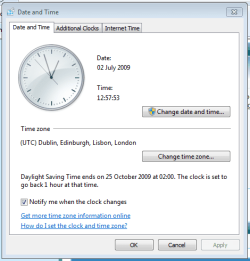
If it's only losing an hour it could be something to do with your time-zone & daylight savings settings.

Click the time/date on the notification bar and click 'Change time and date settings'
Capture.PNG

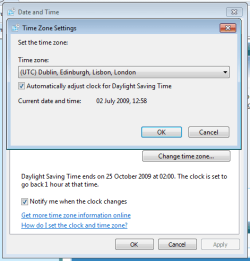
Click 'Change time zone' and make sure that 'Automatically adjust clock for Daylight Saving Time' is selected
Capture1.PNG

You may also want to double check your internet time settings
Capture2.PNG

Hope this helps :)


Jeff
 

My Computer

Computer Manufacturer/Model Number
Compaq Desktop
OS
Windows 7 Ultimate x64
CPU
AMD Sempron Dual Core
Memory
3GB
Graphics Card(s)
NVIDIA GeForce 6150SE nForce 430
Screen Resolution
1024x768
Hard Drives
150GB Sata
Thanks again guys. I'm in GMT with daylight savings and all the settings are correct.
The weird thing is that it doesn't happen every re-boot. Only occasionally, and only in the last couple of weeks.
(Build 7201 x64)
 

My Computer

OS
Windows 7 64-bit
CPU
Intel i7 920 @ 4GHz
Motherboard
Asus P6T Deluxe V2
Memory
6Gb
Graphics Card(s)
nVidia GTX 285
Sound Card
X-Fi Extreme Audio PCIe
Screen Resolution
1900x1200
time prob

Thanks again guys. I'm in GMT with daylight savings and all the settings are correct.
The weird thing is that it doesn't happen every re-boot. Only occasionally, and only in the last couple of weeks.
(Build 7201 x64)

I have a really lame idea. why not chage your timezone to any other time zone. save it and reboot. then re-set it back to you time zone. some times weird things like this get fixed by reset

Ken
 

My Computer

Computer Manufacturer/Model Number
HP Pavillion dv-7 1005 Tx
OS
Win 8 Release candidate 8400
CPU
[email protected]
Memory
4 gigs
Graphics Card(s)
Nvidia 9600M
Sound Card
HD built-in
Monitor(s) Displays
17" Wxga
Screen Resolution
1440x900
Cooling
none
Internet Speed
45Mb down 5Mb up
I have a really lame idea. why not chage your timezone to any other time zone. save it and reboot. then re-set it back to you time zone. some times weird things like this get fixed by reset

Ken

+1 that might just force it to keep it's settings :D
 

My Computer

Computer Manufacturer/Model Number
Compaq Desktop
OS
Windows 7 Ultimate x64
CPU
AMD Sempron Dual Core
Memory
3GB
Graphics Card(s)
NVIDIA GeForce 6150SE nForce 430
Screen Resolution
1024x768
Hard Drives
150GB Sata
I'll try that and let you know how it goes. Thanks.
 

My Computer

OS
Windows 7 64-bit
CPU
Intel i7 920 @ 4GHz
Motherboard
Asus P6T Deluxe V2
Memory
6Gb
Graphics Card(s)
nVidia GTX 285
Sound Card
X-Fi Extreme Audio PCIe
Screen Resolution
1900x1200
It didn't work. Still lost the hour on a couple of reboots today. Only happens in 7 as I said. Vista and OSx86 are both fine.
 

My Computer

OS
Windows 7 64-bit
CPU
Intel i7 920 @ 4GHz
Motherboard
Asus P6T Deluxe V2
Memory
6Gb
Graphics Card(s)
nVidia GTX 285
Sound Card
X-Fi Extreme Audio PCIe
Screen Resolution
1900x1200
I had the same problem in a tripple boot config. When I boot into xp, it was fine, when I went back into 7, it was an hour off. For me... It was one of the OS's not being set to adjust for daylight savings, but had to do one more step...

After correcting the setting, I booted into each OS then right after each boot, would go into the bios, when I came across wrong time in bios, I reset the time in the bios, not in the OS. Think the main thing is to not correct it in the OS, but in the bios. If you boot into OS and time is wrong, just exit and enter bios to correct.
 

My Computer

Computer Manufacturer/Model Number
POS
OS
OS3.5
CPU
celery
Motherboard
Good Question ...Unknown
Memory
memory never forgets
Graphics Card(s)
OB
Sound Card
OB
Monitor(s) Displays
HUGE
Screen Resolution
168000000x105000000
Hard Drives
full
PSU
OEM 65watt
Case
N/A
Cooling
OB
Keyboard
OB
Mouse
mouse
Internet Speed
1 Trillion MBps
Other Info
Still An Awesome Forum!
OK, I tried that, but it has made no difference. All 3 OSs have the time set correctly, but something is changing it when I boot back into W7.
 

My Computer

OS
Windows 7 64-bit
CPU
Intel i7 920 @ 4GHz
Motherboard
Asus P6T Deluxe V2
Memory
6Gb
Graphics Card(s)
nVidia GTX 285
Sound Card
X-Fi Extreme Audio PCIe
Screen Resolution
1900x1200
Have you checked the event log straight after boot to see if anything is listed? Might be an idea :p
 

My Computer

Computer Manufacturer/Model Number
Compaq Desktop
OS
Windows 7 Ultimate x64
CPU
AMD Sempron Dual Core
Memory
3GB
Graphics Card(s)
NVIDIA GeForce 6150SE nForce 430
Screen Resolution
1024x768
Hard Drives
150GB Sata
I noticed the same thing here yesterday,will monitor to see how often it happens.

I have a dual boot system.
 

My Computer

OS
windows 7 x64 build 7229
I'm so glad there are others with the same issue.
How do I check the event log?
 

My Computer

OS
Windows 7 64-bit
CPU
Intel i7 920 @ 4GHz
Motherboard
Asus P6T Deluxe V2
Memory
6Gb
Graphics Card(s)
nVidia GTX 285
Sound Card
X-Fi Extreme Audio PCIe
Screen Resolution
1900x1200
Anyone know how to check the event log?
 

My Computer

OS
Windows 7 64-bit
CPU
Intel i7 920 @ 4GHz
Motherboard
Asus P6T Deluxe V2
Memory
6Gb
Graphics Card(s)
nVidia GTX 285
Sound Card
X-Fi Extreme Audio PCIe
Screen Resolution
1900x1200
ive had this before when booting between windows and osx86/linux.

try adding the following DWORD to the registry and set the value to 1 and you have completely fixed the situation.
Code:
HKLM\SYSTEM\CurrentControlSet\Control\TimeZoneInformation\RealTimeIsUniversal
Don’t forget the value change to 1 then reboot.

Youll probably need to do the same in Vista as I suspect booting to osx86 is causing the time to be set to universal time, then when u go back to windows vista or 7 its using local time and is then 1 hour out.

Perhaps you have only noticed it wrong in windows7 because of the order you have booted to each OS. e.g.

Boot to Osx86 (time gets set to UTC)
Boot to Windows7 (time is now wrong by 1 hour, you then manually fix it)
Boot to Vista (time is correct because you have already fixed it in windows 7)

Try booting osx86 then windows vista directly after and see if vista is out too.
 

My Computer

Computer Manufacturer/Model Number
Dell Inspiron 1525
OS
Windows 7 RC 7264
CPU
Intel Core2duo 1.83 Ghz
Memory
4GB
Back
Top