Windows to lists

sailornaruto39

New member
Member
Local time
11:36 AM
Messages
71
I am not sure what i did.But when i did something and put the mouse on an open program it does this

windows.png


When i want this
windows2.png


How can i get the latter back?
 
Last edited:

My Computer

OS
Windows 7
Hi, welcome to the forums :)

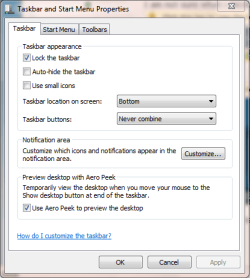
If you unpin everything from the task bar then right-click it and select 'Properties' you can choose how the icons/apps appear. You're looking to set it to 'Never Combine'

Capture.PNG
Capture1.PNG


OS
 

My Computer

Computer Manufacturer/Model Number
Compaq Desktop
OS
Windows 7 Ultimate x64
CPU
AMD Sempron Dual Core
Memory
3GB
Graphics Card(s)
NVIDIA GeForce 6150SE nForce 430
Screen Resolution
1024x768
Hard Drives
150GB Sata
Actually i think, you have turned off Aero by the looks of it.

Right-click on the desktop and go to personalise, where you choose your theme or back ground, pick one from the saved themes.

The first one will have the win 7 background.

Lucky
 

My Computer

Computer Manufacturer/Model Number
The HAFmeister (Custom)
OS
Windows 7 Ultimate x64 RTM + SP1
CPU
Intel Core i7 950 3.06GHZ (OC'd to 3.99Ghz)
Motherboard
Asus Rampage III Extreme x58 SATA 6GB & USB 3.0
Memory
6GB OCZ Reaper HPC Edition PC3-16000 (set 1606Mhz 8-8-8-26)
Graphics Card(s)
EVGA Nvidia Geforce GTX 570
Sound Card
Creative SB X-Fi Titanium Fatal1ty Professional Series
Monitor(s) Displays
Samsung SM2433BW 24" Widescreen Monitor
Screen Resolution
1920x1200
Hard Drives
Western Digital Caviar Black 500GB 32Mb Buffer SATA II
Western Digital Caviar Black 750GB 32Mb Buffer SATA II
Western Digital Caviar Blue 500GB 16Mb Buffer SATA II
Western Digital My Book Essential Edition 750GB USB
Samsung Spinpoint 2TB SATA II
PSU
Thermaltake Toughpower 1200w (Modular)
Case
CoolerMaster HAF-932
Cooling
Zalman Reserator XT and ZM-WB5 Plus - GPU uses Stock coolers
Keyboard
Logitech G510
Mouse
Logitech G9 Gaming Mouse
Internet Speed
3MB Profile - 350-400kbs (Real-Speed)
Other Info
IcyBox Hot-Swap Bay,
Logitech G27 Steering Wheel,
Xbox 360 Wirless Elite Controller with Microsoft Reciever and
Play & Charge Kit,
Belkin USB Wireless Adaptor,
GAME Generic Controller (Playstation Looky-Likey),
Epson SX125 All-in-One.
Hi, welcome to the forums :)

If you unpin everything from the task bar then right-click it and select 'Properties' you can choose how the icons/apps appear. You're looking to set it to 'Never Combine'

View attachment 118780
View attachment 118781


OS

that is not what iam looking for.
I mean look at the first pic.... when i put the mouse on the icon for google it shows a little list as opposed to the other pic in where it shows a little window/picture.

How can i get it to the window/picture?
Actually i think, you have turned off Aero by the looks of it.

Right-click on the desktop and go to personalise, where you choose your theme or back ground, pick one from the saved themes.

The first one will have the win 7 background.

Lucky

that iss not it either!!!
 

My Computer

OS
Windows 7
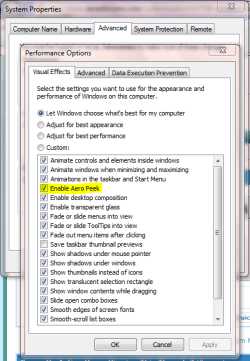
Type Advanced into the start box and select 'View advanced system settings' then click the 'Settings' button under Performance

Check to see if 'Enable Aero Peek' is enabled

Capture.PNG


OS
 

My Computer

Computer Manufacturer/Model Number
Compaq Desktop
OS
Windows 7 Ultimate x64
CPU
AMD Sempron Dual Core
Memory
3GB
Graphics Card(s)
NVIDIA GeForce 6150SE nForce 430
Screen Resolution
1024x768
Hard Drives
150GB Sata

My Computer

Computer type
PC/Desktop
Computer Manufacturer/Model Number
Custom Build
OS
Windows 10 Pro x64
CPU
Intel Core i5 4440 @Stock
Motherboard
Gigabyte Z97 D3H
Memory
4 x 4GB HyperX Fury DDR3
Graphics Card(s)
Gigabyte GTX 1050Ti O4G
Sound Card
Integrated
Monitor(s) Displays
Dell P2417H
Screen Resolution
1920 x 1080
Hard Drives
Samsung EVO 850 120GB / Toshiba DT01ACA050 1TB 7200prm 32MB
PSU
Riotoro Onyx 750W
Case
NZXT H500 Black-Red
Cooling
Stock CPU + NZXT 120mm + 2x120mm red fans
Keyboard
Modecom Volcano Lanparty
Mouse
Asus ROG Gladius / DeepCool E-Pad Plus
Internet Speed
DOCSIS 50/3 Mbit
Browser
Google Chrome
Other Info
Asus K55VJ(i5 3210M, GT635M / 2GB, 8GB DDR3, 500GB HDD)
Actually i think, you have turned off Aero by the looks of it.

Right-click on the desktop and go to personalise, where you choose your theme or back ground, pick one from the saved themes.

The first one will have the win 7 background.

Lucky

Yes Aero is off and select an aero theme.......
 

My Computer

Computer Manufacturer/Model Number
Custom built be me
OS
Windows 7 Ultimate x64
CPU
Amd dual-core 4400 Socket 979
Motherboard
Asus A8N-SLI
Memory
Kingston 3gb ddr 3200
Graphics Card(s)
Radeon Sapphire HD5670 1gb GDDR5 Artic cooling
Sound Card
Standard Motherboards Realtec
Monitor(s) Displays
IC Power
Screen Resolution
1280 x 1024
Hard Drives
Seagate Barracuda 500gb Sata 16mb Cache 7200 rpm Primary Drive
300gb Maxtor IDE
Seagate 500gb usb freeagent backup drive
PSU
600 watt power star
Case
Lian-Li Aluminum
Cooling
MassCool Socket 979
Keyboard
Microsoft Comfort Curve
Mouse
Microsoft Basic Optical Mouse 2.0
Internet Speed
5mb
Other Info
The system as of now is about a year old and the OS was installed on 11/30/2010..

My Computer

Computer type
PC/Desktop
Computer Manufacturer/Model Number
Custom Build
OS
Windows 10 Pro x64
CPU
Intel Core i5 4440 @Stock
Motherboard
Gigabyte Z97 D3H
Memory
4 x 4GB HyperX Fury DDR3
Graphics Card(s)
Gigabyte GTX 1050Ti O4G
Sound Card
Integrated
Monitor(s) Displays
Dell P2417H
Screen Resolution
1920 x 1080
Hard Drives
Samsung EVO 850 120GB / Toshiba DT01ACA050 1TB 7200prm 32MB
PSU
Riotoro Onyx 750W
Case
NZXT H500 Black-Red
Cooling
Stock CPU + NZXT 120mm + 2x120mm red fans
Keyboard
Modecom Volcano Lanparty
Mouse
Asus ROG Gladius / DeepCool E-Pad Plus
Internet Speed
DOCSIS 50/3 Mbit
Browser
Google Chrome
Other Info
Asus K55VJ(i5 3210M, GT635M / 2GB, 8GB DDR3, 500GB HDD)
Back
Top