
Windows tries to perform chkdsk on every boot but fails

fireillusion

New member
Member
Local time
7:12 PM
Messages
62
Hello everyone.
Today my computer froze upon exiting Battlefield 3 and had to shut it down manually.
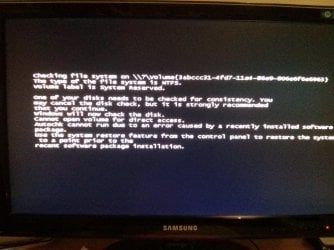
After a lot of problem solving (I had to change the hdd port on the m/b) I am left with the problem displayed in the attached image and cannot figure out what to do. I have searched around and tried a lot of repairs but nothing happens. I also run sfc / scannow command several times (in safe mode also) which finds some problems that cannot be fixed.
Any help would be appreciated.
The ultimate solution would be to format my ssd and hdd
 

Attachments
  • IMG_20150601_203931.jpg
    IMG_20150601_203931.jpg
    728.7 KB · Views: 0

My Computer My Computer

At a glance

Windows 7 Ultimate x64Intel i7 8602x CML8GX3M2A1600C9WATI RADEON Sapphire HD5870 1GB VRAM
Computer type
PC/Desktop
OS
Windows 7 Ultimate x64
CPU
Intel i7 860
Motherboard
Gigabyte P55A UD5
Memory
2x CML8GX3M2A1600C9W
Graphics Card(s)
ATI RADEON Sapphire HD5870 1GB VRAM
Sound Card
Onboard Realtek HD audio (ALC889)
Monitor(s) Displays
Samsung Syncmaster P2350
Screen Resolution
1920x1080
Hard Drives
1. SSD Sansung 840 EVO 250GB ,
2. WESTERN DIGITAL Velociraptor 150GB WD1500HLFS
AHCI enabled
PSU
Corsair TX 750 (750W) enthusiast series
Case
Zalman GS1000
Cooling
3 case fans + cpu cooler (Prolimatech megahalems rev.b)
Keyboard
Logitech wireless keyboard K520
Mouse
Logitech wireless mouse M310
Antivirus
eset security suite (latest updates installed always)
Browser
Google chrome (latest updates installed always)
Other Info
Custom Arctic GPU cooler installed for lower temps
Report back what happens when you attempt to F8 boot into Safe Mode.
 

My Computer My Computer

At a glance

Windows 7 Professional 64-bitDesktop i5; Acers i5 & i7desktop 16GB; 1 Acer 8GB & 1 Acer 16GB
Computer type
PC/Desktop
Computer Manufacturer/Model Number
Antec desktop; Acer Aspire laptops
OS
Windows 7 Professional 64-bit
CPU
Desktop i5; Acers i5 & i7
Memory
desktop 16GB; 1 Acer 8GB & 1 Acer 16GB
Hard Drives
1TB split into 2 equal partitions [OS and data] usable by RJS
Internet Speed
AT&T DSL
Browser
FF, GChrome, msIE
Other Info
Windows 7 Firewall, Emsisoft AM/AV, MSE [scan-only], SpywareBlaster, Ruiware/BillP combine
It boots in safe mode. Nothing out of the ordinary happens.
I have to mention that the computer boots normally to windows after the attached message goes away.
 

My Computer My Computer

At a glance

Windows 7 Ultimate x64Intel i7 8602x CML8GX3M2A1600C9WATI RADEON Sapphire HD5870 1GB VRAM
Computer type
PC/Desktop
OS
Windows 7 Ultimate x64
CPU
Intel i7 860
Motherboard
Gigabyte P55A UD5
Memory
2x CML8GX3M2A1600C9W
Graphics Card(s)
ATI RADEON Sapphire HD5870 1GB VRAM
Sound Card
Onboard Realtek HD audio (ALC889)
Monitor(s) Displays
Samsung Syncmaster P2350
Screen Resolution
1920x1080
Hard Drives
1. SSD Sansung 840 EVO 250GB ,
2. WESTERN DIGITAL Velociraptor 150GB WD1500HLFS
AHCI enabled
PSU
Corsair TX 750 (750W) enthusiast series
Case
Zalman GS1000
Cooling
3 case fans + cpu cooler (Prolimatech megahalems rev.b)
Keyboard
Logitech wireless keyboard K520
Mouse
Logitech wireless mouse M310
Antivirus
eset security suite (latest updates installed always)
Browser
Google chrome (latest updates installed always)
Other Info
Custom Arctic GPU cooler installed for lower temps
What disk is it trying to check? Open an elevated command prompt and type in fsutil dirty query c: (change the driver letter as required for each driver you have).
 

My Computer My Computer

At a glance

W7 Pro x64 SP1 | W10 Pro IP x64 | W8.1 Pro x6...i7-4790k @ 4GHz (4.4GHz Boost)16GB DDR3 Kingston HyperX Fury @ 1600MHz CL 9...EVGA GTX 980 Classified
Computer type
PC/Desktop
Computer Manufacturer/Model Number
Custom Build
OS
W7 Pro x64 SP1 | W10 Pro IP x64 | W8.1 Pro x64 VM | Linux Mint VM
CPU
i7-4790k @ 4GHz (4.4GHz Boost)
Motherboard
ASUS Sabertooth Z87 (BIOS Rev 2004)
Memory
16GB DDR3 Kingston HyperX Fury @ 1600MHz CL 9-9-9-27
Graphics Card(s)
EVGA GTX 980 Classified
Sound Card
Realtek Onboard
Monitor(s) Displays
Samsung S27D390
Screen Resolution
1920 x 1080
Hard Drives
240GB Intel 520 Series SSD |
Samsung 850 EVO 120GB SSD |
2TB WD Caviar Black |
2TB WD Caviar Green
PSU
Corsair HX850-80 Gold Modular
Case
Cooler Master Silencio 650
Cooling
Corsair H80i w/2 x Corsair SP120 | 2 x 120mm Noctua NF-S12B
Keyboard
Microsoft Sidewinder X4
Mouse
Gigabyte M6900 optical
Internet Speed
152mb
Antivirus
F-Secure
Browser
Firefox 38.0
Other Info
Backup Rig: Win 7 Pro 64-bit | AMD A10-5800k | ASUS F2A85-V Pro | 8GB Samsung DDR3 @1600MHz | 120GB Toshiba SDD | 2TB Seagate HDD | Cooler Master Silencio 550
What disk is it trying to check? Open an elevated command prompt and type in fsutil dirty query c: (change the driver letter as required for each driver you have).

Just run the command you suggest on my two drives and reports that both are NOT dirty
 

My Computer My Computer

At a glance

Windows 7 Ultimate x64Intel i7 8602x CML8GX3M2A1600C9WATI RADEON Sapphire HD5870 1GB VRAM
Computer type
PC/Desktop
OS
Windows 7 Ultimate x64
CPU
Intel i7 860
Motherboard
Gigabyte P55A UD5
Memory
2x CML8GX3M2A1600C9W
Graphics Card(s)
ATI RADEON Sapphire HD5870 1GB VRAM
Sound Card
Onboard Realtek HD audio (ALC889)
Monitor(s) Displays
Samsung Syncmaster P2350
Screen Resolution
1920x1080
Hard Drives
1. SSD Sansung 840 EVO 250GB ,
2. WESTERN DIGITAL Velociraptor 150GB WD1500HLFS
AHCI enabled
PSU
Corsair TX 750 (750W) enthusiast series
Case
Zalman GS1000
Cooling
3 case fans + cpu cooler (Prolimatech megahalems rev.b)
Keyboard
Logitech wireless keyboard K520
Mouse
Logitech wireless mouse M310
Antivirus
eset security suite (latest updates installed always)
Browser
Google chrome (latest updates installed always)
Other Info
Custom Arctic GPU cooler installed for lower temps

My Computer My Computer

At a glance

W7 Pro x64 SP1 | W10 Pro IP x64 | W8.1 Pro x6...i7-4790k @ 4GHz (4.4GHz Boost)16GB DDR3 Kingston HyperX Fury @ 1600MHz CL 9...EVGA GTX 980 Classified
Computer type
PC/Desktop
Computer Manufacturer/Model Number
Custom Build
OS
W7 Pro x64 SP1 | W10 Pro IP x64 | W8.1 Pro x64 VM | Linux Mint VM
CPU
i7-4790k @ 4GHz (4.4GHz Boost)
Motherboard
ASUS Sabertooth Z87 (BIOS Rev 2004)
Memory
16GB DDR3 Kingston HyperX Fury @ 1600MHz CL 9-9-9-27
Graphics Card(s)
EVGA GTX 980 Classified
Sound Card
Realtek Onboard
Monitor(s) Displays
Samsung S27D390
Screen Resolution
1920 x 1080
Hard Drives
240GB Intel 520 Series SSD |
Samsung 850 EVO 120GB SSD |
2TB WD Caviar Black |
2TB WD Caviar Green
PSU
Corsair HX850-80 Gold Modular
Case
Cooler Master Silencio 650
Cooling
Corsair H80i w/2 x Corsair SP120 | 2 x 120mm Noctua NF-S12B
Keyboard
Microsoft Sidewinder X4
Mouse
Gigabyte M6900 optical
Internet Speed
152mb
Antivirus
F-Secure
Browser
Firefox 38.0
Other Info
Backup Rig: Win 7 Pro 64-bit | AMD A10-5800k | ASUS F2A85-V Pro | 8GB Samsung DDR3 @1600MHz | 120GB Toshiba SDD | 2TB Seagate HDD | Cooler Master Silencio 550
Run chkdsk on the non-system drive via command prompt. http://www.sevenforums.com/tutorials/433-disk-check.html

just did. It force dismounted the drive, performed the check and found no problems.
I just did sth else. I found in task scheduler the entry about autochk and deleted it. I will reboot now and report back.
I found an article in ms kb about it but I don't know if I will fix the problem or simply hide it.

Edit:
Just tried this https://support.microsoft.com/en-us/kb/831426 but still no luck. It tries to perform the check at evey boot
 

My Computer My Computer

At a glance

Windows 7 Ultimate x64Intel i7 8602x CML8GX3M2A1600C9WATI RADEON Sapphire HD5870 1GB VRAM
Computer type
PC/Desktop
OS
Windows 7 Ultimate x64
CPU
Intel i7 860
Motherboard
Gigabyte P55A UD5
Memory
2x CML8GX3M2A1600C9W
Graphics Card(s)
ATI RADEON Sapphire HD5870 1GB VRAM
Sound Card
Onboard Realtek HD audio (ALC889)
Monitor(s) Displays
Samsung Syncmaster P2350
Screen Resolution
1920x1080
Hard Drives
1. SSD Sansung 840 EVO 250GB ,
2. WESTERN DIGITAL Velociraptor 150GB WD1500HLFS
AHCI enabled
PSU
Corsair TX 750 (750W) enthusiast series
Case
Zalman GS1000
Cooling
3 case fans + cpu cooler (Prolimatech megahalems rev.b)
Keyboard
Logitech wireless keyboard K520
Mouse
Logitech wireless mouse M310
Antivirus
eset security suite (latest updates installed always)
Browser
Google chrome (latest updates installed always)
Other Info
Custom Arctic GPU cooler installed for lower temps
I found the following Microsoft link, you may not like the answer found in here:
"http://microsoft.com/en-us/windows/forum/windows_7-windows_programs/"
"how-to-disable-the-chkdsk-check-disk-on-start-up/35f58c69-7a6c-4e1b-aec3-26d7131ec643"
For some reason, link does not display properly, copy and paste both pieces into your browser address field, then remove my quotation marks, and remove the space between programs/ and how-to-disable
--- that link works in my FF, but won't correctly post in here.
 

My Computer My Computer

At a glance

Windows 7 Professional 64-bitDesktop i5; Acers i5 & i7desktop 16GB; 1 Acer 8GB & 1 Acer 16GB
Computer type
PC/Desktop
Computer Manufacturer/Model Number
Antec desktop; Acer Aspire laptops
OS
Windows 7 Professional 64-bit
CPU
Desktop i5; Acers i5 & i7
Memory
desktop 16GB; 1 Acer 8GB & 1 Acer 16GB
Hard Drives
1TB split into 2 equal partitions [OS and data] usable by RJS
Internet Speed
AT&T DSL
Browser
FF, GChrome, msIE
Other Info
Windows 7 Firewall, Emsisoft AM/AV, MSE [scan-only], SpywareBlaster, Ruiware/BillP combine
I will try this, this afternoon.
My main concern is the volume drive it tries to check. What drive is this? Could it be the system reserve disk?
I recently installed an ssd but for some reason the system reserve partition was installed on my secondary mechanical drive. I think it had to do with "F6" drivers....
 

My Computer My Computer

At a glance

Windows 7 Ultimate x64Intel i7 8602x CML8GX3M2A1600C9WATI RADEON Sapphire HD5870 1GB VRAM
Computer type
PC/Desktop
OS
Windows 7 Ultimate x64
CPU
Intel i7 860
Motherboard
Gigabyte P55A UD5
Memory
2x CML8GX3M2A1600C9W
Graphics Card(s)
ATI RADEON Sapphire HD5870 1GB VRAM
Sound Card
Onboard Realtek HD audio (ALC889)
Monitor(s) Displays
Samsung Syncmaster P2350
Screen Resolution
1920x1080
Hard Drives
1. SSD Sansung 840 EVO 250GB ,
2. WESTERN DIGITAL Velociraptor 150GB WD1500HLFS
AHCI enabled
PSU
Corsair TX 750 (750W) enthusiast series
Case
Zalman GS1000
Cooling
3 case fans + cpu cooler (Prolimatech megahalems rev.b)
Keyboard
Logitech wireless keyboard K520
Mouse
Logitech wireless mouse M310
Antivirus
eset security suite (latest updates installed always)
Browser
Google chrome (latest updates installed always)
Other Info
Custom Arctic GPU cooler installed for lower temps
It happens when you install Windows without removing the old HDD. It can be fixed with EasyBCD.
----------

I wonder if your other HDD is failing. Can you remove it and see if the error change?

Maybe you can use:

Partition Wizard free bootable media to mark the Win7 partition(SSD) Active, then run Startup Repair - Run up to 3 Separate Times.

Wait for experienced members to give a green light on this one though.
 

My Computer My Computer

At a glance

Windows 7 Ultimate x64 SP1AMD Phenom 2 1090T2x8GB Kingston HyperX Fury Black 1600Mhz Unga...MSI GTX 970 Gaming 4G
Computer type
PC/Desktop
Computer Manufacturer/Model Number
Custom Build
OS
Windows 7 Ultimate x64 SP1
CPU
AMD Phenom 2 1090T
Motherboard
Gigabyte GA-890FXA-UD5
Memory
2x8GB Kingston HyperX Fury Black 1600Mhz Unganged
Graphics Card(s)
MSI GTX 970 Gaming 4G
Sound Card
Realtek On-Board HD 7.1 Audio / Logitech G35
Monitor(s) Displays
3xAcer GD245HQ
Screen Resolution
1920x1080
Hard Drives
Samsung 850 Pro 512GB SSD - OS /
WD Caviar Black SATA 3 - 1 TBx2 - Dynamic RAID 0 /
WD Caviar Green SATA 2 - 640GBx2 - Dynamic RAID 0 /
WD Caviar Green SATA 2 - 640GB - Internal Backup /
Seagate Barracude SATA 3 - 3TB - External Backup/ Sync
PSU
HighPower 1000W
Case
Cooler Master HAF 932
Cooling
Noctua NH-D14
Keyboard
Logitech G19
Mouse
Logitech G500
Internet Speed
100/4 Mbit Cable (100GB quota)
Antivirus
ZoneAlarm Extreme Security / MBAM Pro / MBAE Free / SAS Free
Browser
IE 11 - Firefox - Chrome
Other Info
Logitech F710/ G27/ G940/ Z5500 // TrackIR 5 // Nvidia 3D Surround Vision
My main concern is the volume drive it tries to check. What drive is this? Could it be the system reserve disk?
I recently installed an ssd but for some reason the system reserve partition was installed on my secondary mechanical drive. I think it had to do with "F6" drivers....

See if the chkdsk scan results in the Event Viewer log helps.
http://www.sevenforums.com/tutorials/96938-check-disk-chkdsk-read-event-viewer-log.html

For partition (system reserved) questions, post a screen print of Disk Management .
http://www.sevenforums.com/tutorials/274797-disk-management-post-screen-capture-image.html
 

My Computer My Computer

At a glance

Multi-Boot W7_Pro_x64 W8.1_Pro_x64 W10_Pro_x6...AMD Athlon II x4 6206GB GSkill DDR2 800AMD 4670 GPU + AMD 4200 IGP
Computer type
PC/Desktop
Computer Manufacturer/Model Number
home built
OS
Multi-Boot W7_Pro_x64 W8.1_Pro_x64 W10_Pro_x64 +Linux_VMs +Chromium_VM
CPU
AMD Athlon II x4 620
Motherboard
Gigabyte GA-MA785G-UD3H
Memory
6GB GSkill DDR2 800
Graphics Card(s)
AMD 4670 GPU + AMD 4200 IGP
Sound Card
on board Realtek ALC889A
Monitor(s) Displays
RCA 40" LCD TV, Insignia 32" LCD TV, HP 15" LCD monitor
Screen Resolution
1680 x 1050
Hard Drives
OCZ Vertex 3 120GB,
Samsung F3 1TB (3),
Several others - WD, Seagate, Hitachi, ...
PSU
Corsair 500 W
Case
Rosewill mid tower
Cooling
CM 90mm rifle
Keyboard
Gyration wireless, Logitech wireless, Dell USB wired
Mouse
Gyration wireless, Logitech wireless, V7 USB wired
Internet Speed
Spectrum - 100Mbps D / 10Mbps U
Antivirus
Avast, MBAM3, EMET, WinPatrol
Browser
Pale Moon, Firefox, IE
Other Info
2 multi-boot PC's
Mainly HTPC/Office/Gen purpose (no gaming).
Trendnet USB KVM.
LG DVD burner/Blue Ray Player.
Tray system for removable SATA backup drives.

Not currently OCd, under-volted.
I use Hybrid sleep, rarely re-boot or shutdown.

Hauppauge HD-PVR, Avermedia PCIe TV Tuner, Hauppauge PCI TV Tuner.
My main concern is the volume drive it tries to check. What drive is this? Could it be the system reserve disk?
I recently installed an ssd but for some reason the system reserve partition was installed on my secondary mechanical drive. I think it had to do with "F6" drivers....

See if the chkdsk scan results in the Event Viewer log helps.
http://www.sevenforums.com/tutorials/96938-check-disk-chkdsk-read-event-viewer-log.html

For partition (system reserved) questions, post a screen print of Disk Management .
http://www.sevenforums.com/tutorials/274797-disk-management-post-screen-capture-image.html

Here is the entry of chkdsk from event viewer for system drive c:

Checking file system on C:
The type of the file system is NTFS.

A disk check has been scheduled.
Windows will now check the disk.

CHKDSK is verifying files (stage 1 of 5)...
192256 file records processed. File verification completed.
534 large file records processed. 0 bad file records processed. 2 EA records processed. 44 reparse records processed. CHKDSK is verifying indexes (stage 2 of 5)...
250116 index entries processed. Index verification completed.
0 unindexed files scanned. 0 unindexed files recovered. CHKDSK is verifying security descriptors (stage 3 of 5)...
192256 file SDs/SIDs processed. Cleaning up 229 unused index entries from index $SII of file 0x9.
Cleaning up 229 unused index entries from index $SDH of file 0x9.
Cleaning up 229 unused security descriptors.
Security descriptor verification completed.
28931 data files processed. CHKDSK is verifying Usn Journal...
34927312 USN bytes processed. Usn Journal verification completed.
CHKDSK is verifying file data (stage 4 of 5)...
192240 files processed. File data verification completed.
CHKDSK is verifying free space (stage 5 of 5)...
30901638 free clusters processed. Free space verification is complete.
Windows has checked the file system and found no problems.

219775999 KB total disk space.
95787296 KB in 126601 files.
80596 KB in 28932 indexes.
0 KB in bad sectors.
301555 KB in use by the system.
65536 KB occupied by the log file.
123606552 KB available on disk.

4096 bytes in each allocation unit.
54943999 total allocation units on disk.
30901638 allocation units available on disk.

Internal Info:
00 ef 02 00 98 5f 02 00 c4 6a 04 00 00 00 00 00 ....._...j......
49 01 00 00 2c 00 00 00 00 00 00 00 00 00 00 00 I...,...........
00 00 00 00 00 00 00 00 00 00 00 00 00 00 00 00 ................

Windows has finished checking your disk.
Please wait while your computer restarts.

What I still cannot understand is the drive it is trying to check as seen on the screenshot in my 1st post :huh::huh::huh:
 

My Computer My Computer

At a glance

Windows 7 Ultimate x64Intel i7 8602x CML8GX3M2A1600C9WATI RADEON Sapphire HD5870 1GB VRAM
Computer type
PC/Desktop
OS
Windows 7 Ultimate x64
CPU
Intel i7 860
Motherboard
Gigabyte P55A UD5
Memory
2x CML8GX3M2A1600C9W
Graphics Card(s)
ATI RADEON Sapphire HD5870 1GB VRAM
Sound Card
Onboard Realtek HD audio (ALC889)
Monitor(s) Displays
Samsung Syncmaster P2350
Screen Resolution
1920x1080
Hard Drives
1. SSD Sansung 840 EVO 250GB ,
2. WESTERN DIGITAL Velociraptor 150GB WD1500HLFS
AHCI enabled
PSU
Corsair TX 750 (750W) enthusiast series
Case
Zalman GS1000
Cooling
3 case fans + cpu cooler (Prolimatech megahalems rev.b)
Keyboard
Logitech wireless keyboard K520
Mouse
Logitech wireless mouse M310
Antivirus
eset security suite (latest updates installed always)
Browser
Google chrome (latest updates installed always)
Other Info
Custom Arctic GPU cooler installed for lower temps
David, I will ask my question from last page again :)

Why don't you just make the SSD bootable/active and remove the HDD to see if it will boot alright. Then sort the HDD later?

Can be done with repair disk command line right?

Not to interfere, trying to learn these stuff myself.
 

My Computer My Computer

At a glance

Windows 7 Ultimate x64 SP1AMD Phenom 2 1090T2x8GB Kingston HyperX Fury Black 1600Mhz Unga...MSI GTX 970 Gaming 4G
Computer type
PC/Desktop
Computer Manufacturer/Model Number
Custom Build
OS
Windows 7 Ultimate x64 SP1
CPU
AMD Phenom 2 1090T
Motherboard
Gigabyte GA-890FXA-UD5
Memory
2x8GB Kingston HyperX Fury Black 1600Mhz Unganged
Graphics Card(s)
MSI GTX 970 Gaming 4G
Sound Card
Realtek On-Board HD 7.1 Audio / Logitech G35
Monitor(s) Displays
3xAcer GD245HQ
Screen Resolution
1920x1080
Hard Drives
Samsung 850 Pro 512GB SSD - OS /
WD Caviar Black SATA 3 - 1 TBx2 - Dynamic RAID 0 /
WD Caviar Green SATA 2 - 640GBx2 - Dynamic RAID 0 /
WD Caviar Green SATA 2 - 640GB - Internal Backup /
Seagate Barracude SATA 3 - 3TB - External Backup/ Sync
PSU
HighPower 1000W
Case
Cooler Master HAF 932
Cooling
Noctua NH-D14
Keyboard
Logitech G19
Mouse
Logitech G500
Internet Speed
100/4 Mbit Cable (100GB quota)
Antivirus
ZoneAlarm Extreme Security / MBAM Pro / MBAE Free / SAS Free
Browser
IE 11 - Firefox - Chrome
Other Info
Logitech F710/ G27/ G940/ Z5500 // TrackIR 5 // Nvidia 3D Surround Vision
Back
Top