Windows Unexpected Shutdown

JezusSaurusRex

New member
Local time
8:00 PM
Messages
8
Hi everyone; mind you that this is my first post and I'm pretty well computer-oriented but unfamiliar with Windows 7 (its a pretty different from XP).

I keep getting unexpected shutdowns from my system when I leave it idle and its happening faster and faster. It started with when I leave it at night (even though its set for auto-standby after an hour) and now its after maybe 30 minutes. I've never seen it happen but I come back to my computer shutdown constantly.
I found a similiar thread but its not specific to my system and didn't help much further than recognizing it as a related issue (but is probably totally different).
But here's the real details:

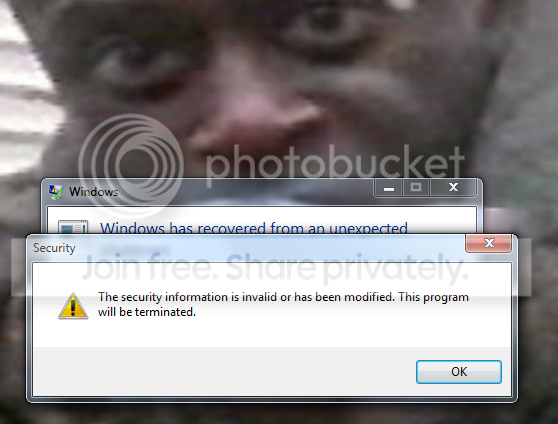
I turn on my PC and get a random message (every time) that security has been shut off, but its just an error message with no details of what files or programs are associated; which leads me to think I may just have a Win7 virus (I have scanned with ESET NOD32 and found nothing on either of my two main HDDs yet my PC is funkedelically shutting down and acting slowly).

Here is the windows error details:

Problem signature:
Problem Event Name: BlueScreen
OS Version: 6.1.7600.2.0.0.256.48
Locale ID: 1033
Additional information about the problem:
BCCode: 1000007e
BCP1: C0000005
BCP2: 81E3419C
BCP3: 9E277B40
BCP4: 9E277720
OS Version: 6_1_7600
Service Pack: 0_0
Product: 256_1
Files that help describe the problem:
C:\Windows\Minidump\030610-19094-01.dmp
C:\Users\Edward\AppData\Local\Temp\WER-172162-0.sysdata.xml


From what I understood in the thread I found that lead me to this forum; some of my hardware is faulty/glitching/failing. I think it may be my RAM because there was a mention of a file with "RAMdump" in the name, so maybe at idle the RAM gets overactive and the system failsafes and shuts down? --Mind you I built this PC at Christmas time and only slightly skimped on prices for my PSU (though it was a budget build), my RAM was $105 for 4GB and I specifically bought RAM that is under the 1.6V limit of the i5 CPU.

System specs:

-Intel Core i5 750 (2.67GHz) CPU
-Intel P55 MoBo
-Windows 7 Professional 32bit
-XFX GeForce 250GTS GFXcard
-Apevia ATX-JV650W PSU
-Seagate Barracuda 320GB 7200RPM (exclusively OS and programs)
-Seagate Barracuda 750GB 7200RPM (data)
-G.Skill (2 x)4GB DDR3 1600MHz Dual Channel RAM


I'm trying to be as thorough as I can, sorry for a lengthly read...the only other thing of note is that I have a Sound Blaster Audigy sound card and I didn't take any precautions to disable the onboard sound card/settings.

Thanks for any help I can get with this mysterious hardware failure (or whatever it may be).
-Edward
PS: Mind you that my PC was running find for over two months and starting doing this about two weeks ago.
 

My Computer

Computer Manufacturer/Model Number
Custom
OS
Windows 7
CPU
Intel Core i5-750 Lynnfield 2.67GHz
Motherboard
Intel P55
Memory
G.Skill 2x4GB DDR3 1600MHz
Graphics Card(s)
XFX GeForce 250GTS 256bit 1GB DDR3
Sound Card
Creative Labs Sound Blaster Audigy SE
Monitor(s) Displays
Hanns-G 22" Hi-221DPB (1000:1 Contrast Ratio, 5ms)
Screen Resolution
1680x1050 Landscape
Hard Drives
Seagate Barracuda 320GB 7200RPM (OS and programs)
Seagate Barracuda 750GB 7200RPM (Data drive)
PSU
Apevia ATX-JV650W
Case
NZXT M59
Cooling
Rosewill fans and Zerotherm Core92 CPU fan
Internet Speed
Optimum Boost 35MB max, usually between 15-30Mbps

My Computer

Computer type
PC/Desktop
Computer Manufacturer/Model Number
Dell XPS 420
OS
Windows 10, Home Clean Install
CPU
Intel Core2 processsor Q8200(2.33Ghz 1333FSB) Quad Core Tech
Motherboard
Dell
Memory
6 gb
Graphics Card(s)
ATI Radeon 256MB HD3650
Sound Card
Intergrated 7.1 Channel Audio
Monitor(s) Displays
Dell SP2009W 20"
Hard Drives
640 GB Serial ATA Hard drive
Cooling
Fan
Keyboard
Dell USB Keyboard
Mouse
Dell Premium Optical USB
Internet Speed
DSL 2.85
Once you are sure there are no nasties, run is safe mode. If that works we will do a clean boot to find the cause.
 

My Computer

Computer type
PC/Desktop
Computer Manufacturer/Model Number
Dell XPS 420
OS
Windows 10, Home Clean Install
CPU
Intel Core2 processsor Q8200(2.33Ghz 1333FSB) Quad Core Tech
Motherboard
Dell
Memory
6 gb
Graphics Card(s)
ATI Radeon 256MB HD3650
Sound Card
Intergrated 7.1 Channel Audio
Monitor(s) Displays
Dell SP2009W 20"
Hard Drives
640 GB Serial ATA Hard drive
Cooling
Fan
Keyboard
Dell USB Keyboard
Mouse
Dell Premium Optical USB
Internet Speed
DSL 2.85
Hello JezusSaurusRex, welcome to Seven Forums!


As you mention the RAM, here is a good, free app to test the RAM, download it and burn it to a CD and boot to the disk and do at least a couple passes to see if you get any errors.


Memtest86.com - Memory Diagnostic

Be sure to post back after you find something out.
 

My Computer

Computer Manufacturer/Model Number
* BFK Customs *
OS
W 7 64-bit Ultimate
CPU
Intel Q9550 Yorkfield
Motherboard
ASUS P5Q Pro
Memory
8GB Dominator 8500C5D
Graphics Card(s)
ATI : XFX 5870
Sound Card
Realtek HD Audio 7-1
Monitor(s) Displays
1x 47" LCD HDMI & 3x 26" LCD HDMI
Screen Resolution
1920x1080P & 1920x1200
Hard Drives
1x 80GB Intel X25-M G2 SSD : 1x 500GB & 1x 640GB WD Caviar Black(s)
PSU
Corsair 620HX
Case
Cooler Master RC-690
Cooling
Tuniq Tower 120, 2x 140mm and 3x 120mm case fans
Keyboard
Microsoft 500
Mouse
Razer Diamondback 3G
Internet Speed
14 Mb/s
Other Info
1x Koutech 3Gb/s SATA HDD Hot Swap Rack
Usually, a bad or failing PSU just crashes the system. no BSOD. Causes a game to exit to Windows etc.

BSODs typically tends to be hardware or driver issues.

I would however, upgrade that PSU to a better one as soon as you can.
The Apevia in't a very good PSU, especially for your build.
4 rails @ 13Amps each. Unfortunately, you cant just add them up for a total of 52Amps. It just doesnt work that way as its splitting the Work load into smaller values.


it could possibly be a PSU issue, But, first thing I would do is try to check if the RAM is good.

Download MEMTEST86+ here:
Memtest86+ - Advanced Memory Diagnostic Tool
burn the ISO to CD or put it on a USB Drive whicever you prefer, and run it.

this should tell you if theres a RAm problem.

Also check the drives for corruption:
open CMD prompt as Admin and execute the cmd :

sfc /scannow

Let us now what the results are.


<<EDIT: I need to type faster :P >>
 

My Computer

Computer Manufacturer/Model Number
Custom (Self Build)
OS
Windows 7 Home Premium 64bit
CPU
Intel Core i7 2700k
Motherboard
eVGA P67 SLI
Memory
8GB Mushkin Redline Ridgebacks @1866
Graphics Card(s)
EVGA GTX570 SC
Sound Card
XiFi Titanium HD
Monitor(s) Displays
LG W2453V
Screen Resolution
1920x1080
Hard Drives
Intel 320 80GB -- Intel X25-V 40GB --WD Black 1TB x2 -- WD Blue 640GB
PSU
Seasonic x750
Case
Corsair 600T SE White
Cooling
eVGA Superclocked CPU Cooler
Keyboard
Saitek Cyborg
Antivirus
Kaspersky
Browser
IE
Other Info
LG BD/DVD
Thanks for the warm & informative welcome guys. :)

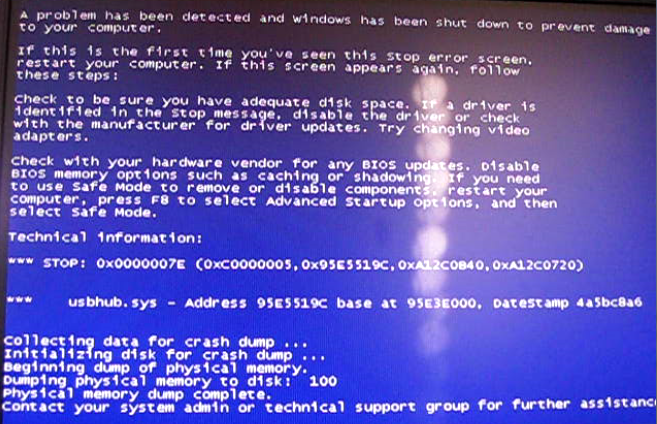
Malwarebytes caught an open command line in a file and when I clicked the suggestion it removed it and my computer shut down and gave me a BSOD...here's the screenshot I took before shutdown:


And the same weird security error (my basic reaction in the background every time I see this error message):

RebootError.png


As for cmd sfc /scannow, it didn't find any errors.

I'm going to run the other memory test but I have to boot from it, I'll update this post when I see the results.
Thanks,
Edward
 

My Computer

Computer Manufacturer/Model Number
Custom
OS
Windows 7
CPU
Intel Core i5-750 Lynnfield 2.67GHz
Motherboard
Intel P55
Memory
G.Skill 2x4GB DDR3 1600MHz
Graphics Card(s)
XFX GeForce 250GTS 256bit 1GB DDR3
Sound Card
Creative Labs Sound Blaster Audigy SE
Monitor(s) Displays
Hanns-G 22" Hi-221DPB (1000:1 Contrast Ratio, 5ms)
Screen Resolution
1680x1050 Landscape
Hard Drives
Seagate Barracuda 320GB 7200RPM (OS and programs)
Seagate Barracuda 750GB 7200RPM (Data drive)
PSU
Apevia ATX-JV650W
Case
NZXT M59
Cooling
Rosewill fans and Zerotherm Core92 CPU fan
Internet Speed
Optimum Boost 35MB max, usually between 15-30Mbps
Yes do remember to post back with the results.
 

My Computer

Computer Manufacturer/Model Number
* BFK Customs *
OS
W 7 64-bit Ultimate
CPU
Intel Q9550 Yorkfield
Motherboard
ASUS P5Q Pro
Memory
8GB Dominator 8500C5D
Graphics Card(s)
ATI : XFX 5870
Sound Card
Realtek HD Audio 7-1
Monitor(s) Displays
1x 47" LCD HDMI & 3x 26" LCD HDMI
Screen Resolution
1920x1080P & 1920x1200
Hard Drives
1x 80GB Intel X25-M G2 SSD : 1x 500GB & 1x 640GB WD Caviar Black(s)
PSU
Corsair 620HX
Case
Cooler Master RC-690
Cooling
Tuniq Tower 120, 2x 140mm and 3x 120mm case fans
Keyboard
Microsoft 500
Mouse
Razer Diamondback 3G
Internet Speed
14 Mb/s
Other Info
1x Koutech 3Gb/s SATA HDD Hot Swap Rack
Well I burned the iso of the memory tester to a CD-R both as suggested by Win7 as to be used as a USB and to be used in only a CD/DVD player. Neither disc would boot at startup...so I went into bios and changed the boot order and still couldn't get either disc to start instead of the OS. I also put a boot latency on the HDDs and that did nothing. So now I'm stepping back and scratching my head on how well I can actually use Win7.

Something of note:
When I rebooted, every time I would get a BSOD right when the "Windows is shutting down..." screen came up and it would dump the physical memory by failsafe and shutdown.

Sounds like a ram problem or is this not enough information to prove it? I'm on the fence of it being a virus and memory problem.
Any suggestions? How can I properly run the memory tester?
Thanks again,
Edward
 

My Computer

Computer Manufacturer/Model Number
Custom
OS
Windows 7
CPU
Intel Core i5-750 Lynnfield 2.67GHz
Motherboard
Intel P55
Memory
G.Skill 2x4GB DDR3 1600MHz
Graphics Card(s)
XFX GeForce 250GTS 256bit 1GB DDR3
Sound Card
Creative Labs Sound Blaster Audigy SE
Monitor(s) Displays
Hanns-G 22" Hi-221DPB (1000:1 Contrast Ratio, 5ms)
Screen Resolution
1680x1050 Landscape
Hard Drives
Seagate Barracuda 320GB 7200RPM (OS and programs)
Seagate Barracuda 750GB 7200RPM (Data drive)
PSU
Apevia ATX-JV650W
Case
NZXT M59
Cooling
Rosewill fans and Zerotherm Core92 CPU fan
Internet Speed
Optimum Boost 35MB max, usually between 15-30Mbps
Is there any chance a program / app you've recently installed is hanging at shutdown, have you installed anything recently?
 

My Computer

Computer Manufacturer/Model Number
* BFK Customs *
OS
W 7 64-bit Ultimate
CPU
Intel Q9550 Yorkfield
Motherboard
ASUS P5Q Pro
Memory
8GB Dominator 8500C5D
Graphics Card(s)
ATI : XFX 5870
Sound Card
Realtek HD Audio 7-1
Monitor(s) Displays
1x 47" LCD HDMI & 3x 26" LCD HDMI
Screen Resolution
1920x1080P & 1920x1200
Hard Drives
1x 80GB Intel X25-M G2 SSD : 1x 500GB & 1x 640GB WD Caviar Black(s)
PSU
Corsair 620HX
Case
Cooler Master RC-690
Cooling
Tuniq Tower 120, 2x 140mm and 3x 120mm case fans
Keyboard
Microsoft 500
Mouse
Razer Diamondback 3G
Internet Speed
14 Mb/s
Other Info
1x Koutech 3Gb/s SATA HDD Hot Swap Rack
Is there any chance a program / app you've recently installed is hanging at shutdown, have you installed anything recently?

In the last month I installed Uniblue Registry editor...could it have #%&*ed my files? It made a backup of my registry...and now that I think of it, Malwarebytes found a registry error and crashed when it repaired it.

I recorded the crash with my camera and paused at the BSOD and found this:
A problem has been detected and windows has been shut down to prevent damage to your computer.

If this is the first time you've...blablabla...

Technical information:
Stop: 0x0000007E (0xC000005, 0x95E5529C, 0xA12C0B40, 0xA12C0720)
usbhub.sys - address 95E5119C base at 95E3E000, DataStamp 4a5bc8a6

Collecting data for crash dump ...
Intitializing disk for crash dump...
Beginning dump of physical memory.
Dumping physical memory to disk:
etc.

The numbers aren't totally right but--well now that I wasted all that time typing it out, I got a screenshot of the video of the screen...I don't think that sounds like a waste of time. :sarc:


Any help?
Edward
 

My Computer

Computer Manufacturer/Model Number
Custom
OS
Windows 7
CPU
Intel Core i5-750 Lynnfield 2.67GHz
Motherboard
Intel P55
Memory
G.Skill 2x4GB DDR3 1600MHz
Graphics Card(s)
XFX GeForce 250GTS 256bit 1GB DDR3
Sound Card
Creative Labs Sound Blaster Audigy SE
Monitor(s) Displays
Hanns-G 22" Hi-221DPB (1000:1 Contrast Ratio, 5ms)
Screen Resolution
1680x1050 Landscape
Hard Drives
Seagate Barracuda 320GB 7200RPM (OS and programs)
Seagate Barracuda 750GB 7200RPM (Data drive)
PSU
Apevia ATX-JV650W
Case
NZXT M59
Cooling
Rosewill fans and Zerotherm Core92 CPU fan
Internet Speed
Optimum Boost 35MB max, usually between 15-30Mbps
You said the reg editor made a backup of the registry, can you restore the registry from that backup.
 

My Computer

Computer Manufacturer/Model Number
* BFK Customs *
OS
W 7 64-bit Ultimate
CPU
Intel Q9550 Yorkfield
Motherboard
ASUS P5Q Pro
Memory
8GB Dominator 8500C5D
Graphics Card(s)
ATI : XFX 5870
Sound Card
Realtek HD Audio 7-1
Monitor(s) Displays
1x 47" LCD HDMI & 3x 26" LCD HDMI
Screen Resolution
1920x1080P & 1920x1200
Hard Drives
1x 80GB Intel X25-M G2 SSD : 1x 500GB & 1x 640GB WD Caviar Black(s)
PSU
Corsair 620HX
Case
Cooler Master RC-690
Cooling
Tuniq Tower 120, 2x 140mm and 3x 120mm case fans
Keyboard
Microsoft 500
Mouse
Razer Diamondback 3G
Internet Speed
14 Mb/s
Other Info
1x Koutech 3Gb/s SATA HDD Hot Swap Rack
I restored the registry and it was fine for about two days and then BSOD autoshutdown with the same problem again. Not sure what to do here and how to get the memory tester to boot before windows.
-JSR
 

My Computer

Computer Manufacturer/Model Number
Custom
OS
Windows 7
CPU
Intel Core i5-750 Lynnfield 2.67GHz
Motherboard
Intel P55
Memory
G.Skill 2x4GB DDR3 1600MHz
Graphics Card(s)
XFX GeForce 250GTS 256bit 1GB DDR3
Sound Card
Creative Labs Sound Blaster Audigy SE
Monitor(s) Displays
Hanns-G 22" Hi-221DPB (1000:1 Contrast Ratio, 5ms)
Screen Resolution
1680x1050 Landscape
Hard Drives
Seagate Barracuda 320GB 7200RPM (OS and programs)
Seagate Barracuda 750GB 7200RPM (Data drive)
PSU
Apevia ATX-JV650W
Case
NZXT M59
Cooling
Rosewill fans and Zerotherm Core92 CPU fan
Internet Speed
Optimum Boost 35MB max, usually between 15-30Mbps

My Computer

Computer type
PC/Desktop
Computer Manufacturer/Model Number
Dell XPS 420
OS
Windows 10, Home Clean Install
CPU
Intel Core2 processsor Q8200(2.33Ghz 1333FSB) Quad Core Tech
Motherboard
Dell
Memory
6 gb
Graphics Card(s)
ATI Radeon 256MB HD3650
Sound Card
Intergrated 7.1 Channel Audio
Monitor(s) Displays
Dell SP2009W 20"
Hard Drives
640 GB Serial ATA Hard drive
Cooling
Fan
Keyboard
Dell USB Keyboard
Mouse
Dell Premium Optical USB
Internet Speed
DSL 2.85
That sure sounds like you got infected somewhere; do you have a Windows 7 install disk?
 

My Computer

Computer Manufacturer/Model Number
* BFK Customs *
OS
W 7 64-bit Ultimate
CPU
Intel Q9550 Yorkfield
Motherboard
ASUS P5Q Pro
Memory
8GB Dominator 8500C5D
Graphics Card(s)
ATI : XFX 5870
Sound Card
Realtek HD Audio 7-1
Monitor(s) Displays
1x 47" LCD HDMI & 3x 26" LCD HDMI
Screen Resolution
1920x1080P & 1920x1200
Hard Drives
1x 80GB Intel X25-M G2 SSD : 1x 500GB & 1x 640GB WD Caviar Black(s)
PSU
Corsair 620HX
Case
Cooler Master RC-690
Cooling
Tuniq Tower 120, 2x 140mm and 3x 120mm case fans
Keyboard
Microsoft 500
Mouse
Razer Diamondback 3G
Internet Speed
14 Mb/s
Other Info
1x Koutech 3Gb/s SATA HDD Hot Swap Rack
That sure sounds like you got infected somewhere; do you have a Windows 7 install disk?

Yeah...are you suggesting I reinstall Windows?:shock:

Here's my minidump contents attached.
-JSR
 

My Computer

Computer Manufacturer/Model Number
Custom
OS
Windows 7
CPU
Intel Core i5-750 Lynnfield 2.67GHz
Motherboard
Intel P55
Memory
G.Skill 2x4GB DDR3 1600MHz
Graphics Card(s)
XFX GeForce 250GTS 256bit 1GB DDR3
Sound Card
Creative Labs Sound Blaster Audigy SE
Monitor(s) Displays
Hanns-G 22" Hi-221DPB (1000:1 Contrast Ratio, 5ms)
Screen Resolution
1680x1050 Landscape
Hard Drives
Seagate Barracuda 320GB 7200RPM (OS and programs)
Seagate Barracuda 750GB 7200RPM (Data drive)
PSU
Apevia ATX-JV650W
Case
NZXT M59
Cooling
Rosewill fans and Zerotherm Core92 CPU fan
Internet Speed
Optimum Boost 35MB max, usually between 15-30Mbps
Lets check the important things first and move on from there.

Run an anti virus scan.

Then download and run malwarebytes.

Malwarebytes.org

If you did this, for the time being I would assume that it is not a virus. If not a virus there are other steps that can be taken before reinstalling.
 

My Computer

Computer type
PC/Desktop
Computer Manufacturer/Model Number
Dell XPS 420
OS
Windows 10, Home Clean Install
CPU
Intel Core2 processsor Q8200(2.33Ghz 1333FSB) Quad Core Tech
Motherboard
Dell
Memory
6 gb
Graphics Card(s)
ATI Radeon 256MB HD3650
Sound Card
Intergrated 7.1 Channel Audio
Monitor(s) Displays
Dell SP2009W 20"
Hard Drives
640 GB Serial ATA Hard drive
Cooling
Fan
Keyboard
Dell USB Keyboard
Mouse
Dell Premium Optical USB
Internet Speed
DSL 2.85
No I was suggesting to use the install disk to check if you have the BIOS set correctly to have the optical drive first in the boot order, if that disk boots, you can cancel after the setup starts and no harm no foul and you'll know that something is wrong with the Memtest86 boot disk, to re-do it.
 

My Computer

Computer Manufacturer/Model Number
* BFK Customs *
OS
W 7 64-bit Ultimate
CPU
Intel Q9550 Yorkfield
Motherboard
ASUS P5Q Pro
Memory
8GB Dominator 8500C5D
Graphics Card(s)
ATI : XFX 5870
Sound Card
Realtek HD Audio 7-1
Monitor(s) Displays
1x 47" LCD HDMI & 3x 26" LCD HDMI
Screen Resolution
1920x1080P & 1920x1200
Hard Drives
1x 80GB Intel X25-M G2 SSD : 1x 500GB & 1x 640GB WD Caviar Black(s)
PSU
Corsair 620HX
Case
Cooler Master RC-690
Cooling
Tuniq Tower 120, 2x 140mm and 3x 120mm case fans
Keyboard
Microsoft 500
Mouse
Razer Diamondback 3G
Internet Speed
14 Mb/s
Other Info
1x Koutech 3Gb/s SATA HDD Hot Swap Rack
Sorry for the late reply, I've just been trying to ignore the fact that my PC shuts down completely after I leave it alone for more than an hour. Its easy to ignore because Win7 starts up so quickly and doesn't lag after the OS loads.
After wasting half a dozen CD-R discs I got the Memtest iso burned correctly and it ran through the whole test in an hour and a half with no issues. What else could be causing this shutdown? Bum PSU? I don't understand how that would cause an OS crash. This problem is beyond my knowledge...
-JSR
 

My Computer

Computer Manufacturer/Model Number
Custom
OS
Windows 7
CPU
Intel Core i5-750 Lynnfield 2.67GHz
Motherboard
Intel P55
Memory
G.Skill 2x4GB DDR3 1600MHz
Graphics Card(s)
XFX GeForce 250GTS 256bit 1GB DDR3
Sound Card
Creative Labs Sound Blaster Audigy SE
Monitor(s) Displays
Hanns-G 22" Hi-221DPB (1000:1 Contrast Ratio, 5ms)
Screen Resolution
1680x1050 Landscape
Hard Drives
Seagate Barracuda 320GB 7200RPM (OS and programs)
Seagate Barracuda 750GB 7200RPM (Data drive)
PSU
Apevia ATX-JV650W
Case
NZXT M59
Cooling
Rosewill fans and Zerotherm Core92 CPU fan
Internet Speed
Optimum Boost 35MB max, usually between 15-30Mbps
Hello JezusSaurusRex.


Thanks for the update, sorry you still have the issue; maybe bringing this thread around again someone new will have some other ideas for you.
 

My Computer

Computer Manufacturer/Model Number
* BFK Customs *
OS
W 7 64-bit Ultimate
CPU
Intel Q9550 Yorkfield
Motherboard
ASUS P5Q Pro
Memory
8GB Dominator 8500C5D
Graphics Card(s)
ATI : XFX 5870
Sound Card
Realtek HD Audio 7-1
Monitor(s) Displays
1x 47" LCD HDMI & 3x 26" LCD HDMI
Screen Resolution
1920x1080P & 1920x1200
Hard Drives
1x 80GB Intel X25-M G2 SSD : 1x 500GB & 1x 640GB WD Caviar Black(s)
PSU
Corsair 620HX
Case
Cooler Master RC-690
Cooling
Tuniq Tower 120, 2x 140mm and 3x 120mm case fans
Keyboard
Microsoft 500
Mouse
Razer Diamondback 3G
Internet Speed
14 Mb/s
Other Info
1x Koutech 3Gb/s SATA HDD Hot Swap Rack
My computer still crashes and doesn't go to standby. I noticed one night that I didn't click the lock screen (prompt username and password screen) and it didn't crash overnight; even though I have it set to turn off after one hour, it was on in the morning. So I did that for maybe a week and now it just seems to crash and shutdown randomly every time I'm not at it.

Could this be my power supply crapping out and the system failsafing when it can't safely go to standby mode?

This has been bugging me for months guys, please help! :shock:
-Jezus
 

My Computer

Computer Manufacturer/Model Number
Custom
OS
Windows 7
CPU
Intel Core i5-750 Lynnfield 2.67GHz
Motherboard
Intel P55
Memory
G.Skill 2x4GB DDR3 1600MHz
Graphics Card(s)
XFX GeForce 250GTS 256bit 1GB DDR3
Sound Card
Creative Labs Sound Blaster Audigy SE
Monitor(s) Displays
Hanns-G 22" Hi-221DPB (1000:1 Contrast Ratio, 5ms)
Screen Resolution
1680x1050 Landscape
Hard Drives
Seagate Barracuda 320GB 7200RPM (OS and programs)
Seagate Barracuda 750GB 7200RPM (Data drive)
PSU
Apevia ATX-JV650W
Case
NZXT M59
Cooling
Rosewill fans and Zerotherm Core92 CPU fan
Internet Speed
Optimum Boost 35MB max, usually between 15-30Mbps
Back
Top