
Windows Update on Windows 7 Ultimate 64-bit keeps failing with multiple errors lately, and it's also offering me updates that I already have, such as IE11.
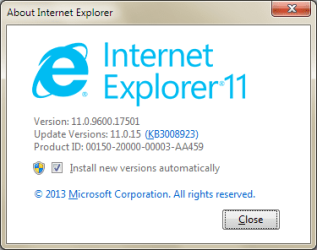
This is the IE version I have:
This is what I'm being offered as an Optional update:

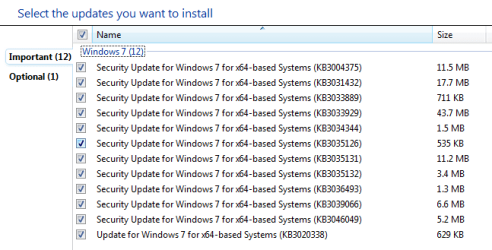
These are what I'm being offered as Important updates:
These are the errors I get:

Naturally I have tried all the Windows Update Troubleshooters, Fixits and other solutions Microsoft recommends. In addition I ran the latest version of CheckSUR i.e. Windows6.1-KB947821-v34-x64.msu (wow, 538MB!) but of course it couldn't fix the errors. I also followed the instructions from How to fix errors found in the CheckSUR.log and placed the following MSU packages in %WinDir%\Temp\CheckSUR\Packages, then ran CheckSUR again but it did nothing at all. Also chkdsk /r c:, sfc /scannow and dism /online /cleanup-image /scanhealth showed no errors.
Windows6.1-KB3004375-v3-x64.msu
Windows6.1-KB3006226-x64.msu
Windows6.1-KB3020338-x64.msu
Windows6.1-KB3031432-x64.msu
Windows6.1-KB3032359-x64.msu
Windows6.1-KB3033889-x64.msu
Windows6.1-KB3033929-x64.msu
Windows6.1-KB3034344-x64.msu
Windows6.1-KB3035126-x64.msu
Windows6.1-KB3035131-x64.msu
Windows6.1-KB3035132-x64.msu
Windows6.1-KB3036493-x64.msu
Windows6.1-KB3039066-x64.msu
Windows6.1-KB3046049-x64.msu
My CBS Logs are attached. I created an RAR because it was only 1.41MB whereas a ZIP of the same files was almost 12MB! Hope that is ok and that someone can help me out. Thanks!
This is the IE version I have:
This is what I'm being offered as an Optional update:
These are what I'm being offered as Important updates:
These are the errors I get:
Naturally I have tried all the Windows Update Troubleshooters, Fixits and other solutions Microsoft recommends. In addition I ran the latest version of CheckSUR i.e. Windows6.1-KB947821-v34-x64.msu (wow, 538MB!) but of course it couldn't fix the errors. I also followed the instructions from How to fix errors found in the CheckSUR.log and placed the following MSU packages in %WinDir%\Temp\CheckSUR\Packages, then ran CheckSUR again but it did nothing at all.
Also chkdsk /r c:, sfc /scannow and dism /online /cleanup-image /scanhealth showed no errors.Windows6.1-KB3004375-v3-x64.msu
Windows6.1-KB3006226-x64.msu
Windows6.1-KB3020338-x64.msu
Windows6.1-KB3031432-x64.msu
Windows6.1-KB3032359-x64.msu
Windows6.1-KB3033889-x64.msu
Windows6.1-KB3033929-x64.msu
Windows6.1-KB3034344-x64.msu
Windows6.1-KB3035126-x64.msu
Windows6.1-KB3035131-x64.msu
Windows6.1-KB3035132-x64.msu
Windows6.1-KB3036493-x64.msu
Windows6.1-KB3039066-x64.msu
Windows6.1-KB3046049-x64.msu
My CBS Logs are attached. I created an RAR because it was only 1.41MB whereas a ZIP of the same files was almost 12MB! Hope that is ok and that someone can help me out. Thanks!
Last edited:
My Computer
At a glance
Windows 7 Ultimate x64
- Computer type
- PC/Desktop
- OS
- Windows 7 Ultimate x64
