Solved Windows Update and MSupdate not Working

sheisel

New member
Local time
12:11 AM
Messages
34
I have a Toshiba Satellite A660. I did a clean install of Windows 7 Home Premium. There were a couple of hundred updates that downloaded and installed OK (I think). At one point it had seven updates to install and these failed and now Windows Update just spins for hours. This is if I run it from the control panel. If I ran it from the start menu, it went to a windows update page in explorer and never started the update. I deleted the start menu windows shortcuts.

I tried the four steps to get update started -
SURT (standalone update) just keeps grinding on for hours
SFC Scan found nothing
Update never gets to the point of having errors
I cannot attach the CBS zip file since all five of the cabinet files are greater than 8 MB

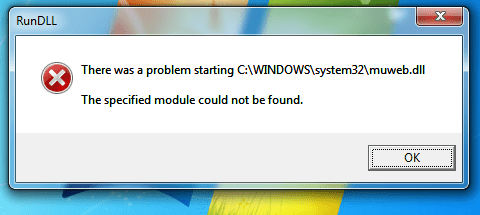
I also installed Office 2010 and the Microsoft Update gives the error in the attached png.

Any help would be appreciated.
 

Attachments

  • MSupdate.png
    MSupdate.png
    13.2 KB · Views: 51

My Computer

Computer type
PC/Desktop
Computer Manufacturer/Model Number
Custom
OS
Windows 7 Home Premium 64bit
CPU
Intel Core i3-4150
Motherboard
Gigabyte Intel H81 Micro ATX
Memory
PC3-12800 4GB DDR3-1600
Hard Drives
Seagate 500GB 7200RPM
Antivirus
Norton 360
Browser
Chrome
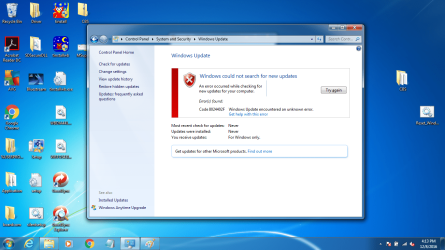
I ran the reset windows update. It seemed to reset, but did not say reset when I restarted update. I now receive the error message I am posting here as a screen shot.
 

Attachments

  • update error screen.png
    update error screen.png
    203.9 KB · Views: 5

My Computer

Computer type
PC/Desktop
Computer Manufacturer/Model Number
Custom
OS
Windows 7 Home Premium 64bit
CPU
Intel Core i3-4150
Motherboard
Gigabyte Intel H81 Micro ATX
Memory
PC3-12800 4GB DDR3-1600
Hard Drives
Seagate 500GB 7200RPM
Antivirus
Norton 360
Browser
Chrome
Hi Shiesel,
you seem to have a fair few Registry icons showing on your destop!!
What have you been doing??.
Adjusting items in these folders can severly compromise the effective running of your comp, including updating
AND more importantly the help we provide is based on a that fact that you are running a STANDARD OS set-up.

From the CBS log on your desktop please copy/paste the LAST day(s) entries into another Zip file and post them.

Roy
 

My Computer

Computer type
PC/Desktop
Computer Manufacturer/Model Number
medionl/Aspire 6930G/acer x55a
OS
W7 home premium 32bit/W7HP 64bit/w10 tp insider ring
CPU
E5300 dual core
Motherboard
medion MS7366
Memory
3gb
Graphics Card(s)
Nvidia Geforce 7100 Nforce 630i
Monitor(s) Displays
avixc
Internet Speed
n (isp resticted to 72)
Antivirus
mse/pands
Browser
palemoon
Other Info
Belkin Fd7050 n USB using Railink RT2870 drivers, more upto date
Hi Roy,

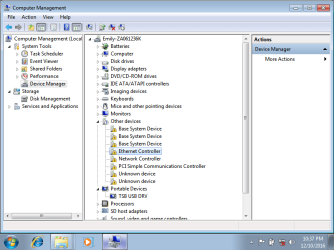
I started all over with another clean install of Windows 7 to keep things as clean as possible. There are a number of device drivers that need to be loaded (see devise driver image). Including LAN, wireless, bluetooth, HDD protector, PCI manager and card reader (folders in attached screenshot of desktop). This time I did not install office as yet or any antivirus.

Did the suggested things such as SURT, SFC scan before posting.

Windows update still just searches for update without finding anything as does the standalone installer.

Attached is the CBS zip file.

Thanks for responding.

Scott
 

Attachments

  • clean install devices.png
    clean install devices.png
    27.4 KB · Views: 1
  • desktop.png
    desktop.png
    218.1 KB · Views: 1

My Computer

Computer type
PC/Desktop
Computer Manufacturer/Model Number
Custom
OS
Windows 7 Home Premium 64bit
CPU
Intel Core i3-4150
Motherboard
Gigabyte Intel H81 Micro ATX
Memory
PC3-12800 4GB DDR3-1600
Hard Drives
Seagate 500GB 7200RPM
Antivirus
Norton 360
Browser
Chrome
Any chance someone can help? My daughter is looking to get her laptop back.
 

My Computer

Computer type
PC/Desktop
Computer Manufacturer/Model Number
Custom
OS
Windows 7 Home Premium 64bit
CPU
Intel Core i3-4150
Motherboard
Gigabyte Intel H81 Micro ATX
Memory
PC3-12800 4GB DDR3-1600
Hard Drives
Seagate 500GB 7200RPM
Antivirus
Norton 360
Browser
Chrome
Hi Scott,
sorry bout delay,
Lets get you connected

There are three Wifi drivers on the website so you need to ensure you install the correct one.
IT WILL BE 1 OF the problem devices*
Right-click the * in Device Manager and select "Properties", then click on the Details Tab, select "Hardware Id" in the list, and look for a VEN_xxxx number.

It should be one of these:
8086 = Intel
1969 = Atheros
14E4 = Broadcom
Intel Wireless LAN Driver (for models with an Intel Wifi card) Wireless 13.1.1.1.0.s64 Windows 7 64-bit 9.31 MB -
Broadcom Wireless LAN Driver (for models with an Broadcom Wifi card) Wireless LAN 5.60.48.35 Windows 7 64-bit 16.22 MB -
Atheros Wireless LAN Driver (for models with an Atheros Wifi card) Wireless LAN 8.0.0.258.0 Windows 7 64-bit 21.91 MB

download it to a USB, then from her lappy select update driver and point it to the usb

Once connected go to the homepage for the correct version a660 xxx,
download the updater utility, should then provide you with the other drivers.


Roy
 

My Computer

Computer type
PC/Desktop
Computer Manufacturer/Model Number
medionl/Aspire 6930G/acer x55a
OS
W7 home premium 32bit/W7HP 64bit/w10 tp insider ring
CPU
E5300 dual core
Motherboard
medion MS7366
Memory
3gb
Graphics Card(s)
Nvidia Geforce 7100 Nforce 630i
Monitor(s) Displays
avixc
Internet Speed
n (isp resticted to 72)
Antivirus
mse/pands
Browser
palemoon
Other Info
Belkin Fd7050 n USB using Railink RT2870 drivers, more upto date
Hi Roy,

Thank you. I had previously installed all missing drivers by googling using the Hardware IDs as you suggested. Now downloaded and ran the Toshiba Service Station (updater) which updated the BIOS. Everything else was up to date. I am running windows update again, but I am sure it will have to run for a few hours before I can determine it is not working.
 

My Computer

Computer type
PC/Desktop
Computer Manufacturer/Model Number
Custom
OS
Windows 7 Home Premium 64bit
CPU
Intel Core i3-4150
Motherboard
Gigabyte Intel H81 Micro ATX
Memory
PC3-12800 4GB DDR3-1600
Hard Drives
Seagate 500GB 7200RPM
Antivirus
Norton 360
Browser
Chrome
I have a Toshiba Satellite A660. I did a clean install of Windows 7 Home Premium. There were a couple of hundred updates that downloaded and installed OK (I think). At one point it had seven updates to install and these failed and now Windows Update just spins for hours. This is if I run it from the control panel. If I ran it from the start menu, it went to a windows update page in explorer and never started the update. I deleted the start menu windows shortcuts.

I tried the four steps to get update started -
SURT (standalone update) just keeps grinding on for hours
SFC Scan found nothing
Update never gets to the point of having errors
I cannot attach the CBS zip file since all five of the cabinet files are greater than 8 MB

I also installed Office 2010 and the Microsoft Update gives the error in the attached png.

Any help would be appreciated.
In your search engine type "WUD update downloader" download and install the file for your system, then go to windows update files and download the "windows update stand alone installer" that you need mine was Windows6.1-KB947821-v34-x64 for win 7 Ultimate when you have downloaded this file open it with the WUD downloader and you will find it will install all updates. The windows file I have listed here is for 64 bit however the file for 32 bit is listed here also
 
Last edited:

My Computer

Computer type
PC/Desktop
Computer Manufacturer/Model Number
Custom Build
OS
Windows 7 Ultimate X64
CPU
i5 3570
Motherboard
GigabyteH77M-D3H
Memory
8gb Gskill extreme
Graphics Card(s)
AMD Radeon R7 200 series
Monitor(s) Displays
1920x1080
Hard Drives
3x500gb seagate sata
Internet Speed
12.7 mbs
Antivirus
Nod 32
Browser
firefox
Because I have within the last hour installed this on my PC I do not know if I will have to run this every month when Microsoft releases updates however it installed more than 2gb of updates. I have just checked and updates are put into a folder in Windows Update Downloader and it looks like I will have to download and install the updates monthly as it has only installed updates until November 2015. It is best to open Windows update Downloader and Tick which downloads you need as I have installed updates that I do not need.
 
Last edited:

My Computer

Computer type
PC/Desktop
Computer Manufacturer/Model Number
Custom Build
OS
Windows 7 Ultimate X64
CPU
i5 3570
Motherboard
GigabyteH77M-D3H
Memory
8gb Gskill extreme
Graphics Card(s)
AMD Radeon R7 200 series
Monitor(s) Displays
1920x1080
Hard Drives
3x500gb seagate sata
Internet Speed
12.7 mbs
Antivirus
Nod 32
Browser
firefox
Hi Roy,

Windows update asked for a new product key for activation and said the one entered was no good. It took the one from the computer's label. Ran windows update overnight and got nothing. SURT was running all day today and nothing. Attaching a new CBS log file.

Scott
 
Last edited:

My Computer

Computer type
PC/Desktop
Computer Manufacturer/Model Number
Custom
OS
Windows 7 Home Premium 64bit
CPU
Intel Core i3-4150
Motherboard
Gigabyte Intel H81 Micro ATX
Memory
PC3-12800 4GB DDR3-1600
Hard Drives
Seagate 500GB 7200RPM
Antivirus
Norton 360
Browser
Chrome
Hi Scott,
run this tool please, copy/paste the output
http://go.microsoft.com/fwlink/?LinkID=52012

Can you tell me whats on the COA sticker, NOT the code just the Version.

as a secondary check try inputting the code again but
Additionally, a Microsoft product key does not contain any of the following characters:
Numbers 0, 1 and 5
Letters A, E, I, L, N, O, S, U, and Z


Roy
 

My Computer

Computer type
PC/Desktop
Computer Manufacturer/Model Number
medionl/Aspire 6930G/acer x55a
OS
W7 home premium 32bit/W7HP 64bit/w10 tp insider ring
CPU
E5300 dual core
Motherboard
medion MS7366
Memory
3gb
Graphics Card(s)
Nvidia Geforce 7100 Nforce 630i
Monitor(s) Displays
avixc
Internet Speed
n (isp resticted to 72)
Antivirus
mse/pands
Browser
palemoon
Other Info
Belkin Fd7050 n USB using Railink RT2870 drivers, more upto date
Hi Roy,

Reentered the product key and activation was successful again. The version is Win 7 Home Premium OA. Not sure what OA is, but the disk I used from another computer was Win 7 Home Premium with service pack 1. None of the letters or numbers you mentioned were in the key obviously since it worked.

Code:
Diagnostic Report (1.9.0027.0):
-----------------------------------------
Windows Validation Data-->
 
Validation Code: 0
Cached Online Validation Code: N/A, hr = 0xc004f012
Windows Product Key: *****-*****-D9HKT-4JQKD-KKJ6P
Windows Product Key Hash: +6lqi8pcargmAtJe+Q/oaJyP5Lk=
Windows Product ID: 00359-OEM-9813142-54452
Windows Product ID Type: 8
Windows License Type: COA SLP
Windows OS version: 6.1.7601.2.00010300.1.0.003
ID: {64E7C0FD-6E15-48F8-B274-A311BA3B896C}(1)
Is Admin: Yes
TestCab: 0x0
LegitcheckControl ActiveX: N/A, hr = 0x80070002
Signed By: N/A, hr = 0x80070002
Product Name: Windows 7 Home Premium
Architecture: 0x00000009
Build lab: 7601.win7sp1_rtm.101119-1850
TTS Error: 
Validation Diagnostic: 
Resolution Status: N/A
 
Vista WgaER Data-->
ThreatID(s): N/A, hr = 0x80070002
Version: N/A, hr = 0x80070002
 
Windows XP Notifications Data-->
Cached Result: N/A, hr = 0x80070002
File Exists: No
Version: N/A, hr = 0x80070002
WgaTray.exe Signed By: N/A, hr = 0x80070002
WgaLogon.dll Signed By: N/A, hr = 0x80070002
 
OGA Notifications Data-->
Cached Result: N/A, hr = 0x80070002
Version: N/A, hr = 0x80070002
OGAExec.exe Signed By: N/A, hr = 0x80070002
OGAAddin.dll Signed By: N/A, hr = 0x80070002
 
OGA Data-->
Office Status: 109 N/A
OGA Version: N/A, 0x80070002
Signed By: N/A, hr = 0x80070002
Office Diagnostics: 025D1FF3-364-80041010_025D1FF3-229-80041010_025D1FF3-230-1_025D1FF3-517-80040154_025D1FF3-237-80040154_025D1FF3-238-2_025D1FF3-244-80070002_025D1FF3-258-3
 
Browser Data-->
Proxy settings: N/A
User Agent: Mozilla/4.0 (compatible; MSIE 8.0; Win32)
Default Browser: C:\Program Files (x86)\Google\Chrome\Application\chrome.exe
Download signed ActiveX controls: Prompt
Download unsigned ActiveX controls: Disabled
Run ActiveX controls and plug-ins: Allowed
Initialize and script ActiveX controls not marked as safe: Disabled
Allow scripting of Internet Explorer Webbrowser control: Disabled
Active scripting: Allowed
Script ActiveX controls marked as safe for scripting: Allowed
 
File Scan Data-->
File Mismatch: C:\Windows\system32\wat\watadminsvc.exe[Hr = 0x80070003]
File Mismatch: C:\Windows\system32\wat\npwatweb.dll[Hr = 0x80070003]
File Mismatch: C:\Windows\system32\wat\watux.exe[Hr = 0x80070003]
File Mismatch: C:\Windows\system32\wat\watweb.dll[Hr = 0x80070003]
 
Other data-->
Office Details: <GenuineResults><MachineData><UGUID>{64E7C0FD-6E15-48F8-B274-A311BA3B896C}</UGUID><Version>1.9.0027.0</Version><OS>6.1.7601.2.00010300.1.0.003</OS><Architecture>x64</Architecture><PKey>*****-*****-*****-*****-KKJ6P</PKey><PID>00359-OEM-9813142-54452</PID><PIDType>8</PIDType><SID>S-1-5-21-1258645802-53675234-2317173567</SID><SYSTEM><Manufacturer>TOSHIBA</Manufacturer><Model>Satellite A660</Model></SYSTEM><BIOS><Manufacturer>TOSHIBA</Manufacturer><Version>2.30</Version><SMBIOSVersion major="2" minor="6"/><Date>20111124000000.000000+000</Date></BIOS><HWID>06AE3307018400FC</HWID><UserLCID>0409</UserLCID><SystemLCID>0409</SystemLCID><TimeZone>Central Standard Time(GMT-06:00)</TimeZone><iJoin>0</iJoin><SBID><stat>3</stat><msppid></msppid><name></name><model></model></SBID><OEM><OEMID>TOSCPL</OEMID><OEMTableID>TOSCPL00</OEMTableID></OEM><GANotification/></MachineData><Software><Office><Result>109</Result><Products/><Applications/></Office></Software></GenuineResults>  
 
Spsys.log Content: 0x80070002
 
Licensing Data-->
Software licensing service version: 6.1.7601.17514
 
Name: Windows(R) 7, HomePremium edition
Description: Windows Operating System - Windows(R) 7, OEM_COA_SLP channel
Activation ID: 5e017a8a-f3f9-4167-b1bd-ba3e236a4d8f
Application ID: 55c92734-d682-4d71-983e-d6ec3f16059f
Extended PID: 00359-00196-131-454452-02-1033-7601.0000-3512016
Installation ID: 015963475564779750661352622031247164360173539732436516
Processor Certificate URL: [URL="http://go.microsoft.com/fwlink/?LinkID=88338"]SpcService Web Service[/URL]
Machine Certificate URL: [URL="http://go.microsoft.com/fwlink/?LinkID=88339"]RacService Web Service[/URL]
Use License URL: [URL="http://go.microsoft.com/fwlink/?LinkID=88341"]UseLicenseService Web Service[/URL]
Product Key Certificate URL: [URL="http://go.microsoft.com/fwlink/?LinkID=88340"]PkcService Web Service[/URL]
Partial Product Key: KKJ6P
License Status: Licensed
Remaining Windows rearm count: 3
Trusted time: 12/16/2016 3:51:55 PM
 
Windows Activation Technologies-->
HrOffline: 0x00000000
HrOnline: N/A
HealthStatus: 0x0000000000000000
Event Time Stamp: N/A
ActiveX: Not Registered - 0x80040154
Admin Service: Not Registered - 0x80040154
HealthStatus Bitmask Output:
 
 
HWID Data-->
HWID Hash Current: MAAAAAEAAgABAAEAAAACAAAAAgABAAEAeqiSuf21mlGcj3o/vH1qryBJrvISH1xd
 
OEM Activation 1.0 Data-->
N/A
 
OEM Activation 2.0 Data-->
BIOS valid for OA 2.0: yes
Windows marker version: 0x20001
OEMID and OEMTableID Consistent: yes
BIOS Information: 
  ACPI Table Name    OEMID Value    OEMTableID Value
  APIC            TOSCPL        TOSCPL00
  FACP            TOSCPL        TOSCPL00
  HPET            TOSCPL        TOSCPL00
  MCFG            TOSCPL        TOSCPL00
  ASF!            TOSCPL        TOSCPL00
  SLIC            TOSCPL        TOSCPL00
  SSDT            PmRef        CpuPm
  UEFI            PTL           PTLBUF8ë
  UEFI            PTL           PTLBUF8ë
  UEFI            PTL           PTLBUF8ë


Scott
 
Last edited by a moderator:

My Computer

Computer type
PC/Desktop
Computer Manufacturer/Model Number
Custom
OS
Windows 7 Home Premium 64bit
CPU
Intel Core i3-4150
Motherboard
Gigabyte Intel H81 Micro ATX
Memory
PC3-12800 4GB DDR3-1600
Hard Drives
Seagate 500GB 7200RPM
Antivirus
Norton 360
Browser
Chrome
Hi Scott,

thats cool

Happy surfing

note use Acronis/macrium (both free) to create a system image, it'll save hassle like this again:)

Roy
 

My Computer

Computer type
PC/Desktop
Computer Manufacturer/Model Number
medionl/Aspire 6930G/acer x55a
OS
W7 home premium 32bit/W7HP 64bit/w10 tp insider ring
CPU
E5300 dual core
Motherboard
medion MS7366
Memory
3gb
Graphics Card(s)
Nvidia Geforce 7100 Nforce 630i
Monitor(s) Displays
avixc
Internet Speed
n (isp resticted to 72)
Antivirus
mse/pands
Browser
palemoon
Other Info
Belkin Fd7050 n USB using Railink RT2870 drivers, more upto date
Hi Roy,

My issue is not with activation, but it is not updating.

Scott
 

My Computer

Computer type
PC/Desktop
Computer Manufacturer/Model Number
Custom
OS
Windows 7 Home Premium 64bit
CPU
Intel Core i3-4150
Motherboard
Gigabyte Intel H81 Micro ATX
Memory
PC3-12800 4GB DDR3-1600
Hard Drives
Seagate 500GB 7200RPM
Antivirus
Norton 360
Browser
Chrome
This problem of not updating seems to be a ruse put out by Microsoft to force people to update to Windows 10. I bought a Copy of Windows 7 x64 Ultimate prior to 18/8/2010 I do not know the exact date as apart from crashing on this date until 11/11/2016 when it crashed again I have had no problems, however on doing a re-install after it had loaded a message came up stating " This is not a Genuine copy of Windows and if you paid for it you should ask for a Refund". However it would not download updates. I went to the Microsoft Update Download centre and went through all of the Fixes which they told me to do and still it would not update. Then I saw a blog which said download "WUD update down loader" install and then it would download updates and it Did!!!
 

My Computer

Computer type
PC/Desktop
Computer Manufacturer/Model Number
Custom Build
OS
Windows 7 Ultimate X64
CPU
i5 3570
Motherboard
GigabyteH77M-D3H
Memory
8gb Gskill extreme
Graphics Card(s)
AMD Radeon R7 200 series
Monitor(s) Displays
1920x1080
Hard Drives
3x500gb seagate sata
Internet Speed
12.7 mbs
Antivirus
Nod 32
Browser
firefox

My Computer

Computer type
PC/Desktop
Computer Manufacturer/Model Number
medionl/Aspire 6930G/acer x55a
OS
W7 home premium 32bit/W7HP 64bit/w10 tp insider ring
CPU
E5300 dual core
Motherboard
medion MS7366
Memory
3gb
Graphics Card(s)
Nvidia Geforce 7100 Nforce 630i
Monitor(s) Displays
avixc
Internet Speed
n (isp resticted to 72)
Antivirus
mse/pands
Browser
palemoon
Other Info
Belkin Fd7050 n USB using Railink RT2870 drivers, more upto date
Hi Roy,

THANKS for all your Help!! I had to go to the "Windows Update will not update and I've tried multiple fixes", but all seems to be going smoothly now. I think part of my problem was not getting windows update to fully stop before, but it really does not matter now. Windows is on 181 of 209 updates now.

Thanks again for all your help. I could not have done it without you.

Scott
 

My Computer

Computer type
PC/Desktop
Computer Manufacturer/Model Number
Custom
OS
Windows 7 Home Premium 64bit
CPU
Intel Core i3-4150
Motherboard
Gigabyte Intel H81 Micro ATX
Memory
PC3-12800 4GB DDR3-1600
Hard Drives
Seagate 500GB 7200RPM
Antivirus
Norton 360
Browser
Chrome
Hi,
Hopefully you won't get many if any failed to install out of those :)
 

My Computer

Computer type
PC/Desktop
Computer Manufacturer/Model Number
Custom assembled by me :}
OS
Win-7-Pro64bit 7-H-Prem-64bit
CPU
i7-5930K 2nd i9-9940x both water blocked VRM's too
Motherboard
ASUS SABERTOOTH X99 2nd ASUS x299 Apex
Memory
Trident-z 3200C14 2nd Trident-z 3600C16
Graphics Card(s)
EVGA 1080ti ftw3 2nd Titan Xp both water blocked
Sound Card
Built-in Realtek
Monitor(s) Displays
1-AOC G2460PG 24"G-Sync 144Hz/ 2nd 1-ASUS VG248QE 24" 144Hz
Screen Resolution
1920 x 1080 144Hz
Hard Drives
2-Samsung M.2 Evo & Evo Plus
2-Samsung 850 EVO 500GB SSD's/ 3-2.5 W.D. Black 1tb-&3-1tb/3-3.5 WD Black 1tb hdd's
PSU
EVGA SuperNOVA 1000-P2 2nd 1200-P2
Case
2-Corsair Obsidian Series 450D Black ATX Mid Tower
Cooling
Custom water loops
Keyboard
Logitech G710+/ 2nd Logitech G910
Mouse
2-RedDragon M901 Perdition 16400 dpi Gaming mouse = wired
Internet Speed
Comcast Ping 19ms 89.31mbps download speed 6.12mbps upload
Antivirus
Malwarebytes Pro/ Superantispyware Pro
Browser
FireFox & Pale moon
Other Info
2nd ASUS X299 Apex/Intel i9-9940x with Custom water loop/7H-Prem-x64/Corsair 450D case/Ram Trident-z 3600C16 4x8gb / Samsung970Evo plus 500gb SSD/Dual ssd EZ swap evo/PSU EVGA SuperNova 1200w-P2 80+Platinum/GPU Titan Xp /8-ML-140 on push-pull on 2-280GTX rads
Back
Top