
windows update doesn't show details

vi76

New member
Local time
7:09 AM
Messages
6
When looking at the details of which updates I want to install and which ones I don't, I get an empty screen.
Is this familiar behaviour to anyone? And what can I do about it?

The first screen looks normal:
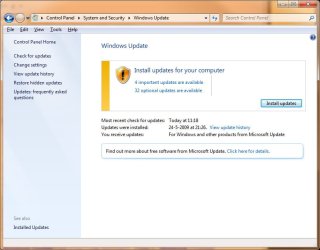
Clip_2.jpg

But when I click on the 4 important updates to see the details, I get this:
Clip.jpg
 

My Computer

OS
windows 7 64 bit RC 7100 (dual boot with Vista SP1 64 bit)
That's strange. Haven't seen or heard of this before.

You can try deleting everything inside of

C:\Windows\SoftwareDistribution\Download

and try again.
 

My Computer

Computer Manufacturer/Model Number
self built
OS
7600.20510 x86
CPU
P4 550 3.4 GHz HT running at 3.5 GHz
Motherboard
MSI PM8M3-V (MS-7211 v1.x) Micro-ATX mainboard
Memory
OCZ 2 GB(2x1GB) DDR400mHz running @ 414 mHz
Graphics Card(s)
HIS Radeon HD 3850 IceQ 3 Turbo HDMI Dual DL-DVI AGP
Sound Card
MOTU Traveler firewire studio interface 192 kHz 24 bit
Monitor(s) Displays
22" widescreen Acer X223W LCD, 17" Compaq P75 CRT
Screen Resolution
1680x1050 and 1280x1024
Hard Drives
SATA I x2 WD, 400 GB and 120 GB, SATA 2 WD Caviar Black 1 TB
PSU
350W generic
Case
Cybertronpc, it glows blue
Cooling
stock cpu fan, Ice-Q 3 gpu and system, many case fans
Keyboard
Logitch Classical Keyboard 200
Mouse
Logitech Mediaplay cordless
Internet Speed
1792/448 kbits/sec
Other Info
SATA II PCI fake RAID adapter, 1 GB Readyboost, original ATI Remote Wonder (even works with WMC perfectly), Logitech Rumblepad 2 game controller x2
Nope, that didn't help.

I noticed this behaviour the previous time I had updates too, but installed them anyway. They were updates for Office 2003 (I could see the names when Windows was actually installing them).

So maybe this behaviour is only related to office. Although, come to think of it, I do remember seeing an SP3 update...

Edit: I changed the setting to not include updates for other Microsoft products, but that didn't help either.

Edit2: I installed those 4 (now 5) important updates anyway. Got an error, tried again and all worked fine. After the mandatory reboot, I finally could see the details again.
And I'm glad I did, because those 32 updates were language packs, which are bigsized updates and just the one I needed took almost 10 minutes to install. So, all's well in the end. Still don't what caused it though.
 
Last edited:

My Computer

OS
windows 7 64 bit RC 7100 (dual boot with Vista SP1 64 bit)
I can't see updates aswell.
List is empty but they are there...reboot didn't help :P
 

My Computer

Computer Manufacturer/Model Number
ASUS
OS
WIN 7 x64
CPU
E8400
Motherboard
P5Bdlx
Memory
4gb Corsair
Graphics Card(s)
9800gtx+
Sound Card
X-Fi
Monitor(s) Displays
samsung 22
PSU
tagan 600W
I have same problem since yesterday. I see updates but I can't see update names. So I can't choose updates. Some kind of virusses or what I don't know. I use up-to-date Virus Program. :(
 

My Computer

OS
Windows Vista 64 Bit
CPU
Intel Quad Q8300
Motherboard
Asus P5Q
Memory
4GB
Graphics Card(s)
Saphire 4850
Hard Drives
Western Digital Black 500GB Raid 0
PSU
Tagan 530W
Case
A-Open
Sorry to BUMP, but I'm having this problem too since the 7100 build
 

My Computer

OS
Windows 7

My Computer

Computer Manufacturer/Model Number
HP Touchsmart IQ771.uk
OS
Windows 7 Ultimate x64
CPU
AMD Turion(tm) 64 X2 Mobile Technology TL-56
Motherboard
ASUS Pheonix
Memory
3GB Nanya PC2-6400 DDR2-SDRAM SO-DIM (400MHz)
Graphics Card(s)
NVIDIA GeForce Go 7600 256MB GDDR3 SDRAM
Sound Card
High Definition Intergrated NVIDIA MCP51
Monitor(s) Displays
46" Sony Bravia HDTV
Screen Resolution
1600x1200
Hard Drives
1.5TB Samsug
320GB Seagate ST3320820AS - SATA 3Gb/s 8MB
500GB Maxtor Basics STM305003EHD301-RK
Internet Speed
↓6.32 Mb/s ↑0.35 Mb/s ↔26ms
Other Info
BIOS - American Megatrends Inc. 5.07
Ethernet Port - NVIDIA nForce 10/100/1000 Mbps
DVD Drive - TSSTcorp DVDR/RW TS-T632L
Resolved!

That's strange. Haven't seen or heard of this before.

You can try deleting everything inside of

C:\Windows\SoftwareDistribution\Download

and try again.

I've had the same issues on Vista, same blank screen of the details. I followed your tip, restarted and worked! :D
 

My Computer

OS
Windows Vista 32-bit SP2
resolved

q.gif
Quote: Originally Posted by torrentg
That's strange. Haven't seen or heard of this before.

You can try deleting everything inside of

C:\Windows\SoftwareDistribution\Download

and try again.


same problem and the tip works great whit my 7 home premium.
 

My Computer

OS
7
q.gif
Quote: Originally Posted by torrentg
That's strange. Haven't seen or heard of this before.

You can try deleting everything inside of
C:\Windows\SoftwareDistribution\Download
and try again.


same problem and the tip works great whit my 7 home premium.

Same here, Windows Ultimate
thx for tip
 

My Computer

OS
Windows /
Same here (as of today). Just like vi76 images

WTF?

Update: reboot and the problem is gone, the list appeared as expected
 
Last edited:

My Computer

Computer Manufacturer/Model Number
www.sinco.com.br / Workstation
OS
Win7 x64 Ultimate
CPU
Intel Core Quad Q9550 @ 2.83GHz
Motherboard
Intel DC48BT2
Memory
Kingston DDR3-1333MHz (8GB)
Graphics Card(s)
(2) NVidia Quadro FX570
Sound Card
Intel HighDefinition (onBoard)
Monitor(s) Displays
(2) Dell 3008WFP + (2) 1080p plasma and projector
Screen Resolution
(2) 2560x1600 DVI + (2) 1080p DVI > HDMI
Hard Drives
(4) Seagate SATA + (2) External USB
PSU
Seventeam 850W
Keyboard
Gertec ergonomic ABNT
Mouse
MS Natural Intellimouse
Internet Speed
ADSL 8 Mbps
Back
Top