
Solved Windows update downed

Freedoommer

Banned
Local time
7:52 PM
Messages
7
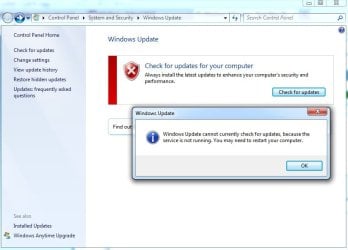
Today installing Service Pack 1, then a window poped up said something missing, I didn't continue to install so I shut down the computer. The next time I turned it on and try to install it again, Windows update show me this
QQ截图未命名.jpg
I restarted the computer but it still like this.
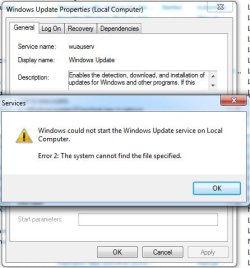
So I try to go to Services and fix it but
QQ截图未命名2.jpg

So what am I suppose to do right now?
 

My Computer

OS
Windows 7 Home Premium 64bit
CPU
AMD Athon(tm) II x2 215
Motherboard
NARRA5 (Nvidia nForce 430(MCP61))
Memory
4 GB (DDR2 800MHz)
Graphics Card(s)
Nvidia GeForce GT640 (1 GB)
Hard Drives
Seagate ST3250820AS
Antivirus
360
Browser
Firefox
Just do a simple system restore and that will go away. Try 2 or 3 restore dates back. then update again.
 

My Computer

OS
Stools
Just do a simple system restore and that will go away. Try 2 or 3 restore dates back. then update again.
Yeah, I've been trying to do it without using System Restore. But still I have to use System Restore.
Anyway, thanks.
 

My Computer

OS
Windows 7 Home Premium 64bit
CPU
AMD Athon(tm) II x2 215
Motherboard
NARRA5 (Nvidia nForce 430(MCP61))
Memory
4 GB (DDR2 800MHz)
Graphics Card(s)
Nvidia GeForce GT640 (1 GB)
Hard Drives
Seagate ST3250820AS
Antivirus
360
Browser
Firefox
this is the exact same issue i am having, did u manage to fix it yet and how so?
 

My Computer

OS
Windows 7 Home Premium 64Bit
Ok all i have it figured out, this is wht u do, do a system restore to a point **BEFORE** october 26th 2011, one of the windows updates was kinda messed or something, not really sure, so ive managed to stop the update from happening, and the 2 updates i had to **BLOCK** or stop from updating or installing were: (KB2603229) and (KB2607576)
 

My Computer

OS
Windows 7 Home Premium 64Bit
Back
Top