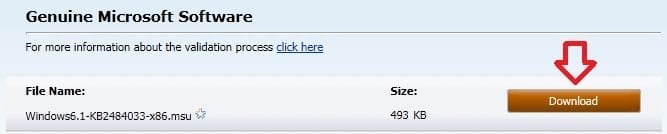
Windows Update - Download Standalone MSU Installer File

How to Download the Standalone MSU Installer File of a Windows Update

   Information
A MSU (Microsoft Update) file is a standalone Windows Update installation file that allows you to manually install the specific Windows Update that the MSU file is for. You can double click on a MSU file to install it.

This will show you how to download the standalone MSU installer file for any Windows Update in Windows 7.

This can be handy if you are unable to install the Windows Update normally in Windows Update, or would like to use the MSU file to integrate (tutorial coming soon) into a slipstreamed Windows 7 SP1 installion ISO, DVD, or Bootable USB flash drive.
   Tip
You can download the Windows 7 standalone SP1 installer at the link below.

Download: Windows 7 and Windows Server 2008 R2 Service Pack 1 (KB976932) - Microsoft Download Center - Download Details

You can also use: Microsoft Update Catalog
NOTE: You may need to click on the Run Control option for the 'MUCatalogWebControl Class' if prompted, then close and reload the page to use this.


Here's How:
1. Open the Control Panel (icons view), and click on the Windows Update icon.

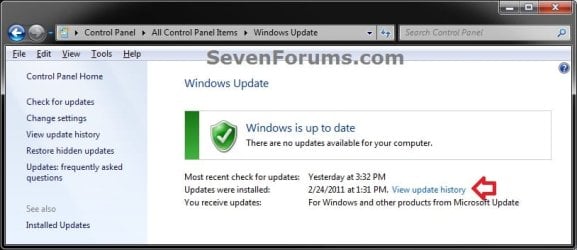
2. If the Windows Update is Installed on Windows 7 A) Click on the View update history link. (see screenshot below) Installed-1.jpg
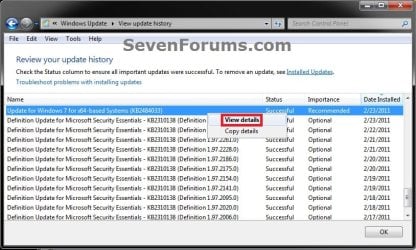
B) Select and right click on the Windows Update (ex: KB2484033) that you want to download the MSU file for, and click on View details. (see screenshot below) Installed-2.jpg
C) Click on the More information link. (see screenshot below) Installed_3.jpg
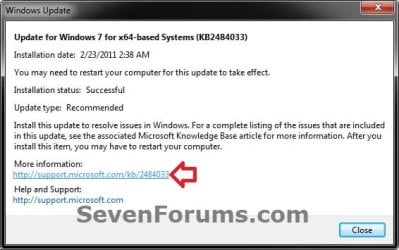
D) Go to step 4.
3. If the Windows Update is NOT Installed on Windows 7 A) Click on either the important or optional updates are available link for the one that has the uninstalled Windows Update that you want to download the MSU file for. (see screenshot below) Not_Installed-1.jpg
B) Select (highlight) the uninstalled Windows Update (ex: KB2484033) that you want to download the MSU file for, and click on the More information link. (see screenshot below) Not_Installed-2.jpg
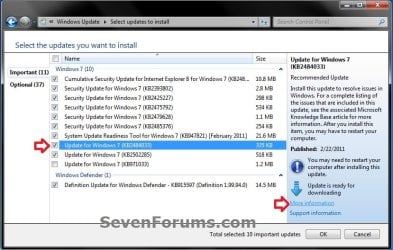
4. Your default web broweser (ex: Internet Explorer) will now open to the Windows Update download page for the selected Windows Update.

5. Click on the same 32-bit (x86) or 64-bit (x64) Download the update package link as your 32-bit (x86) or 64-bit (x64) Windows 7. (see screenshot below) Download-1.jpg
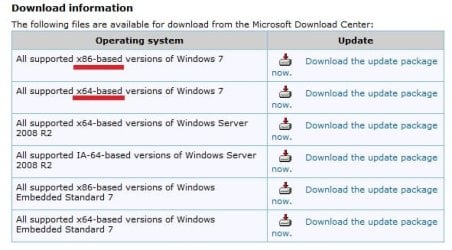
6. If prompted, click on Continue and Download to download the MSU file. Save the MSU file to your Desktop. (see screenshots below) Download-2.jpg

Download-3.jpg

7. Right click on the downloaded MSU file, and click on Properties, General tab, and on the Unblock button. (see screenshot below)
NOTE: If you do not have a Unblock button under the General tab, then the shortcut is already unblocked and you are done. Unblock.jpg
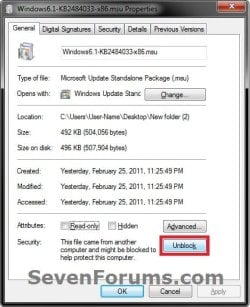
8. Repeat these steps for any other Windows Update that you want to download it's MSU file for.

9. When finished, close all opened Windows Update windows from above.

That's it,
Shawn


Last edited:
Hi, Then how to check whether all updates are installed.
Is there a complete list of files that contain all the updates and in the same order that it gives in view installed updates so that one could easily find the missing updates and manually update as per your tutorial.
If the order is not , then it will be another lengthy process of ticking each one.
If the checksur.log contains nil error what that means? Should we take that all are installed
 

My Computer My Computer

At a glance

Microsoft Windows 7 Ultimate 64-bit 7601 Mult...Intel(R) Core(TM)2 Duo CPU E7200 @ 2.53GHz4.00 GBNVIDIA GeForce 210
Computer type
PC/Desktop
Computer Manufacturer/Model Number
custom build
OS
Microsoft Windows 7 Ultimate 64-bit 7601 Multiprocessor Free Service Pack 1
CPU
Intel(R) Core(TM)2 Duo CPU E7200 @ 2.53GHz
Motherboard
To be filled by O.E.M. To be filled by O.E.M.
Memory
4.00 GB
Graphics Card(s)
NVIDIA GeForce 210
Sound Card
(1) NVIDIA High Definition Audio (2) Realtek High Definiti
Screen Resolution
1920 x 1080 x 32 bits (4294967296 colors) @ 60 Hz
Hard Drives
ST3500312CS ATA Device
View Update History will show you since the successfully installed updates are listed as well.

The best way to tell is if after you check for updates, there are none available to install. :)
 

My Computer My Computer

At a glance

64-bit Windows 11 Pro for WorkstationsIntel i7-8700K OC'd to 5 GHz64 GB (4x16GB) G.SKILL TridentZ RGB DDR4 3600...ASUS ROG-STRIX-GTX1080TI-O11G-GAMING
Computer type
PC/Desktop
Computer Manufacturer/Model Number
Self built custom
OS
64-bit Windows 11 Pro for Workstations
CPU
Intel i7-8700K OC'd to 5 GHz
Motherboard
ASUS ROG Maximus XI Formula Z390
Memory
64 GB (4x16GB) G.SKILL TridentZ RGB DDR4 3600 MHz
Graphics Card(s)
ASUS ROG-STRIX-GTX1080TI-O11G-GAMING
Sound Card
Integrated
Monitor(s) Displays
2 x Samsung Odyssey G7 27"
Screen Resolution
2560x1440
Hard Drives
1TB Samsung 990 PRO M.2,
4TB Samsung 990 PRO PRO M.2,
TerraMaster F8 SSD Plus NAS
PSU
Seasonic Prime Titanium 850W
Case
Thermaltake Core P3
Cooling
Corsair Hydro H115i
Keyboard
Logitech wireless K800
Mouse
Logitech MX Master 4
Internet Speed
2 Gb/s Download and 100 Mb/s Upload
Antivirus
Malwarebyte Anti-Malware Premium
Browser
Google Chrome
Other Info
Logitech Z625 speaker system,
Logitech BRIO 4K Pro webcam,
HP Color LaserJet Pro MFP M477fdn,
APC SMART-UPS RT 1000 XL - SURT1000XLI,
Galaxy S23 Plus phone
Manual vs Automatic

Here's something weird that I experienced this weekend installing Microsoft Security Updates on Windows 2008R2 and 2012R2 servers.
Installing the updates through the Windows Update program, the 8 to 11 updates installed quickly. Usually in less than 8 minutes.
But if I tried to install by grabbing the Windows Update MSU file from Microsoft, then double-click on that MSU file, the system would just sit and sit and sit on the "checking for updates" message. Sometimes 30-45 minutes. Then finally, pop up a message asking me if I want to install this update. Of course, after waiting for almost an hour for it to figure out what to do, of course I hit yes...
My question is; why does it take SOOOOOO much longer to install the exact same updates individually from the MSU files than it does through Windows Update?
 

My Computer My Computer

At a glance

All Windows operating systems
Computer type
PC/Desktop
OS
All Windows operating systems
Hello ekummel, and welcome to Seven Forums. :)

Usually, installing from a MSU would be faster since you don't have to wait on the Windows Update to download the update before installing.

I suppose something else could have been interfering causing a delay, but you could check the Windows Update log to see if anything may stand out.

https://support.microsoft.com/en-us/kb/902093
 

My Computer My Computer

At a glance

64-bit Windows 11 Pro for WorkstationsIntel i7-8700K OC'd to 5 GHz64 GB (4x16GB) G.SKILL TridentZ RGB DDR4 3600...ASUS ROG-STRIX-GTX1080TI-O11G-GAMING
Computer type
PC/Desktop
Computer Manufacturer/Model Number
Self built custom
OS
64-bit Windows 11 Pro for Workstations
CPU
Intel i7-8700K OC'd to 5 GHz
Motherboard
ASUS ROG Maximus XI Formula Z390
Memory
64 GB (4x16GB) G.SKILL TridentZ RGB DDR4 3600 MHz
Graphics Card(s)
ASUS ROG-STRIX-GTX1080TI-O11G-GAMING
Sound Card
Integrated
Monitor(s) Displays
2 x Samsung Odyssey G7 27"
Screen Resolution
2560x1440
Hard Drives
1TB Samsung 990 PRO M.2,
4TB Samsung 990 PRO PRO M.2,
TerraMaster F8 SSD Plus NAS
PSU
Seasonic Prime Titanium 850W
Case
Thermaltake Core P3
Cooling
Corsair Hydro H115i
Keyboard
Logitech wireless K800
Mouse
Logitech MX Master 4
Internet Speed
2 Gb/s Download and 100 Mb/s Upload
Antivirus
Malwarebyte Anti-Malware Premium
Browser
Google Chrome
Other Info
Logitech Z625 speaker system,
Logitech BRIO 4K Pro webcam,
HP Color LaserJet Pro MFP M477fdn,
APC SMART-UPS RT 1000 XL - SURT1000XLI,
Galaxy S23 Plus phone
Hi, Brink.
i searched for tutorial on wsus offline installer in your forum. But nearest search fetched me this page.
I have downloaded the required files after installing wsus offline and then clicked update generator exe. Now, the target folder is client folder in the installation folder of wsus offline and all the updates have been downloaded from servers and ready to be installed.
Can i copy the whole folder, ie , wsus created folder, which also contains the update folder in subfolder client, to a pendrive and use in updating another computer. or should i have to install some thing more to the pendrive if i want to update to another computer. pl.
Long time no see, as i was busy in learning mobi tricks, as i bought a new samsung phone. If there are tutorials in that i will look here also. Thanks expecting a reply
 

My Computer My Computer

At a glance

Microsoft Windows 7 Ultimate 64-bit 7601 Mult...Intel(R) Core(TM)2 Duo CPU E7200 @ 2.53GHz4.00 GBNVIDIA GeForce 210
Computer type
PC/Desktop
Computer Manufacturer/Model Number
custom build
OS
Microsoft Windows 7 Ultimate 64-bit 7601 Multiprocessor Free Service Pack 1
CPU
Intel(R) Core(TM)2 Duo CPU E7200 @ 2.53GHz
Motherboard
To be filled by O.E.M. To be filled by O.E.M.
Memory
4.00 GB
Graphics Card(s)
NVIDIA GeForce 210
Sound Card
(1) NVIDIA High Definition Audio (2) Realtek High Definiti
Screen Resolution
1920 x 1080 x 32 bits (4294967296 colors) @ 60 Hz
Hard Drives
ST3500312CS ATA Device
Hello jraju, :)

It's good to hear from you.

I haven't used WSUS Offline Installer, but as long as it created installable files, it should work.
 

My Computer My Computer

At a glance

64-bit Windows 11 Pro for WorkstationsIntel i7-8700K OC'd to 5 GHz64 GB (4x16GB) G.SKILL TridentZ RGB DDR4 3600...ASUS ROG-STRIX-GTX1080TI-O11G-GAMING
Computer type
PC/Desktop
Computer Manufacturer/Model Number
Self built custom
OS
64-bit Windows 11 Pro for Workstations
CPU
Intel i7-8700K OC'd to 5 GHz
Motherboard
ASUS ROG Maximus XI Formula Z390
Memory
64 GB (4x16GB) G.SKILL TridentZ RGB DDR4 3600 MHz
Graphics Card(s)
ASUS ROG-STRIX-GTX1080TI-O11G-GAMING
Sound Card
Integrated
Monitor(s) Displays
2 x Samsung Odyssey G7 27"
Screen Resolution
2560x1440
Hard Drives
1TB Samsung 990 PRO M.2,
4TB Samsung 990 PRO PRO M.2,
TerraMaster F8 SSD Plus NAS
PSU
Seasonic Prime Titanium 850W
Case
Thermaltake Core P3
Cooling
Corsair Hydro H115i
Keyboard
Logitech wireless K800
Mouse
Logitech MX Master 4
Internet Speed
2 Gb/s Download and 100 Mb/s Upload
Antivirus
Malwarebyte Anti-Malware Premium
Browser
Google Chrome
Other Info
Logitech Z625 speaker system,
Logitech BRIO 4K Pro webcam,
HP Color LaserJet Pro MFP M477fdn,
APC SMART-UPS RT 1000 XL - SURT1000XLI,
Galaxy S23 Plus phone
Hi, I mean that if i do not select any output folder, the installation is stored in the client folder in the same directory as is the place of the wsus installed directory. if suppose, i download the zip, that is used for generating the updates, and also the extract of actual updates , then would it be possible to use the other machine to just install the already downloaded ready updates to that machine using the pendrive. this is the question. as you are an expert, i raise this query. Why not a tutorial on your site on this important easy to update feature. I just downloaded and updated using this installer. Otherwise, you have to reboot the machines and select the updates etc. This installs in com mode
 

My Computer My Computer

At a glance

Microsoft Windows 7 Ultimate 64-bit 7601 Mult...Intel(R) Core(TM)2 Duo CPU E7200 @ 2.53GHz4.00 GBNVIDIA GeForce 210
Computer type
PC/Desktop
Computer Manufacturer/Model Number
custom build
OS
Microsoft Windows 7 Ultimate 64-bit 7601 Multiprocessor Free Service Pack 1
CPU
Intel(R) Core(TM)2 Duo CPU E7200 @ 2.53GHz
Motherboard
To be filled by O.E.M. To be filled by O.E.M.
Memory
4.00 GB
Graphics Card(s)
NVIDIA GeForce 210
Sound Card
(1) NVIDIA High Definition Audio (2) Realtek High Definiti
Screen Resolution
1920 x 1080 x 32 bits (4294967296 colors) @ 60 Hz
Hard Drives
ST3500312CS ATA Device
I can't comment on how that program works since I never used it.

You could install the MSU files to the PC from the pendrive.
 

My Computer My Computer

At a glance

64-bit Windows 11 Pro for WorkstationsIntel i7-8700K OC'd to 5 GHz64 GB (4x16GB) G.SKILL TridentZ RGB DDR4 3600...ASUS ROG-STRIX-GTX1080TI-O11G-GAMING
Computer type
PC/Desktop
Computer Manufacturer/Model Number
Self built custom
OS
64-bit Windows 11 Pro for Workstations
CPU
Intel i7-8700K OC'd to 5 GHz
Motherboard
ASUS ROG Maximus XI Formula Z390
Memory
64 GB (4x16GB) G.SKILL TridentZ RGB DDR4 3600 MHz
Graphics Card(s)
ASUS ROG-STRIX-GTX1080TI-O11G-GAMING
Sound Card
Integrated
Monitor(s) Displays
2 x Samsung Odyssey G7 27"
Screen Resolution
2560x1440
Hard Drives
1TB Samsung 990 PRO M.2,
4TB Samsung 990 PRO PRO M.2,
TerraMaster F8 SSD Plus NAS
PSU
Seasonic Prime Titanium 850W
Case
Thermaltake Core P3
Cooling
Corsair Hydro H115i
Keyboard
Logitech wireless K800
Mouse
Logitech MX Master 4
Internet Speed
2 Gb/s Download and 100 Mb/s Upload
Antivirus
Malwarebyte Anti-Malware Premium
Browser
Google Chrome
Other Info
Logitech Z625 speaker system,
Logitech BRIO 4K Pro webcam,
HP Color LaserJet Pro MFP M477fdn,
APC SMART-UPS RT 1000 XL - SURT1000XLI,
Galaxy S23 Plus phone
Back
Top