
Windows update error 80070308

Milan740

New member
Local time
3:09 PM
Messages
19
Hello Everyone,

Thank you in advance for your assistance in this very frustrating matter:

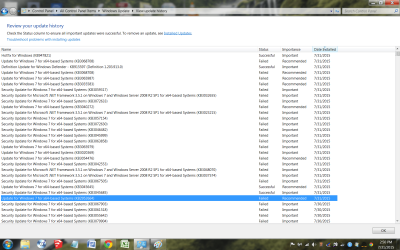
I have a Windows 7 64 bit home premium pc and 37 updates waiting to be installed but keep getting error code 80070308. Fix-it does not find anything. SFC /scannow did not find any integrity violations.

Attached is a screenshot. Any help you can provide would be greatly appreciated.

Thank you,
Milan
 

Attachments
  • screenshot.png
    screenshot.png
    137 KB · Views: 1

My Computer

Computer type
PC/Desktop
Computer Manufacturer/Model Number
custom build
OS
Windows 7 64 bit home premium
Please follow the Windows Update Posting Instructions and post the requested data

If the file is too large (8MB compressed), remove the older CBSPersist cab files until the final file is below the limit - you can always post them separately after zipping them. (the forum doesn't allow the upload of bare CAB files, for a number of reasons)

Please also post the C:\Windows\windowsudpate.log file
 

My Computer

Computer type
Laptop
Computer Manufacturer/Model Number
Asus K52F or Lenovo B51-80
OS
Win 7 x64 Home Premium (and x86 VirtualBox VM)/Win10
CPU
i3 370M/i7 6500U
Motherboard
Asus/Lenovo
Memory
8GB - finally :)/8GB
Graphics Card(s)
it's an i3, dude!/dual Intel&nVidia
Sound Card
onboard
Monitor(s) Displays
15.6" built-in
Screen Resolution
1366x768/1920x1080
Hard Drives
750GB Seagate internal
Sundry external drives attached to other computers on the local network
1TB SSD on the Lenovo
PSU
n/a
Internet Speed
as much as I can get - usually on a dongle/phone, so <1MB/s
Antivirus
MSE/Defender
Browser
IE11/12/Edge/Chrome/FF(if I must)
Noel,

The files are too big to keep within the 8 MB limit. One CBS file is 225 mb which gets compressed to 12 mb which cannot get uploaded. I am attaching the windowsupdate file as requested. I can email the larger zip files if you can assist. Thank you.
 

My Computer

Computer type
PC/Desktop
Computer Manufacturer/Model Number
custom build
OS
Windows 7 64 bit home premium
The RPC service appears to have hung during the install of one of the updates - with the result that all are failing.

This error can be caused by a file exisiting in a place it shouldn't ;)

Please open an Elevated Command Prompt, and run the following command

Cmd /c ren %WinDir%\System32\Spupdsvc.exe Spupdsvc.old

(note the spaces!)

(don't be surprised if it says 'not found' - it shouldn't be!)

If it is found (and successfully deleted) try Windows Update again - post the new windowsupdate.log file.
 

My Computer

Computer type
Laptop
Computer Manufacturer/Model Number
Asus K52F or Lenovo B51-80
OS
Win 7 x64 Home Premium (and x86 VirtualBox VM)/Win10
CPU
i3 370M/i7 6500U
Motherboard
Asus/Lenovo
Memory
8GB - finally :)/8GB
Graphics Card(s)
it's an i3, dude!/dual Intel&nVidia
Sound Card
onboard
Monitor(s) Displays
15.6" built-in
Screen Resolution
1366x768/1920x1080
Hard Drives
750GB Seagate internal
Sundry external drives attached to other computers on the local network
1TB SSD on the Lenovo
PSU
n/a
Internet Speed
as much as I can get - usually on a dongle/phone, so <1MB/s
Antivirus
MSE/Defender
Browser
IE11/12/Edge/Chrome/FF(if I must)
It came back with not found. Please advise next step. Thank you.
 

My Computer

Computer type
PC/Desktop
Computer Manufacturer/Model Number
custom build
OS
Windows 7 64 bit home premium
This error indicates the first of the set of failing updates.
Code:
2015-08-01	22:29:04:063	1016	14fc	Report	REPORT EVENT: {73B39D23-B2A3-4405-BA0D-215809B61797}	2015-08-01 22:27:40:124-0700	1	182	101	{B8BBA0C2-E54F-4515-8D58-C7EA28862312}	201	800706be	AutomaticUpdates	Failure	Content Install	Installation Failure: Windows failed to install the following update with error 0x800706be: Security Update for Windows 7 for x64-based Systems (KB3069762).
For the moment, please Hide update KB3069762, then attempt to install the others - what happens? Please post the new Windowsupdate.log file.
 

My Computer

Computer type
Laptop
Computer Manufacturer/Model Number
Asus K52F or Lenovo B51-80
OS
Win 7 x64 Home Premium (and x86 VirtualBox VM)/Win10
CPU
i3 370M/i7 6500U
Motherboard
Asus/Lenovo
Memory
8GB - finally :)/8GB
Graphics Card(s)
it's an i3, dude!/dual Intel&nVidia
Sound Card
onboard
Monitor(s) Displays
15.6" built-in
Screen Resolution
1366x768/1920x1080
Hard Drives
750GB Seagate internal
Sundry external drives attached to other computers on the local network
1TB SSD on the Lenovo
PSU
n/a
Internet Speed
as much as I can get - usually on a dongle/phone, so <1MB/s
Antivirus
MSE/Defender
Browser
IE11/12/Edge/Chrome/FF(if I must)
I tried to do 35 updates instead of 36 leaving out KB3069762 but all of them failed. Attached is the Windowsupdate file as requested.
 

My Computer

Computer type
PC/Desktop
Computer Manufacturer/Model Number
custom build
OS
Windows 7 64 bit home premium
At least we got a significantly different error code this time!
THe new one is 0x80070308 - which implies registry corruption.

Please upload at least the CheckSUR.log file to your reply.
 

My Computer

Computer type
Laptop
Computer Manufacturer/Model Number
Asus K52F or Lenovo B51-80
OS
Win 7 x64 Home Premium (and x86 VirtualBox VM)/Win10
CPU
i3 370M/i7 6500U
Motherboard
Asus/Lenovo
Memory
8GB - finally :)/8GB
Graphics Card(s)
it's an i3, dude!/dual Intel&nVidia
Sound Card
onboard
Monitor(s) Displays
15.6" built-in
Screen Resolution
1366x768/1920x1080
Hard Drives
750GB Seagate internal
Sundry external drives attached to other computers on the local network
1TB SSD on the Lenovo
PSU
n/a
Internet Speed
as much as I can get - usually on a dongle/phone, so <1MB/s
Antivirus
MSE/Defender
Browser
IE11/12/Edge/Chrome/FF(if I must)
I am attaching 2 files...not sure which one you want. Also note that both these files are dated 7/31/15 as the date modified. These files were in the C:\windows\logs\cbs directory.
 

Attachments

My Computer

Computer type
PC/Desktop
Computer Manufacturer/Model Number
custom build
OS
Windows 7 64 bit home premium
Any news my friend?
 

My Computer

Computer type
PC/Desktop
Computer Manufacturer/Model Number
custom build
OS
Windows 7 64 bit home premium
Sorry - must have missed it :(
There's no problems in the CheckSUR - which is likely to mean that the problem is a severe one


I need to have a look at your COMPONENTS registry hive

Please copy the C:\Windows\System32\config\COMPONENTS file (no extension) to your desktop and then compress it - upload the compressed file to your favoured fileshare site (preferably Dropbox or OneDrive) and post a link.
 

My Computer

Computer type
Laptop
Computer Manufacturer/Model Number
Asus K52F or Lenovo B51-80
OS
Win 7 x64 Home Premium (and x86 VirtualBox VM)/Win10
CPU
i3 370M/i7 6500U
Motherboard
Asus/Lenovo
Memory
8GB - finally :)/8GB
Graphics Card(s)
it's an i3, dude!/dual Intel&nVidia
Sound Card
onboard
Monitor(s) Displays
15.6" built-in
Screen Resolution
1366x768/1920x1080
Hard Drives
750GB Seagate internal
Sundry external drives attached to other computers on the local network
1TB SSD on the Lenovo
PSU
n/a
Internet Speed
as much as I can get - usually on a dongle/phone, so <1MB/s
Antivirus
MSE/Defender
Browser
IE11/12/Edge/Chrome/FF(if I must)
Hi,

The file is 44 GB and I cannot copy this file to my desktop. It gives me the message:

The action can't be completed because the file is open in System
Close file and try again
 

My Computer

Computer type
PC/Desktop
Computer Manufacturer/Model Number
custom build
OS
Windows 7 64 bit home premium
Boot to Safe Mode, and do the Copy there - this prevents it being opened.
 

My Computer

Computer type
Laptop
Computer Manufacturer/Model Number
Asus K52F or Lenovo B51-80
OS
Win 7 x64 Home Premium (and x86 VirtualBox VM)/Win10
CPU
i3 370M/i7 6500U
Motherboard
Asus/Lenovo
Memory
8GB - finally :)/8GB
Graphics Card(s)
it's an i3, dude!/dual Intel&nVidia
Sound Card
onboard
Monitor(s) Displays
15.6" built-in
Screen Resolution
1366x768/1920x1080
Hard Drives
750GB Seagate internal
Sundry external drives attached to other computers on the local network
1TB SSD on the Lenovo
PSU
n/a
Internet Speed
as much as I can get - usually on a dongle/phone, so <1MB/s
Antivirus
MSE/Defender
Browser
IE11/12/Edge/Chrome/FF(if I must)
I'm by no means certain this will do anything useful- but it's worth trying...

I've uploaded a file - m74aa.zip - to my OneDrive at Noel's OneDrive
Please download and save it to your desktop.
Right-click on the file and select Extract All, and save to the default destination (which should be a folder on the desktop)

Create a new System Restore point

Open an Elevated Command Prompt, and run the following commands.

Code:
IF EXIST C:\Windows\System32\config\COMPONENTS.OLD1 DEL C:\Windows\System32\config\COMPONENTS.OLD1
REN C:\Windows\System32\config\COMPONENTS COMPONENTS.OLD1
COPY "%userprofile%\desktop\m74aa\COMPONENTS" C:\Windows\System32\config
 
.

If you get an error with any command, STOP THERE - do not reboot! - post for instructions.

Assuming all commands go OK, reboot, and run another CheckSUR scan - post the new CheckSUR.log file.
 

My Computer

Computer type
Laptop
Computer Manufacturer/Model Number
Asus K52F or Lenovo B51-80
OS
Win 7 x64 Home Premium (and x86 VirtualBox VM)/Win10
CPU
i3 370M/i7 6500U
Motherboard
Asus/Lenovo
Memory
8GB - finally :)/8GB
Graphics Card(s)
it's an i3, dude!/dual Intel&nVidia
Sound Card
onboard
Monitor(s) Displays
15.6" built-in
Screen Resolution
1366x768/1920x1080
Hard Drives
750GB Seagate internal
Sundry external drives attached to other computers on the local network
1TB SSD on the Lenovo
PSU
n/a
Internet Speed
as much as I can get - usually on a dongle/phone, so <1MB/s
Antivirus
MSE/Defender
Browser
IE11/12/Edge/Chrome/FF(if I must)
While running the following command:

REN C:\Windows\System32\config\COMPONENTS COMPONENTS.OLD1

I got a message as follows:
The process cannot access the file because it is being used by another process
 

My Computer

Computer type
PC/Desktop
Computer Manufacturer/Model Number
custom build
OS
Windows 7 64 bit home premium
Reboot to Safe Mode and do the substitution there.
 

My Computer

Computer type
Laptop
Computer Manufacturer/Model Number
Asus K52F or Lenovo B51-80
OS
Win 7 x64 Home Premium (and x86 VirtualBox VM)/Win10
CPU
i3 370M/i7 6500U
Motherboard
Asus/Lenovo
Memory
8GB - finally :)/8GB
Graphics Card(s)
it's an i3, dude!/dual Intel&nVidia
Sound Card
onboard
Monitor(s) Displays
15.6" built-in
Screen Resolution
1366x768/1920x1080
Hard Drives
750GB Seagate internal
Sundry external drives attached to other computers on the local network
1TB SSD on the Lenovo
PSU
n/a
Internet Speed
as much as I can get - usually on a dongle/phone, so <1MB/s
Antivirus
MSE/Defender
Browser
IE11/12/Edge/Chrome/FF(if I must)
Before I do this, I had some questions:

1) I can only boot in SAFE MODE WITH NETWORKING. This allows me to access the internet through my wireless connection. Will I be able to do the substitution in this mode?

2) The Checksur scan you are referring to is the windows standalone package that I downloaded right?
windows6.1-kb3035583-x64_d6308e28c41fcbd15695343d83709ed1c4bf5812

3) The Checksur file is in the CBS directory?

Thanks.
 

My Computer

Computer type
PC/Desktop
Computer Manufacturer/Model Number
custom build
OS
Windows 7 64 bit home premium
Answers -
1) yes, you should be able to
2) No - CheckSUR is KB947821 - which you have also downloaded.
3) Yes
 

My Computer

Computer type
Laptop
Computer Manufacturer/Model Number
Asus K52F or Lenovo B51-80
OS
Win 7 x64 Home Premium (and x86 VirtualBox VM)/Win10
CPU
i3 370M/i7 6500U
Motherboard
Asus/Lenovo
Memory
8GB - finally :)/8GB
Graphics Card(s)
it's an i3, dude!/dual Intel&nVidia
Sound Card
onboard
Monitor(s) Displays
15.6" built-in
Screen Resolution
1366x768/1920x1080
Hard Drives
750GB Seagate internal
Sundry external drives attached to other computers on the local network
1TB SSD on the Lenovo
PSU
n/a
Internet Speed
as much as I can get - usually on a dongle/phone, so <1MB/s
Antivirus
MSE/Defender
Browser
IE11/12/Edge/Chrome/FF(if I must)
All commands ran fine. I ran KB947821 and it came back with the update is not applicable to your computer.

I know before I ran KB3035583. Shall I run this instead and post the CheckSur file?
 

My Computer

Computer type
PC/Desktop
Computer Manufacturer/Model Number
custom build
OS
Windows 7 64 bit home premium
Back
Top