Solved Windows Update Error 80070490

Loray

New member
Local time
8:28 AM
Messages
32
Location
Western Victoria
I have had two Windows 7 Security updates fail (KB3004375 & KB3031432) and both have said error 80070490. I have run Mr Fixit and other things suggested by your site as well as sfc scan (Ihope I have these names correct).
All of this lead me to try downloading the Offficial Windows 7 SP1 ISO download, but two days prior to this Digital River was closed down for the OEM version of Windows 7 Great.
I don't want to do a clean re-install at this point as my computer is running well - there doesn't appear to be any problems anyway.
I have attached the results from the sfc scan and I would really appreciate it if someone could check this report for me and let me know if I have any huge problems and that I must do a clean install. I do have the Windows 7 Disc but it it not a retail version.
Thank you for any help you can give me
 

Attachments

My Computer

Computer type
PC/Desktop
Computer Manufacturer/Model Number
Custom Built
OS
Windows 7 Home Premium 64bit
Antivirus
Avast Premier
Browser
Google Chrome
Digital River was closed down for the OEM version of Windows 7
But was the Retail version [which you need] still available?

I have both updates installed on 2/11/2015.

Re your System Specs, is Avast Premier really an Internet Browser?
 

My Computer

Computer type
PC/Desktop
Computer Manufacturer/Model Number
Customs, Dell, Gateway, HP, Toshiba, Acer, ASUS
OS
Windows 7 Ultimate 64-bit, Windows 8.1 64-bit, Mac OS X 10.10, Linux Mint 17, Windows 10 Pro TP
Keyboard
Microsoft
Mouse
Microsoft
Please follow the Windows Update Posting Instructions and post the requested data

If the file is too large (8MB compressed), remove the older CBSPersist cab files until the final file is below the limit - you can always post them separately after zipping them. (the forum doesn't allow the upload of bare CAB files, for a number of reasons)

Please also post the C:\Windows\windowsudpate.log file
 

My Computer

Computer type
Laptop
Computer Manufacturer/Model Number
Asus K52F or Lenovo B51-80
OS
Win 7 x64 Home Premium (and x86 VirtualBox VM)/Win10
CPU
i3 370M/i7 6500U
Motherboard
Asus/Lenovo
Memory
8GB - finally :)/8GB
Graphics Card(s)
it's an i3, dude!/dual Intel&nVidia
Sound Card
onboard
Monitor(s) Displays
15.6" built-in
Screen Resolution
1366x768/1920x1080
Hard Drives
750GB Seagate internal
Sundry external drives attached to other computers on the local network
1TB SSD on the Lenovo
PSU
n/a
Internet Speed
as much as I can get - usually on a dongle/phone, so <1MB/s
Antivirus
MSE/Defender
Browser
IE11/12/Edge/Chrome/FF(if I must)
I believe the retail version is still available, but you need to have the product key for a retail version to download it. Microsoft will not give me the ISO file as I have the OEM version.
Avast Premier is not my Internet Browser, it is my Security Software. I did have problems with Avast not long ago, as it didn't seem to be scanning properly. I un-installed it and re-installed and it seems to be working fine now. I have Google Chrome as my Internet Browser.
Thank you for your reply Berton.
 

My Computer

Computer type
PC/Desktop
Computer Manufacturer/Model Number
Custom Built
OS
Windows 7 Home Premium 64bit
Antivirus
Avast Premier
Browser
Google Chrome
Thank you for such detailed instructions. I hope I have done all you asked correctly.
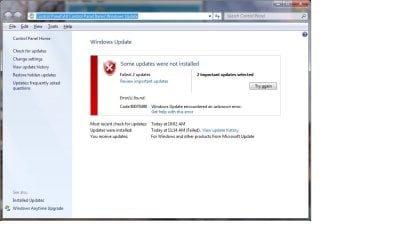
I ran the SURT Tool and windows added an update called "Hotfix for Windows (KB947821) - The two failed updates are still there. I have attached a snapshot of the error code and also a copy of the sfc scan. I tried to send a copy of the CBS folder, but I received this message "File not found or no read permission". I did open the file and there was "stuff" in there.

Thank you again

View attachment sfcdetails.txt

Windows Error Code.jpg
 

My Computer

Computer type
PC/Desktop
Computer Manufacturer/Model Number
Custom Built
OS
Windows 7 Home Premium 64bit
Antivirus
Avast Premier
Browser
Google Chrome
I need the C:\Windows\Logs\CBS\CheckSUR.log file that should be created by the CheckSUR tool - please upload it.
 

My Computer

Computer type
Laptop
Computer Manufacturer/Model Number
Asus K52F or Lenovo B51-80
OS
Win 7 x64 Home Premium (and x86 VirtualBox VM)/Win10
CPU
i3 370M/i7 6500U
Motherboard
Asus/Lenovo
Memory
8GB - finally :)/8GB
Graphics Card(s)
it's an i3, dude!/dual Intel&nVidia
Sound Card
onboard
Monitor(s) Displays
15.6" built-in
Screen Resolution
1366x768/1920x1080
Hard Drives
750GB Seagate internal
Sundry external drives attached to other computers on the local network
1TB SSD on the Lenovo
PSU
n/a
Internet Speed
as much as I can get - usually on a dongle/phone, so <1MB/s
Antivirus
MSE/Defender
Browser
IE11/12/Edge/Chrome/FF(if I must)
I opened up Log file and found this file attached, I hope it is the one you need. When I tried to send the whole folder as requested it said I didn't have permission - sorry, but new to all of this.

View attachment CheckSUR.zip
 

My Computer

Computer type
PC/Desktop
Computer Manufacturer/Model Number
Custom Built
OS
Windows 7 Home Premium 64bit
Antivirus
Avast Premier
Browser
Google Chrome
There's quite a lot of damage there :(
Code:
Summary:
Seconds executed: 1820
 Found 109 errors
 Fixed 24 errors
  CSI Manifest Missing Total count: 55
  CSI Catalog Missing Total count: 11
  Fixed: CSI Catalog Missing.  Total count: 11
  CSI Payload File Missing Total count: 11
  Fixed: CSI Payload File Missing.  Total count: 6
  CBS MUM Missing Total count: 21
  CBS Catalog Missing Total count: 4
  CSI Store Directory Missing Total count: 1
  Fixed: CSI Store Directory Missing.  Total count: 1
  CSI Catalog Thumbprint Invalid Total count: 6
  Fixed: CSI Catalog Thumbprint Invalid.  Total count: 6

I'll post a fix for the remaining errors later today or tomorrow.
 

My Computer

Computer type
Laptop
Computer Manufacturer/Model Number
Asus K52F or Lenovo B51-80
OS
Win 7 x64 Home Premium (and x86 VirtualBox VM)/Win10
CPU
i3 370M/i7 6500U
Motherboard
Asus/Lenovo
Memory
8GB - finally :)/8GB
Graphics Card(s)
it's an i3, dude!/dual Intel&nVidia
Sound Card
onboard
Monitor(s) Displays
15.6" built-in
Screen Resolution
1366x768/1920x1080
Hard Drives
750GB Seagate internal
Sundry external drives attached to other computers on the local network
1TB SSD on the Lenovo
PSU
n/a
Internet Speed
as much as I can get - usually on a dongle/phone, so <1MB/s
Antivirus
MSE/Defender
Browser
IE11/12/Edge/Chrome/FF(if I must)
I've uploaded a file - lryaa.zip - to my OneDrive at Noel's OneDrive
Please download and save it.
Right-click on the downloaded file, and select Extract all…
Extract to the default location - which will create a new folder lryaa in the same place.
Open this folder - there should be two folders inside it (Manifests, and Packages)

Copy the content of the Packages folder to the folder
C:\Windows\Temp\CheckSur\Servicing\Packages

And the content of the manifests folder (.manifest files) into this folder:

C:\Windows\Temp\CheckSur\Winsxs\Manifests

Now run the CheckSUR tool again (it may take a while)

Post the new CheckSUR.log file, and the CheckSUR.persist.log file.
 

My Computer

Computer type
Laptop
Computer Manufacturer/Model Number
Asus K52F or Lenovo B51-80
OS
Win 7 x64 Home Premium (and x86 VirtualBox VM)/Win10
CPU
i3 370M/i7 6500U
Motherboard
Asus/Lenovo
Memory
8GB - finally :)/8GB
Graphics Card(s)
it's an i3, dude!/dual Intel&nVidia
Sound Card
onboard
Monitor(s) Displays
15.6" built-in
Screen Resolution
1366x768/1920x1080
Hard Drives
750GB Seagate internal
Sundry external drives attached to other computers on the local network
1TB SSD on the Lenovo
PSU
n/a
Internet Speed
as much as I can get - usually on a dongle/phone, so <1MB/s
Antivirus
MSE/Defender
Browser
IE11/12/Edge/Chrome/FF(if I must)
Thank you so much for everything you are doing. I have tried to open the Temp file in C:\Windows and I don't have permission. I have tried changing permission to full control (following links as I was trying to change - as I don't know how else to do this) but still can't get in there. Can you help me to this please.
 
Last edited:

My Computer

Computer type
PC/Desktop
Computer Manufacturer/Model Number
Custom Built
OS
Windows 7 Home Premium 64bit
Antivirus
Avast Premier
Browser
Google Chrome
I thought I'd give an update to me trying to open Temp folder. I have tried most of the day to change permissions to gain access, and I have noticed when I hold mouse over "Temp" folder it is saying it is empty. I am fairly sure I am looking in the correct place. I have gone to C: Drive, then to "Windows", then down to "Temp" folder. I must apologise for my ignorance in these matters and hope you can be patient with me. Your download worked perfectly and the Iryaa file does contain the two folders - (Manifests, and Packages)
 

My Computer

Computer type
PC/Desktop
Computer Manufacturer/Model Number
Custom Built
OS
Windows 7 Home Premium 64bit
Antivirus
Avast Premier
Browser
Google Chrome
Let's have a close look at your problems....
Open an Elevated Command Prompt, and run the following commands.

ICACLS C:\Windows\Temp
DIR C:\Windows\*.* /AL /S

the second one should take a minute or two to complete - wait until the prompt returns, then post the results.

Here are some instructions to make life easier :)
1) To open an Elevated Command Prompt Window (the ECP window), click on Start, All Programs, Accessories – then right-click on Command Prompt, and select Run as Administrator. Accept the UAC prompt.
2) To run the commands easier, highlight the block of commands, and right-click on the highlight – select Copy. In the CP Window, click on the black/white icon at top left – select Paste. The commands will run but may not complete the last command, so hit the Enter Key once.
3) To copy the results... click on the Black/White icon in the top left, and select Edit... 'Select All', and hit the Enter key - then use Ctrl+V or r-click+Paste to paste it into your response.
 

My Computer

Computer type
Laptop
Computer Manufacturer/Model Number
Asus K52F or Lenovo B51-80
OS
Win 7 x64 Home Premium (and x86 VirtualBox VM)/Win10
CPU
i3 370M/i7 6500U
Motherboard
Asus/Lenovo
Memory
8GB - finally :)/8GB
Graphics Card(s)
it's an i3, dude!/dual Intel&nVidia
Sound Card
onboard
Monitor(s) Displays
15.6" built-in
Screen Resolution
1366x768/1920x1080
Hard Drives
750GB Seagate internal
Sundry external drives attached to other computers on the local network
1TB SSD on the Lenovo
PSU
n/a
Internet Speed
as much as I can get - usually on a dongle/phone, so <1MB/s
Antivirus
MSE/Defender
Browser
IE11/12/Edge/Chrome/FF(if I must)
Thank you so much once again - you are amazing. I have pasted below - hope all OKMicrosoft Windows [Version 6.1.7601]
Copyright (c) 2009 Microsoft Corporation. All rights reserved.

C:\Windows\system32>ICACLS C:\Windows\Temp
C:\Windows\Temp BUILTIN\Users:(CI)(S,WD,AD,X)
BUILTIN\Administrators:(F)
BUILTIN\Administrators:(OI)(CI)(IO)(F)
NT AUTHORITY\SYSTEM:(F)
NT AUTHORITY\SYSTEM:(OI)(CI)(IO)(F)
CREATOR OWNER:(OI)(CI)(IO)(F)

Successfully processed 1 files; Failed processing 0 files

C:\Windows\system32>DIR C:\Windows\*.* /AL /S
Volume in drive C has no label.
Volume Serial Number is 7CE4-755B
File Not Found

C:\Windows\system32>
 

My Computer

Computer type
PC/Desktop
Computer Manufacturer/Model Number
Custom Built
OS
Windows 7 Home Premium 64bit
Antivirus
Avast Premier
Browser
Google Chrome
Hmm - that looks normal enough

I should have added the following lines to make sure...

ICACLS C:\Windows\Temp\CheckSUR\Servicing
DIR C:\Windows\Temp\CheckSUR\Servicing

Please run those, and we'll see what we can see...
 

My Computer

Computer type
Laptop
Computer Manufacturer/Model Number
Asus K52F or Lenovo B51-80
OS
Win 7 x64 Home Premium (and x86 VirtualBox VM)/Win10
CPU
i3 370M/i7 6500U
Motherboard
Asus/Lenovo
Memory
8GB - finally :)/8GB
Graphics Card(s)
it's an i3, dude!/dual Intel&nVidia
Sound Card
onboard
Monitor(s) Displays
15.6" built-in
Screen Resolution
1366x768/1920x1080
Hard Drives
750GB Seagate internal
Sundry external drives attached to other computers on the local network
1TB SSD on the Lenovo
PSU
n/a
Internet Speed
as much as I can get - usually on a dongle/phone, so <1MB/s
Antivirus
MSE/Defender
Browser
IE11/12/Edge/Chrome/FF(if I must)
Here we go:

IICACLS C:\Windows\Temp\CheckSUR\Servicing
DIR C:\Windows\Temp\CheckSUR\Servicing
Microsoft Windows [Version 6.1.7601]
Copyright (c) 2009 Microsoft Corporation. All rights reserved.

C:\Windows\system32>ICACLS C:\Windows\Temp\CheckSUR\Servicing
C:\Windows\Temp\CheckSUR\Servicing BUILTIN\Users:(I)(CI)(S,WD,AD,X)
BUILTIN\Administrators:(I)(OI)(CI)(F)
NT AUTHORITY\SYSTEM:(I)(OI)(CI)(F)
CREATOR OWNER:(I)(OI)(CI)(IO)(F)
Lorayne-PC\Lorayne:(I)(OI)(CI)(F)

Successfully processed 1 files; Failed processing 0 files

C:\Windows\system32>DIR C:\Windows\Temp\CheckSUR\Servicing
Volume in drive C has no label.
Volume Serial Number is 7CE4-755B

Directory of C:\Windows\Temp\CheckSUR\Servicing

13/02/2015 04:16 PM <DIR> .
13/02/2015 04:16 PM <DIR> ..
13/02/2015 04:16 PM <DIR> Packages
0 File(s) 0 bytes
3 Dir(s) 436,151,091,200 bytes free

C:\Windows\system32>
 

My Computer

Computer type
PC/Desktop
Computer Manufacturer/Model Number
Custom Built
OS
Windows 7 Home Premium 64bit
Antivirus
Avast Premier
Browser
Google Chrome
That also looks fine to me - although I might have expected a Manifests folder in the last response.
I'll come back tomorrow with a possible work-through to get the proper files in the right place ;)
 

My Computer

Computer type
Laptop
Computer Manufacturer/Model Number
Asus K52F or Lenovo B51-80
OS
Win 7 x64 Home Premium (and x86 VirtualBox VM)/Win10
CPU
i3 370M/i7 6500U
Motherboard
Asus/Lenovo
Memory
8GB - finally :)/8GB
Graphics Card(s)
it's an i3, dude!/dual Intel&nVidia
Sound Card
onboard
Monitor(s) Displays
15.6" built-in
Screen Resolution
1366x768/1920x1080
Hard Drives
750GB Seagate internal
Sundry external drives attached to other computers on the local network
1TB SSD on the Lenovo
PSU
n/a
Internet Speed
as much as I can get - usually on a dongle/phone, so <1MB/s
Antivirus
MSE/Defender
Browser
IE11/12/Edge/Chrome/FF(if I must)
Save/move/copy the extracted lryaa folder to your desktop.

then open an Elevated Command Prompt, and run the following commands:

XCOPY "%userprofile%\desktop\lryaa" C:\windows\temp\checksur\servicing /y /i /s /v /h
DIR C:\Windows\temp\checksur\servicing

post the results...

Here are some instructions to make life easier :)
1) To open an Elevated Command Prompt Window (the ECP window), click on Start, All Programs, Accessories – then right-click on Command Prompt, and select Run as Administrator. Accept the UAC prompt.
2) To run the commands easier, highlight the block of commands, and right-click on the highlight – select Copy. In the CP Window, click on the black/white icon at top left – select Paste. The commands will run but may not complete the last command, so hit the Enter Key once.
3) To copy the results... click on the Black/White icon in the top left, and select Edit... 'Select All', and hit the Enter key - then use Ctrl+V or r-click+Paste to paste it into your response.

Once that's done, run the CheckSUR tool again, and post the new C:\Windows\Logs\CBS\CeckSUR.log file.
 

My Computer

Computer type
Laptop
Computer Manufacturer/Model Number
Asus K52F or Lenovo B51-80
OS
Win 7 x64 Home Premium (and x86 VirtualBox VM)/Win10
CPU
i3 370M/i7 6500U
Motherboard
Asus/Lenovo
Memory
8GB - finally :)/8GB
Graphics Card(s)
it's an i3, dude!/dual Intel&nVidia
Sound Card
onboard
Monitor(s) Displays
15.6" built-in
Screen Resolution
1366x768/1920x1080
Hard Drives
750GB Seagate internal
Sundry external drives attached to other computers on the local network
1TB SSD on the Lenovo
PSU
n/a
Internet Speed
as much as I can get - usually on a dongle/phone, so <1MB/s
Antivirus
MSE/Defender
Browser
IE11/12/Edge/Chrome/FF(if I must)
Thank you so much once again - you really are the best! I hope I have done all you want in the correct way and you have had a chance to spend some time in a pub in Wales.
I just posted what is directly below this writing from command prompt, and as CheckSur is running noticed the whole comand hasn't been posted (there was more than what is posted here). I hope I haven't mucked it up. I will post CheckSur once it has completed and do the whole thing over again and post again. I hope all will be what you wanted in the long run.:o

XCOPY "%userprofile%\desktop\lryaa" C:\windows\temp\checksur\servicing /y /i /s /v /h*
*DIR C:\Windows\temp\checksur\servicing*
 

Attachments

My Computer

Computer type
PC/Desktop
Computer Manufacturer/Model Number
Custom Built
OS
Windows 7 Home Premium 64bit
Antivirus
Avast Premier
Browser
Google Chrome
That's better, this is what it read last time. :D I will now run CheckSur again then attach

Microsoft Windows [Version 6.1.7601]
Copyright (c) 2009 Microsoft Corporation. All rights reserved.

C:\Windows\system32>*XCOPY "%userprofile%\desktop\lryaa" C:\windows\temp\checks
ur\servicing /y /i /s /v /h*
'*XCOPY' is not recognized as an internal or external command,
operable program or batch file.

C:\Windows\system32>*DIR C:\Windows\temp\checksur\servicing*
'*DIR' is not recognized as an internal or external command,
operable program or batch file.

C:\Windows\system32>
C:\Windows\system32>^V
 

Attachments

My Computer

Computer type
PC/Desktop
Computer Manufacturer/Model Number
Custom Built
OS
Windows 7 Home Premium 64bit
Antivirus
Avast Premier
Browser
Google Chrome
There should not be an Asterisk * at the start or end of any line of command - you probably copied the commands from a non-HTML emailer (Agent?) rather than from the browser. As a result both commands failed.

please try again.
 

My Computer

Computer type
Laptop
Computer Manufacturer/Model Number
Asus K52F or Lenovo B51-80
OS
Win 7 x64 Home Premium (and x86 VirtualBox VM)/Win10
CPU
i3 370M/i7 6500U
Motherboard
Asus/Lenovo
Memory
8GB - finally :)/8GB
Graphics Card(s)
it's an i3, dude!/dual Intel&nVidia
Sound Card
onboard
Monitor(s) Displays
15.6" built-in
Screen Resolution
1366x768/1920x1080
Hard Drives
750GB Seagate internal
Sundry external drives attached to other computers on the local network
1TB SSD on the Lenovo
PSU
n/a
Internet Speed
as much as I can get - usually on a dongle/phone, so <1MB/s
Antivirus
MSE/Defender
Browser
IE11/12/Edge/Chrome/FF(if I must)
Back
Top